To distinguish between different number systems, we use prefixes or suffixes. There are many things used to distinguish between the number systems, I will only show the most common.
- Decimal is represented with the suffix “d” or with nothing. Examples: 12d or 12.
- Hexadecimal is represented with the prefix “0x” or suffix “h”. Examples: 0x12 or 12h. Another way hexadecimal is represented is with the prefix of “\x”. However, this is typically used per byte. Two hexadecimal digits make one byte. Examples: \x12 or \x12\x45\x21. If bits and bytes seem a little weird we’ll get into them soon so don’t worry.
- Binary is represented with a suffix “b” or with padding of zeros at the start. Examples: 100101b or 00100101. The padding at the start is often used because a decimal number can’t start with a zero.
What is decimal 25 in hexadecimal? Include the prefix for hexadecimal.
- 0x19
Data type sizes vary based on architecture. These are the most common sizes and are what you will come across when working with desktop Windows and Linux.
- Bit is one binary digit. Can be 0 or 1.
- Nibble is 4 bits.
- Byte is 8 bits.
- Word is 2 bytes.
- Double Word (DWORD) is 4 bytes. Twice the size of a word.
- Quad Word (QWORD) is 8 bytes. Four times the size of a word.
Data Type Sizes
- Char - 1 byte (8 bits).
- Int - There are 16-bit, 32-bit, and 64-bit integers. When talking about integers, it’s usually 32-bit. For signed integers, one bit is used to specify whether the integer is positive or negative.
- Signed Int
- 16 bit is -32,768 to 32,767.
- 32 bit is -2,147,483,648 to 2,147,483,647.
- 64-bit is -9,223,372,036,854,775,808 to 9,223,372,036,854,775,807.
- Unsigned Int - Minimum is zero, maximum is twice that of a signed int (of the same size). For example: unsigned 32-bit int goes from 0 to 4,294,967,295. That is twice the signed int maximum of 2,147,483,647, however, its minimum value is 0. This is due to signed integers using the sign bit, making it unavailable to represent a value.
- Signed Int
- Bool - 1 byte. Interestingly, a bool only needs 1 bit because it’s either 1 or 0 but it still takes up a full byte. This is because computers don’t tend to work with individual bits due to alignment (talked about later). So instead, they work in chunks such as 1 byte, 2 bytes, 4 bytes, 8 bytes, and so on.
Data positions are referenced by how far away they are from the address of the first byte of data, known as the base address (or just the address), of the variable. The distance a piece of data is from its base address is considered the offset. For example, let’s say we have some data, 12345678. Just to push the point, let’s also say each number is 2 bytes.
- 1 is at offset 0x0
- 2 is at offset 0x2
- 3 is at offset 0x4
- 4 is at offset 0x6, and so on. You could reference these values with the format BaseAddress+0x##. BaseAddress+0x0 or just BaseAddress would contain the 1, BaseAddress+0x2 would be the 2, and so on.
C vs. Assembly
Small example:
if(x == 4){
    func1();
}else{
    return;
}
is functionally the same as the following pseudo-assembly:
mov RAX, x
cmp RAX, 4
jne 5       ; Line 5 (ret)
call func1
ret
This should be fairly self-explanatory, but I’ll go over it briefly. First, the variable x is moved into RAX. RAX is a register, think of it as a variable in assembly. Then, we compare that with 4. If the comparison between RAX (4) and 5 results in them not being equal then jump (jne) to line 5 which returns. Otherwise, they are equal, so call func1().
The Registers
Let’s talk about General Purpose Registers (GPR). You can think of these as variables because that’s essentially what they are. The CPU has its own storage that is extremely fast. This is great, however, space in the CPU is extremely limited. Any data that’s too big to fit in a register is stored in memory (RAM). Accessing memory is much slower for the CPU compared to accessing a register. Because of the slow speed, the CPU tries to put data in registers instead of memory if it can. If the data is too large to fit in a register, a register will hold a pointer to the data so it can be accessed.
8 Main General-Purpose Registers
- RAX - Known as the accumulator register. Often used to store the return value of a function.
- RBX - Sometimes known as the base register, not to be confused with the base pointer. Sometimes used as a base pointer for memory access.
- RDX - Sometimes known as the data register.
- RCX - Sometimes known as the counter register. Used as a loop counter.
- RSI - Known as the source index. Used as the source pointer in string operations.
- RDI - Known as the destination index. Used as the destination pointer in string operations.
- RSP - The stack pointer. Holds the address of the top of the stack.
- RBP - The base pointer. Holds the address of the base (bottom) of the stack.
Each register can be broken down into smaller segments which can be referenced with other register names. RAX is 64 bits, the lower 32 bits can be referenced with EAX, and the lower 16 bits can be referenced with AX. AX is broken down into two 8 bit portions. The high/upper 8 bits of AX can be referenced with AH. The lower 8 bits can be referenced with AL.
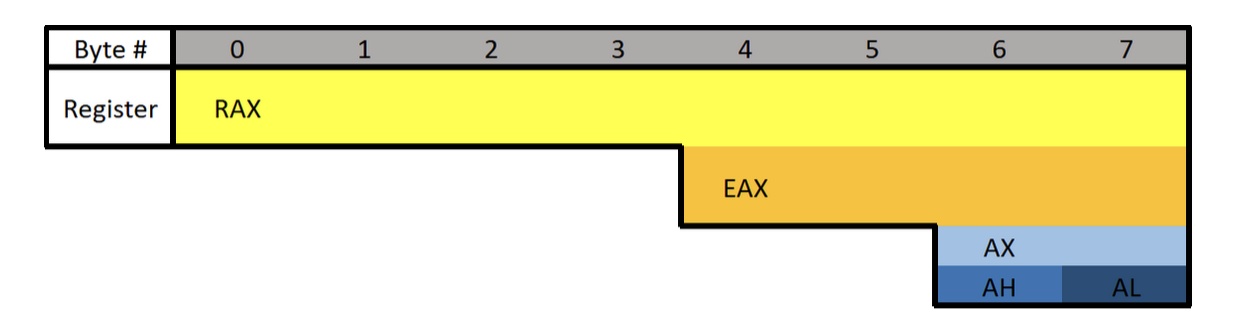
What is the difference between the “E” and “R” prefixes? Besides one being a 64-bit register and the other 32 bits, the “E” stands for extended. The “R” stands for register. The “R” registers were newly introduced in x64, and no, you won’t see them on 32-bit systems.
Floating-point values are represented differently than integers. Because of this, floating-point values have special registers. These registers include YMM0 to YMM15 (64-bit) and XMM0 to XMM15 (32-bit). The XMM registers are the lower half of the YMM registers, similar to how EAX is the lower 32 bits of RAX. Something unique about these registers is that they can be treated as arrays.
Extra Registers
There are additional registers that should be mentioned. These registers don’t have any special uses. There are registers r8 to r15 which are designed to be used by integer type values (not floats or doubles). The lower 4 bytes (32 bits), 2 bytes (16 bits), and 8 bits (1 byte) can all be accessed. These can be accessed by appending the letter “d”, “w”, or “b”.
Examples:
- R8 - Full 64-bit (8 bytes) register.
- R8D - Lower double word (4 bytes).
- R8W - Lower word (2 bytes)
- R8B - Lower byte.
Instructions
Before we get started there are three different terms you should know: immediate, register, and memory.
- An immediate value (or just immediate, sometimes IM) is something like the number 12. An immediate value is not a memory address or register, instead, it’s some sort of constant data.
- A register is referring to something like RAX, RBX, R12, AL, etc.
- Memory or a memory address refers to a location in memory (a memory address) such as 0x7FFF842B.
;is used to write a comment in Assembly- Syntax is:
(Instruction/Opcode/Mnemonic) <Destination Operand>, <Source Operand>
Data Movement
MOV is used to move/store the source operand into the destination. The source doesn’t have to be an immediate value like it is in the following example. In the following example, the immediate value of 5 is being moved into RAX.
This is equivalent to RAX = 5.
mov RAX, 5
LEA is short for Load Effective Address. This is essentially the same as MOV except for addresses. They key difference between MOV and LEA is that LEA doesn’t dereference. It’s also commonly used to compute addresses. In the following example, RAX will contain the memory address/location of num1.
lea RAX, num1
lea RAX, [struct+8]
mov RBX, 5
lea RAX, [RBX+1]
In the first example, RAX is set to the address of num1. In the second, RAX is set to the address of the member in a structure which is 8 bytes from the start of the structure. This would usually be the second member. The third example RBX is set to 5, then LEA is used to set RAX to RBX + 1. RAX will be 6.
PUSH is used to push data onto the stack. Pushing refers to putting something on the top of the stack. In the following example, RAX is pushed onto the stack. Pushing will act as a copy so RAX will still contain the value it had before it was pushed. Pushing is often used to save the data inside a register by pushing it onto the stack, then later restoring it with pop.
push RAX
POP is used to take whatever is on the top of the stack and store it in the destination. In the following example whatever is on the top of the stack will be put into RAX.
pop RAX
Arithmetic:
INC will increment data by one. In the following example RAX is set to 8, then incremented. RAX will be 9 by the end.
mov RAX, 8
inc RAX
DEC decrements a value. In the following example, RAX ends with a value of 7.
mov RAX, 8
dec RAX
ADD adds a source to a destination and stores the result in the destination. In the following example, 2 is moved into RAX, 3 into RBX, then they are added together. The result (5) is then stored in RAX.
Same as RAX = RAX + RBX or RAX += RBX.
mov RAX, 2
mov RBX, 3
add RAX, RBX
SUB subtracts a source from a destination and stores the result in the destination. In the following example, RAX will end with a value of 2.
Same as RAX = RAX - RBX or RAX -= RBX.
mov RAX, 5
mov RBX, 3
sub RAX, RBX
Multiplication and division are a bit different.
Because the sizes of data can vary and change greatly when multiplying and dividing, they use a concatenation of two registers to store the result. The upper half of the result is stored in RDX, and the lower half is in RAX. The total result of the operation is RDX:RAX, however, referencing just RAX is usually good enough. Furthermore, only one operand is given to the instruction. Whatever you want to multiply or divide is stored in RAX, and what you want to multiply or divide by is passed as the operand. Examples are provided in the following descriptions.
MUL (unsigned) or IMUL (signed) multiplies RAX by the operand. The result is stored in RDX:RAX. In the following example, RDX:RAX will end with a value of 125.
The following is the same as 25*5
mov RAX, 25
mov RBX, 5
mul RBX ; Multiplies RAX (25) with RBX (5)
After that code runs, the result is stored in RDX:RAX but in this case, and in most cases, RAX is enough.
DIV (unsigned) and IDIV (unsigned) work the same as MUL. What you want to divide (dividend) is stored in RAX, and what you want to divide it by (divisor) is passed as the operand. The result is stored in RDX:RAX, but once again RAX alone is usually enough.
mov RAX, 18
mov RBX, 3
div RBX ; Divides RAX (18) by RBX (3)
After that code executes, RAX would be 6.
####
Flow Control:
RET is short for return. This will return execution to the function that called the currently executing function, aka the caller. As you will soon learn, one of the purposes of RAX is to hold return values. The following example sets RAX to 10 then returns. This is equivalent to return 10; in higher-level programming languages.
mov RAX, 10 ret
CMP compares two operands and sets the appropriate flags depending on the result. The following would set the Zero Flag (ZF) to 1 which means the comparison determined that RAX was equal to five. Flags are talked about in the next section. In short, flags are used to represent the result of a comparison, such as if the two numbers were equal or not.
mov RAX, 5
cmp RAX, 5
JCC instructions are conditional jumps that jump based on the flags that are currently set. JCC is not an instruction, rather a term used to mean the set of instructions that includes JNE, JLE, JNZ, and many more. JCC instructions are usually self-explanatory to read. JNE will jump if the comparison is not equal, and JLE jumps if less than or equal, JG jumps if greater, etc. This is the assembly version of if statements.
The following example will return if RAX isn’t equal to 5. If it is equal to 5 then it will set RBX to 10, then return.
mov RAX, 5
cmp RAX, 5
jne 5 ; Jump to line 5 (ret) if not equal.
mov RBX, 10
ret
NOP is short for No Operation. This instruction effectively does nothing. It’s typically used for padding because some parts of code like to be on specific boundaries such as 16-bit or 32-bit boundaries.
Efficiency
Instead of what a programmer would typically write:
if(x == 4){
    func1();
}
else{
    return;
}
The compiler will generate something closer to:
if(x != 4){
    goto __exit;
}
func1();
__exit:
return;
The compiler generates code this way because it’s almost always more efficient and skips more code. The above examples may not see much of a performance improvement over one another, however, in larger programs the improvement can be quite significant.
Pointers
Assembly has its ways of working with pointers and memory addresses as C/C++ does. In C/C++ you can use dereferencing to get the value inside of a memory address. For example:
int main(){
    int num = 10;
    int* ptr = &num
    return (*ptr + 5);
}
-
ptris a pointer tonum, which meansptris holding the memory address ofnum. -
Then return the sum of what’s at the address inside
ptr(numwhich is 10) and 5.
Two of the most important things to know when working with pointers and addresses in Assembly are LEA and square brackets.
-
Square Brackets - Square brackets dereference in assembly. For example,
[var]is the address pointed to by var. In other words, when using[var]we want to access the memory address thatvaris holding. -
LEA - Ignore everything about square brackets when working with LEA. LEA is short for Load Effective Address and it’s used for calculating and loading addresses.
It’s important to note that when working with the LEA instruction, square brackets do not dereference.
The JMP’s Mason, what do they mean?!
Let’s talk about the difference between instructions such as jg (jump if greater) and ja (jump if above). Knowing the difference can help you snipe those hard-to-understand data types. There are other instructions like this so be sure to look up what they do when you come across them. For example, there are several variants of mov.
Here’s the rundown for the jump instructions when it comes to signed or unsigned. Ignore the “CF” and “ZF” if you don’t know what they mean, I’ve included them for reference after you understand flags (covered next).
For unsigned comparisons:
-
JB/JNAE (CF = 1) ; Jump if below/not above or equal
-
JAE/JNB (CF = 0) ; Jump if above or equal/not below
-
JBE/JNA (CF = 1 or ZF = 1) ; Jump if below or equal/not above
-
JA/JNBE (CF = 0 and ZF = 0); Jump if above/not below or equal
For signed comparisons:
JL/JNGE (SF <> OF) ; Jump if less/not greater or equal
JGE/JNL (SF = OF) ; Jump if greater or equal/not less
JLE/JNG (ZF = 1 or SF <> OF); Jump if less or equal/not greater
JG/JNLE (ZF = 0 and SF = OF); Jump if greater/not less or equal
Easy way to remember this, and how I remember it:
Humans normally work with signed numbers, and we usually say greater than or less than. That’s how I remember signed goes with the greater than and less than jumps.
Flags
Flags are used to signify the result of the previously executed operation or comparison. For example, if two numbers are compared to each other the flags will reflect the results such as them being even. Flags are contained in a register called EFLAGS (x86) or RFLAGS (x64). I usually just refer to it as the flags register. There is an actual FLAGS register that is 16 bit, but the semantics are just a waste of time. If you want to get into that stuff, look it up, Wikipedia has a good article on it. I’ll tell you what you need to know.
Status Flags
Here are the flags you should know. Note that when I say a “flag is set” I mean the flag is set to 1 which is true/on. 0 is false/off.
- Zero Flag (ZF) - Set if the result of an operation is zero. Not set if the result of an operation is not zero.
- Carry Flag (CF) - Set if the last unsigned arithmetic operation carried (addition) or borrowed (subtraction) a bit beyond the register. It’s also set when an operation would be negative if it wasn’t for the operation being unsigned.
- Overflow Flag (OF) - Set if a signed arithmetic operation is too big for the register to contain.
- Sign Flag (SF) - Set if the result of an operation is negative.
- Adjust/Auxiliary Flag (AF) - Same as the carry flag but for Binary Coded Decimal (BCD) operations.
- Parity Flag (PF) - Set to 1 if the number of bits set in the last 8 bits is even. (10110100, PF=1; 10110101, PF=0)
- Trap Flag (TF) - Allows for single-stepping of programs.
For a full list of flags see: https://www.tech-recipes.com/rx/1239/assembly-flags/
Examples
Basic Comparison
Here are some examples to demonstrate flags being set.
Here’s the first example. The following code is trying to determine if RAX is equal to 4. Since we’re testing for equality, the ZF is going to be the most important flag.
On line 2 there is a CMP instruction that is going to be testing for equality between RAX and the number 4. The way in which CMP works is by subtracting the two values. So when cmp RAX, 4 runs, 4 is subtracted from RAX (also 4). This is why the comparison results in zero because the subtraction process literally results in zero. Since the result is zero, the ZF flag is set to 1 (on/true) to denote that the operation resulted in the value of 0, also meaning the values were equal! That brings us to the JNE, which jumps if not equal/zero. Since the ZF is set it will not jump, since they are equal, and therefore the call to func1() is made. If they were not equal, the jump would be taken which would jump over the function call straight to the return.
mov RAX, 4
cmp RAX, 4
jne 5       ; Line 5 (ret)
call func1
ret
; ZF = 1, OF = 0, SF = 0
Subtraction
The following example will be demonstrating a signed operation. SF will be set to 1 because the subtraction operation results in a negative number. Using the cmp instruction instead of sub would have the same results, except the value of the operation (-6) wouldn’t be saved in any register.
mov RAX, 2
sub RAX, 8  ; 2 - 8 = -6.
; ZF = 0, OF = 0, SF = 1
Addition
The following is an example where the result is too big to fit into a register. Here I’m using 8-bit registers so we can work with small numbers. The biggest number that can fit in a signed 8-bit register is 128. AL is loaded with 75 then 60 is added to it. The result of adding the two together should result in 135, which exceeds the maximum. Because of this, the number wraps around and AL is going to be -121. This sets the OF because the result was too big for the register, and the SF flag is set because the result is negative. If this was an unsigned operation CF would be set.
mov AL, 75
add AL, 60
; ZF = 0, OF = 1, SF = 1
Windows x64 Calling Convention
There are many calling conventions, I will cover the one used on x64 Windows in detail. Once you understand one you can understand the others very easily, it’s just a matter of remembering which is which (if you choose to).
Before we start, be aware that attention to detail is very important here.
When a function is called you could, theoretically, pass parameters via registers, the stack, or even on disk. You just need to be sure that the function you are calling knows where you’re putting the parameters. This isn’t too big of a problem if you are using your own functions, but things would get messy when you start using libraries. To solve this problem we have calling conventions that define how parameters are passed to a function, who allocates space for variables, and who cleans up the stack.
Callee refers to the function being called, and the caller is the function making the call.
There are several different calling conventions including cdecl, syscall, stdcall, fastcall, and more. Because I’ve chosen to focus on x64 Windows for simplicity, we will be working with x64 fastcall. If you plan to reverse engineer on other platforms, be sure to learn their respective calling convention(s).
You will sometimes see a double underscore prefix before a calling convention’s name. For example:
__fastcall. I won’t be doing this because it’s annoying to type.
Fastcall
Fastcall is the calling convention for x64 Windows. Windows uses a four-register fastcall calling convention by default. Quick FYI, when talking about calling conventions you will hear about something called the “Application Binary Interface” (ABI). The ABI defines various rules for programs such as calling conventions, parameter handling, and more.
How does the x64 Windows calling convention work?
- The first four parameters are passed in registers, LEFT to RIGHT. Parameters that are not floating-point values, such as integers, pointers, and chars, will be passed via RCX, RDX, R8, and R9 (in that order). Floating-point parameters will be passed via XMM0, XMM1, XMM2, and XMM3 (in that order).
- If there is a mix of floating-point and integer values, they will still be passed via the register that corresponds to their position. For example,
func(1, 3.14, 6, 6.28)will pass the first parameter through RCX, the second through XMM1, the third through R8, and the last through XMM3. - If the parameter being passed is too big to fit in a register then it is passed by reference (a pointer to the data in memory). Parameters can be passed via any sized corresponding register. For example, RCX, ECX, CX, CH, and CL can all be used for the first parameter. Any other parameters are pushed onto the stack, RIGHT to LEFT.
There is always going to be space allocated on the stack for 4 parameters, even if there aren’t any parameters. This space isn’t completely wasted because the compiler can, and often will, use it. Usually, if it’s a debug build, the compiler will put a copy of the parameters in the space. On release builds, the compiler will use it for temporary or local variable storage.
Here are some more rules of the calling convention:
- The base pointer (RBP) is saved when a function is called so it can be restored.
- A function’s return value is passed via RAX if it’s an integer, bool, char, etc., or XMM0 if it’s a float or double.
- Member functions have an implicit first parameter for the “this” pointer. Because it’s a pointer and it’s the first parameter, it will be passed via RCX. This can be very useful to know.
- The caller is responsible for allocating space for parameters for the callee. The caller must always allocate space for 4 parameters even if no parameters are passed.
- The registers RAX, RCX, RDX, R8, R9, R10, R11, and XMM0-XMM5 are considered volatile and must be considered destroyed on function calls.
- The registers RBX, RBP, RDI, RSI, RSP, R12, R13, R14, R15, and XMM6-XMM15 are considered nonvolatile and should be saved and restored by a function that uses them.
Stack Access
Data on the stack such as local variables and function parameters are often accessed with RBP or RSP. On x64 it’s extremely common to see RSP used instead of RBP to access parameters. Remember that the first four parameters, even though they are passed via registers, still have space reserved for them on the stack. This space is going to be 32 bytes (0x20), 8 bytes for each of the 4 registers. Remember this because at some point you will see this offset when accessing parameters passed on the stack.
- 1-4 Parameters:
- Arguments will be pushed via their respective registers, left to right. The compiler will likely use RSP+0x0 to RSP+0x18 for other purposes.
- More Than 4 Parameters:
- The first four arguments are passed via registers, left to right, and the rest are pushed onto the stack starting at offset RSP+0x20, right to left. This makes RSP+0x20 the fifth argument and RSP+0x28.
Here is a very simple example where the numbers 1 to 8 are passed from one function to another function. Notice the order they are put in.
function(1,2,3,4,5,6,7,8)
MOV RCX 0x1 ; Going left to right.
MOV RDX 0x2
MOV R8 0x3
MOV R9 0x4
PUSH 0x8 ; Now going right to left.
PUSH 0x7
PUSH 0x6
PUSH 0x5
CALL function
In this case, the stack parameters should be accessed via RSP+0x20 to RSP+0x28.
Putting them in registers left to right and then pushing them on the stack right to left may not make sense, but it does once you think about it. By doing this, if you were to pop the parameters off the stack they would be in order.
POP R10 ; = 5
POP R11 ; = 6
POP R12 ; = 6
POP R13 ; = 7
Now you can access them, left to right in order: RCX, RDX, R8, R9, R10, R11, R12, R13.
Beautiful :D
Further Exploration
That’s the x64 Windows fastcall calling convention in a nutshell. Learning your first calling convention is like learning your first programming language. It seems complex and daunting at first, but that’s probably because you’re overthinking it. Furthermore, it’s typically harder to learn your first calling convention than it is your second or third.
If you want to learn more about this calling convention you can here:
https://docs.microsoft.com/en-us/cpp/build/x64-calling-convention?view=vs-2019
https://docs.microsoft.com/en-us/cpp/build/x64-software-conventions?view=vs-2019
Quick reminder, it may not hurt to go back and read the registers, memory layout, and instructions sections again. Maybe even come back and read this section after those. All of these concepts are intertwined, so it can help. I know it’s annoying and sometimes frustrating to re-read, but trust me when I say it’s worth it.
cdecl (C Declaration)
After going in-depth on fastcall, here’s a quick look at cdecl.
- The parameters are passed on the stack backward (right to left).
- The base pointer (RBP) is saved so it can be restored.
- The return value is passed via EAX.
- The caller cleans the stack. This is what makes cdecl cool. Because the caller cleans the stack, cdecl allows for a variable number of parameters.
Like I said after you understand your first calling convention learning others is pretty easy. Quick reminder, this was only a brief overview of cdecl.
See here for more info:
- https://docs.microsoft.com/en-us/cpp/build/x64-software-conventions?view=vs-2019
- https://docs.microsoft.com/en-us/cpp/build/x64-calling-convention?view=vs-2019
- https://docs.microsoft.com/en-us/cpp/build/prolog-and-epilog?view=vs-2019
- https://www.gamasutra.com/view/news/171088/x64_ABI_Intro_to_the_Windows_x64_calling_convention.php
Memory Layout
The system’s memory is organized in a specific way. This is done to make sure everything has a place to reside in.
Memory Segments
There are different segments/sections in which data or code is stored in memory. They are the following:
- Stack - Holds non-static local variables. Discussed more in-depth soon.
- Heap - Contains dynamically allocated data that can be uninitialized at first.
- .data - Contains global and static data initialized to a non-zero value.
- .bss - Contains global and static data that is uninitialized or initialized to zero.
- .text - Contains the code of the program (don’t blame me for the name, I didn’t make it).
Overview of Memory Sections
Here is a general overview of how memory is laid out in Windows. This is extremely simplified.

Important:
The diagram above shows the direction variables (and any named data, even structures) are put into or taken out of memory. The actual data is put into memory differently. This is why stack diagrams vary so much. You’ll often see stack diagrams with the stack and heap growing towards each other or high memory addresses at the top. I will explain more later. The diagram I’m showing is the most relevant for reverse engineering. Low addresses being at the top is also the most realistic depiction.
Each Section Explained:
- Stack - Area in memory that can be used quickly for static data allocation. Imagine the stack with low addresses at the top and high addresses at the bottom. This is identical to a normal numerical list. Data is read and written as “last-in-first-out” (LIFO). The LIFO structure of the stack is often represented with a stack of plates. You can’t simply take out the third plate from the top, you have to take off one plate at a time to get to it. You can only access the piece of data that’s on the top of the stack, so to access other data you need to move what’s on top out of the way. When I said that the stack holds static data I’m referring to data that has a known length such as an integer. The size of an integer is defined at compile-time, the size is typically 4 bytes, so we can throw that on the stack. Unless a maximum length is specified, user input should be stored on the heap because the data has a variable size. However, the address/location of the input will probably be stored on the stack for future reference. When you put data on top of the stack you push it onto the stack. When data is pushed onto the stack, the stack grows up, towards lower memory addresses. When you remove a piece of data off the top of the stack you pop it off the stack. When data is popped off the stack, the stack shrinks down, towards higher addresses. That all may seem odd but remember, it’s like a normal numerical list where 1, the lower number, is at the top. 10, the higher number, is at the bottom. Two registers are used to keep track of the stack. The stack pointer (RSP/ESP/SP) is used to keep track of the top of the stack and the base pointer (RBP/EBP/BP) is used to keep track of the base/bottom of the stack. This means that when data is pushed onto the stack, the stack pointer is decreased since the stack grew up towards lower addresses. Likewise, the stack pointer increases when data is popped off the stack. The base pointer has no reason to change when we push or pop something to/from the stack. We’ll talk about both the stack pointer and base pointer more as time goes on.
Be warned, you will sometimes see the stack represented the other way around, but the way I’m teaching it is how you’ll see it in the real world.
- Heap - Similar to the stack but used for dynamic allocation and it’s a little slower to access. The heap is typically used for data that is dynamic (changing or unpredictable). Things such as structures and user input might be stored on the heap. If the size of the data isn’t known at compile-time, it’s usually stored on the heap. When you add data to the heap it grows towards higher addresses.
- Program Image - This is the program/executable loaded into memory. On Windows, this is typically a Portable Executable (PE).
Don’t worry too much about the TEB and PEB for now. This is just a brief introduction to them.
- TEB - The Thread Environment Block (TEB) stores information about the currently running thread(s).
- PEB - The Process Environment Block (PEB) stores information about the process and the loaded modules. One piece of information the PEB contains is “BeingDebugged” which can be used to determine if the current process is being debugged.
PEB Structure Layout: https://docs.microsoft.com/en-us/windows/win32/api/winternl/ns-winternl-peb
Here’s a quick example diagram of the stack and heap with some data on them.

In the diagram above, stackVar1 was created before stackVar2, likewise for the heap variables.
Stack Frames
Stack frames are chunks of data for functions. This data includes local variables, the saved base pointer, the return address of the caller, and function parameters. Consider the following example:
int Square(int x){
    return x*x;
}
int main(){
    int num = 5;
    Square(5);
}
In this example, the main() function is called first. When main() is called, a stack frame is created for it. The stack frame for main(), before the function call to Square(), includes the local variable num and the parameters passed to it (in this case there are no parameters passed to main). When main() calls Square() the base pointer (RBP) and the return address are both saved. Remember, the base pointer points to the base/bottom of the stack. The base pointer is saved because when a function is called, the base pointer is updated to point to the base of that function’s stack. Once the function returns, the base pointer is restored so it points to the base of the caller’s stack frame. The return address is saved so once the function returns, the program knows where to resume execution. The return address is the next instruction after the function call. So in this case the return address is the end of the main() function. That may sound confusing, hopefully, this can clear it up:
mov RAX, 15 ;RAX = 15
call func   ;Call func. Same as func();
mov RBX, 23 ;RBX = 23. This line is saved as the return address for the function call.
I know that this can be a bit confusing but it is quite simple in how it works. It just may not be intuitive at first. It’s simply telling the computer where to go (what instruction to execute) when the function returns. You don’t want it to execute the instruction that called the function because that will cause an infinite loop. This is why the next instruction is used as the return address instead. So in the above example, RAX is set to 15, then the function called func is called. Once it returns it’s going to start executing at the return address which is the line that contains mov RBX, 23.
Here is the layout of a stack frame:

Note the location of everything. This will be helpful in the future.
Endianness
Given the value of 0xDEADBEEF, how should it be stored in memory? This has been debated for a while and still strikes arguments today. At first, it may seem intuitive to store it as it is, but when you think of it from a computer’s perspective it’s not so straightforward. Because of this, there are two ways computers can store data in memory - big-endian and little-endian.
- Big Endian - The most significant byte (far left) is stored first. This would be 0xDEADBEEF from the example.
- Little Endian - The least significant byte (far right) is stored first. This would be 0xEFBEADDE from the example.
You can learn more about endianness here: https://www.youtube.com/watch?v=NcaiHcBvDR4
Data Storage
As promised, I’ll explain how data is written into memory. It’s slightly different than how space is allocated for data. As a quick recap, space is allocated on the stack for variables from bottom to top, or higher addresses to lower addresses.
Data is put into this allocated space very simply. It’s just like writing English: left to right, top to bottom. The first piece of data in a variable or structure is at the lowest address in memory compared to the rest of the data. As data gets added, it’s put at a higher address further down the stack.

This diagram illustrates two things. First, how data is put into its allocated space. Second, a side effect of how data is put into its allocated memory. I’ll break down the diagram. On the left are the variables being created. On the right are the results of those variable creations. I’ll just focus on the stack for this explanation.
- On the left three variables are given values. The first variable, as previously explained, is put on the bottom. The next variable is put on top of that, and the next on top of that.
- After allocating the space for the variables, data is put into those variables. It’s all pretty simple but something interesting is going on with the array. Notice how it only allocated an array of 2 elements
stackArr[2], but it was given 3= {3,4,5}. Because data is written from lower addresses to higher or left to right and top to bottom, it overwrites the data of the variable below it. So instead ofstackVar2being 2, it’s overwritten by the 5 that was intended to be instackArr[2].
Hopefully that all makes sense. Here’s a quick recap:
Variables are allocated on the stack one on top of the other like a stack of trays. This means they’re put on the stack starting from higher addresses and going to lower addresses.
Data is put into the variables from left to right, top to bottom. That is, from lower to higher addresses.
It’s a simple concept, try not to over-complicate it just because I’ve given a long explanation. It’s vital you understand it, which is why I’ve taken so much time to explain this concept. It’s because of these concepts that there are so many depictions of memory out there that go in different directions.
RBP & RSP on x64
On x64, it’s common to see RBP used in a non-traditional way (compared to x86). Sometimes only RSP is used to point to data on the stack such as local variables and function parameters, and RBP is used for general data (similar to RAX). This will be discussed in further detail later.
Other Terms
Endianness - how does your computer store values that are larger than one byte. Note that the e is the least signifcant byte, like least significant digit.
0x00c0ffee
Big Endian: 0x 00 c0 ff ee
Little Endian: 0x ee ff c0 00