TShark is a text-based tool, and it is suitable for data carving, in-depth packet analysis, and automation with scripts.
Basic Tools
Main Parameters
| -h | - Display the help page with the most common features. - tshark -h |
| -v | - Show version info. - tshark -v |
| -D | - List available sniffing interfaces. - tshark -D |
| -i | - Choose an interface to capture live traffic. - tshark -i 1- tshark -i ens55 |
| No Parameter | - Sniff the traffic like tcpdump. |
| -r | - Read/input function. Read a capture file. - tshark -r demo.pcapng |
| -c | - Packet count. Stop after capturing a specified number of packets. - E.g. stop after capturing/filtering/reading 10 packets. - tshark -c 10 |
| -w | - Write/output function. Write the sniffed traffic to a file. - tshark -w sample-capture.pcap |
| -V | - Verbose. - Provide detailed information for each packet. This option will provide details similar to Wireshark’s “Packet Details Pane”. - tshark -V |
| -q | - Silent mode. - Suspress the packet outputs on the terminal. - tshark -q |
| -x | - Display packet bytes. - Show packet details in hex and ASCII dump for each packet. - tshark -x |
Capture Conditions
| | |
| ————- | ——————————————————————————————————————————————————————————————————————————————————————————————————————————————————————————————————————————————————————————————————————– |
| Parameter | Purpose |
| | Define capture conditions for a single run/loop. STOP after completing the condition. Also known as “Autostop”. |
| -a | - Duration: Sniff the traffic and stop after X seconds. Create a new file and write output to it.
- tshark -w test.pcap -a duration:1
- Filesize: Define the maximum capture file size. Stop after reaching X file size (KB).
- tshark -w test.pcap -a filesize:10
- Files: Define the maximum number of output files. Stop after X files.
- tshark -w test.pcap -a filesize:10 -a files:3 |
| | Ring buffer control options. Define capture conditions for multiple runs/loops. (INFINITE LOOP). |
| -b | - Duration: Sniff the traffic for X seconds, create a new file and write output to it.
- tshark -w test.pcap -b duration:1
- Filesize: Define the maximum capture file size. Create a new file and write output to it after reaching filesize X (KB).
- tshark -w test.pcap -b filesize:10
- Files: Define the maximum number of output files. Rewrite the first/oldest file after creating X files.
- tshark -w test.pcap -b filesize:10 -b files:3 |
Capture and Display Filters
| | | |—|—| |-f|Capture filters. Same as BPF syntax and Wireshark’s capture filters.| |-Y|Display filters. Same as Wireshark’s display filters.|
Capture
| | |
| ————————— | ————————————————————————————————————————————————————————————————————————————————————————————————————————————————————————————————————————————————————————————————— |
| Qualifier | Details and Available Options |
| Type | Target match type. You can filter IP addresses, hostnames, IP ranges, and port numbers. Note that if you don’t set a qualifier, the “host” qualifier will be used by default.
- host | net | port | portrange
- Filtering a host
- tshark -f "host 10.10.10.10"
- Filtering a network range
- tshark -f "net 10.10.10.0/24"
- Filtering a Port
- tshark -f "port 80"
- Filtering a port range
- tshark -f "portrange 80-100" |
| Direction | Target direction/flow. Note that if you don’t use the direction operator, it will be equal to “either” and cover both directions.
- src | dst
- Filtering source address
- tshark -f "src host 10.10.10.10"
- Filtering destination address
- tshark -f "dst host 10.10.10.10" |
| Protocol | Target protocol.
- arp | ether | icmp | ip | ip6 | tcp | udp
- Filtering TCP
- tshark -f "tcp"
- Filtering MAC address
- tshark -f "ether host F8:DB:C5:A2:5D:81"
- You can also filter protocols with IP Protocol numbers assigned by IANA.
- Filtering IP Protocols 1 (ICMP)
- tshark -f "ip proto 1"
- Assigned Internet Protocol Numbers |
| | |
| Capture Filter Category | Details |
| Host Filtering | Capturing traffic to or from a specific host.
- Traffic generation with cURL. This command sends a default HTTP query to a specified address.
- curl tryhackme.com
- TShark capture filter for a host
- tshark -f "host tryhackme.com" |
| IP Filtering | Capturing traffic to or from a specific port. We will use the Netcat tool to create noise on specific ports.
- Traffic generation with Netcat. Here Netcat is instructed to provide details (verbosity), and timeout is set to 5 seconds.
- nc 10.10.10.10 4444 -vw 5
- TShark capture filter for specific IP address
- tshark -f "host 10.10.10.10" |
| Port Filtering | Capturing traffic to or from a specific port. We will use the Netcat tool to create noise on specific ports.
- Traffic generation with Netcat. Here Netcat is instructed to provide details (verbosity), and timeout is set to 5 seconds.
- nc 10.10.10.10 4444 -vw 5
- TShark capture filter for port 4444
- tshark -f "port 4444" |
| Protocol Filtering | Capturing traffic to or from a specific protocol. We will use the Netcat tool to create noise on specific ports.
- Traffic generation with Netcat. Here Netcat is instructed to use UDP, provide details (verbosity), and timeout is set to 5 seconds.
- nc -u 10.10.10.10 4444 -vw 5
- TShark capture filter for
- tshark -f "udp" |
Display Filters
| Display Filter Category | Details and Available Options |
| Protocol: IP | - Filtering an IP without specifying a direction. - tshark -Y 'ip.addr == 10.10.10.10'- Filtering a network range - tshark -Y 'ip.addr == 10.10.10.0/24'- Filtering a source IP - tshark -Y 'ip.src == 10.10.10.10'- Filtering a destination IP - tshark -Y 'ip.dst == 10.10.10.10' |
| Protocol: TCP | - Filtering TCP port - tshark -Y 'tcp.port == 80'- Filtering source TCP port - tshark -Y 'tcp.srcport == 80' |
| Protocol: HTTP | - Filtering HTTP packets - tshark -Y 'http'- Filtering HTTP packets with response code “200” - tshark -Y "http.response.code == 200" |
| Protocol: DNS | - Filtering DNS packets - tshark -Y 'dns'- Filtering all DNS “A” packets - tshark -Y 'dns.qry.type == 1' |
CLI Wireshark Features
| Parameter | Purpose |
|---|---|
| –color | - Wireshark-like colourised output. - tshark --color |
| -z | - Statistics - There are multiple options available under this parameter. You can view the available filters under this parameter with: - tshark -z help- Sample usage. - tshark -z filter- Each time you filter the statistics, packets are shown first, then the statistics provided. You can suppress packets and focus on the statistics by using the -q parameter. |
-
Statistics Protocol Hierarchy - Protocol hierarchy helps analysts to see the protocols used, frame numbers, and size of packets in a tree view based on packet numbers. As it provides a summary of the capture, it can help analysts decide the focus point for an event of interest. Use the
-z io,phs -qparameters to view the protocol hierarchy.
- Protocol hierarchy helps analysts to see the protocols used, frame numbers, and size of packets in a tree view based on packet numbers. As it provides a summary of the capture, it can help analysts decide the focus point for an event of interest. Use the
-
Statistics Packet Lengths Tree - The packet lengths tree view helps analysts to overview the general distribution of packets by size in a tree view. It allows analysts to detect anomalously big and small packets at a glance! Use the
-z plen,tree -qparameters to view the packet lengths tree.
- The packet lengths tree view helps analysts to overview the general distribution of packets by size in a tree view. It allows analysts to detect anomalously big and small packets at a glance! Use the
-
Statistics Endpoints - The endpoint statistics view helps analysts to overview the unique endpoints. It also shows the number of packets associated with each endpoint. Use the
-z endpoints,ip -qparameters to view IP endpoints. Note that you can choose other available protocols as well.
- The endpoint statistics view helps analysts to overview the unique endpoints. It also shows the number of packets associated with each endpoint. Use the
| Filter | Purpose |
|---|---|
| eth | - Ethernet addresses |
| ip | - IPv4 addresses |
| ipv6 | - IPv6 addresses |
| tcp | - TCP addresses - Valid for both IPv4 and IPv6 |
| udp | - UDP addresses - Valid for both IPv4 and IPv6 |
| wlan | - IEEE 802.11 addresses |
Statistics
| | Parameters |
| ———————————– | ———————— |
| Conversations | -z conv,ip -q |
| Expert Info | -z expert -q |
| IPv4 | -z ip_hosts,tree -q |
| IPv6 | -z ipv6_hosts,tree -q |
| IPv4 SRC and DST | -z ip_srcdst,tree -q |
| IPv6 SRC and DST | -z ipv6_srcdst,tree -q |
| Outgoing IPv4 | -z dests,tree -q |
| Outgoing IPv6 | -z ipv6_dests,tree -q |
| DNS | -z dns,tree -q |
| Packet and status counter for HTTP | -z http,tree -q |
| Packet and status counter for HTTP2 | -z http2,tree -q |
| Load distribution | -z http_srv,tree -q |
| Requests | -z http_req,tree -q |
| Requests and responses | -z http_seq,tree -q |
Follow Stream
| Main Parameter | Protocol | View Mode | Stream Number | Additional Parameter |
| —————— | ———————————– | —————- | ——————– | ———————— |
| -z follow | - TCP
- UDP
- HTTP
- HTTP2 | - HEX
- ASCII | 0 | 1 | 2 | 3 … | -q |
- TCP Streams:
-z follow,tcp,ascii,0 -q - UDP Streams:
-z follow,udp,ascii,0 -q - HTTP Streams:
-z follow,http,ascii,0 -q
Export Objects
| Main Parameter | Protocol | Target Folder | Additional Parameter |
| —————— | ——————————————— | ——————————– | ———————— |
| –export-objects | - DICOM
- HTTP
- IMF
- SMB
- TFTP | Target folder to save the files. | -q |
Example: tshark -r demo.pcapng --export-objects http,/home/ubuntu/Desktop/extracted-by-tshark -q
Credentials
-z credentials -q
Advanced Filtering
| Filter | Details |
| ———— | ————————————————————————————————————————— |
| Contains | - Search a value inside packets.
- Case sensitive.
- Similar to Wireshark’s “find” option. |
| Matches | - Search a pattern inside packets.
- Supports regex.
- Case insensitive.
- Complex queries have a margin of error. |
Extract Fields
| Main Filter | Target Field | Show Field Name |
|---|---|---|
| -T fields | -e |
-E header=y |
Example: tshark -r demo.pcapng -T fields -e ip,src -e ip,dst -E header=y -c5
Extract hostnames: tshark -r demo.pcapng -T fields -e dhcp.option.hostname
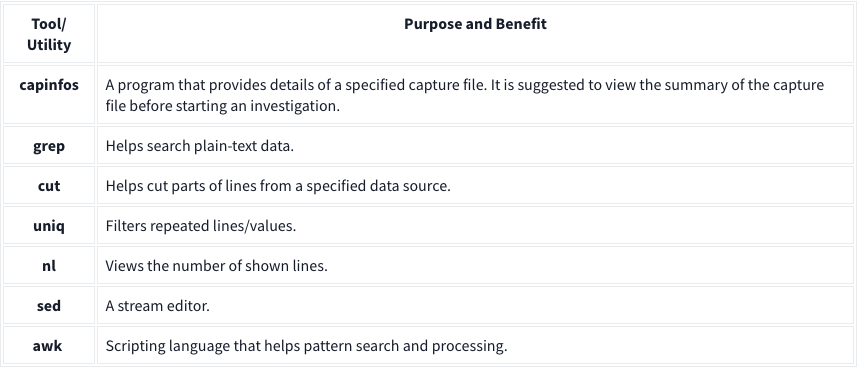
Extract DNS queries: tshark -r dns-queries.pcap -T fields -e dns.qry.name | awk NF | sort -r | uniq -c | sort -r
awk NFto remove empty lines Extract User Agents:tshark -r demo.pcapng -T fields -e http.user_agent | awk NF | sort -r | uniq -c | sort -r
Filter: contains
| Filter | contains |
| ———– | ——————————————————————————————————————————————– |
| Type | Comparison operator |
| Description | Search a value inside packets. It is case-sensitive and provides similar functionality to the “Find” option by focusing on a specific field. |
| Example | Find all “Apache” servers. |
| Workflow | List all HTTP packets where the “server” field contains the “Apache” keyword. |
| Usage | http.server contains "Apache" |
Ex: tshark -r demo.pcang -Y 'http.server contains "Apache"'
Filter: matches
| Filter | matches |
|---|---|
| Type | Comparison operator |
| Description | Search a pattern of a regular expression. It is case-insensitive, and complex queries have a margin of error. |
| Example | Find all .php and .html pages. |
| Workflow | List all HTTP packets where the “request method” field matches the keywords “GET” or “POST”. |
| Usage | http.request.method matches "(GET\|POST)" |
Ex: tshark -r demo.pcapng -Y 'http.request.method matches "(GET|POST)"' -T fields -e ip.src -e ip.dst -e http.request.method -E header=y