Remember that the Docker daemon is responsible for processing requests such as managing containers and pulling or uploading images to a Docker registry. The Docker daemon is not exposed to the network by default and must be manually configured. That said, exposing the Docker daemon is a common practice (especially in cloud environments such as CI/CD pipelines).
Docker uses contexts which can be thought of as profiles. To create:
docker context create
--docker host=ssh://myuser@remotehost
--description="Development Environment"
development-environment-host
Then you can use it with docker context use development-environment-host.
TLS Encryption
On the host (server) that you are issuing the commands from:
dockerd --tlsverify --tlscacert=myca.pem --tlscert=myserver-cert.pem --tlskey=myserver-key.pem -H=0.0.0.0:2376
On the host (client) that you are issuing the commands from:
docker --tlsverify --tlscacert=myca.pem --tlscert=client-cert.pem --tlskey=client-key.pem -H=SERVERIP:2376 info
Implementing Control Groups
Control Groups (also known as cgroups) are a feature of the Linux kernel that facilitates restricting and prioritizing the number of system resources a process can utilize. In the context of Docker, implementing cgroups helps achieve isolation and stability (think about divvying up resources). Ex:
docker run -it --cpus="1" mycontainerdocker run -it --memory="20m" mycontainerdocker update --memory="40m" mycontainerdocker inspect mycontainer
Preventing Over-Privileged Containers
Privileged containers are containers that have unchecked access to the host. When running a Docker container in “privileged” mode, Docker will assign all possible capabilities to the container, meaning the container can do and access anything on the host (such as filesystems).
Capabilities are a security feature of Linux that determines what processes can and cannot do on a granular level. This separates privileges from being all-or-nothing like giving root access or not. Ex:
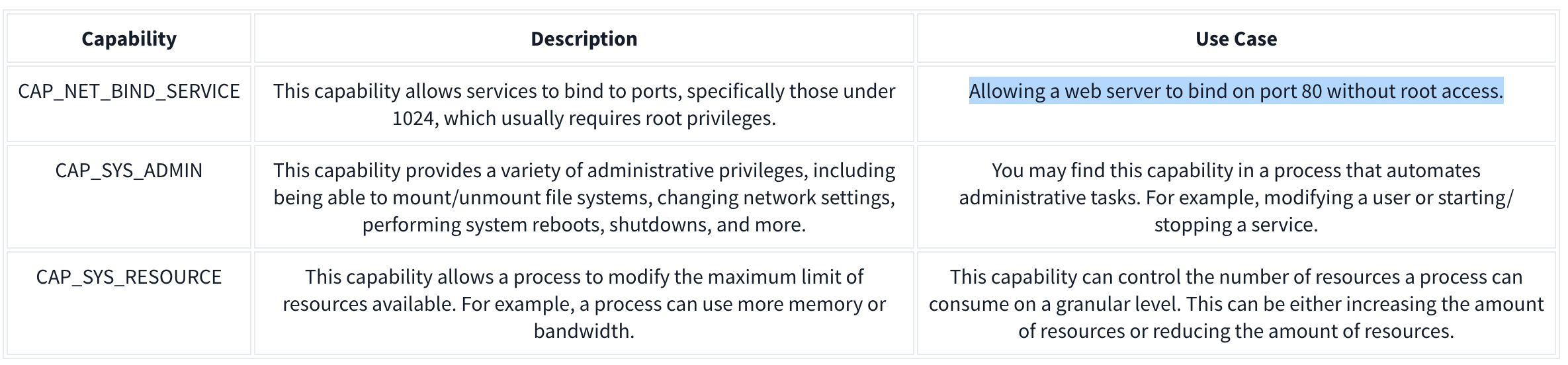
It’s recommended assigning capabilities to containers individually rather than running containers with the --privileged flag (which will assign all capabilities).
docker run -it --rm --cap-drop=ALL --cap-add=NET_BIND_SERVICE mywebserver
To show capabilities from a shell: capsh --print
Seccomp
Seccomp is an important security feature of Linux that restricts the actions a program can and cannot do through profiles which allows you to create and enforce a list of rules of what actions (system calls) the application can make.
Ex:
{
  "defaultAction": "SCMP_ACT_ALLOW",
  "architectures": [
    "SCMP_ARCH_X86_64",
    "SCMP_ARCH_X86",
    "SCMP_ARCH_X32"
  ],
  "syscalls": [
    { "names": [ "read", "write", "exit", "exit_group", "open", "close", "stat", "fstat", "lstat", "poll", "getdents", "munmap", "mprotect", "brk", "arch_prctl", "set_tid_address", "set_robust_list" ], "action": "SCMP_ACT_ALLOW" },
    { "names": [ "execve", "execveat" ], "action": "SCMP_ACT_ERRNO" }
  ]
}
This Seccomp profile:
- Allows files to be read and written to
- Allows a network socket to be created
- But does not allow execution (for example,
execve)
Then apply it to the container:
docker run --rm -it --security-opt seccomp=/home/cmnatic/container1/seccomp/profile.json mycontainer
AppArmor 101
AppArmor is a similar security feature in Linux because it prevents applications from performing unauthorised actions. However, it works differently from Seccomp because it is not included in the application but in the operating system.This mechanism is a Mandatory Access Control (MAC) system that determines the actions a process can execute based on a set of rules at the operating system level. Here is an example AppArmor profile:
/usr/sbin/httpd {

  capability setgid,
  capability setuid,

  /var/www/** r,
  /var/log/apache2/** rw,
  /etc/apache2/mime.types r,

  /run/apache2/apache2.pid rw,
  /run/apache2/*.sock rw,

  # Network access
  network tcp,

  # System logging
  /dev/log w,

  # Allow CGI execution
  /usr/bin/perl ix,

  # Deny access to everything else
  /** ix,
  deny /bin/**,
  deny /lib/**,
  deny /usr/**,
  deny /sbin/**
}
This “Apache” web server that:
- Can read files located in /var/www/, /etc/apache2/mime.types and /run/apache2.
- Read & write to /var/log/apache2.
- Bind to a TCP socket for port 80 but not other ports or protocols such as UDP.
- Cannot read from directories such as /bin, /lib, /usr.
Then we can (1) import it into the AppArmor profile and (2) apply it to our container at runtime:
sudo apparmor_parser -r -W /home/cmnatic/container1/apparmor/profile.jsondocker run --rm -it --security-opt apparmor=/home/cmnatic/container1/apparmor/profile.json mycontainer
Reviewing Docker Images
NIST SP 800-190 is a framework that outlines the potential security concerns associated with containers and provides recommendations for addressing these concerns.
Benchmarking is a process used to see how well an organisation is adhering to best practices. Benchmarking allows an organisation to see where they are following best practices well and where further improvements are needed.
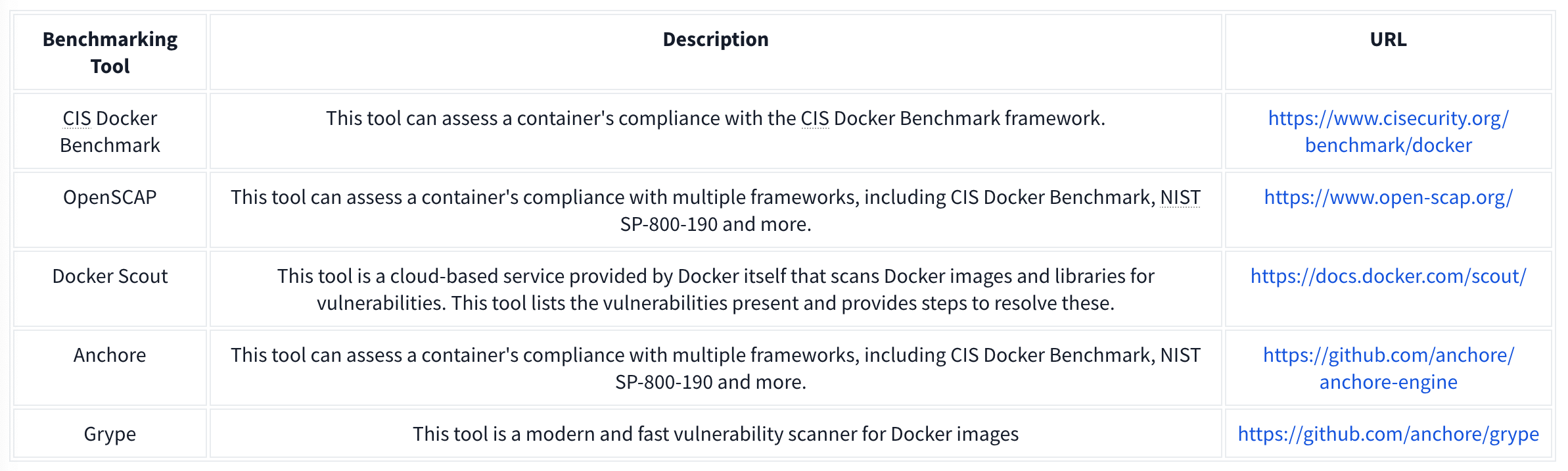
Grype can be used to analyze Docker images and container filesystems. Consider the cheat sheet below:
