Kroll Artifact Parser and Extractor (KAPE) parses and extracts Windows forensics artifacts. KAPE serves two primary purposes:
- collect files
- process the collected files as per the provided options.
The collection of files (targets) KAPE adds the files to a queue and copies them in two passes. In the first pass, it copies the files that it can. This works for files that the OS has not locked. The rest of the files are passed to a secondary queue. The secondary queue is processed using a different technique that uses raw disk reads to bypass the OS locks and copy the files. The copied files are saved with original timestamps and metadata and stored in a similar directory structure.
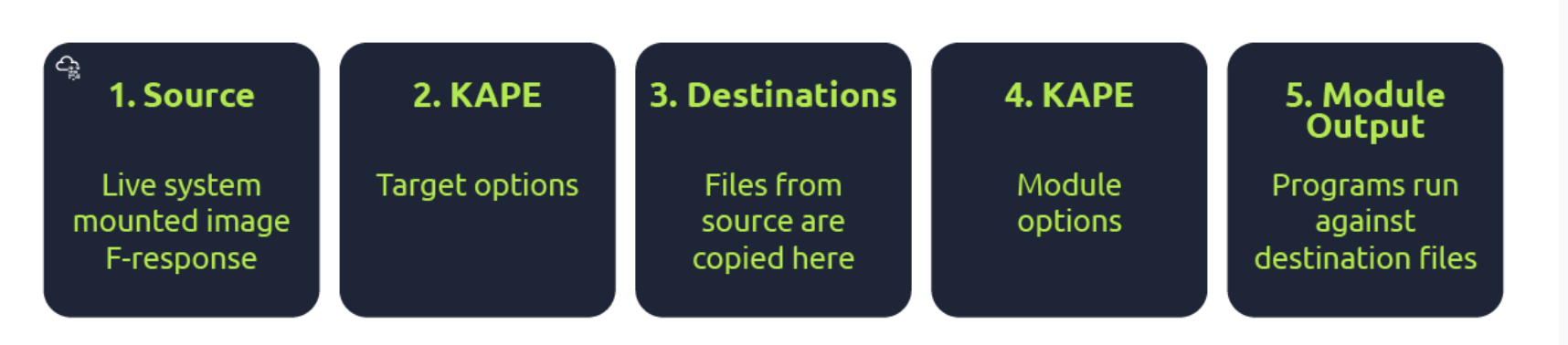
Targets are the artifacts that need to be collected from a system or image and copied to our provided destination. For example, Windows Prefetch is a forensic artifact for evidence of execution so that we can create a Target for it. Similarly, we can also create Targets for the registry hives. In short, Targets copy files from one place to another.
Target is defined for KAPE with a TKAPE file which contains information about the artifact that we want to collect, such as the path, category, and file masks to collect. As an example, below is how the Prefetch Target is defined.
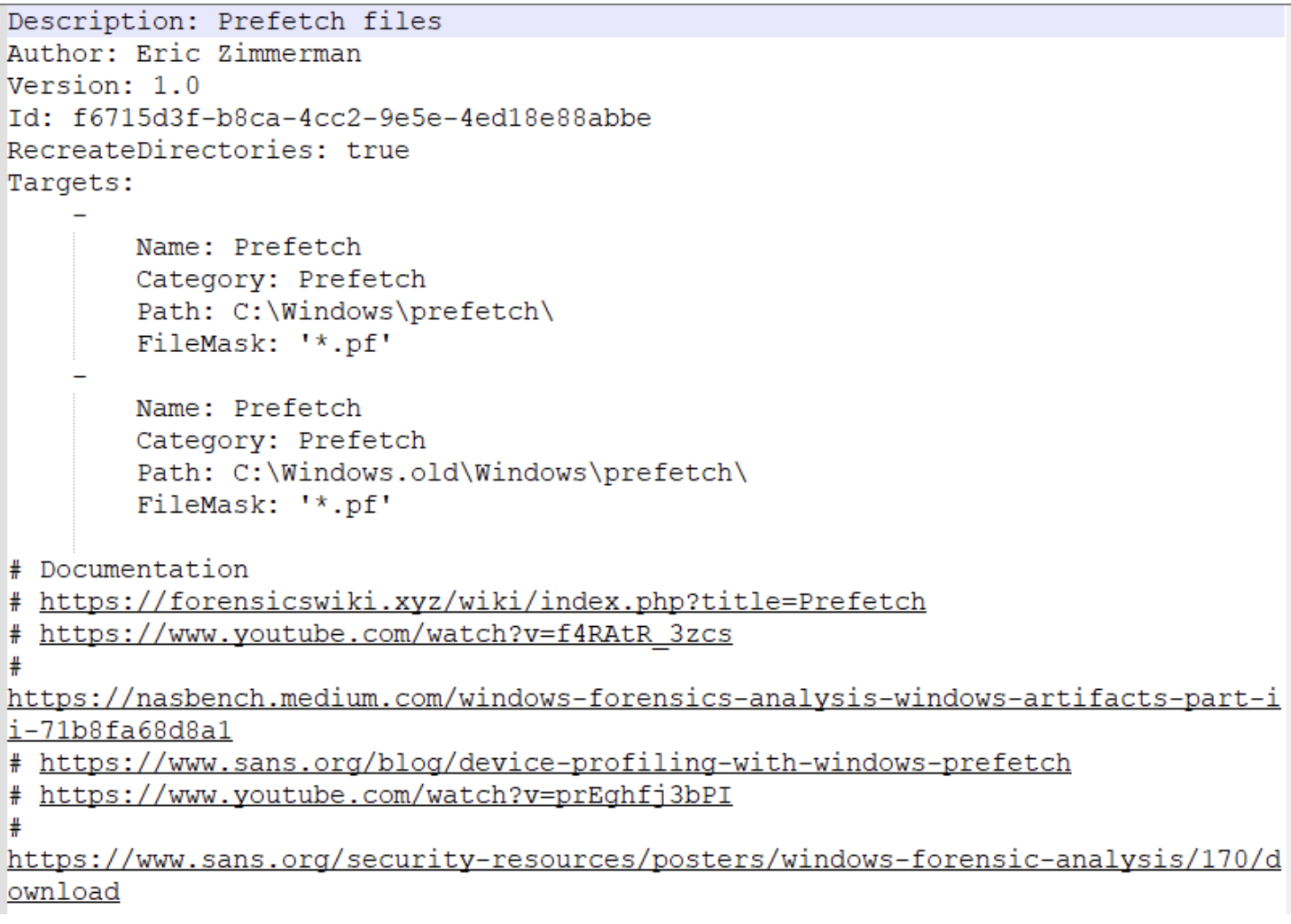
^ This TKAPE file tells KAPE to collect files with the file mask *.pf from the path C:\Windows\prefetch and C:\Windows.old\prefetch.
Compound Targets - KAPE also supports Compound Targets. These are Targets that are compounds of multiple other targets. As mentioned in the previous tasks, KAPE is often used for quick triage collection and analysis. The purpose of KAPE will not be fulfilled if we have to collect each artifact individually. Therefore, Compound Targets help us collect multiple targets by giving a single command. Examples of Compound Targets include !BasicCollection, !SANS_triage and KAPEtriage. We can view the Compound Targets on the path KAPE\Targets\Compound. The following image shows what a Compound Target for evidence of execution looks like:
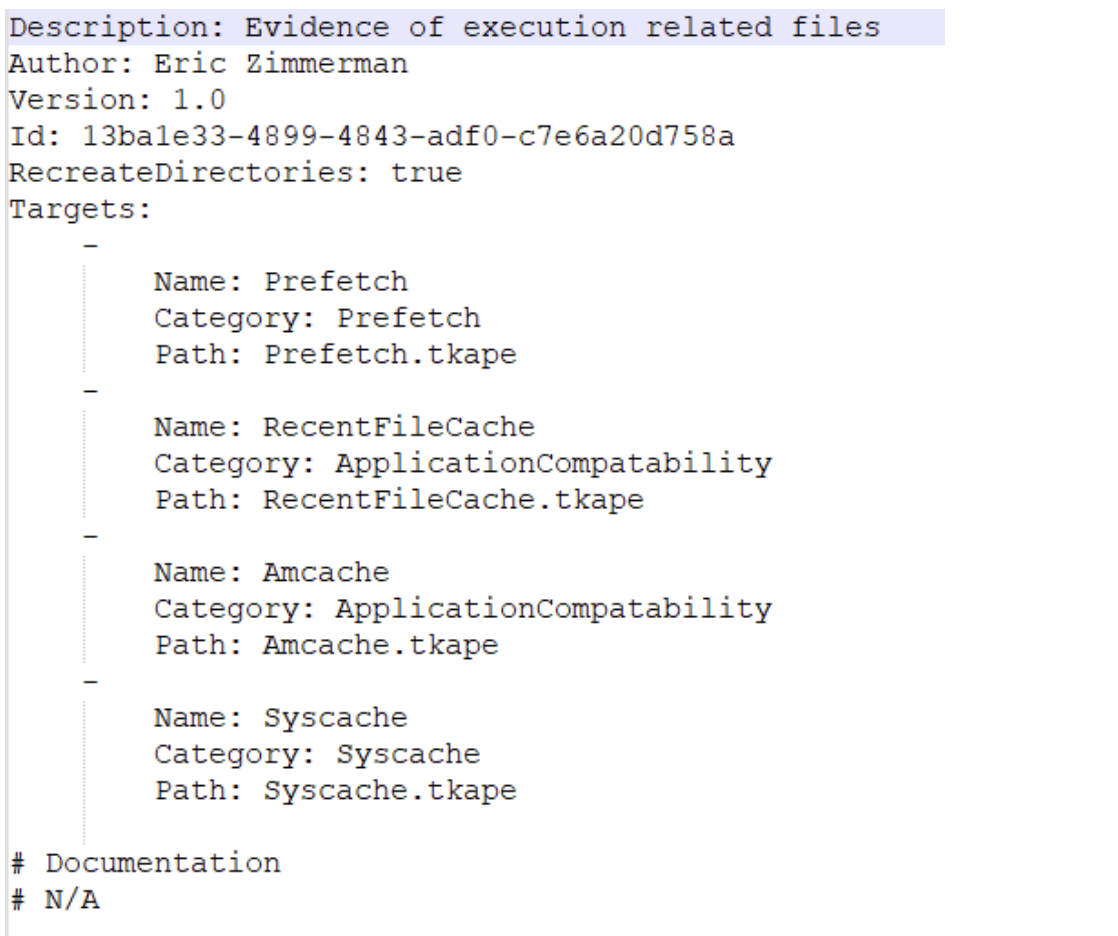
^ The above Compound Target will collect evidence of execution from Prefetch, RecentFileCache, AmCache, and Syscache Targets.
If you have created some Targets that you don’t want to sync with the KAPE Github repository, you can place them in the !Local directory. These can be Targets that are specific to your environment.
Module Options
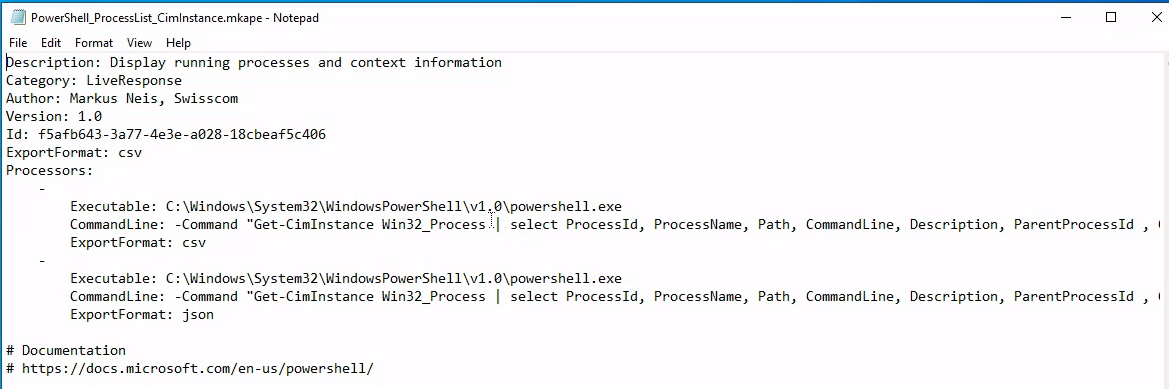
Modules, in KAPE’s lexicon, run specific tools against the provided set of files.
- Runs the commands and stores the output as TXT or CSV
Files with the .mkape extension are understood as Modules by KAPE
The bin directory contains executables that we want to run on the system but are not natively present on most systems. KAPE will run executables either from the bin directory or the complete path. An example of files to be kept in the bin directory are Eric Zimmerman’s tools, which are generally not present on a Windows system.
This is important because each of the .mkape files contains information that includes an executable and what we want it to do. So we may need additional executables that are not present on the system.
KAPE GUI
KAPE CLI
We can see from the above screenshot that while collecting Targets, the switches tsource, target and tdest are required. Similarly, when processing files using Modules, module and mdest are required switches. The other switches are optional as per the requirements of the collection.
D:\KAPE>kape.exe

KAPE version 1.1.0.1 Author: Eric Zimmerman (kape@kroll.com)

        tsource         Target source drive to copy files from (C, D:, or F:\ for example)
        target          Target configuration to use
        tdest           Destination directory to copy files to. If --vhdx, --vhd or --zip is set, files will end up in VHD(X) container or zip file
        tlist           List available Targets. Use . for Targets directory or name of subdirectory under Targets.
        tdetail         Dump Target file details
        tflush          Delete all files in 'tdest' prior to collection
        tvars           Provide a list of key:value pairs to be used for variable replacement in Targets. Ex: --tvars user:eric would allow for using %user% in a Target which is replaced with eric at runtime. Multiple pairs should be separated by ^
        tdd             Deduplicate files from --tsource (and VSCs, if enabled) based on SHA-1. First file found wins. Default is TRUE

        msource         Directory containing files to process. If using Targets and this is left blank, it will be set to --tdest automatically
        module          Module configuration to use
        mdest           Destination directory to save output to
        mlist           List available Modules. Use . for Modules directory or name of subdirectory under Modules.
        mdetail         Dump Module processors details
        mflush          Delete all files in 'mdest' prior to running Modules
        mvars           Provide a list of key:value pairs to be used for variable replacement in Modules. Ex: --mvars foo:bar would allow for using %foo% in a module which is replaced with bar at runtime. Multiple pairs should be separated by ^
        mef             Export format (csv, html, json, etc.). Overrides what is in Module config

        sim             Do not actually copy files to --tdest. Default is FALSE
        vss             Process all Volume Shadow Copies that exist on --tsource. Default is FALSE

        vhdx            The base name of the VHDX file to create from --tdest. This should be an identifier, NOT a filename. Use this or --vhd or --zip
        vhd             The base name of the VHD file to create from --tdest. This should be an identifier, NOT a filename. Use this or --vhdx or --zip
        zip             The base name of the ZIP file to create from --tdest. This should be an identifier, NOT a filename. Use this or --vhdx or --vhd

        scs             SFTP server host/IP for transferring *compressed VHD(X)* container
        scp             SFTP server port. Default is 22
        scu             SFTP server username. Required when using --scs
        scpw            SFTP server password
        scd             SFTP default directory to upload to. Will be created if it does not exist
        scc             Comment to include with transfer. Useful to include where a transfer came from. Defaults to the name of the machine where KAPE is running

        s3p             S3 provider name. Example: spAmazonS3 or spGoogleStorage. See 'https://bit.ly/34s9nS6' for list of providers. Default is 'spAmazonS3'
        s3r             S3 region name. Example: us-west-1 or ap-southeast-2. See 'https://bit.ly/3aNxXhc' for list of regions by provider
        s3b             S3 bucket name
        s3k             S3 Access key
        s3s             S3 Access secret
        s3st            S3 Session token
        s3kp            S3 Key prefix. When set, this value is used as the beginning of the key. Example: 'US1012/KapeData'
        s3o             When using 'spOracle' provider, , set this to the 'Object Storage Namespace' to use
        s3c             Comment to include with transfer. Useful to include where a transfer came from. Defaults to the name of the machine where KAPE is running

        s3url           S3 Presigned URL. Must be a PUT request vs. a GET request

        asu             Azure Storage SAS Uri
        asc             Comment to include with transfer. Useful to include where a transfer came from. Defaults to the name of the machine where KAPE is running

        zv              If true, the VHD(X) container will be zipped after creation. Default is TRUE
        zm              If true, directories in --mdest will be zipped. Default is FALSE
        zpw             If set, use this password when creating zip files (--zv | --zm | --zip)

        hex             Path to file containing SHA-1 hashes to exclude. Only files with hashes not found will be copied

        debug           Show debug information during processing
        trace           Show trace information during processing

        gui             If true, KAPE will not close the window it executes in when run from gkape. Default is FALSE

        ul              When using _kape.cli, when true, KAPE will execute entries in _kape.cli one at a time vs. in parallel. Default is FALSE

        cu              When using _kape.cli, if true, KAPE will delete _kape.cli and both Target/Module directories upon exiting. Default is FALSE

        sftpc           Path to config file defining SFTP server parameters, including port, users, etc. See documentation for examples
        sftpu           When true, show passwords in KAPE switches for connection when using --sftpc. Default is TRUE

        rlc             If true, local copy of transferred files will NOT be deleted after upload. Default is FALSE
        guids           KAPE will generate 10 GUIDs and exit. Useful when creating new Targets/Modules. Default is FALSE
        sync            If true, KAPE will download the latest Targets and Modules from specified URL prior to running. Default is https://github.com/EricZimmerman/KapeFiles/archive/master.zip

        ifw             If false, KAPE will warn if a process related to FTK is found, then exit. Set to true to ignore this warning and attempt to proceed. Default is FALSE


        Variables: %d = Timestamp (yyyyMMddTHHmmss)
                   %s = System drive letter
                   %m = Machine name

Examples: kape.exe --tsource L: --target RegistryHives --tdest "c:\temp\RegistryOnly"
          kape.exe --tsource H --target EvidenceOfExecution --tdest "c:\temp\default" --debug
          kape.exe --tsource \\server\directory\subdir --target Windows --tdest "c:\temp\default_%d" --vhdx LocalHost
          kape.exe --msource "c:\temp\default" --module LECmd --mdest "c:\temp\modulesOut" --trace --debug

          Short options (single letter) are prefixed with a single dash. Long commands are prefixed with two dashes

          Full documentation: https://ericzimmerman.github.io/KapeDocs/